
For medium-to-large organizations that need automated, secure delivery of KPI dashboards and reports without data leaving their network, the best kpi dashboard software is ChristianSteven Software's on-premises automation suite: PBRS for Power BI and SSRS, ATRS for Tableau, CRD for Crystal Reports, and IntelliFront BI for real-time dashboards. These four products cover the report scheduling, formatting, and delivery gaps that native BI tools leave open.
Here's why IT teams standardize on this stack:
- On-prem data residency — report data and processing never leave your environment, which matters for regulated industries and IP-sensitive workflows.
- Multi-platform support — one automation layer handles Power BI, Tableau, SSRS, and Crystal Reports instead of four separate scheduling tools.
- Enterprise bursting — a single job can generate and route hundreds or thousands of personalized PDFs or Excel files based on recipient-level data rules.
- SOC 2 Type II security — PBRS delivers data-driven schedules and event-triggered workflows with on-prem processing, backed by independently audited controls.
If your team is evaluating options this quarter, the fastest path is a scoped pilot against your existing Power BI, Tableau, or Crystal Reports environment, not a lengthy RFP cycle.
Key Takeaways
The best kpi dashboard software for enterprise use is an on-premises automation layer that schedules, formats, and delivers reports without moving that work off your BI platform.
| Point | Details |
|---|---|
| Automation is a separate layer | Decouple delivery from analytics so Power BI, Tableau, and Crystal Reports each keep native scheduling limitations off your desk. |
| Bursting is the real differentiator | Prioritize tools that map personalized outputs to recipients using data tables, not manual lists. |
| Test RLS before scaling | Validate Row-Level Security against representative user identities before bursting to full recipient lists. |
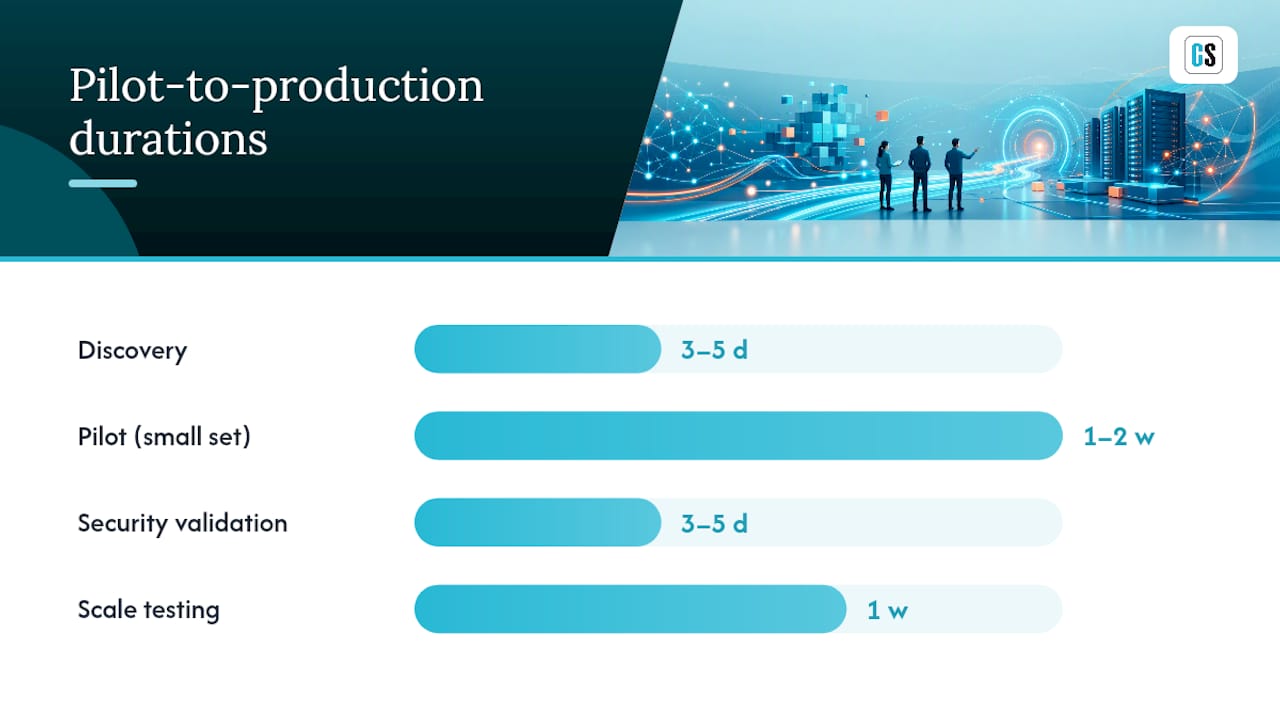
| Plan a four-to-six-week pilot | Move through discovery, pilot, security validation, and scale testing before full production cutover. |
| ChristianSteven Software covers the stack | PBRS, ATRS, CRD, and IntelliFront BI provide on-prem scheduling and delivery across Power BI, Tableau, SSRS, and Crystal Reports, backed by SOC 2 Type II certification. |
Table of Contents
- What Is On-Premises KPI Dashboard Automation, Exactly?
- What Should Be On Your Evaluation Checklist?
- What Do IT Teams Need to Check Before Going Live?
- How Long Does a Pilot-to-Production Rollout Take?
- Why We Push On-Premises Automation as the Default, Not the Exception
- Which ChristianSteven Product Fits Your Platform?
- FAQ
What Is On-Premises KPI Dashboard Automation, Exactly?
On-premises KPI dashboard automation is a delivery layer that sits between your BI platform and your recipients. It doesn't build dashboards or run queries. It watches your data, triggers scheduled or event-based jobs, formats the output, and routes it to wherever the recipient actually works, whether that's an inbox, an SFTP folder, or a Teams channel.
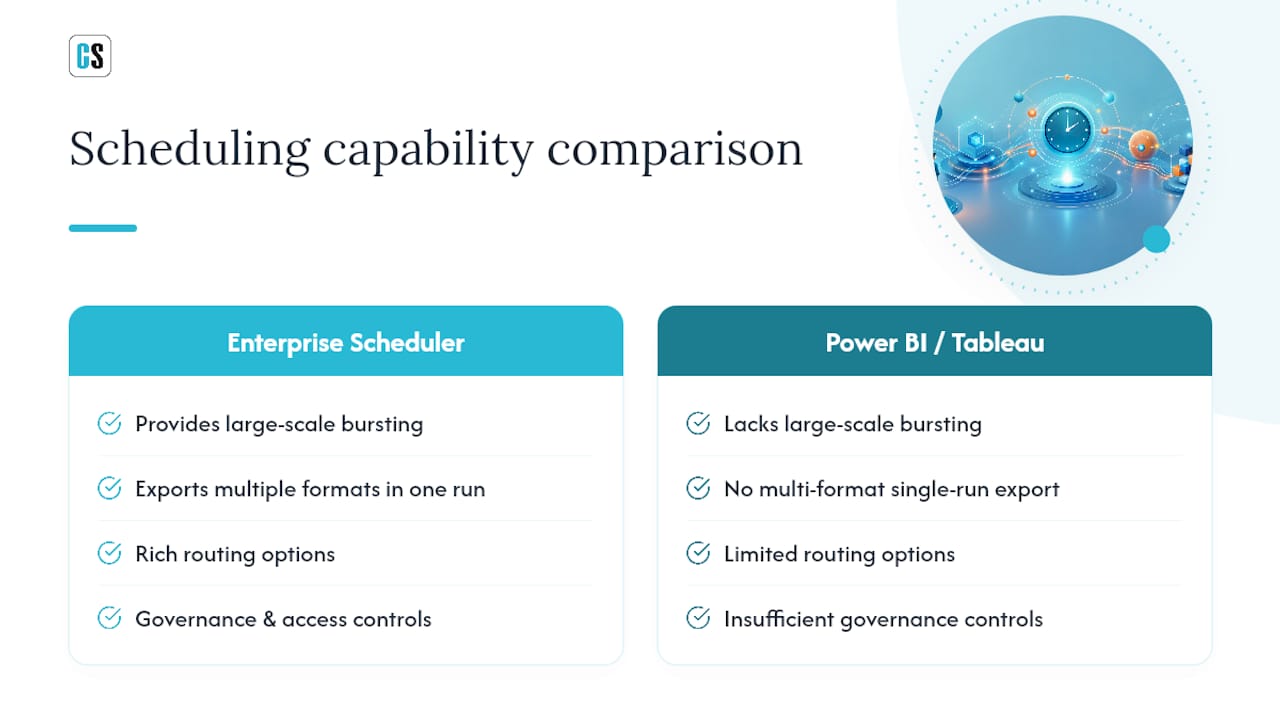
This separation matters more than it sounds. Native scheduling inside Power BI or Tableau handles the basics fine for small teams, but it wasn't built for enterprise-scale distribution. Enterprises typically add a dedicated scheduler when they need large-scale bursting, multi-format exports, complex routing, and governance controls that native tools simply don't offer.
Power BI's own on-premises story illustrates the gap. Power BI Report Server is a supported on-premises portal for publishing paginated reports, but it's a distinct product from the cloud service, with its own licensing and installation path. An automation layer built to work across both on-prem and cloud deployments avoids locking your delivery workflows to one portal.
Typical deliverables this layer produces:
- Paginated PDF reports formatted for print or archival, not screen viewing
- Batched Excel exports with formulas and formatting intact, not flattened data dumps
- Personalized customer or branch-level statements, one file per recipient, generated from a single template
What Should Be On Your Evaluation Checklist?
Most RFPs for reporting automation focus on the wrong things first, usually price and dashboard aesthetics. The features that actually determine whether a deployment succeeds or stalls are less visible. Here's what to prioritize, in order:
- Scheduling flexibility. You need calendar-based schedules, data-driven schedules (run when a database value changes), and event-triggered workflows (run when a file lands or a job completes). A tool that only does calendar scheduling will force you back into scripting within a year.
- Bursting and personalization. Can the tool map each output file to a specific recipient using a data table, and apply consistent filename conventions automatically? This is the single feature that separates a real scheduler from a glorified cron job.
- Export fidelity. Paginated PDFs need to render correctly, not just "convert." Confirm the platform can produce multiple formats in one run, since finance teams often want PDF and Excel from the same job.
- Delivery channel coverage. Email, SFTP, SharePoint, Teams, network folders, and even direct-to-printer delivery should all be native options, not workarounds.
- Security and governance. Ask specifically about Row-Level Security integration, SOC 2 evidence, and retention policies for delivered files and logs.
- Monitoring and SLA telemetry. Retry logic, failure notifications, and delivery confirmations matter more once you're running hundreds of jobs a day.
- APIs and automation hooks. A REST API and database-driven schedule triggers let your existing workflow engines call the scheduler programmatically.
Pro Tip: Don't evaluate bursting on a five-recipient demo. Ask the vendor to run a test burst against 500 to 1,000 sample recipients pulled from your own data. Personalization logic that looks fine at small scale often breaks on edge cases like duplicate names or missing email addresses.
For a deeper walkthrough of these criteria, ChristianSteven Software's guide on how to pick the right KPI dashboard software covers additional scoring weight for each category.
What Do IT Teams Need to Check Before Going Live?
A pilot that works in a sandbox can still fail in production if the underlying environment isn't ready. Run through this list before scheduling your first live job.
- Server sizing. Confirm your scheduler database (typically SQL Server) has headroom for job history and log retention, and plan a backup strategy that includes the schedule configuration itself, not just report data.
- Service accounts. Use least-privilege service accounts scoped only to the data sources and delivery channels they need. Avoid running the scheduler under a domain admin account, a shortcut that creates an audit finding later.
- Authentication. Decide upfront whether you're using AD-integrated accounts, SSO, or service principals for each connected BI platform, since Power BI, Tableau, and Crystal Reports each handle authentication differently.
- Row-Level Security testing. Before bursting to real recipients, test RLS against a handful of representative user identities covering different departments, regions, or access tiers to catch misconfigured filters before they leak data.
- Network configuration. Map firewall rules for every delivery channel you'll use, SMTP for email, SFTP ports for file transfer, and outbound HTTPS for SharePoint or Teams, before your first scheduled run, not after it fails.
- Audit and retention. Confirm the scheduler logs job execution, delivery confirmation, and failure details in a format your compliance team can pull for an audit without manual reconstruction.
Skipping the RLS test is the single most common cause of an embarrassing rollback in the first month of production use.
How Long Does a Pilot-to-Production Rollout Take?
A realistic timeline runs several weeks from kickoff to production cutover, assuming your BI platform and data sources are already stable. Rushing this compresses risk into the go-live week instead of catching it early.
- Discovery (3 to 5 days). Inventory the reports you'll automate first, identify recipients, and confirm data sources and refresh timing.
- Pilot (1 to 2 weeks). Automate a small set, three to five reports, with a representative recipient list and the full delivery path you'll use in production, not a simplified email-only test.
- Security validation (3 to 5 days). Run the RLS and permissions checks described above against the pilot group specifically.
- Scale testing (1 week). Burst to a larger sample, 500 or more recipients, and measure delivery success rate, job latency, and server resource usage under load.
- Production cutover. Migrate remaining reports in batches rather than all at once, keeping legacy delivery running in parallel for the first cycle as a fallback.
Pro Tip: Track delivery success rate as a percentage from day one of the pilot, not just "did it work." A high success rate sounds fine until you realize some recurring failures often point to data quality issues, not a scheduler bug.
The most common pitfall isn't the software, it's timing: reports scheduled to run before the underlying data refresh finishes, which delivers stale numbers with a confident timestamp. Ad hoc scripts often become fragile at this exact point, which is usually the moment teams start looking for a dedicated scheduler in the first place.
Why We Push On-Premises Automation as the Default, Not the Exception
Most vendors in this space lead with cloud convenience and treat on-premises as a compliance afterthought for the few customers who ask. That's backwards. Enterprises with legacy Crystal Reports environments, regulated data, or multi-region compliance requirements aren't an edge case, they're a large share of the mid-to-large market, and their constraints don't disappear because a vendor's roadmap favors cloud-first development.
Many organizations run BI platforms for interactive analytics while routing formatted, regulatory, or large-scale deliveries through a separate automation layer. That hybrid pattern isn't a compromise. It's what happens when IT teams stop forcing one tool to do two very different jobs.
ChristianSteven Software has built PBRS, ATRS, CRD, and IntelliFront BI around that reality for more than two decades, holds SOC 2 Type II certification, and maintains consistently strong customer satisfaction across enterprise deployments. If you want to see how a specific Power BI, Tableau, or Crystal Reports environment maps onto this stack, request a demo and walk through your own report list.
Which ChristianSteven Product Fits Your Platform?
Once you know you need an on-premises automation layer, the next question is simply which product matches your BI stack. The mapping is straightforward: if you run Power BI or SSRS, PBRS handles automated exports without relying on Power Automate. If Tableau is your platform, ATRS is built specifically for Tableau scheduling and bursting. Crystal Reports environments run on CRD, and teams that need real-time KPI dashboards alongside scheduled delivery should look at IntelliFront BI.
Across all four products, you get the same core advantages: on-prem processing that keeps report data inside your network, multi-format output from a single job, data-driven bursting to hundreds of recipients, and SOC 2 Type II security controls behind the scenes. Teams that want proactive alerting layered on top of scheduled delivery can also look at Prowl's market-intelligence tooling as a complementary integration.
The fastest way to see the fit is to run it against your own reports. Get started with a free 30-day trial and schedule your first live job this week instead of waiting on another round of vendor calls.
FAQ
What Makes On-Premises KPI Dashboard Software Different From Cloud BI Tools?
On-premises automation software schedules, formats, and delivers reports without sending data through a cloud service, which matters for regulated industries and legacy Crystal Reports or SSRS environments.
Does ChristianSteven Software Support Power BI and Tableau?
Yes. PBRS handles Power BI and SSRS automation, while ATRS is built specifically for Tableau scheduling and bursting, both with on-prem processing.
How Long Does It Take to Pilot a Reporting Automation Tool?
A realistic pilot runs four to six weeks, covering discovery, a limited-scope pilot, Row-Level Security validation, and scale testing before production cutover.
Why Would an Enterprise Need a Scheduler If Power BI Already Has One?
Native scheduling in Power BI or Tableau lacks large-scale bursting, multi-format exports in a single run, and the routing and governance controls enterprises need at scale.
What Security Certifications Should a Reporting Automation Vendor Have?
Look for SOC 2 Type II certification and clear support for Row-Level Security testing, since these directly affect data governance and audit readiness.
Recommended
- Streamline Your Data Analytics & Business Intelligence Tasks | IntelliFront BI
- On-Premises Business Intelligence Software: How To Choose A Secure, Scalable Solution
- KPI Dashboard Software: How To Choose A Platform That Drives Faster, Smarter Decisions
- How To Pick The Right KPI Dashboard Software For Your Company