
For enterprise Power BI scheduling, PBRS from ChristianSteven Software is the recommended choice for secure, hands-free report distribution. It runs on-premises and handles parameterized, batch, and event-driven automation that native tools can't match. If your team distributes reports to many people on a recurring basis, start with a trial rather than building your own scripts.
TL;DR:
- Most enterprise scheduling requires a dedicated tool like PBRS for reliable, on-premises, and secure report distribution, especially in regulated industries.
- PBRS offers features like parameterized reports, batch scheduling, and event-driven triggers that native Power BI tools cannot provide, improving automation and error handling.
- A thorough pilot with real reports and failure scenarios can validate export fidelity, delivery scope, and resilience before full deployment, typically taking several weeks.
- Total ownership costs include licensing, implementation, support, and manual process savings, with the latter often outweighing license fees over time.
- Native Power BI scheduling suits small-scale needs, but enterprise use cases with complex parameters, compliance requirements, and delivery reliability justify a dedicated scheduler investment.
Table of Contents
- What Is PBRS and How Does It Deploy?
- How Do You Choose the Right Power BI Scheduler?
- Which Capabilities Actually Matter During a Trial?
- What Does a Safe Rollout Checklist Look Like?
- Why Trust PBRS for Enterprise Deployment?
- How Long Does Implementation Actually Take?
- What's the Real Total Cost of Ownership?
- When Do You Actually Need a Dedicated Scheduler?
- Start Your PBRS Trial Today
- Further Reading and Primary Sources
- Sources
- FAQ
What Is PBRS and How Does It Deploy?
PBRS (Power BI Reports Scheduler) automates the export, formatting, and delivery of Power BI reports on a schedule you define, rather than relying on someone remembering to run and send them manually. It exports to PDF, Excel, and several other formats, then routes those files wherever the recipient actually works.
The deployment model is on-premises, which matters more than it sounds. Instead of routing your reports through a third-party cloud queue, PBRS installs inside your own network and uses a local service or gateway to talk to Power BI, your data sources, and your delivery destinations directly. For regulated industries (finance, healthcare, government contractors) that single fact often decides the shortlist before any feature comparison starts.
Delivery destinations cover the places reports actually need to land, similar to how an Automated Publishing Platform schedules content across all channels:
- Email (individual or distribution list)
- Network shares and SFTP
- SharePoint and Microsoft Teams
- Databases and cloud storage
- Direct-to-printer output for physical distribution
Three automation features separate PBRS from a basic scheduler. Parameterized reports let one report definition generate hundreds of personalized versions, one per region, client, or cost center, without manual duplication. Batch scheduling groups multiple reports into a single run so a Monday-morning distribution doesn't require ten separate jobs. Event triggers fire a report the moment a data condition changes, rather than waiting for the next calendar slot. Built-in error handling logs failures and retries automatically, which matters more once you're running dozens of scheduled jobs a day and can't babysit each one.
How Do You Choose the Right Power BI Scheduler?
Most evaluations go wrong because teams compare feature lists instead of operational fit. Score every vendor against the same six criteria, in this order, because the first two eliminate options fast and save you time on demos that were never going to work.
- Deployment fit. Decide up front whether you need on-premises control or can accept a cloud-hosted layer, and confirm compatibility with XMLA endpoints and Fabric if you're on Power BI Premium.
- Security and compliance. Ask for SOC 2 documentation, encryption details for data at rest and in transit, and how role-based access control maps to your existing Active Directory or Azure AD groups.
- Operational resilience. Confirm the product retries failed jobs automatically, logs every delivery attempt, and alerts someone when a job fails silently. Ask about the vendor's own support SLA, not just the software's uptime.
- Integration depth. Check for a REST API, PowerShell or Python support, and whether the tool can hook into a CI/CD pipeline for version-controlled deployments.
- Licensing shape. Per-server pricing behaves very differently from per-user pricing at scale, and a subscription model carries different long-term math than a perpetual license.
- Demo behavior under stress. Ask the vendor to schedule a parameterized report with 200 dynamic recipients live, during the demo. Watch what breaks.
Pro Tip: Bring your ugliest real report to the demo, the one with nested parameters and a weird page-break requirement, instead of letting the vendor show you their clean sample file. That's where scheduling tools actually reveal their limits.
Weight security and operational resilience heaviest if you're in a regulated industry; weight integration depth heaviest if your BI team already lives in Python or maintains its own deployment pipelines. A tool like pbi-enterprise-cli illustrates the Python-native end of that spectrum, with XMLA and Fabric connectivity built for teams that want granular, scriptable control over their semantic models.
Which Capabilities Actually Matter During a Trial?
Feature names on a spec sheet don't tell you much. What matters is what happens when you actually run the report.
Export fidelity is the first thing to test, because it's the first thing users notice. A scheduler that mangles page breaks or drops formatting on a parameterized PDF export will generate support tickets within a week of rollout, no matter how good its scheduling engine is underneath.
Delivery breadth comes next. Confirm the tool reaches every destination your organization actually uses: email, SFTP, network shares, SharePoint, Teams, direct database writes, and printers where physical output is still required. A scheduler that covers eight of your nine destinations still leaves one team manually distributing reports.
Scheduling flexibility separates entry-level tools from enterprise ones. You want calendar-based recurrence for routine reports, but also event-driven and data-driven triggers, so a report fires when a sales threshold is crossed or a new data load completes, not just when the clock strikes 8 a.m.
Resilience features determine what happens when something goes wrong at 2 a.m. with nobody watching:
- Automatic retries with backoff instead of a single failed attempt
- A dead-letter queue or equivalent for jobs that fail repeatedly
- Delivery confirmation logs you can audit after the fact
Integration options round out the checklist. A command-line interface, a REST API, and PowerShell or Python libraries let your BI team script deployments instead of clicking through a UI for every change. Projects like pbi-cli show what that developer-first pattern looks like in practice, with direct interop for fast, scriptable model and report automation.
What Does a Safe Rollout Checklist Look Like?
A pilot done right takes weeks, not months, and gives you hard evidence before you commit budget to a full license.
- Pick three to five pilot reports with a defined, willing recipient group, and set explicit success metrics: on-time delivery rate, format accuracy, and time saved versus manual distribution.
- Provision service accounts and gateways with least-privilege access, and store credentials in a secrets manager like Azure Key Vault or a managed identity rather than a config file.
- Run integration tests covering parameterized schedules, data-driven triggers, and deliberate failure scenarios (a locked file, a dead network share, a bad parameter value) to see how the tool logs and recovers.
- Load-test throughput at roughly twice your expected peak volume, and confirm monitoring and alerts fire correctly before you scale past the pilot group.
- Roll out in stages with a defined verification step after each stage and a documented rollback plan if a stage fails.
Field reports on deployment pipelines and CI/CD-driven automation show meaningfully reduced deployment times and failure rates compared with manual, UI-based publishing. That gap tends to widen as report volume grows, which is exactly when manual processes start breaking down anyway.
Why Trust PBRS for Enterprise Deployment?
ChristianSteven Software has focused specifically on BI reporting automation for more than two decades, across Power BI, SSRS, Tableau, and Crystal Reports environments. That's not a general software vendor bolting on a scheduling feature. It's a company whose entire product line exists to solve one problem: getting the right report to the right person at the right time, without a human in the loop.
The company holds SOC 2 Type II certification, which matters directly to the security criteria covered earlier in this article. Independent user feedback aggregated on Gartner's product review page for Power BI Report Scheduler gives prospective buyers a third-party read on real-world satisfaction, separate from anything the vendor says about itself.
Enterprise schedulers succeed or fail on the boring stuff: secure delivery channels, error handling that actually catches problems, and audit trails someone can review after an incident. SOC 2 and comparable controls are what separate a scheduler you can put in front of an auditor from one you can't.
ChristianSteven Software also backs the product with practical, hands-on tutorials from Christian Ofori-Boateng covering how to automate Power BI report scheduling and delivery step by step, which is a meaningfully different kind of resource than marketing copy.
- Two decades of dedicated BI automation focus
- SOC 2 Type II certification
- Independently aggregated user reviews on Gartner
- Published, step-by-step implementation tutorials
How Long Does Implementation Actually Take?
Most enterprise teams move from vendor selection to full production rollout in several weeks, assuming a focused pilot and a BI team that isn't fighting fires elsewhere.
Week one is discovery and setup: install the software, provision service accounts, and connect it to your Power BI environment and initial delivery destinations. Weeks two through four cover the pilot itself, running your chosen reports on their real schedule, testing parameterized exports against actual recipient lists, and fixing formatting or permission issues as they surface. This is where most of the friction lives, and it's almost always about data source permissions and network access rather than the scheduling engine itself.
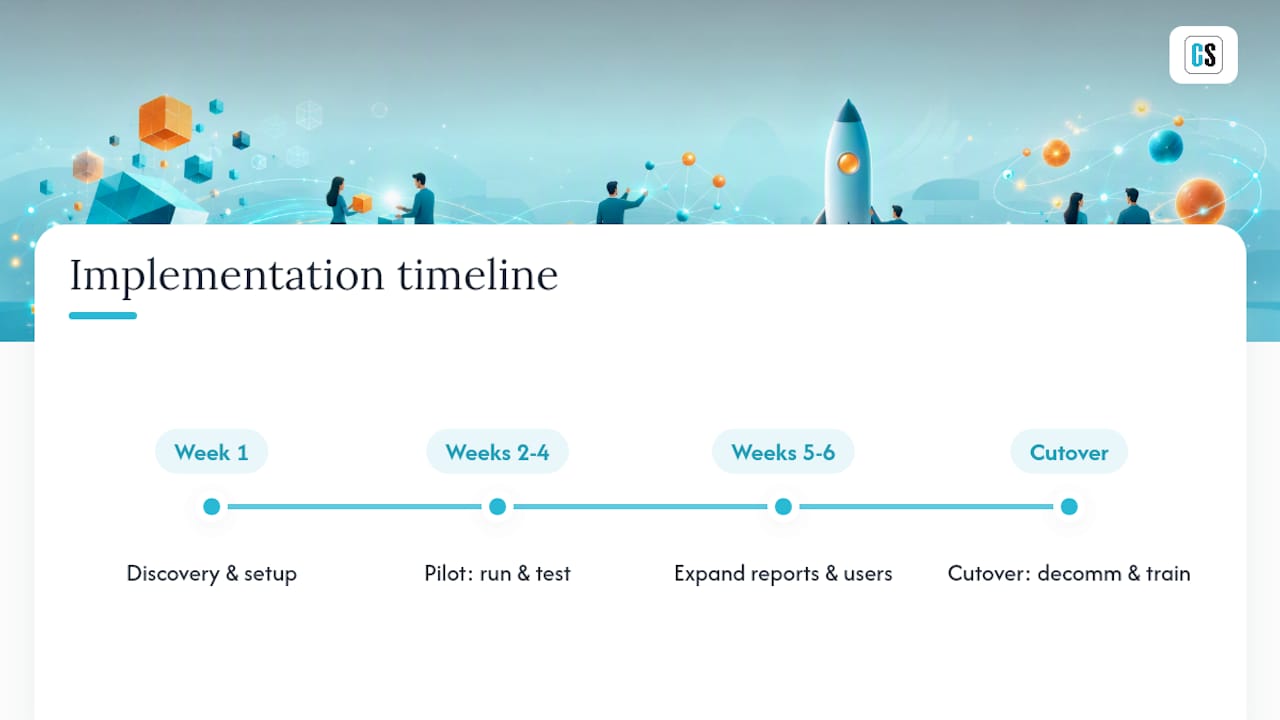
Weeks five and six expand the pilot to a broader report set and recipient group, with monitoring in place to catch failures before end users notice them. The final stretch, roughly two weeks, is full cutover: decommissioning any manual distribution processes, training remaining users, and documenting the new workflow so it survives staff turnover.
Teams that skip the pilot and try to deploy everything at once routinely take longer overall, not less, because they end up troubleshooting production issues across dozens of reports simultaneously instead of a controlled handful. A staged rollout costs a few extra weeks upfront and saves considerably more downstream.
What's the Real Total Cost of Ownership?
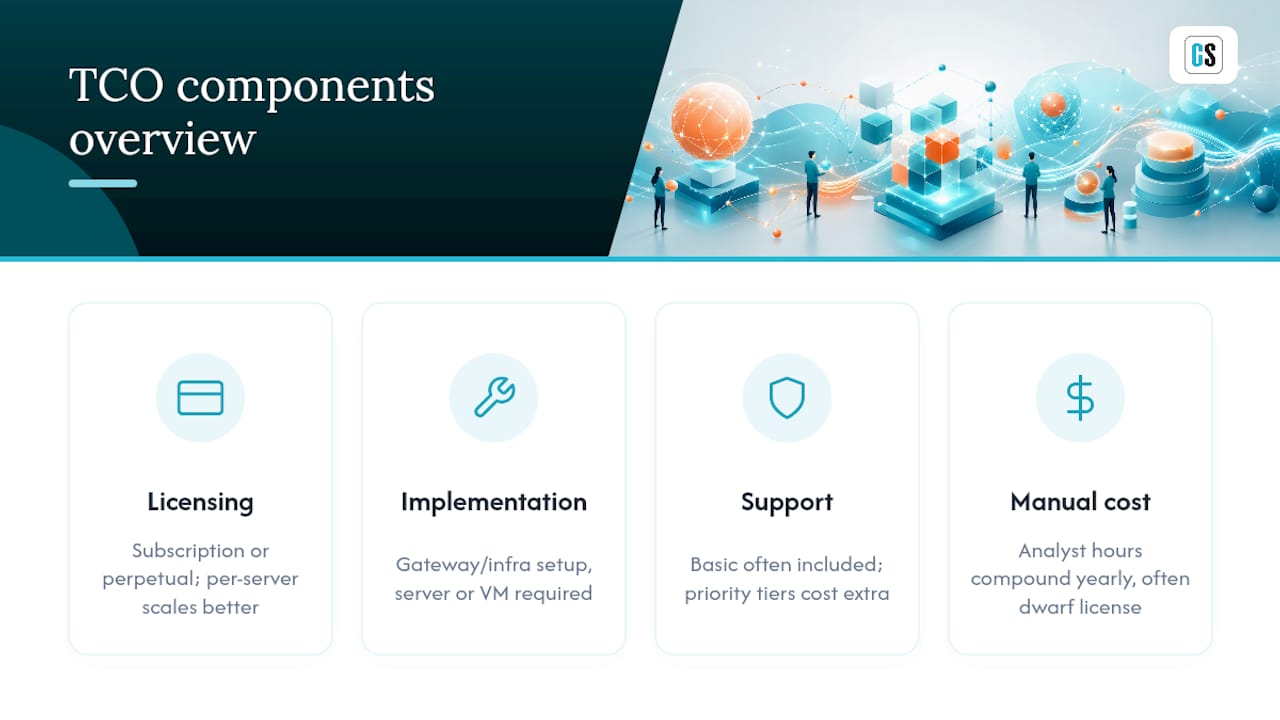
The license price on a quote is rarely the full number. Total cost of ownership includes at least four components: the license itself, implementation time, ongoing support, and the cost of whatever manual process it replaces.
Licensing typically follows one of two shapes: a subscription with predictable annual renewal, or a perpetual license with a larger upfront cost and lower long-term spend if you keep the software for several years. Per-server licensing tends to scale better than per-user pricing once you cross a few dozen report recipients, since recipient counts grow faster than server counts.
Hidden costs cluster in three places. First, gateway and infrastructure setup, since on-premises deployment needs a server or virtual machine and someone to maintain it. Second, integration work if your reports need custom parameter logic or connect to unusual data sources. Third, support tier: basic support is often included, but priority response times or dedicated onboarding assistance can carry an additional cost depending on the vendor's tiering.
The offsetting number is what manual distribution already costs you. If an analyst spends even a few hours a week manually exporting and emailing reports, that labor cost compounds over a year into a figure that usually dwarfs the license fee. Calculate that number before comparing quotes. It reframes the entire budget conversation.
When Do You Actually Need a Dedicated Scheduler?
Native Power BI scheduling and Power Automate handle simple cases fine: a handful of reports going to a short, stable recipient list on a basic weekly cadence. If that's your entire use case, don't overbuy.
The math changes once you're distributing dozens of parameterized report variants, dealing with regulatory audit requirements, or needing guaranteed delivery with retry logic and logging. At that point, the labor cost of maintaining DIY scripts or Power Automate flows usually exceeds a scheduler's license fee within the first year.
Run a real pilot before committing. Measure hours saved per week and failed-delivery incidents avoided. Those two numbers make the buy decision for you.
— Christian Ofori-Boateng
Start Your PBRS Trial Today
You get an on-premises automation layer built specifically for enterprise Power BI distribution, backed by two decades of BI-focused development.

That combination matters most once you're past a handful of recipients and into territory where parameterized reports, event-driven triggers, and audit-ready delivery logs stop being nice extras and start being requirements. Onboarding support is built into the process, so your team isn't left configuring gateways and service accounts alone. If your organization is evaluating Power BI scheduling solutions for enterprise rollout, the practical next step is a trial: connect it to a handful of real reports, run the pilot checklist covered earlier, and measure the results against your current manual process before you decide.
Further Reading and Primary Sources
For deeper technical detail, review pbi-enterprise-cli's documentation on Fabric and XMLA connectivity, the pbi-cli project for CLI-driven automation patterns, and ChristianSteven Software's guide on scheduling Power BI reports to meet enterprise BI needs.
Sources
FAQ
Can Power BI Be Used for Scheduling?
Power BI's native tools handle basic subscription-style scheduling and refresh, but they lack parameterized batch exports, event-driven triggers, and the delivery-destination breadth that dedicated tools like PBRS provide for enterprise distribution.
Is Power BI Still in Demand in 2026?
Yes. Power BI remains one of the most widely deployed business intelligence platforms, and demand for professionals who can automate and govern its reporting workflows, including scheduling and delivery, continues to grow alongside broader Fabric adoption.
Is There Anything Better Than Power BI?
"Better" depends on your ecosystem: Power BI integrates tightly with Microsoft products and Azure, which makes it the practical choice for most Microsoft-centric organizations, and the scheduling gap is closed by dedicated automation tools rather than switching platforms.
Can I Learn Power BI in Two Days?
You can learn the basics, building simple visuals and reports, in a couple of days, but mastering data modeling, DAX, and enterprise-grade scheduling and governance takes considerably longer and benefits from structured tutorials and hands-on practice.