
For most analytics and BI teams, the best SQL report scheduler is not a full BI suite. It is a purpose-built automation layer that runs your query on a schedule, formats the output, and delivers it to email, Slack, or a shared sheet without moving your data anywhere risky. Small teams can get away with a lightweight scheduled-SQL platform. Enterprises with compliance obligations need an on-prem or hybrid tool with role-based access and audit trails. Start with the evaluation checklist below before you commit to either path.
TL;DR:
- Most teams should choose lightweight scheduled-SQL platforms for automation, but enterprises with strict compliance needs require on-prem or hybrid solutions with role-based security.
- Reliable schedulers must have retry logic, alerting, audit logs, and parameterized reports to function effectively in production environments.
- Deployment options include on-prem for data sovereignty, cloud for quick setup, or hybrid setups that balance control and flexibility; the choice depends on governance and infrastructure requirements.
- When selecting a tool, consider report volume, delivery destinations, database support, retention policies, and security standards like encryption and SOC 2 Type II certification.
- Teams using Power BI, Tableau, SSRS, or Crystal Reports can replace manual workflows with dedicated automation tools that run on-premises, supporting secure delivery and seamless integration.
Table of Contents
- What Does an SQL Report Scheduler Actually Do?
- How Schedulers Run: Setup Patterns and Reliability Practices
- Which Features and Security Standards Actually Matter?
- On-Prem, Cloud, or Hybrid: Which Deployment Fits?
- How Do You Pick the Right Scheduler for Your Team?
- What Two Decades of BI Automation Actually Teaches You
- Match Your Reporting Platform to the Right ChristianSteven Tool
- Resources Worth Bookmarking Before You Build
- Sources
- FAQ
What Does an SQL Report Scheduler Actually Do?
An SQL report scheduler takes a query you already trust and turns it into a recurring deliverable. It runs the query on a timer, formats the result, and pushes it to wherever your team actually looks for information. That last part matters more than most vendors admit: a report nobody opens is not automation, it is noise.
The output generally takes one of three shapes. A live, always-current sheet that updates in place. A scheduled document (PDF, Excel, or CSV) sent by email at a set time. Or a message posted directly into a chat channel or triggered through a webhook. Automated SQL reports commonly land in Google Sheets, email digests, or chat tools like Slack and Teams, which keeps one canonical artifact updated instead of ten stale copies floating around.
Behind that simple output, the scheduler is doing several jobs at once:
- Running the query against live data on a defined interval
- Substituting parameters (region, date range, department) without rewriting SQL
- Formatting the result into a readable, exportable document
- Delivering it to the right destination, whether that is a distribution list, an SFTP folder, or a Teams channel
- Retrying failed runs and alerting someone when a delivery fails
How Schedulers Run: Setup Patterns and Reliability Practices
Setting one up follows a predictable sequence, and most tools that skip a step will fail you later, usually during a busy quarter close.
- Write or import the SQL query that produces the data you want.
- Attach a schedule — time-based, data-driven, or event-triggered.
- Define parameters so one report can serve multiple audiences (a region filter, a fiscal period).
- Pick the deliverable format — PDF for finance, Excel for analysts, a live sheet for dashboards.
- Set permissions so only the right people can view or modify the schedule.
- Configure retries and alerts so a failed database connection doesn't fail silently.
Triggers vary by need. Cron-style time triggers cover most daily and weekly reports. Data-driven subscriptions fire only when a table changes or a threshold is crossed. Event or webhook triggers respond to an external system, like a new record landing in a CRM. Some scheduled-SQL platforms can go from database connection to a working scheduled report in about 10 minutes for a single report, which is a reasonable benchmark to hold any tool to during a trial.
Pro Tip: Ask any vendor to show you what happens when a report fails midrun, not just when it succeeds. A tool with no retry logic or alerting will fail quietly, and you won't find out until someone asks why last Monday's numbers never arrived.
Reliability comes down to a handful of unglamorous practices: retry logic with backoff, alerting on failure (not just success confirmations), audit logs for every run, idempotent exports so a rerun doesn't duplicate data downstream, and caching to keep repeated queries from hammering a production database.
Which Features and Security Standards Actually Matter?
Vendor feature lists are long on purpose. Most of what's listed is irrelevant to your actual evaluation. Here's what separates a scheduler that survives a real production environment from one that looks good in a demo.
The non-negotiables:
- Secure database authentication, ideally with a credential vault rather than plaintext connection strings
- Role-based access control so report ownership and visibility are enforced, not assumed
- Automatic retries and failure alerts, not just a status dashboard someone has to check manually
- Parameterized reports so one query serves many audiences without duplicating logic
- A wide delivery range: email, cloud storage, chat tools, webhooks, and database write-back
Beyond the basics, operational maturity shows up in multi-connection support (running the same report logic across SQL Server, PostgreSQL, MySQL, or Oracle), batch or loop execution modes for high report volumes, full execution history for auditing, and throttling or caching to protect source databases from redundant load. Enterprise-grade schedulers put real weight on audit logs, role-based security, retry policies, and pixel-perfect export formatting, because those are the features that show up in a compliance review, not a sales demo.
Security and compliance close the list. On-prem installation matters for teams that cannot let report data leave their network. Encryption at rest and in transit is table stakes. And for regulated industries, a SOC 2 Type II certification signals the vendor has been independently audited over time, not just at a single point.
On-Prem, Cloud, or Hybrid: Which Deployment Fits?
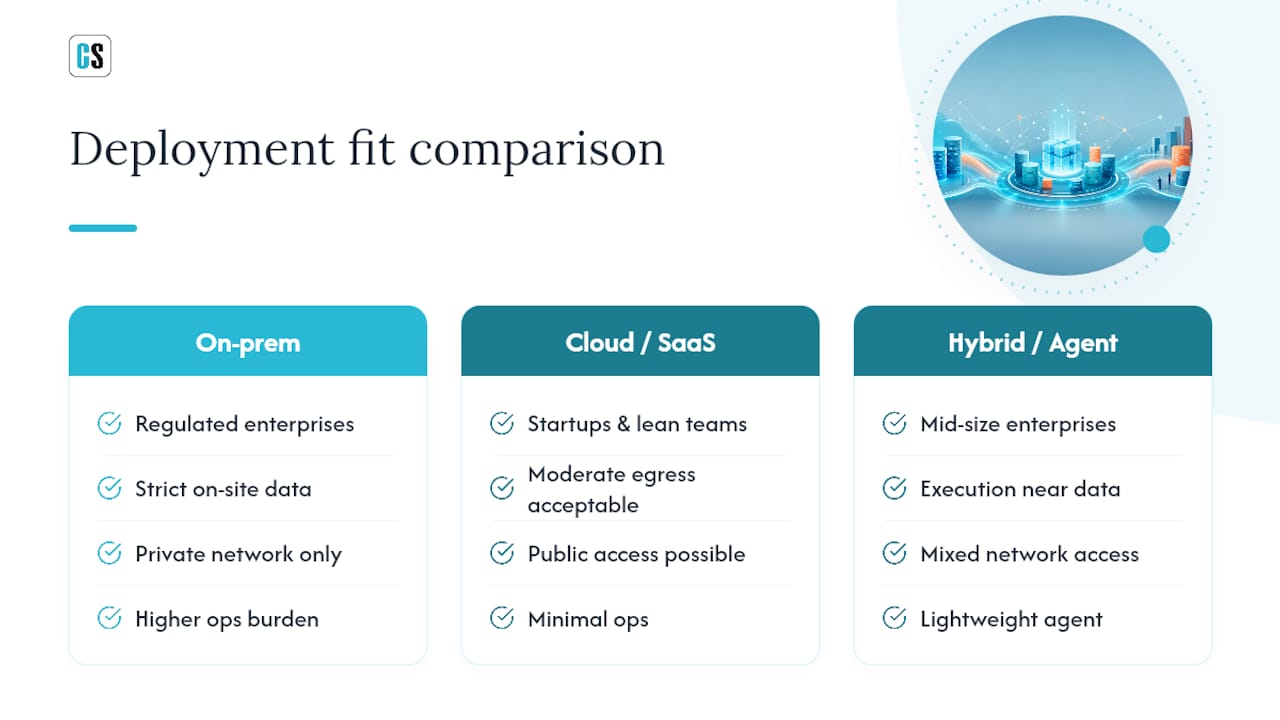
Deployment choice is really a governance decision wearing a technical costume. Get it wrong and you either overbuild for a five-person analytics team or underbuild for a regulated enterprise.
Choose on-prem when data residency rules are strict, when the database sits behind a private network with no public access, or when compliance teams require every query and export to stay inside your own infrastructure. Financial services, healthcare, and government reporting teams land here almost by default.
Cloud or SaaS works when setup speed matters more than infrastructure control, when the ops team is small, and when moderate data egress is acceptable. It's the right fit for startups and lean analytics teams that would rather not manage servers.
Hybrid and agent-based patterns split the difference. A central control plane manages schedules and policies, while a lightweight agent executes queries inside the customer's own network. This kind of architecture lets execution stay close to the data while management stays centralized, which is exactly the compromise most mid-size enterprises end up choosing once they outgrow a pure SaaS tool but aren't ready to run everything on-prem. Other BI reporting tools take a similar approach, running queries where the data already sits rather than pulling it into a separate hosted environment.
How Do You Pick the Right Scheduler for Your Team?
Before signing anything, run through a short checklist. It surfaces the gaps a vendor demo conveniently skips over.
- How many reports per day or per hour will you actually run at peak?
- Which delivery destinations do you need on day one (email, Slack, SFTP, a live sheet)?
- What authentication modes does the tool support for your databases?
- How long does it retain execution history and audit logs?
- What SLA backs uptime and support response time?
- Is pricing per user, per report, or per server, and does that model scale with you?
- What does the trial NOT let you test (data volume caps, connection limits, export formats)?
During a vendor call, ask specific, hard-to-dodge questions: What happens on a failed delivery, exactly, step by step? How are database credentials stored, and who can see them? Can the tool run entirely inside our network, or does any data pass through a third-party cloud?
Pro Tip: If a sales rep can't answer the credential-storage question precisely on the spot, that's your answer. Security architecture isn't something a vendor should need to "check and get back to you" on.
As a rough map: small teams with a handful of reports usually do fine with a lightweight scheduled-SQL platform. Centralized BI teams juggling multiple report types benefit from a dedicated scheduler layered on top of their existing tool (Power BI, Tableau, SSRS). Enterprises with compliance obligations need on-prem or hybrid deployment with full audit support, no exceptions.
What Two Decades of BI Automation Actually Teaches You
Most report automation failures aren't technical. They're organizational: someone builds a script, it works for six months, then the person who wrote it leaves, and nobody can safely touch it again. ChristianSteven Software has spent more than two decades solving exactly that problem across Power BI, SSRS, Tableau, and Crystal Reports environments, and the pattern repeats often enough to be a law: automation that isn't owned by IT, with proper audit trails and retry logic, eventually collapses under its own fragility.
That's why the product line splits by platform instead of forcing everyone into one tool. PBRS handles Power BI scheduling and export automation. ATRS does the same for Tableau. CRD covers Crystal Reports. IntelliFront BI manages real-time dashboards and KPIs. Each is built for on-prem deployment, backed by SOC 2 Type II certification, and designed around the reality that BI teams rarely run just one reporting platform.
Teams that implement this kind of automation typically report faster report delivery, far fewer manual reruns, and alerts that actually fire when something breaks instead of failing silently for a week.
— Christian Ofori-Boateng
Match Your Reporting Platform to the Right ChristianSteven Tool
If you're running Power BI, Tableau, SSRS, or Crystal Reports today and stitching together manual exports or half-finished scripts to keep reports flowing, ChristianSteven Software replaces that entire process with one automated layer that runs on your own infrastructure, not a third-party cloud you don't control.

The fit depends on what you're already running. Teams on Power BI use PBRS to automate dataset refreshes and report exports without relying on Power Automate. Tableau shops turn to ATRS to automate scheduled Tableau report emails directly to stakeholders. Crystal Reports users get dedicated scheduler tooling built for Crystal Reports exports, and teams tracking live metrics lean on IntelliFront BI for real-time KPI dashboards. All four support on-prem installation, encrypted delivery, role-based access, and destinations ranging from email and SFTP to Slack and Teams.
Before a trial, have your connection details, a sample query, and your target delivery list ready. That's enough to see a working schedule in under an hour. Start a free 30-day trial and test it against your own reporting environment before deciding anything.
Resources Worth Bookmarking Before You Build
A handful of resources are worth reading before you commit to a setup. Superset's user documentation covers the open-source route, including its SQL editor and scheduling options, for teams weighing a no-license path. Fastero's guide to automating SQL reports without a full BI tool breaks down cron scripts versus scheduled-SQL platforms in plain terms. For database connectivity questions across engines, DLH.io's data integration resources are a solid reference. And for Power BI specifics, this guide to automating company reports walks through implementation patterns step by step.
Sources
- Automated SQL Reports: The Lightweight Database Reporting Tool — SaturnSQL
- Superset user docs — Apache Superset
FAQ
Is Microsoft Discontinuing SSRS?
Microsoft has shifted investment toward Power BI Report Server and cloud-based Power BI, but standalone SSRS remains supported for existing SQL Server deployments. Many teams are migrating gradually rather than being forced off overnight, and tools like PBRS support both environments during that transition.
What Are Some Good Reporting Tools for SQL?
Options range from open-source platforms like Superset and Redash to dedicated scheduling tools such as PBRS, ATRS, and CRD depending on which BI platform you already run. The right choice depends on whether you need a full charting interface or just reliable scheduled delivery of existing queries.
Is SQL Still Relevant in 2026?
Yes. SQL remains the primary language for querying relational data, and nearly every report scheduler, from open-source tools to enterprise platforms, still runs on SQL underneath its scheduling and formatting layer.
What Is Replacing SSRS?
Nothing has fully replaced SSRS; organizations are splitting between Power BI Report Server for Microsoft-centric shops and third-party automation layers like PBRS that add scheduling, retries, and delivery options SSRS lacks natively.