
For most IT teams retiring native SSRS subscriptions, PBRS from ChristianSteven Software is the strongest overall pick. It handles data-driven and event-triggered scheduling across SSRS and Power BI without forcing a SQL Server Enterprise upgrade. Bold Reports, Power BI paginated reports, and SAP BusinessObjects BI Suite are worth evaluating too, depending on whether you need embedded design, native Microsoft integration, or large-scale enterprise distribution.
TL;DR:
- PBRS supports data-driven and event-triggered scheduling for SSRS and Power BI without requiring an upgrade to SQL Server Enterprise licensing.
- It offers broad compatibility, retry logic, bursting, and real-time triggers, making it suitable for automating complex report workflows across multiple delivery channels.
- Choosing a scheduler should prioritize support for your specific SSRS and Power BI deployment models, along with testing data-driven, failure handling, and burst scenarios during trials.
- Migrating from native SSRS subscriptions benefits from a phased approach, including cataloging current subscriptions, sandbox testing, and monitoring during rollout to prevent disruptions.
- Over time, third-party schedulers can reduce licensing, maintenance, and engineering costs compared to native SSRS on-premises solutions, especially when combined with event-driven automation.
Table of Contents
- What Makes a Scheduler the Best SSRS Scheduler for Your Team
- How to Evaluate and Choose the Right SSRS Scheduler
- Practical Steps to Migrate From SSRS Subscriptions
- Modern Scheduler Features and What They Actually Buy You
- How Long Does It Take to Deploy an External SSRS Scheduler?
- What Does an SSRS Scheduler Really Cost Over Time?
- Why Event-Driven Scheduling Changes the Calculation
- Put PBRS to the Test on Your Own SSRS Reports
- Selected Sources and Further Reading
- FAQ
What Makes a Scheduler the Best SSRS Scheduler for Your Team
The label "best SSRS scheduler" means something specific in practice: a tool that runs data-driven subscriptions, fires reports on real business events instead of just the clock, and delivers to wherever your recipients actually work, without requiring you to license SQL Server Enterprise just to get there. Native SSRS ties data-driven subscriptions to Enterprise Edition, which is one of the most common reasons IT teams start shopping for an alternative in the first place.
That single licensing constraint explains why so many BI managers end up comparing third-party SSRS scheduling tools rather than sticking with what shipped in the box. A scheduler earns the "best" tag by covering three things at once: broad compatibility with SSRS and Power BI, flexible triggers beyond a fixed time window, and delivery flexibility that matches how your organization actually distributes reports, whether that's email, Slack, cloud storage, or a database table.
PBRS (ChristianSteven Software)
PBRS is built specifically to sit on top of SSRS and Power BI, including both Power BI Service and Power BI Report Server, and it supports data-driven and event-triggered scheduling alongside pre- and post-processing tasks. It's the strongest fit for organizations that want hands-free automation across mixed Power BI and SSRS environments without touching their core SQL Server licensing. Bursting to hundreds of recipients from a single schedule, retry logic on failed deliveries, and a REST API for triggering runs from external systems round out the feature set.
Bold Reports
Bold Reports leans into embedded reporting: a web-based designer, pixel-perfect paginated output, and APIs meant for developers building reporting directly into custom applications. It fits teams that need reporting baked into a product rather than distributed as standalone files, though its scheduling depth is lighter than a dedicated automation layer.
Power BI Paginated Reports
This is Microsoft's own paginated reporting layer for Power BI, and it is the natural starting point if your organization is already fully committed to the Power BI ecosystem. Scheduling behavior, however, depends heavily on whether you're hosting through Power BI Service or Power BI Report Server, and neither path natively supports the kind of event-triggered delivery that operations teams increasingly expect.
JasperReports
An open-source reporting engine with a large developer community, JasperReports suits teams that want to build and customize their own reporting layer rather than buy a packaged scheduler. Its scheduling capabilities exist but require more engineering investment to configure and maintain than a purpose-built product.
Telerik Reporting
Telerik targets .NET development teams embedding reports inside applications. It offers strong rendering and export SDKs, but it's a developer library first, not a standalone enterprise scheduling console for IT operations.
FineReport
FineReport's spreadsheet-style design environment appeals to analysts who think in Excel logic rather than code. It handles report design and basic scheduling well, though it's less suited to organizations running complex, multi-condition SSRS subscription logic.
Stimulsoft Reports
Stimulsoft offers cross-platform report designers with a wide range of export formats, making it a reasonable fit where output format variety matters more than deep scheduling automation.
Visio
Visio shows up on some alternative lists, but it's a diagramming tool, not a report scheduler. It has a place for visualizing workflows and process maps, not for automating SSRS report delivery.
SAS Enterprise Guide
Organizations already running SAS for analytics may use SAS Enterprise Guide's built-in scheduling for SAS-native reports. It's a reasonable extension of an existing SAS investment, but it isn't designed as a general-purpose SSRS replacement.
SAP BusinessObjects BI Suite
BusinessObjects brings genuine enterprise scale: report bursting, large-distribution lists, and scheduling built for SAP-centered BI stacks. It's a heavyweight option best suited to large enterprises already standardized on SAP, and it carries the licensing complexity that comes with that scale.
Google Cloud Search, IBM SPSS Statistics, and IBM Cognos Business Intelligence (Legacy)
These three appear on broader "alternative" lists more because of adjacent BI functionality than direct SSRS scheduling parity. Google Cloud Search indexes and surfaces enterprise content rather than scheduling reports. IBM SPSS Statistics focuses on statistical analysis with reporting as a secondary function. IBM Cognos, now largely treated as a legacy platform by many enterprises, still offers scheduling and bursting but requires a heavier infrastructure commitment than most teams evaluating lighter-weight alternatives want to take on.
Several products in the broader "SSRS alternatives" conversation, Visio, Google Cloud Search, IBM SPSS Statistics, and Base SAS among them, don't fit a scheduling comparison table at all because they solve a different problem entirely: diagramming, enterprise search, statistical analysis, and raw data processing respectively. They're worth knowing about, but they won't replace an SSRS subscription workflow.
- PBRS wins on SSRS and Power BI coverage plus true event triggers.
- SAP BusinessObjects wins on raw enterprise distribution scale, at the cost of platform complexity.
- Power BI paginated reports wins on native Microsoft integration, at the cost of scheduling flexibility.
- JasperReports and Telerik Reporting win on developer customization, at the cost of setup time.
How to Evaluate and Choose the Right SSRS Scheduler
Start with compatibility, not price. Confirm the tool actually talks to your specific SSRS version and, if relevant, both Power BI Service and Power BI Report Server, before you get anywhere near a contract conversation.
From there, run every candidate through the same evaluation lens:
- Compatibility. Does it support your exact SSRS edition and Power BI deployment model, on-premises or Report Server, without workarounds?
- Scheduling types. Can it run time-based, data-driven, and event-triggered schedules, or only the first?
- Delivery destinations. Does it reach email, cloud storage like S3 or Azure, Slack, network printers, and databases, or just a subset?
- Output formats. Are PDF, Excel, and other formats native, or do they require extra conversion steps?
- Workflow automation. Does it support pre- and post-processing tasks, retries on failure, and bursting to large recipient lists?
- Performance under load. How does it behave when dozens of schedules fire simultaneously during month-end?
- Error handling. What happens when a data source is unavailable or a report renders blank?
- Security and compliance. Does the vendor carry an independent certification like SOC 2 Type II?
- Support and SLAs. Is there a real support team, or just a ticket queue and a knowledge base?
During a trial, don't just click through the demo. Inventory every existing SSRS subscription first, then try to recreate the trickiest one, the one with dynamic parameters or a distribution list that changes weekly, inside the new tool. Simulate a bursting scenario by sending one report to fifty recipients with unique parameters. Test at least one genuine event trigger, not a scheduled proxy for one. And confirm you can build a data-driven schedule without touching your SQL Server licensing tier.
Ask vendors these eight questions directly: What SSRS and Power BI versions do you support? How do data-driven schedules pull parameters at runtime? What happens on a failed delivery, retry count, alerting, logging? Can you burst to more than 100 recipients from one schedule? What deployment models do you support? What certifications do you hold? What's included in standard support versus premium tiers? What's the realistic timeline from install to production?
Watch for three red flags: vague answers about data-driven scheduling that turn out to require Enterprise licensing anyway, no clear answer on failure handling, and a support model that's documentation-only with no human escalation path.
Pro Tip: During your pilot, track key metrics side by side: the success rate of scheduled deliveries completing without manual intervention, and the average CPU or memory load on your report server during peak scheduling windows. A tool that improves both is doing its job; one that only improves the first is just moving the bottleneck.
Practical Steps to Migrate From SSRS Subscriptions
A migration off native SSRS subscriptions runs cleaner when you treat it as five discrete steps rather than one big cutover.
- Audit current subscriptions. Catalog every existing SSRS subscription, its schedule type, parameters, and recipient list, before you touch anything.
- Map data-driven variables. For each data-driven subscription, document the source table and how parameters map to recipients and formats.
- Configure in a sandbox. Build the equivalent schedules in your new scheduler against a test environment first, never production.
- Test delivery and error handling. Force a failure, missing data source, invalid parameter, and confirm retries and alerts fire correctly.
- Roll out with monitoring. Move production subscriptions over in batches, with an escalation policy for the first few cycles.
This sequence matters because ChristianSteven's knowledge base documents exactly this kind of setup, down to single-schedule configuration, exception calendars, and custom task chaining, which shortens the sandbox phase considerably.
The licensing angle deserves its own line item: since data-driven subscriptions in native SSRS require SQL Server Enterprise, replicating that behavior through a third-party scheduler like PBRS avoids the Enterprise upgrade entirely while also shifting scheduling load off the report server itself. Combined with event triggers and bursting, that shift tends to reduce the number of redundant runs your server processes during any given cycle, since you're no longer firing every report on a fixed clock regardless of whether the underlying data changed.

Modern Scheduler Features and What They Actually Buy You
The feature list that separates a modern SSRS scheduler from the native tool is short but consequential: data-driven schedules without an Enterprise license, event triggers tied to database changes or file arrivals, workflow tasks that chain actions before and after a report runs, bursting to large recipient lists, automatic blank-report suppression, and multi-threaded processing with built-in retries.
The operational payoff shows up in three places. Missed deliveries drop because retries and error handling catch failures before a human notices. Server load drops because event-driven and bursting logic replace dozens of redundant time-based runs. And auditability improves because a centralized scheduler logs every delivery across SSRS, Power BI, and other BI tools in one place instead of scattered subscription logs.
Picture a sales team that needs an alert the moment daily revenue crosses a threshold, a finance team bursting month-end statements to two hundred cost centers, and an ops team that wants blank reports suppressed automatically rather than emailed out. That's the difference between a scheduler built for the calendar and one built for the business.
How Long Does It Take to Deploy an External SSRS Scheduler?
Most organizations can move from evaluation to production in a matter of weeks, depending on how many subscriptions you're migrating and how complex your data-driven logic is. Smaller environments with straightforward schedules may go live within a few weeks, while larger enterprises with complex subscriptions and multiple delivery destinations should plan for a longer deployment period.
The timeline breaks down roughly into four phases: one to two weeks for evaluation and trial testing, one week for sandbox configuration, one to two weeks for parallel testing alongside existing SSRS subscriptions, and one to two weeks for phased production rollout with monitoring. Running the new scheduler in parallel with native SSRS for at least one full reporting cycle, weekly or monthly depending on your cadence, catches edge cases before you decommission anything.
The variable that most often stretches this timeline isn't the software itself, it's data-driven parameter mapping. If your subscriptions pull recipient lists and formats dynamically from a database table, budget extra time to validate that logic against the new scheduler's data source configuration before going live. Teams that skip this step tend to discover mismatched parameters in production instead of in testing, which is the more expensive way to find out.
What Does an SSRS Scheduler Really Cost Over Time?
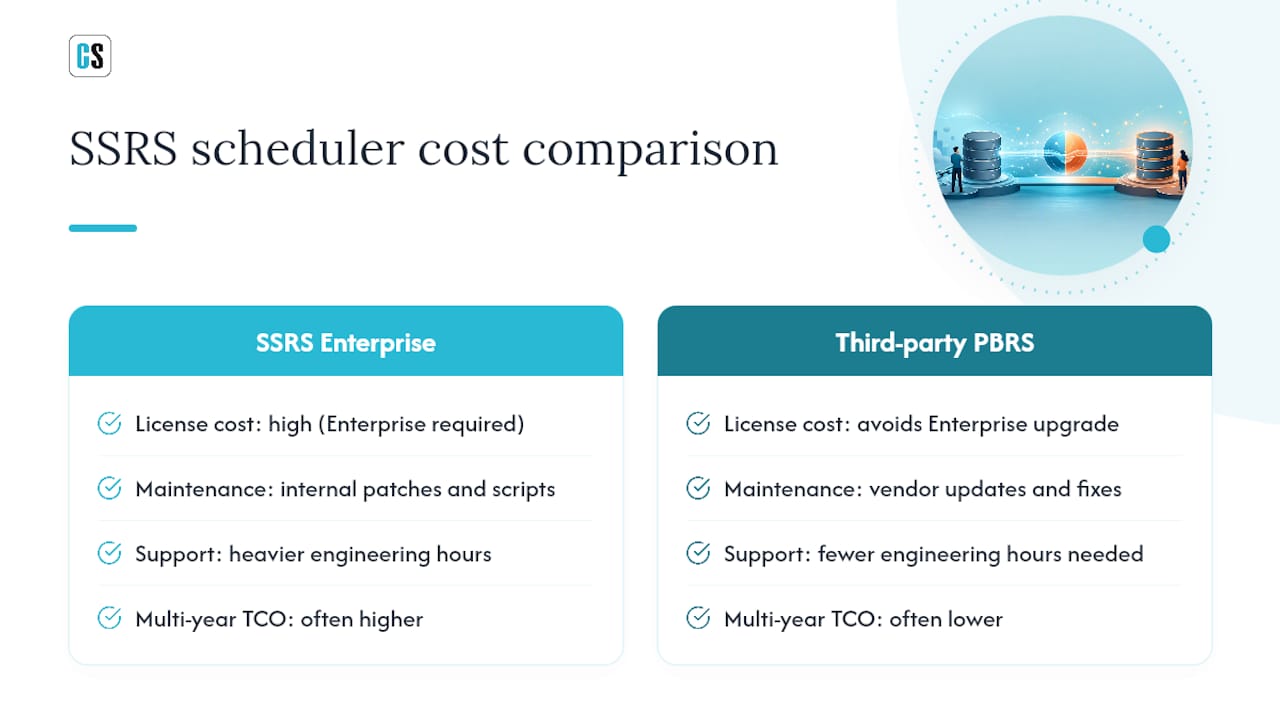
Total cost of ownership for an SSRS scheduler breaks into three buckets: the license itself, ongoing maintenance, and support. Each one shifts depending on whether you go with native SSRS Enterprise licensing or a dedicated third-party scheduler.
Native SSRS data-driven subscriptions require SQL Server Enterprise Edition, and that licensing tier carries a meaningfully higher cost than Standard Edition, on top of whatever you're already paying for SQL Server itself. That cost applies whether you need Enterprise for one advanced feature or ten. A third-party scheduler like PBRS avoids that upgrade path entirely, which for many mid-size organizations is the single largest line item difference between the two approaches.
Maintenance costs run lower with a purpose-built scheduler too, since vendor updates and bug fixes are handled through standard support contracts rather than internal engineering time spent patching custom scheduling scripts or workarounds built on top of native SSRS. Support costs vary by vendor tier, but the real cost comparison isn't just the invoice, it's the engineering hours saved by not having to build and maintain retry logic, error handling, and bursting capability from scratch.
Over a multi-year horizon, licensing avoidance, reduced maintenance overhead, and fewer engineering hours spent firefighting failed subscriptions often outweigh the subscription cost of a dedicated scheduling tool, especially for organizations running multiple data-driven reports.
Why Event-Driven Scheduling Changes the Calculation
ChristianSteven Software has spent two decades automating BI report delivery across Power BI, SSRS, Tableau, and Crystal Reports, and that history, backed by SOC 2 Type II certification, shapes how I think about this decision. The real shift isn't scheduling itself, it's moving from time-based guessing to event-driven precision.
Most teams evaluating SSRS alternatives focus on feature checklists and miss the operational point: a report that fires because data changed is worth more than ten that fire because the clock did. If you're piloting a scheduler, measure delivery reliability and server load together, then request a trial or demo and test that logic directly.
— Christian Ofori-Boateng
Put PBRS to the Test on Your Own SSRS Reports
PBRS is built to do exactly what this comparison points toward: data-driven schedules and event triggers across both SSRS and Power BI, without forcing a SQL Server Enterprise upgrade to get there. It runs on-premises, connects to email, cloud storage, Slack, and databases, and adds retry logic and bursting on top of whatever your current subscriptions already do manually.

If you're piloting it, run three tests before you decide anything: build one data-driven schedule pulling parameters from a live table, simulate an event trigger instead of a time-based one, and burst a single report to a large recipient list with unique filters per recipient. Start a PBRS trial and run those three scenarios against your actual SSRS subscriptions before your next reporting cycle.
Selected Sources and Further Reading
- PBRS product overview and scheduling capabilities
- PBRS knowledge base: SSRS single-schedule setup
- Crystal Reports Scheduler (CRD) feature reference
- Gartner: SQL Server Reporting Services (SSRS) Alternatives
FAQ
Is Microsoft Getting Rid of SSRS?
Microsoft hasn't discontinued SSRS, but it has shifted investment toward Power BI Report Server and Power BI paginated reports, which signals where long-term development focus is heading.
What's Replacing SSRS?
There's no single successor. Organizations are moving toward Power BI paginated reports for Microsoft-native environments, or toward dedicated third-party schedulers like PBRS when they need data-driven and event-triggered scheduling without an Enterprise upgrade.
How Much Does SSRS Cost?
SSRS itself comes bundled with SQL Server, but data-driven subscriptions require SQL Server Enterprise Edition, which carries substantially higher licensing costs than Standard Edition regardless of how many advanced features you actually use.
What Is the Newest Version of SSRS?
SSRS ships as part of the broader SQL Server Reporting Services line, with functionality also delivered through Power BI Report Server for organizations running hybrid on-premises and cloud reporting.
Do I Need SQL Server Enterprise for Data-Driven Scheduling?
Only if you're using native SSRS subscriptions. A third-party scheduler like PBRS replicates data-driven behavior against SSRS and Power BI without requiring an Enterprise license upgrade.