
For enterprise IT, BI, and finance teams that need on-prem report scheduling, formatting, and delivery across Power BI, Tableau, SSRS, and Crystal Reports, ChristianSteven Software is the recommended replacement for Microsoft Flow (now Power Automate). Its integrated product suite handles the full automation cycle without a cloud-only dependency.
Why it fits:
- On-prem deployment with no mandatory cloud routing of sensitive data
- Platform coverage: Power BI (PBRS), Tableau (ATRS), SSRS, and Crystal Reports (CRD)
- Scheduling types: time-based, data-driven, and event-triggered
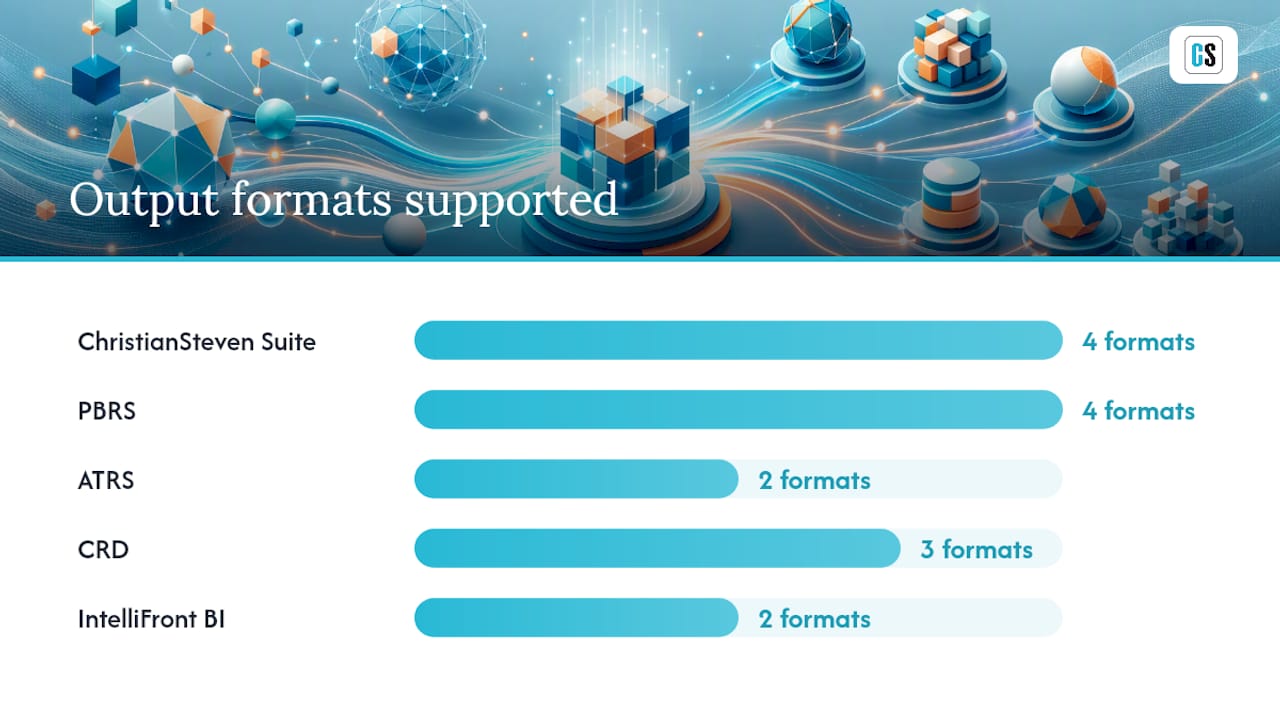
- Output formats: PDF, Excel, Word, and images
- Delivery destinations: email, SFTP/FTPS, SharePoint, local file systems, and cloud storage
- Security: SOC 2 Type II certified, encryption at rest, full audit logging
Best for enterprise IT, BI, and finance teams that require on-site control, guaranteed SLAs, and platform-specific scheduling depth.
Key Takeaways
ChristianSteven Software's on-prem suite covers Power BI, Tableau, SSRS, and Crystal Reports with SOC 2 Type II controls, making it the strongest fit for enterprises replacing Microsoft Flow in regulated, on-site environments.
| Point | Details |
|---|---|
| Standardize before automating | Define and govern metrics before any scheduler runs, or you lock in errors at scale. |
| Require on-prem deployment | Cloud-only vendors cannot satisfy data-residency and audit requirements in regulated industries. |
| Validate connectors early | Run a proof-of-concept against your actual source systems before committing to a vendor. |
| Demand SOC 2 evidence | Request the SOC 2 Type II report, not just a checkbox claim, during procurement. |
| ChristianSteven Software | Covers Power BI, Tableau, SSRS, and Crystal Reports with on-prem deployment and SOC 2 Type II certification. |
Table of Contents
- What are the best Microsoft Flow alternatives for on-prem BI scheduling?
- What practitioners get wrong about BI report automation
- ChristianSteven Software is built for this exact job
- Sources
- FAQ
What are the best Microsoft Flow alternatives for on-prem BI scheduling?
Several use cases show where an on-prem BI scheduler replaces Power Automate in practice.
Monthly financial close packs. Finance teams run the same 40-page PDF pack every month-end. Sourcing data once and reusing it across financial, statutory, ESG, and GRC reports cuts manual recreation and improves consistency across stakeholder outputs.
Statutory and global filings. Regulatory deadlines are fixed. A data-driven schedule tied to a period-close event fires the report automatically when the source data is ready, not on a calendar guess.
ESG and GRC control reporting. Audit trails and access controls are non-optional here. An on-prem scheduler with SOC 2 controls keeps sensitive data off third-party cloud pipes entirely.

Client-delivered PDFs. Accounting and advisory teams still email reports manually because the orchestration layer is missing. Connecting a close event to portal upload and client notification removes that manual step without heavy IT effort.
Cross-department dashboards. IntelliFront BI delivers live KPIs alongside scheduled exports, so operations and finance see the same numbers at the same time.
A locally deployable system can include database and file connectors, JSON processing, template-driven PDF/HTML generation, and delivery to SMTP, SFTP, and cloud storage, which sets a reasonable baseline for what to expect from any vendor in this category.
Ask every vendor for concurrency limits, throughput benchmarks, and a stress-test report before signing.
| Dimension | ChristianSteven Suite | PBRS | ATRS | CRD | IntelliFront BI |
|---|---|---|---|---|---|
| Deployment | On-prem / cloud | On-prem / cloud | On-prem / cloud | On-prem / cloud | On-prem / cloud |
| Supported BI platforms | Power BI, Tableau, SSRS, Crystal Reports | Power BI | Tableau | Crystal Reports | Multi-platform dashboards |
| Scheduling types | Time, data-driven, event-triggered | Time, data-driven, event-triggered | Time, data-driven | Time, data-driven | Real-time + scheduled |
| Output formats | PDF, Excel, Word, images | PDF, Excel, Word, images | PDF, Excel | PDF, Excel, Word | Live KPI + PDF |
| Delivery destinations | Email, SFTP, SharePoint, local FS, cloud | Email, SFTP, SharePoint, cloud | Email, SFTP, cloud | Email, SFTP, local FS | Email, portal, cloud |
| Security & compliance | SOC 2 Type II, encryption, audit logs | SOC 2 Type II, audit logs | SOC 2 Type II, audit logs | SOC 2 Type II, audit logs | SOC 2 Type II, audit logs |
| Integration / APIs | REST API, AD/LDAP, connectors | REST API, AD/LDAP | REST API, AD/LDAP | REST API, AD/LDAP | REST API |
| Licensing model | Perpetual or subscription | Perpetual or subscription | Perpetual or subscription | Perpetual or subscription | Perpetual or subscription |
| Setup time | Days to weeks | Days | Days | Days | Days to weeks |
| Support / SLAs | Dedicated support, SLA options | Dedicated support | Dedicated support | Dedicated support | Dedicated support |
What practitioners get wrong about BI report automation
Standardize metrics and validate data at the pipeline level before automating. Automating a broken process just delivers wrong numbers faster. That single rule eliminates most post-launch failures.
Red flags to walk away from:
- Vendor automates your existing workflow without auditing metric definitions first
- Output is a "black box" with no visible exception log
- No audit trail for who received what and when
- Cloud-only licensing when your security policy requires on-prem
Vendor checklist for engineering and BI leads:
- Confirm Active Directory / LDAP integration is native, not bolted on
- Request encryption-at-rest documentation and key management details
- Review published API docs before the demo, not after
- Ask for a sample SLA with uptime and response-time commitments
- Run a live demo of data-driven schedules against your actual data profile
Scheduling repeatable queries into governed outputs is faster than building separate backends per report. Validate that the vendor's connector handles your source systems before the proof-of-concept, not during it.
Pro Tip: Ask the vendor for a stress-test report or a reference customer with a dataset size and concurrency profile that matches yours. A vendor who cannot produce either has not been tested at your scale.
ChristianSteven Software is built for this exact job

Twenty-plus years in BI reporting automation, SOC 2 Type II certification, and an on-prem deployment model that keeps your data on your infrastructure. ChristianSteven Software maps directly to your stack: PBRS for Power BI automated exports, ATRS for Tableau scheduling and delivery, CRD for Crystal Reports, and IntelliFront BI for real-time dashboards alongside scheduled exports.
Licensing is perpetual or subscription. Cost drivers are concurrent jobs, number of delivery targets, and any custom connector development. Request a product-matched demo, ask for an on-prem trial, and get the migration checklist for your current Power Automate workflows.
Sources
The sources below back the claims in this article and give technical decision-makers a direct path to implementation detail, vendor evaluation frameworks, and platform-specific guidance.
- Reporting automation strategy (Deloitte)
- Reporting Automation Fundamentals | CFO Upgrade
- Kvery
- Why Are Accounting Firms Still Emailing Reports Manually in 2026? | US Tech Automations
FAQ
What is the best on-prem Microsoft Flow replacement for Power BI?
PBRS by ChristianSteven Software schedules, exports, and delivers Power BI reports on-prem without relying on Power Automate, with data-driven triggers and SOC 2 Type II controls.
Can these tools replace Power Automate for Crystal Reports delivery?
Yes. CRD handles Crystal Reports scheduling, formatting, and secure delivery to email, SFTP, and local file systems, covering the same distribution jobs Power Automate handled.
What should I ask a vendor before replacing Microsoft Flow?
Ask for AD/LDAP integration confirmation, encryption-at-rest documentation, a sample SLA, live data-driven schedule demo, and a stress-test report matching your data volume.
How long does migration from Power Automate typically take?
Most on-prem deployments complete initial setup in days; a full migration pilot with connector validation and schedule testing typically runs one to three weeks depending on workflow complexity.