

If your reports already run well on a Windows report server and your data stays on-premises, SSRS is still the right home for them. Power BI paginated reports fit better when the rest of your reporting already lives in the Power BI service. The main condition that flips this answer is delivery: SSRS supports data-driven subscriptions, and Power BI paginated reports do not. If you send a different version of a report to hundreds of recipients on a schedule, that one feature decides more than any rendering difference.
The two are closer than the names suggest. Both use the same report format, and the difference is where the report runs and what surrounds it. This article walks through those differences using one illustrative scenario, so you can see which ones affect a decision.
Table of Contents
- The scenario we will use
- What they have in common
- Where they differ in ways that matter
- When your existing tool is enough
- Moving from SSRS to Power BI paginated reports
- Closing the delivery gap with PBRS
- Our perspective
- Deciding this week
- FAQ
The scenario we will use
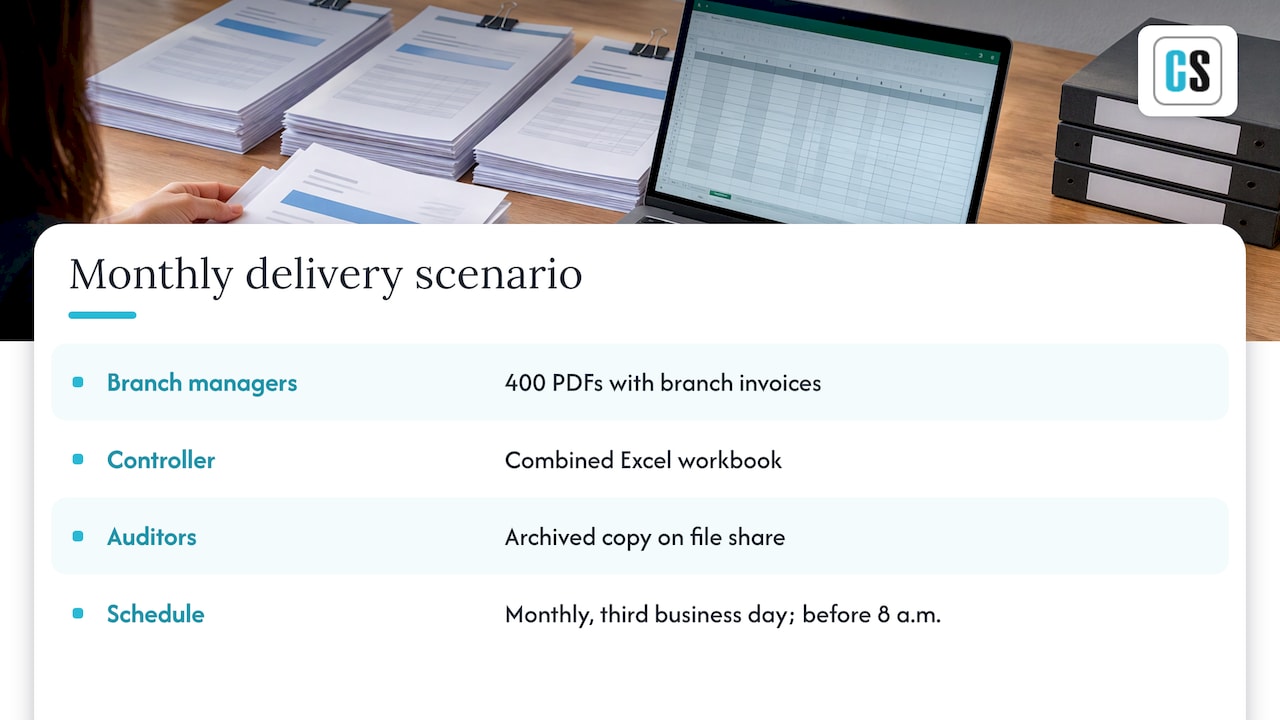
Imagine a finance team at a regional distributor. Every month, on the third business day, 400 branch managers each need a PDF statement with only their branch's invoices, formatted for printing. The controller also needs a combined Excel workbook, and the auditors need an archived copy on a file share. The statements must arrive before 8 a.m., every month, without someone running reports by hand.
This is an illustrative scenario, not a customer story. It is useful because it touches every point where SSRS and Power BI paginated reports differ: layout, data sources, security, subscriptions and delivery.
What they have in common
Power BI paginated reports and SSRS reports both use the .rdl format (Report Definition Language, an XML file that describes layout, queries and parameters). Both are authored in Report Builder. According to a reference comparing the two, the difference is where they run: the Power BI service (backed by Fabric or Premium capacity) or a self-installed Windows report server.
So a statement designed for page breaks, repeating table headers, headers and footers and exact print layout can be built in either place. Paginated reports exist for the case where output must be precise and printable, such as invoices, statements and regulatory documents. That is not the same as the interactive .pbix reports built in Power BI Desktop, and mixing the two up is a common reason migration scopes go wrong. Our guide on Power BI Report Builder vs Power BI Desktop explains which tool builds which.
Power BI Report Server sits between the two. It is a self-hosted server that runs both paginated reports and Power BI reports on your own infrastructure. If your reason for staying on-premises is data residency or policy, it is the nearest Power BI equivalent to SSRS.
Where they differ in ways that matter
Most feature lists include differences that never change a decision. These are the ones that do.
| Decision point | SSRS | Power BI paginated reports |
|---|---|---|
| Where it runs | Your Windows report server | Power BI service on capacity-backed workspaces |
| Data-driven subscriptions | Supported | Not supported |
| Standard subscriptions | Supported | Supported |
| Shared data sources and datasets | Supported | Not supported; embedded in each .rdl |
| Access model | Folders and security groups | Workspaces and workspace roles |
| On-premises data | Direct | Through a gateway |
| Licensing | Server-based, with SQL Server | User- and capacity-based |
The comparison reference confirms the subscription and shared-source rows. A migration write-up adds that document maps are not rendered in the service and linked reports only work inside the same workspace.
Subscriptions and delivery
This is where our scenario gets decided. A standard subscription sends the same report, with fixed parameters, to a fixed list. Both platforms have it. A data-driven subscription reads recipients and parameter values from a query at run time, so each branch manager gets their own branch's statement. That is the 400-manager requirement, and only SSRS supports it natively.
In Power BI, per-recipient delivery for paginated reports is available through dynamic per-recipient subscriptions, which one 2026 overview lists with a 10-minute timeout and a limit of 1,000 recipient rows. Beyond that, teams typically build Power Automate flows that call the export API once per recipient. That works, but it means building and maintaining flows, and each run counts against whatever your Power Automate licensing charges. We cover that trade-off in Power Automate vs SSRS subscriptions.
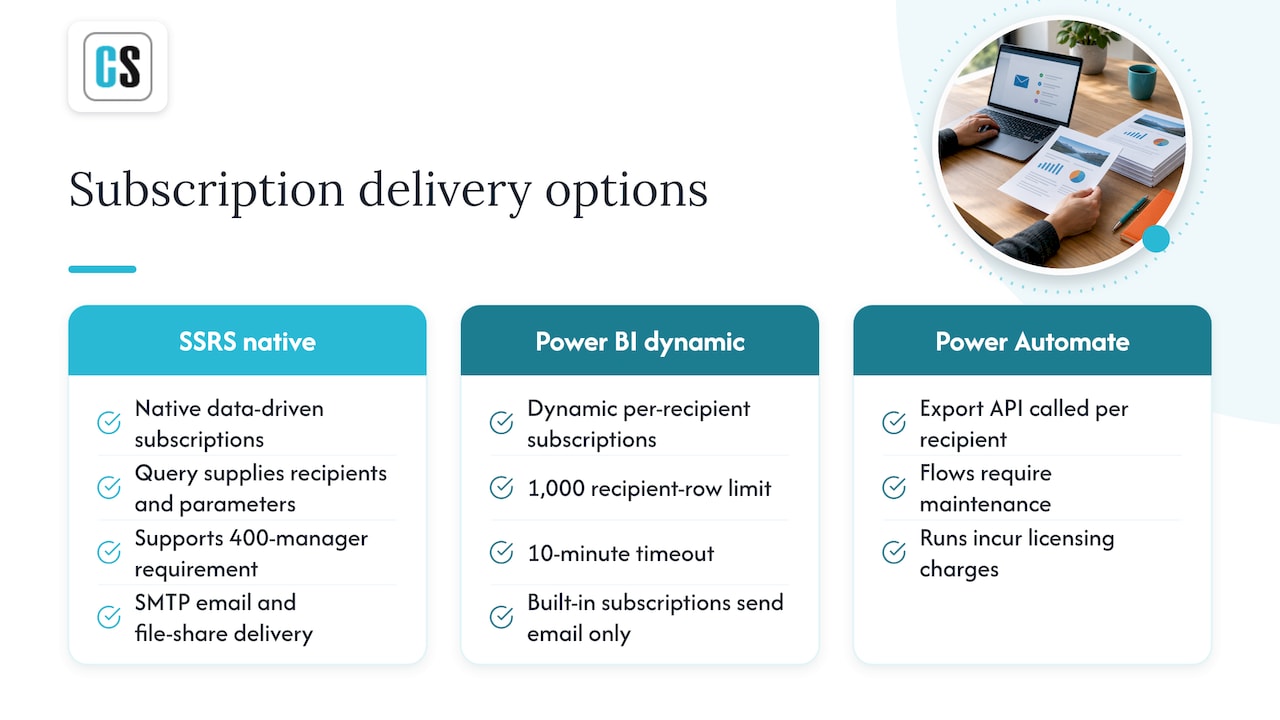
Email in SSRS goes through SMTP, plus file share delivery. Power BI's built-in subscriptions send email only, so a file-share archive for the auditors needs something else.
Data sources and shared objects
SSRS lets many reports point at one shared data source or shared dataset, so a change to a connection string happens once. Power BI paginated reports embed these inside each .rdl. For a portfolio of 300 reports, that turns a one-line change into 300 edits or a scripted update. If you keep a lot of shared datasets, count them before you decide.
Cloud paginated reports reach on-premises SQL Server through a data gateway. SSRS reads the database directly, which is simpler when the server sits next to the data.
Security and administration
The two use different access models. In the Power BI service, paginated reports sit in workspaces secured by roles, such as Viewer for read-only and Contributor for read and write. On a report server, reports live in folders governed by security groups. If your permissions are mapped to Active Directory groups and folder hierarchy, they will not carry over one to one. Plan for a redesign, not a copy.
Licensing and capacity
SSRS arrives with SQL Server licensing. Power BI paginated reports need a paid Power BI license tier for publishing and, for viewers on the free license, a Fabric or Premium capacity workspace. One migration provider summarizes Microsoft's FAQ this way, and licensing details change often, so confirm the current rules on Microsoft's licensing pages before you budget. The point to remember is that the model shifts from per server to per user and capacity, and a wrong tier chosen early causes rework later.
When your existing tool is enough
Stay on SSRS when most of these hold:
- Your data sits on-premises and you want it to stay there.
- You rely on data-driven subscriptions for personalized delivery.
- You have many shared data sources and datasets.
- You deliver to file shares as part of a close or audit routine.
- Your SQL Server licenses already cover it.
Move to Power BI paginated reports when:
- Your semantic models and interactive reports already live in the Power BI service, and you want one place for users to find everything.
- You want to retire the report server and its patching.
- Your reports are mostly sent to a modest, fixed audience, so standard subscriptions cover the need.
For our distributor, the answer depends on the 400 statements. If branch managers could instead open a parameterized report themselves, Power BI is fine. If each must receive a file, the delivery gap is the deciding requirement.
Moving from SSRS to Power BI paginated reports
If you decide to move, treat it as a short project with checkpoints.
- Inventory your reports. List each .rdl, its data sources, shared datasets, custom code, subscriptions and recipients. Subscriptions are the item people forget. They do not migrate automatically and must be rebuilt, and one guide puts that at one to three weeks depending on count and complexity.
- Flag the incompatible items. Custom .NET assemblies do not run in the cloud runtime, shared sources must become embedded ones, and some VB expressions need rewriting. Document maps and linked reports across workspaces have limits as noted above.
- Publish a pilot. The Publish button in newer SSRS builds and Power BI Report Server can upload reports to the service and convert shared sources to embedded ones, leaving the SSRS setup running. That lets both platforms run in parallel.
- Compare the output. Render the same statement from both platforms, in PDF and in Excel. Excel exports in particular can differ from SSRS.
- Rebuild the subscriptions and the schedule. Decide whether each subscription maps to a standard Power BI subscription, a flow, or something that handles per-recipient delivery for you.
- Cut over by report group, not all at once, and retire the SSRS copy only after a full cycle, such as one month-end close.
If you are staying on the on-premises side and moving to Power BI Report Server, note that there is no in-place upgrade from SSRS: you back up the encryption key and the report server databases, clone them to a target SQL Server instance, then install.
Closing the delivery gap with PBRS
Whichever platform renders your reports, the open question for most teams is what happens after the report is built: who runs it, who receives which version, and where the file goes. PBRS is our report automation software for Power BI and SSRS, including paginated reports. It runs reports on a schedule or when an event occurs, generates recipient-specific versions through report bursting, bundles outputs, and delivers them to internal or external recipients.
In the distributor example, that means one statement design producing 400 branch versions, an Excel bundle for the controller and a copy for the audit location, from one schedule. The same approach works against SSRS today and against Power BI paginated reports after a move, so the delivery setup does not have to be rebuilt when the report platform changes.
You can see the product on the PBRS for Power BI and SSRS page, and the paginated report scheduling guide shows how scheduling works. For a deeper explanation of the report type itself, read Power BI paginated reports, everything you wanted to know.
Our perspective
Most teams ask which platform is better. We think the better question is which delivery requirement they cannot drop. Layout is rarely the problem, because the same .rdl file runs in both places. The pain appears on the third business day of the month, when someone has to get the right file to the right person on time.
That is why we build around the delivery job: control over when a report runs, what each recipient sees and where each file goes. When a team moves from SSRS to Power BI paginated reports, the report design moves with it, but the subscription logic usually has to be rebuilt. We would rather you keep that logic in one place that does not depend on which server renders the report.
If your reports are paginated, your recipients are many and your deadlines are fixed, plan the delivery first and choose the platform second.
Christian Ofori-Boateng
Deciding this week
Take your three most important recurring reports and answer four questions for each: where does the data live, how many distinct recipients receive a different version, which destinations are needed (email, file share, SharePoint), and how many shared datasets does it use? If the answers point to on-premises data and per-recipient files, keep SSRS and automate delivery. If they point to cloud data and a modest fixed list, pilot one report in a Power BI workspace and compare the output against SSRS before you move the rest.
FAQ
Are Power BI paginated reports just SSRS in the cloud?
They share the .rdl format and the Report Builder authoring tool, so the layout skills carry over. They are not identical: the cloud service does not support shared data sources, shared datasets or data-driven subscriptions, and it uses workspaces instead of folders.
Do SSRS subscriptions move to Power BI automatically?
No. Subscriptions must be rebuilt using Power BI subscriptions, Power Automate flows or export API calls. Standard subscriptions map across fairly directly, while data-driven ones take the most work, so count them during your inventory.
Which is better for invoices and statements?
Either can produce them, since both are built for precise, printable layouts. Choose based on where the data lives and how you deliver: per-recipient files on a schedule favor SSRS or an automation layer such as PBRS, while a fixed audience inside the Power BI service suits native paginated reports.
Can I run both at the same time?
Yes. Newer SSRS builds and Power BI Report Server can publish reports to the Power BI service while leaving the existing server in place, so you can pilot and compare before cutting over.