
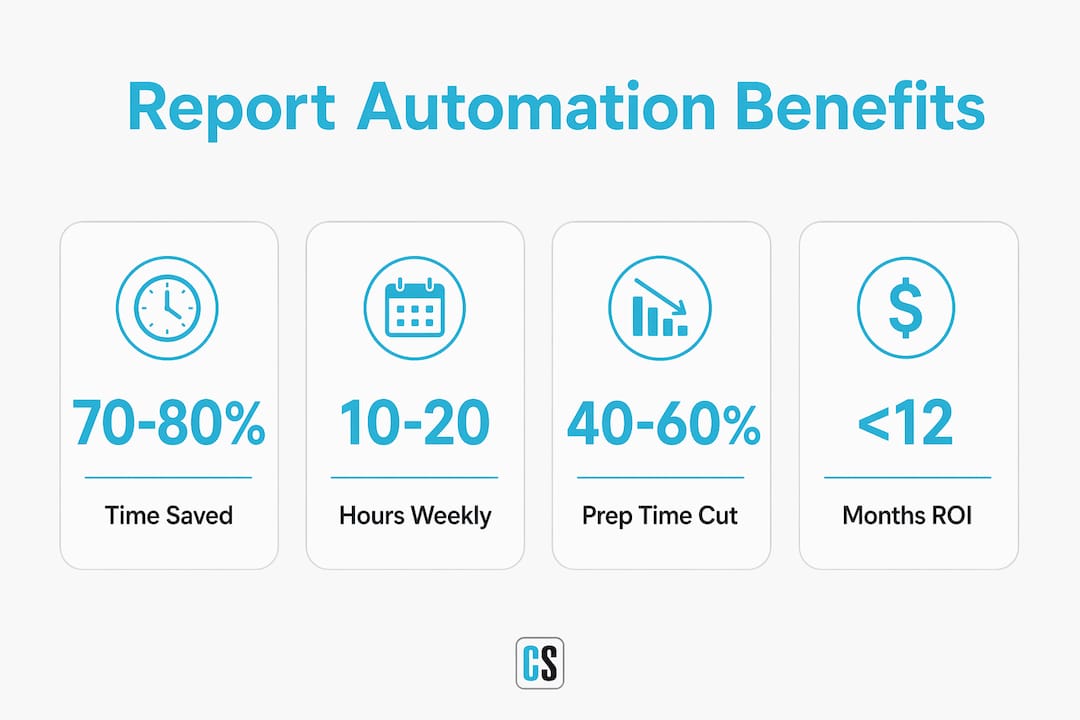
Report automation is the process of using technology to automatically generate, format, and distribute business reports, eliminating repetitive manual tasks that drain analyst time and introduce errors. The advantages of report automation are well documented: organizations that adopt automated reporting reduce manual reporting time by 70–80%, saving teams 10–20 hours every week. That is not a marginal gain. It is the difference between a reporting team that reacts and one that advises. This guide covers report automation benefits explained through real data, practical examples, and implementation guidance for business professionals ready to move beyond manual workflows.
How does report automation improve reporting speed and efficiency?
Report automation removes the three most time-consuming steps in any reporting cycle: pulling data, formatting outputs, and assembling the final document. Each of those steps is manual, repetitive, and error-prone when done by hand. Automation handles all three on a schedule, without human intervention.
The time savings are substantial. Teams that automate recurring report generation recover 10–20 hours per week that were previously spent on mechanical assembly. That time compounds quickly. Over a quarter, a single analyst reclaims more than 100 hours for higher-value work.
Financial services teams see this most clearly. Automated financial report delivery cuts per-client prep time by 40–60% and delivers reports 3.2 business days faster. Faster delivery means clients get answers sooner, and the firm spends less labor per engagement.

The payback period is short. Most organizations that automate recurring reports break even within the first year, with savings compounding as report volume grows. The ROI case is not theoretical. It shows up in reduced overtime, fewer missed deadlines, and lower error correction costs.
Key efficiency gains from report automation include:
- Elimination of manual data pulls from multiple source systems
- Automatic formatting to approved templates on every run
- Scheduled delivery to the right recipients without staff involvement
- Consistent output regardless of team size or workload
Pro Tip: Start by automating your highest-frequency, most manual reports first. A daily sales summary or weekly operations report delivers faster ROI than a quarterly board pack because the time savings repeat more often.
In what ways does report automation enhance accuracy and data consistency?
Manual reporting introduces errors at every handoff. Copy-pasting figures between spreadsheets, reformatting tables for different audiences, and assembling data from multiple sources all create opportunities for mistakes. A single transposed number in a board pack can trigger hours of rework and erode executive confidence.
Automation eliminates those handoffs. Every report pulls from the same validated data source, applies the same template, and follows the same delivery rules on every cycle. The output is consistent by design, not by luck.
"The best client reporting automation makes reporting invisible. Consistent templates and quality control across all outputs institutionalize professionalism and build client trust over time." — Satuit Technologies
Governance is a direct benefit of templated report designs. When every report uses an approved layout, brand standards apply automatically. Finance teams do not need to chase down off-brand charts. Compliance teams do not need to verify that disclosures appear in the right place. The template enforces the rules.
Common accuracy risks that automation addresses:
- Inconsistent number formats across report versions
- Missing data fields when source systems change
- Version control failures when multiple people edit the same file
- Formatting errors introduced during manual assembly
Pro Tip: Build failure alerts into your automation workflow from day one. A report that runs but pulls from a broken data connection is worse than no report at all. Alerts catch silent failures before they reach decision-makers.
Automated workflows also reduce inquiry volume from clients and internal stakeholders. When reports arrive on schedule with consistent formatting, the "where's my report?" calls stop. That reduction in follow-up is itself a measurable time saving for the team managing delivery.
Why do analysts and business teams benefit from reporting automation?
Analysts spend the majority of their working hours on tasks that do not require analytical skill. Manual data preparation consumes 60–80% of analyst time, leaving less than a quarter of the workday for the interpretation and insight generation that organizations actually need from them.
Automation shifts that ratio. When data pulling, cleaning, and formatting happen automatically, analysts spend their time on the work that justifies their expertise: identifying trends, building forecasts, and advising leadership. That shift is the real value of automated reporting for analysts.
The bottleneck in most reporting workflows is not technology. Human coordination delays slow response times even when the underlying data systems are fast. An analyst waiting for a data export, then formatting it, then routing it for approval adds days to a cycle that could complete in minutes. Automation removes those coordination steps entirely.
Four ways analysts and business teams benefit directly:
- Faster insight delivery. Reports reach decision-makers on schedule, not when an analyst finishes assembling them manually.
- Reduced cognitive load. Analysts stop tracking which reports are due, who needs them, and in what format. The system handles that.
- Better strategic output. Time freed from assembly goes toward analysis, scenario modeling, and recommendations.
- Lower burnout risk. Repetitive mechanical work is a known driver of analyst turnover. Removing it improves job satisfaction and retention.
Revenue-critical reports like board packs illustrate the stakes clearly. Board pack preparation consumes 40–60 senior staff hours per cycle. Automating even part of that process frees executive bandwidth for the decisions those reports are meant to inform. The productivity gains from AI-assisted automation follow a similar pattern across industries: less time assembling, more time deciding.
What are the best practices for implementing report automation?
Successful report automation starts before any software is configured. The first step is mapping the entire reporting workflow: every data source, every transformation step, every recipient, and every delivery format. Skipping this step is the most common reason automation projects underdeliver.
Complete workflow mapping identifies which reports are genuinely automatable and which require human judgment at specific points. Not every report is a good candidate on day one. High-frequency, structured reports with stable data sources automate cleanly. Reports that require narrative interpretation or ad hoc data pulls need a phased approach.
Common failure modes to plan around:
- Data quality errors. Automation amplifies bad data. A corrupted source field produces wrong outputs at scale.
- Poorly specified templates. Vague formatting rules produce inconsistent outputs that require manual correction.
- Missing monitoring. Without alerts, failed runs go undetected until a stakeholder notices the report did not arrive.
- No governance process. Automated reports still need periodic review to confirm they reflect current business logic.
The table below summarizes typical implementation metrics and risk factors:
| Factor | Typical Outcome |
|---|---|
| Time to break even | Under 12 months for recurring reports |
| Weekly hours recovered | 10–20 hours per analyst |
| Prep time reduction | 40–60% for structured reports |
| Primary failure mode | Data quality errors at the source |
| Governance requirement | Quarterly review of templates and data connections |
A phased rollout works better than a full cutover. Automate one report category, run it in parallel with the manual process for two to four weeks, then retire the manual version once the outputs match. That approach catches configuration errors before they affect decision-makers.
Pro Tip: Keep a human review gate on automated reports for the first 30 days after launch. Automation handles the assembly, but a quick human check confirms the output reflects reality before it reaches the executive team.
ChristianSteven Software applies this principle across its PBRS for Power BI, ATRS for Tableau Reports, and CRD for Crystal Reports solutions. Each product is built to automate Power BI reports with scheduling, formatting, and delivery controls that support phased rollout without requiring custom development.
Key Takeaways
Report automation delivers its greatest value when teams treat it as a workflow redesign, not just a technology installation.
| Point | Details |
|---|---|
| Time savings are immediate | Automation recovers 10–20 analyst hours per week from day one of deployment. |
| Accuracy improves by design | Templated outputs and validated data sources remove the manual handoffs that cause errors. |
| Analysts shift to strategic work | Freeing 60–80% of prep time lets analysts focus on interpretation and decision support. |
| Implementation requires workflow mapping | Map every data source and delivery step before configuring any automation tool. |
| ROI arrives within the first year | Most recurring-report automation projects break even inside 12 months and compound savings after that. |
Why report automation changes more than just the reporting process
I have watched organizations adopt report automation expecting to save time, and they do. But the change that surprises them most is cultural, not operational. When analysts stop spending their days assembling reports, they start showing up to meetings with opinions instead of printouts. That shift changes how leadership uses the data team.
The teams that get the most from automation are the ones that treat the time savings as an investment, not a windfall. They take the hours recovered from manual assembly and redirect them into building better models, asking harder questions, and challenging the assumptions baked into the data. That is where the real return lives.
The risk I see most often is the opposite: organizations automate the reports and then fill the recovered time with more reports. Volume expands to meet capacity. The analyst who used to produce five reports manually now produces fifteen automatically, and the strategic work never happens. Automation without intentional reallocation of analyst effort just produces more of the same output faster.
The organizations that win are the ones that reduce errors and cut costs while simultaneously raising the bar for what analysts are expected to deliver. Automation handles the assembly. Humans handle the judgment. That division of labor is what makes reporting a genuine competitive advantage rather than a back-office function.
— Bobbieann Gordon
ChristianSteven Software: reporting automation built for business teams
ChristianSteven Software has spent more than two decades turning complex reporting workflows into reliable, hands-free processes for Power BI, Tableau, Crystal Reports, and SSRS environments.

PBRS automates Power BI report scheduling and delivery across formats and recipients without manual intervention. ATRS handles Tableau report automation, including scheduled emails and burst distribution to large recipient lists. IntelliFront BI supports real-time KPI dashboards that give leadership current data without waiting for a reporting cycle. All solutions carry SOC 2 Type II certification, which means enterprise security and compliance requirements are met out of the box. If your team is ready to move from manual assembly to automated delivery, ChristianSteven Software has the tools to get there.
FAQ
What is report automation?
Report automation is the use of software to automatically generate, format, and distribute business reports on a defined schedule. It eliminates manual data pulls, formatting steps, and delivery tasks that would otherwise require analyst time.
How much time does report automation save?
Automated reporting reduces manual reporting time by 70–80%, saving most teams 10–20 hours per week. The exact savings depend on report frequency and complexity.
Does report automation improve data accuracy?
Automation improves accuracy by removing manual handoffs where errors occur, such as copy-pasting and reformatting. Consistent templates and validated data sources produce the same correct output on every run.
How long does it take to see ROI from report automation?
Most organizations that automate recurring reports break even within the first year, with labor cost savings compounding as report volume grows over time.
What reports should businesses automate first?
Start with high-frequency, structured reports that use stable data sources, such as daily sales summaries or weekly operations reports. These deliver the fastest payback and the lowest implementation risk.