
TL;DR:
- A report scheduling architecture orchestrates reliable, repeatable report execution at scale, ensuring template fidelity and auditability. It separates responsibilities among components like scheduler, query runner, renderer, and delivery processor, supporting multi-format outputs and compliance needs. Implementing publication gates, strict data validation, and independent scaling of processing fleets enhances trust and operational resilience.
A report scheduling architecture is the orchestration layer that reliably runs, renders, and delivers repeatable business reports at scale while preserving template fidelity and auditability. When it works, producing a thousand reports costs roughly the same operational effort as producing one. When it breaks silently, bad numbers reach executives with perfect formatting.
Adopt this architecture when you have high-frequency recurring reports, multi-tenant delivery requirements, strict auditability mandates, or multi-format output needs (PDF, CSV, XLSX, Slack, SFTP). Success looks like three things: templates render identically every run, queries hit read replicas with enforced timeouts, and every failure surfaces explicitly rather than disappearing into a void.
When to adopt a dedicated scheduling architecture:
- Recurring reports run daily, weekly, or more frequently across multiple consumers
- Delivery spans more than one channel or format per report
- Compliance or audit requirements demand a tamper-evident run history
- Multiple tenants or business units share the same reporting infrastructure
Table of Contents
- How report scheduling architecture is structured
- Job lifecycle, states, and trigger models
- Detailed design of the scheduler, queues, workers, and delivery processors
- Scaling patterns, duplicate avoidance, and failure handling
- Decoupling rendering from data retrieval
- Treating data validation as a built-in gate
- Security, compliance, and audit trail requirements
- Monitoring, alerting, and runbooks for production operations
- Do's and don'ts for scheduling system design
- Key Takeaways
- The part most architecture guides skip
- ChristianSteven Software covers the full architecture stack
- Useful sources
- FAQ
How report scheduling architecture is structured
The architecture breaks into eight discrete components, each with a single responsibility. Mixing those responsibilities is the most common design mistake.
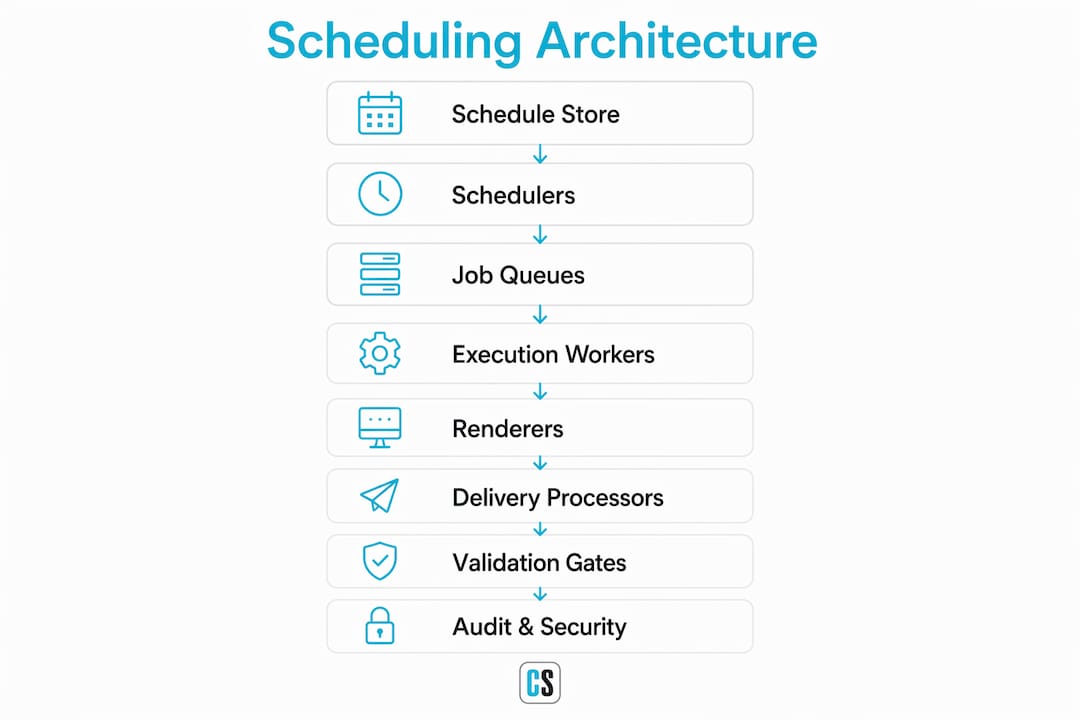
| Component | Responsibility | What It Should NOT Do |
|---|---|---|
| Schedule store (DB) | Persist cron expressions, parameters JSON, delivery metadata, next_run_at | Execute queries or render files |
| Scheduler loop | Poll the store, elect a leader, enqueue due jobs | Run queries or touch delivery channels |
| Job queue(s) | Buffer execution, export, and delivery tasks separately | Merge all job types into one queue |
| Execution workers | Run parameterized queries against read replicas, stream results to intermediate storage | Render PDFs or send emails |
| Intermediate storage | Hold Parquet or rowset exports between query and render stages | Serve as the primary data warehouse |
| Renderer / exporter | Read intermediate file, apply template, produce PDF/CSV/XLSX | Execute database queries |
| Delivery processors | Route outputs to email, Slack, SFTP, webhook, CRM API | Decide report logic or re-query data |
| Audit / logging service | Record run_id, status, outputs, delivery receipts, checksums | Block or gate job execution |
High-performance schedulers use JMS-like queueing so each processor type listens to its own dedicated queue, which lets you scale query workers independently of delivery workers. Deploy separate fleets for query execution, export/render, and delivery. Shared artifact storage (S3 or equivalent object store) sits between the fleets so a failed render can retry from the Parquet file without re-querying the database.

For BI tool scheduling, the same separation applies: the scheduler orchestrates, the BI engine renders, and a delivery layer handles distribution.
Job lifecycle, states, and trigger models
Every job moves through a canonical state machine. Understanding the transitions is what lets you write safe retry logic.
State sequence:
- created — schedule record written; next_run_at computed from cron + timezone
- queued — scheduler loop enqueues the job; a worker claims it
- running — execution worker queries the read replica; timeout clock starts
- exporting — renderer reads the Parquet intermediate and produces the output format
- delivering — delivery processor routes to configured channels
- succeeded — all delivery receipts confirmed; audit record closed
- failed — unrecoverable error or retry limit exceeded; dead-letter queue receives the job
- cancelled — manual or gate-triggered cancellation before execution completes
Key status fields to store on every run record: started_at, finished_at, error_code, retry_count, external_id (idempotency key), and triggered_by (cron, event, or user ID).
Recurrence and timezone handling deserves more care than most teams give it. Store the cron expression and the IANA timezone string together (e.g., 0 8 * * 1 + America/New_York). Compute next_run_at in UTC at write time. Recompute it after each run to handle DST transitions correctly — a fixed UTC offset breaks twice a year. For business calendars (skip holidays, run on last business day of month), maintain a calendar table and apply it as a filter when computing the next fire time.
Trigger types and when to prefer each:
- Time-based (cron): reliable for fixed cadences; simple to reason about; can produce stale data if upstream pipelines are delayed
- Calendar-aware: extends cron with business-day logic; useful for finance and operations reports
- Event-driven (pipeline-complete webhook): fires when upstream data is confirmed fresh; prevents stale-data reports more reliably than time-only schedules — prefer this for any report that depends on an ETL pipeline completing
- Ad-hoc / manual: user-triggered single runs; must share the same job lifecycle and idempotency controls as scheduled runs
Detailed design of the scheduler, queues, workers, and delivery processors
1. Scheduler loop and leader election
The scheduler loop polls the schedule store on a configurable interval (typically 10–60 seconds) and enqueues any job whose next_run_at is in the past. Only one node should do this at a time. Two common leader-election approaches:
- Database advisory locks: low-ops overhead; the lock holder runs the loop; other nodes skip. Works well for moderate scale.
- Redis SETNX with TTL: faster failover; the TTL acts as a safety margin so a crashed leader releases the lock automatically. Set the TTL to at least 2× the polling interval.
After enqueuing, update next_run_at immediately to prevent a second node from enqueuing the same job during a failover window.
2. Job queues and consumers
Oracle's BI Publisher architecture demonstrates the value of separate queues: a Job Queue, Report Queue, and Delivery Queue each have dedicated processor pools. Apply the same pattern. Separate queues let you tune consumer counts, visibility timeouts, and retry policies per workload type. Use idempotency keys (the external_id field) so a consumer that crashes mid-processing does not produce a duplicate delivery when it restarts.
3. Execution workers
Workers pull from the execution queue, bind parameter values to the query template, and run against a read replica — never the primary write database. Enforce a hard query timeout (30 seconds default, configurable up to 5 minutes for scheduled jobs). If the query exceeds the timeout, mark the run TIMED_OUT and alert the report owner. Stream results to intermediate storage as Parquet rather than holding them in memory; this decouples the export stage from the query stage and enables format-flexible retries.

If a query returns more than 100,000 rows, force the output to CSV and disable HTML and PDF rendering. A 100K-row PDF is not a report — it is a liability.
4. Renderer / exporter
The renderer reads the Parquet file from intermediate storage, applies the report template, and produces the requested output format. Keep this process entirely separate from query workers. Heavy PDF rendering on a query node starves the execution thread pool. Use native rendering where the BI tool supports it — native engines preserve template fidelity better than generic converters. Template ownership stays with designers; the renderer treats templates as immutable inputs, not editable artifacts.
5. Delivery processors
Each delivery channel gets its own processor: email (SMTP or SendGrid), Slack (file upload API), SFTP, webhook, CRM API. Retry with exponential backoff up to a configured attempt limit (three attempts is a common default). After exhausting retries, route the job to a dead-letter queue and notify the report owner. Never silently drop a failed delivery.
Scaling patterns, duplicate avoidance, and failure handling
Queue-based scaling is the right model. Add consumer instances to the execution fleet when query throughput is the bottleneck; add renderer instances when export latency climbs. These fleets scale independently because their workloads have different resource profiles: query workers are I/O-bound, renderers are CPU-bound.
Key patterns for reliability:
- Leader election lock TTLs: set the TTL to at least 2× the polling interval so a crashed leader releases the lock before the next node waits too long
- Idempotency keys: generate a deterministic key per (schedule_id, run_at) pair; delivery processors check this key before sending to prevent duplicate emails on retry
- Dead-letter queues: any job that exhausts retries lands here; ops teams can inspect, fix, and replay without touching live queues
- Retry policies by error type: transient errors (network timeout, replica lag spike) get exponential backoff; permanent errors (invalid recipient, template schema mismatch) go straight to dead-letter with no retry
- Per-tenant throttling: in multi-tenant systems, cap the number of concurrent jobs per tenant to prevent one noisy tenant from starving others; fair-share scheduling distributes queue capacity proportionally
For concurrency control within a single schedule, use a database-level unique constraint on (schedule_id, run_at) to prevent race conditions when two nodes simultaneously attempt to enqueue the same job.
Decoupling rendering from data retrieval
The single biggest template-fidelity risk is mixing query execution and rendering in the same process. When a query worker also renders the PDF, a slow query delays rendering for every other job sharing that worker. Worse, a rendering crash can corrupt the query result in memory.
Practical separation guidance:
- Write query results to Parquet in object storage before the renderer ever starts; the renderer reads only from that file
- Keep designer-owned templates in their native tool (Crystal Reports, Power BI Desktop, Tableau workbook) and enforce a strict schema contract between the generation engine and the template — field names, data types, and sort orders must match exactly
- For PDF delivery, use the BI tool's native rendering engine rather than a generic HTML-to-PDF converter; pixel-perfect fidelity matters for executive decks and regulatory filings
- For CSV and XLSX outputs, include column headers, apply locale-aware number formatting, and paginate large exports rather than producing a single unbounded file
- For API and webhook consumers, produce structured JSON with a versioned schema so downstream systems can parse outputs without brittle string parsing
Pro Tip: When integrating LLMs into narrative report sections, use structured-output APIs (OpenAI's strict JSON Schema mode or Anthropic's tool-use) rather than free-form prompts. Pre-compute all deltas and anomalies in code before the model sees the data — the LLM's job is narration, not arithmetic. Pair this with permission-aware retrieval so the model only sees data the recipient is authorized to view.
Set hard export limits: maximum file size per format, row caps per output type, and separate quotas for large scheduled exports versus ad-hoc runs.
Treating data validation as a built-in gate
Publication gates are automated checks that run after data retrieval and before distribution. They block delivery when the data fails a defined condition. Most teams treat this as optional; it should be a first-class architectural requirement.
Useful gate checks:
- Source freshness: confirm the upstream table's
updated_attimestamp is within the expected window before querying - Row-count validation: compare output row count against a rolling average; flag runs that deviate significantly
- Delta checks: compare key metrics against the prior period; block distribution if a metric moves beyond a configured threshold without a known cause
- Schema validation: confirm that every field the template expects is present in the Parquet file with the correct data type
- Control total reconciliation: for financial reports, sum a key column and compare against a known control total from the source system
When a gate fails, route the job to a manual review queue rather than sending. Give product owners a pause/resume control so they can investigate without restarting the entire pipeline.
Pro Tip: Build a kill switch into every pipeline: a single flag per schedule that halts distribution without canceling the run. This lets ops teams stop a bad report mid-delivery without losing the already-generated artifact.
Security, compliance, and audit trail requirements
Enterprise deployments need access control, encryption, and tamper-evident logging as baseline requirements, not afterthoughts.
| Audit field | Purpose |
|---|---|
| run_id | Unique identifier for each execution; links all log entries for a single run |
| schedule_id | Ties the run back to its schedule definition and version |
| triggered_by | User ID, cron string, or event name that initiated the run |
| started_at / finished_at | Precise timestamps for SLA measurement and forensics |
| status | Final state: succeeded, failed, cancelled, timed_out |
| output_locations | S3 paths or artifact IDs for every generated file |
| delivery_receipts | Per-channel confirmation tokens (SMTP message ID, Slack ts, SFTP transfer ID) |
| checksums | cryptographic hash of each output file for tamper detection |
Access model: use RBAC with separation of duties. Template editors should not be able to modify delivery configurations; schedule managers should not be able to alter template definitions. Enforce this at the API layer, not just the UI.
Encryption: encrypt intermediate Parquet files and final outputs at rest (S3 server-side encryption or equivalent). Enforce TLS for all in-transit data including SMTP, SFTP, and webhook calls. Redact PII from baked outputs where regulatory requirements apply — do this in the renderer, not as a post-processing step.
Tamper-evident logs: write audit records to append-only storage (WORM S3 bucket, an append-only Kafka topic, or equivalent). Support export of audit bundles for SOC 2 reviews and internal audits. ChristianSteven Software's ATRS audit trail configuration is a practical reference for how a production scheduling product implements these fields.
Monitoring, alerting, and runbooks for production operations
Key metrics to track
- Jobs scheduled per second — baseline throughput; spikes indicate backlog buildup
- Queue depth per queue — the primary leading indicator of worker saturation
- Job latency percentiles (p50, p95, p99) — end-to-end time from enqueue to delivery confirmed
- Export success rate — percentage of render jobs that complete without error
- Delivery success rate — percentage of delivery attempts that receive a channel confirmation
- Cache / intermediate storage hit ratio — measures how often renders avoid re-querying
- Read-replica lag — a lagging replica produces stale data; alert before it affects report freshness
Alerting thresholds
| Alert | Condition | Severity |
|---|---|---|
| Queue depth elevated | Execution queue depth high for several minutes | Warning |
| Queue depth critical | Execution queue depth very high for a few minutes | Critical |
| Replica lag | Read-replica lag > 60 seconds | Warning |
| Export failure rate | Export success rate < 95% over 10-minute window | Critical |
| Publication gate failure | Any gate check fails on a high-priority schedule | Critical |
| Repeated delivery failure | Same schedule fails delivery 3 consecutive runs | Warning |
Runbook steps for common incidents
- Stuck queue: check consumer health; restart dead consumer instances; verify the leader node holds its lock; inspect dead-letter queue for poison-pill jobs blocking the head of queue
- Failing renderer: check intermediate storage availability; verify template schema matches the Parquet file schema; roll back to the previous template version if a recent change caused the break
- Partial delivery failures: confirm channel credentials are valid (SMTP relay, Slack token, SFTP key); check per-channel rate limits; replay from dead-letter queue after fixing credentials
- Re-running safely: use the existing
external_ididempotency key when replaying a job; delivery processors will skip channels that already have a confirmed receipt for that key
SLO suggestion: target end-to-end delivery latency (enqueue to delivery confirmed) at p95 < 10 minutes for standard scheduled reports, with a 99.5% weekly delivery success rate as the SLI baseline.
Do's and don'ts for scheduling system design
The Map → Eliminate → Standardize → Automate sequence is the right order of operations. Teams that skip to "Automate" first end up with faster delivery of wrong numbers.
Do:
- Standardize metric definitions and eliminate redundant KPIs before writing a single scheduler job
- Run all queries against read replicas with enforced timeouts; treat a query that touches the primary write DB as a production incident
- Use intermediate Parquet storage between query and render stages so each stage can fail and retry independently
- Enforce row caps and file-size limits per output format; log every execution with run_id, parameters, row count, and delivery status
- Implement publication gates as a first-class pipeline stage, not an optional add-on
- Use out-of-system scheduling for SSRS and similar platforms that lack native orchestration depth
Don't:
- Automate a broken manual reconciliation process — automation scales the error, not the fix
- Mix query execution and rendering in the same worker process
- Let failures fail silently; every failed run needs an explicit status, an alert, and a path to replay
- Use a single monolithic queue for all job types; separate queues for execution, export, and delivery are not premature optimization
- Ignore DST edge cases; a schedule that fires at 2:00 AM on a DST transition day will behave unexpectedly without explicit UTC normalization
Key Takeaways
A well-designed report scheduling architecture separates query execution, rendering, and delivery into independent, idempotent stages with explicit state transitions, publication gates, and tamper-evident audit trails.
| Point | Details |
|---|---|
| Separate your fleets | Run query workers, renderers, and delivery processors on independent fleets with separate queues and resource profiles. |
| Enforce read-replica use | Never run scheduled queries against the primary write database; apply a hard timeout (30 seconds default) and stream results to Parquet. |
| Build publication gates | Block distribution automatically when freshness, row-count, or schema checks fail; route failures to a manual review queue. |
| Store cron + timezone together | Compute next_run_at in UTC and recompute after each run to handle DST transitions correctly. |
| ChristianSteven Software | PBRS, ATRS, CRD, and IntelliFront BI implement scheduling, rendering, multi-format delivery, and SOC 2-compliant audit trails across Power BI, Tableau, and Crystal Reports environments. |
The part most architecture guides skip
Most write-ups on scheduling architecture focus on the happy path: cron fires, query runs, PDF lands in inbox. The operational reality is messier. The reports that cause the most damage are not the ones that fail loudly. They are the ones that succeed technically while delivering numbers that are three days stale, missing a filter, or formatted for the wrong fiscal calendar.
The architectural answer to that problem is not better retry logic. It is publication gates and metric ownership. Before a single schedule goes live, someone needs to own each KPI definition, document the source query, and write a validation rule that would have caught the last bad report. That work is unglamorous and rarely shows up in system design interviews. It is also the difference between a reporting system that builds trust and one that quietly erodes it.
The other thing teams consistently underestimate is template governance. Designers spend real time building branded layouts in Crystal Reports, Power BI Desktop, or Tableau. The moment a developer modifies a template to "fix" a rendering issue without going through the designer, you have two versions of the truth and no clear owner. Treat templates as versioned artifacts with a change-management process, the same way you treat database migrations.
ChristianSteven Software's connector breadth across Power BI, Tableau, Crystal Reports, and SSRS matters precisely because most enterprise environments are not homogeneous. The practical migration path is usually not "replace everything" but "add an orchestration layer that works with what you have." SOC 2 Type II certification is the operational trust signal that lets security teams approve that layer without a six-month review.
ChristianSteven Software covers the full architecture stack
Architects who have read this far now have a clear picture of the components involved. ChristianSteven Software's product suite maps directly onto them.

PBRS handles Power BI scheduling, parameterized delivery, and automated exports across email, SFTP, SharePoint, and more. ATRS covers the same orchestration layer for Tableau, including PDF export automation and audit trail configuration. CRD brings Crystal Reports into the same scheduling framework with dynamic report generation and delivery connectors. IntelliFront BI adds real-time dashboard and KPI distribution for stakeholders who need live data rather than scheduled snapshots.
| Architecture component | ChristianSteven capability |
|---|---|
| Scheduler / job store | PBRS, ATRS, CRD scheduling engines |
| Renderer / exporter | CRD (Crystal), ATRS (Tableau), PBRS (Power BI) native rendering |
| Delivery processors | Email, SFTP, Slack, SharePoint, webhook across all products |
| Audit trail | Built-in run history, delivery receipts, and SOC 2 Type II compliance |
With over two decades of BI automation experience and SOC 2 Type II certification, ChristianSteven Software is built for the enterprise constraints this architecture demands. Start with a trial or request a demo to see how PBRS, ATRS, or CRD maps to your current reporting stack.
Useful sources
- Low-Level Design: Reporting Service (techinterview.org) — includes schema examples, read-replica guidance, and Parquet intermediate storage patterns
- Report Builder LLD: Dynamic Query Generation and Scheduled Delivery (techinterview.org) — covers parameterized SQL templates, idempotency, and delivery retry logic with code-level detail
- Report Automation: How to Automate Recurring Business Reports (SourceToDocs) — practical guide to automation workflows and template fidelity
- Architecture: Oracle BI Publisher — reference for multi-queue processor architecture and clusterable scheduler design
- Configuring the Scheduler: Oracle BI Publisher — shared directory requirements, diagnostics pages, and cluster configuration notes
- Reporting Automation Fundamentals (CFO Upgrade) — Map → Eliminate → Standardize → Automate sequence with practical workflow guidance
- Scheduling in CRD for Dynamic Report Generation (ChristianSteven) — step-by-step Crystal Reports scheduling configuration with audit trail setup
- Advanced Tableau Report Scheduler: Enterprise-Grade Automation (ChristianSteven) — database schema examples and scheduling patterns for Tableau environments
- How to Automate Report Generation with AI (Zarif Automates) — six-stage pipeline architecture with structured-output and sanity-check guidance
- What Is Report Scheduling? (Jaspersoft) — foundational definition and use-case overview
FAQ
What is report scheduling architecture?
Report scheduling architecture is the orchestration layer that manages when reports run, how job metadata is stored, and how outputs are routed to delivery channels while maintaining audit trails. It covers the scheduler loop, job queues, execution workers, renderers, delivery processors, and the persistence layer that ties them together.
How do you prevent duplicate report runs in a distributed scheduler?
Use leader election (database advisory locks or Redis SETNX with a TTL set to at least 2× the polling interval) so only one node enqueues jobs at a time. Pair this with a unique database constraint on (schedule_id, run_at) and idempotency keys on delivery processors so retries do not produce duplicate sends.
Why should report queries never run against the primary write database?
Scheduled report queries can be long-running and resource-intensive. Running them against the primary write database risks locking rows, degrading write throughput, and affecting application performance. Read replicas isolate that load; combined with a hard query timeout (30 seconds default), they keep scheduled reporting from becoming a production incident.
How does ChristianSteven Software implement this architecture?
PBRS, ATRS, and CRD each implement scheduling, native rendering, multi-format delivery, and built-in audit trails for Power BI, Tableau, and Crystal Reports respectively. ChristianSteven Software holds SOC 2 Type II certification, which satisfies the tamper-evident audit and access-control requirements described in this architecture.
What are publication gates and why do they matter?
Publication gates are automated checks that run after data retrieval and before distribution, blocking delivery when freshness, row-count, schema, or control-total checks fail. They prevent technically successful jobs from distributing stale or incorrect data, which is the failure mode most retry logic cannot catch.