
Why data refresh determines whether your reports can be trusted
Data refresh is the systematic process of pulling updated records from source systems into your reports and dashboards, closing the gap between when data is generated and when analysts actually see it. Get it wrong and every chart, KPI, and forecast in your BI environment reflects a world that no longer exists. Get it right and your organization makes decisions on facts, not artifacts.
The core role of data refresh in reporting is straightforward: keep outputs current so they remain useful. But the mechanics behind that goal touch storage architecture, scheduling logic, gateway infrastructure, and organizational policy all at once. Tools like Power BI have made refresh configuration more accessible, yet the underlying tradeoffs between freshness, cost, and performance still require deliberate choices from every BI team.
A few things every analyst should know before diving deeper:
- Data freshness measures how recent the data in a report actually is, regardless of how fast the dashboard loads.
- Stale data does not announce itself. A beautifully formatted report can show figures that are hours or days old with no visible warning.
- Service Level Objectives (SLOs) for freshness define the maximum acceptable age of data for a given report, and mature BI teams treat them as first-class requirements alongside uptime and query performance.
- Data refresh ensures reporting systems stay current by systematically updating from source systems, bridging the gap between data generation and consumption.
- Power BI, one of the most widely deployed BI platforms, supports multiple refresh types and storage modes, each with distinct freshness characteristics.
The stakes are real. Stale data directly causes financial loss, with e-commerce operations losing revenue when machine learning models run on outdated product or pricing data. Treating refresh as a background IT task rather than a business-critical process is where most organizations go wrong.
How storage modes shape your data refresh strategy
The storage mode you choose for a dataset is arguably the single biggest architectural decision affecting refresh behavior. Power BI documents three primary dataset modes: Import, DirectQuery, and Dual, and each one carries a fundamentally different relationship with freshness.

Import mode loads a full or incremental copy of source data into the in-memory engine. Reports run fast because they query cached data, but freshness depends entirely on how often you trigger a refresh. A dataset refreshed once a day will show yesterday's numbers at 11:59 PM, no matter how urgent the business question.
DirectQuery mode sends every report interaction as a live query to the source system. There is no cached copy to go stale, which sounds ideal until you factor in query latency, source system load, and the fact that not every data source supports DirectQuery reliably. It trades freshness for performance and infrastructure pressure.
Dual mode lets individual tables operate as either Import or DirectQuery depending on the query context, giving analysts a middle path. Frequently aggregated dimension tables can be cached while high-velocity fact tables query live. The Direct Lake mode in Microsoft Fabric takes this further, reading Parquet files directly from OneLake without a traditional import step, which reduces refresh overhead for large datasets.
Choosing the right mode comes down to three questions: How old can this data be before a decision suffers? How much load can the source system absorb? And what query performance do report consumers expect?
- Import: best for stable data, complex DAX, and fast query performance where hourly or daily freshness is acceptable.
- DirectQuery: best for high-velocity transactional data where near-real-time freshness outweighs query speed concerns.
- Dual: best for mixed workloads where some tables need live data and others benefit from caching.
Pro Tip: Before committing to DirectQuery, run a query load test against your source system during peak report usage. A single report with 20 concurrent users can generate hundreds of queries per minute, and many operational databases are not sized for that.
What types of data refresh exist, and when should you use each?
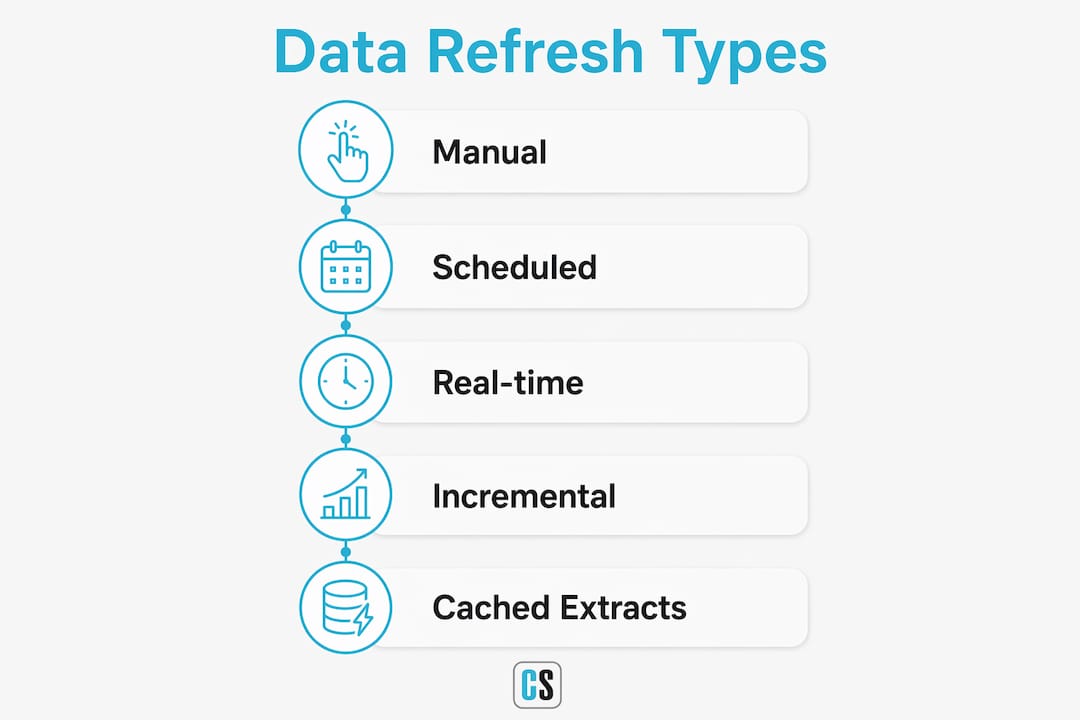
Three core refresh strategies cover most BI scenarios: live queries, scheduled refreshes, and cached extracts. Each one sits at a different point on the cost-versus-freshness spectrum.
Manual refresh puts control in the analyst's hands. You trigger it on demand, which works fine for ad hoc analysis but fails any use case where stakeholders expect current data without human intervention.
Scheduled refresh automates the process on a defined interval, whether every 15 minutes, hourly, or nightly. Power BI supports multiple scheduled refreshes per day for Premium capacity datasets, allowing frequent refreshes at relatively short intervals. Most operational dashboards land somewhere between hourly and daily depending on how quickly the underlying data changes.
Real-time streaming bypasses the traditional refresh cycle entirely. Data flows continuously into a streaming dataset, and visuals update as new records arrive. This approach suits IoT telemetry, live transaction monitoring, and call center dashboards, but it requires a streaming data source and a different dataset architecture than standard Import or DirectQuery models.
| Refresh type | Typical latency | Resource cost | Best use case |
|---|---|---|---|
| Manual | Minutes to hours | Low | Ad hoc analysis, one-off reports |
| Scheduled | — | Medium | Operational dashboards, daily KPIs |
| Incremental | Near-scheduled | Lower than full | Large datasets with append-only history |
| Real-time streaming | Seconds | High | Live monitoring, IoT, transaction feeds |
| DirectQuery (live) | Near-zero | High (source load) | Transactional systems, compliance reporting |
Incremental refresh deserves special mention. Rather than reloading an entire dataset on every cycle, it partitions data by date and refreshes only the most recent window. For datasets with years of history, this cuts refresh duration from hours to minutes and reduces the risk of timeout failures.
The right frequency is not always the fastest one. Effective BI teams set different refresh SLOs tailored to each report's business need, avoiding unnecessary real-time refresh that drives up infrastructure costs without improving decisions.
What infrastructure does reliable data refresh actually require?
Refresh does not happen in isolation. Behind every scheduled update sits a chain of infrastructure components, and a failure anywhere in that chain means stale data reaches your stakeholders.
On-premises data gateways are the most common single point of failure in enterprise Power BI environments. When a dataset connects to an on-premises SQL Server, Oracle database, or file share, the gateway handles authentication and data transfer between the source and the Power BI service. Gateway downtime, credential expiration, or network interruptions all surface as refresh failures.
Data connectors and pipelines determine what sources a refresh can reach and how reliably it can reach them. Cloud-native connectors to sources like Azure SQL Database or Snowflake tend to be more stable than connectors to legacy systems with rate limits or maintenance windows that overlap with scheduled refresh times.
Orchestration tools coordinate refresh sequencing when multiple datasets depend on each other. Refreshing a sales summary dataset before its underlying transaction dataset has finished updating produces incorrect aggregates. Azure Data Factory, Microsoft Fabric pipelines, and similar orchestration layers enforce dependency ordering so downstream datasets always refresh after their upstream sources.
- Gateway health monitoring catches credential expiration and connectivity drops before they cause missed refreshes.
- Alerting on refresh failures should notify the dataset owner within minutes, not the next morning when a stakeholder reports a blank dashboard.
- Mature BI setups integrate refresh scheduling into broader auditable platform pipelines to improve reliability and stakeholder trust.
Security during data transit matters as much as the refresh itself. Credentials stored in the Power BI service should use OAuth or service principal authentication rather than shared passwords, and gateway communication should run over encrypted channels. Any data moving through a refresh pipeline carries the same sensitivity as the source data, so access controls and audit logs apply at every hop.
How data freshness affects report accuracy and business outcomes
Data depreciates exponentially in value over time, meaning delayed refresh intervals do not just inconvenience analysts. They systematically remove decision quality and economic benefit from every report that depends on that data.

The clearest example comes from e-commerce. A product recommendation engine trained on last week's inventory data will confidently suggest items that are out of stock, driving customers to competitors and eroding conversion rates. The model is not broken. The data feeding it is simply old.
AI and machine learning models compound this problem. Full retraining stabilizes predictions, in contrast to last-batch retraining approaches which risk arbitrary prediction reversals after a refresh. An ML model that scores customer churn risk can flip its predictions dramatically if a refresh introduces a distributional shift in the input features. Monitoring model stability after each refresh cycle is as important as monitoring whether the refresh completed at all.
One pattern that addresses silent degradation is the staleness circuit breaker. When data freshness SLAs are exceeded, the circuit breaker fails loudly rather than allowing stale data to propagate through downstream reports and models. A dashboard that shows a clear "data as of 14 hours ago" warning is far less dangerous than one that shows current-looking figures built on yesterday's numbers.
Freshness SLO guidance by report type:
- Executive scorecards: daily refresh is typically sufficient; decisions rarely hinge on hour-level changes.
- Operational dashboards (inventory, support queues): hourly or sub-hourly refresh aligns with the pace of the underlying process.
- Financial close reports: refresh should align with the close cycle, often nightly with a final refresh at period end.
- Real-time monitoring (fraud detection, live sales): streaming or DirectQuery with no scheduled refresh interval.
A fast-loading dashboard can still mislead. Distinguishing data freshness from latency is critical: query speed tells you how fast the report renders, not how old the data inside it is. Both metrics need monitoring, but they require different tools and different SLOs.
Best practices for optimizing data refresh performance
Refresh performance problems tend to cluster around a few predictable causes: datasets that are too large to refresh within the timeout window, queries that hit source systems inefficiently, and schedules that stack too many concurrent refreshes against shared capacity.
Use incremental refresh for large datasets. Reloading three years of transaction history every night is wasteful when only the last 48 hours have changed. Incremental refresh in Power BI partitions the dataset by date range and only processes the recent window, cutting both refresh duration and source system load. You can learn more about automating Power BI refresh for enterprise-grade reliability.
Stagger your refresh schedules. When 20 datasets all refresh at midnight, they compete for gateway connections, memory, and source system query slots simultaneously. Spreading refreshes across a two-hour window reduces contention and lowers the chance of timeout failures.
Push transformation work upstream. A dataset that performs heavy joins and aggregations during refresh puts that compute load on the Power BI engine. Moving those transformations into a data warehouse or a dataflow layer means the refresh only needs to load pre-aggregated, clean data, which is faster and more reliable.
Monitor query folding. In Power Query, query folding means that transformation steps are translated into native source queries and executed at the source rather than in memory. When folding breaks, Power BI pulls raw data and transforms it locally, which dramatically increases refresh time and memory consumption. The Power Query diagnostics tools surface folding status for each step.
Set refresh timeouts and failure alerts proactively. A refresh that silently hangs for two hours before failing is worse than one that fails fast. Configure timeout thresholds appropriate to your dataset size and set up email or Teams notifications so the right person knows immediately when a refresh fails, not when a stakeholder calls.
How to monitor and troubleshoot data refresh failures
Refresh failures are inevitable. The difference between a mature BI environment and a fragile one is how quickly failures are detected and resolved.
Start with the refresh history. Power BI logs every refresh attempt with a start time, end time, status, and error message. The refresh history panel in the dataset settings is the first place to look when a report shows stale data. Error codes like DM_GWPipeline_Gateway_SpooledOperationMissingFromCache point to gateway issues, while DataFormat.Error typically indicates a schema change in the source.
Separate gateway health from dataset health. A gateway that is offline or overloaded will fail every dataset that routes through it. Checking gateway status in the Power BI admin portal before debugging individual datasets saves time. Gateway cluster health, including CPU, memory, and active connections, is visible in the on-premises data gateway app.
Track schema drift. Source systems change. A column gets renamed, a table gets dropped, or a data type changes from integer to string. Any of these breaks the refresh without any change to the Power BI dataset itself. Building schema validation checks into your upstream pipeline, or using a data observability tool, catches drift before it surfaces as a 2 AM refresh failure.
Use the staleness circuit breaker pattern in production. Rather than letting a dashboard silently show stale data after a failed refresh, configure a freshness check that either displays a visible warning banner or withholds the report entirely until fresh data is available. This is especially important for reports used in automated decision workflows.
Common failure categories and their typical causes:
- Credential errors: OAuth tokens expire, service principal secrets rotate, or passwords change without updating the stored credential in the gateway.
- Timeout failures: Dataset is too large to refresh within the allotted window; solution is incremental refresh or query optimization.
- Gateway connectivity: Network changes, firewall rule updates, or gateway service restarts break the connection between Power BI and on-premises sources.
- Source system unavailability: Maintenance windows, rate limits, or source database restarts during the scheduled refresh window.
For Tableau environments, the same principles apply. Scheduling refresh intervals correctly and monitoring for failures is covered in depth in this guide on scheduling refresh in Tableau.
Key Takeaways
Stale data does not just slow down analysis. It actively degrades decision quality, model accuracy, and business outcomes, making data refresh one of the highest-leverage processes in any BI environment.
| Point | Details |
|---|---|
| Storage mode drives freshness | Import, DirectQuery, and Dual modes each carry different freshness characteristics; choose based on acceptable data age and source system capacity. |
| Set freshness SLOs per report | Not every report needs real-time data; defining the maximum acceptable data age per use case avoids unnecessary infrastructure cost. |
| Data value decays over time | Delayed refresh systematically removes decision quality and economic benefit from every dependent report and model. |
| Fail loudly, not silently | The staleness circuit breaker pattern prevents stale data from propagating through dashboards and automated workflows without warning. |
| Monitor stability after refresh | Updating models or datasets can introduce prediction instability; tracking output stability post-refresh is as important as tracking completion status. |
FAQ
What is a data refresh?
A data refresh is the process of updating a report or dashboard by pulling the latest records from one or more source systems. It bridges the gap between when data is generated and when analysts see it, keeping BI outputs current and trustworthy.
Which tool is used for scheduled data refresh in reporting?
Power BI is one of the most widely used platforms for scheduled data refresh, supporting up to 48 refreshes per day on Premium capacity and offering incremental refresh for large datasets. Orchestration tools like Azure Data Factory handle dependency sequencing across multiple datasets.
What does a report refresh include?
A report refresh typically covers data refresh (reloading source data), tile refresh (updating dashboard visuals), and in some configurations, query cache refresh. Each component can be triggered independently or as part of a full refresh cycle.
Why do storage mode and refresh schedule decisions matter together?
Storage mode determines whether a dataset holds a cached copy of data or queries live, while the refresh schedule controls how often that cache is updated. Choosing Import mode with a 24-hour schedule, for example, means reports can show data that is nearly a day old. Aligning both decisions to the same freshness SLO prevents mismatches that mislead report consumers.
How does data freshness differ from query latency?
Data freshness measures how old the data inside a report is, while query latency measures how fast the report loads. A dashboard can render quickly and still display data that is hours old. Both metrics need separate monitoring because a fast-loading report with stale data is just as misleading as a slow one.