
Scalable reporting automation deployment is the process of building reporting systems that automatically handle growing data volumes, increasing user counts, and rising complexity without requiring proportional increases in manual effort. Organizations that get this right reduce deployment cycles from days to minutes while supporting more than 100 workspaces simultaneously. The payoff is real: teams reclaim 20–40 hours per month of manual reporting labor and redirect that time toward analysis rather than assembly. ChristianSteven Software has spent more than two decades helping enterprises reach this level of automation across Power BI, Tableau, SSRS, and Crystal Reports environments. This guide covers every stage of the process, from foundational prerequisites to long-term optimization.
What are the prerequisites for scalable reporting automation deployment?
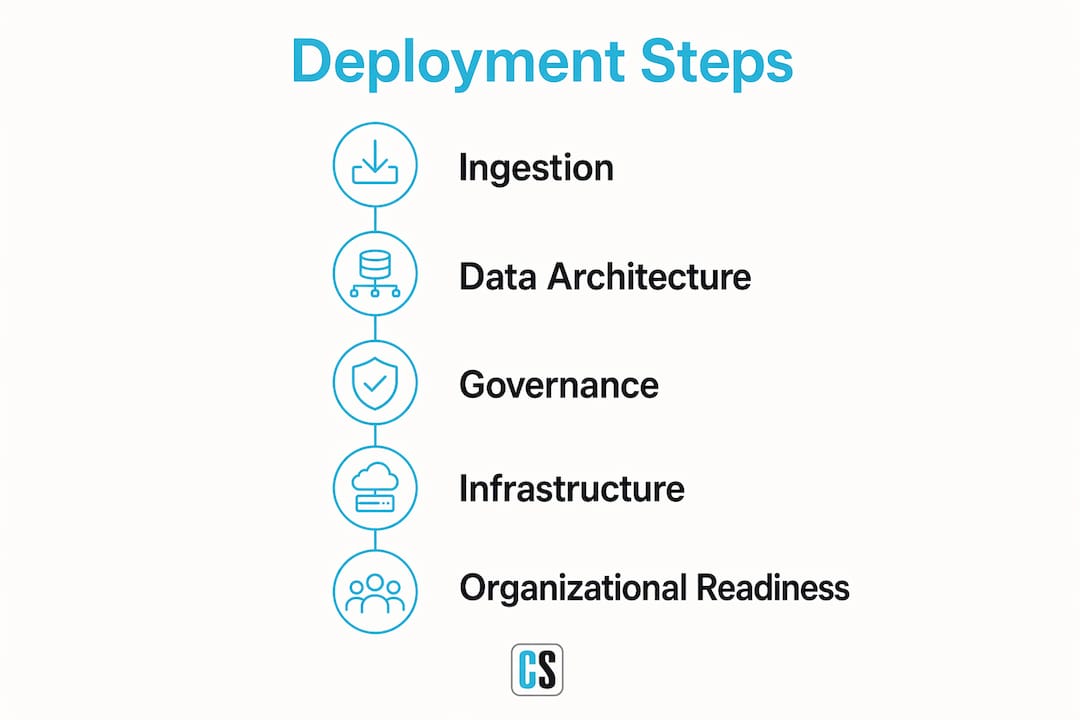
Successful automated reporting deployment starts with architecture decisions, not tool selection. Teams that skip this step build systems that work at small scale and break at large scale.
Unified data architecture
A unified data architecture is the single most important prerequisite. Scaling reporting depends more on unified data structures than on processing speed alone. That means tiered storage (raw, curated, and semantic layers), consistent naming conventions, and semantic models that mirror real business structures. Without this foundation, every new report becomes a custom project instead of a configuration task.

Governance and data ownership
Governance gaps cause more scaling failures than technology limitations. Functional accountability at the asset level is critical when reporting scales to thousands of assets. Each dataset needs a named owner, a defined update schedule, and a version history. Without clear ownership, errors multiply silently as the system grows.
Technical infrastructure
The technical layer requires three components working together: APIs with explicit pagination support, automated ingestion pipelines, and CI/CD (Continuous Integration/Continuous Delivery) workflows. CI/CD workflows move report content through defined stages automatically, reducing the risk of untested changes reaching production. Teams also need role-based access controls configured before deployment, not retrofitted afterward.
Organizational readiness
The human side of deployment matters as much as the technical side. Define who approves report changes, who monitors pipeline health, and who handles security exceptions before the first pipeline runs. Teams that assign these roles in advance avoid the bottlenecks that stall scaling efforts.
Pro Tip: Map your existing data sources and identify ownership gaps before writing a single line of pipeline code. Fixing governance after deployment costs three to five times more than addressing it upfront.
How to execute a scalable reporting automation deployment step by step
A structured execution path prevents the most common failure modes. The following sequence moves from data ingestion through to production delivery.
-
Set up automated data ingestion with pagination. API pagination failures are the most common cause of silent data loss at scale. Build explicit looped pagination into every API call from day one. A report that pulls 50 records correctly but silently drops records 51 through 5,000 is worse than no automation at all.
-
Build semantic data models aligned to business structures. Semantic models translate raw database tables into business terms like "revenue by region" or "open tickets by priority." When models reflect how the business actually thinks, report authors work faster and produce fewer errors.
-
Implement CI/CD deployment pipelines. A formal Path to Production moves content through Dev, QA, and Production stages with automated validation at each gate. This structure eliminates chaotic manual updates and creates an auditable record of every change.
-
Preserve Row-Level Security (RLS) declaratively. RLS metadata must be treated as immutable within pipelines. When security rules are hardcoded into deployment scripts rather than preserved declaratively, they get overwritten during updates. That exposes sensitive data to the wrong users.
-
Run staged testing and validation. Test in Dev first, promote to QA for user acceptance testing, then push to Production only after automated checks pass. Each stage should have defined pass/fail criteria, not informal sign-offs.
-
Automate scheduling and delivery. Once reports are validated, configure automated delivery schedules. Tools like ChristianSteven Software's PBRS for Power BI handle scheduling, formatting, and distribution without manual intervention at each cycle.
The table below summarizes the key stages and their primary success criteria.
| Stage | Primary action | Success criterion |
|---|---|---|
| Ingestion | Build paginated API loops | Zero silent data loss |
| Modeling | Create semantic layer | Business terms match report output |
| Pipeline setup | Configure CI/CD workflow | Dev→QA→Prod gates active |
| Security | Preserve RLS declaratively | No permission changes on promotion |
| Testing | Run automated validations | All checks pass before production |
| Delivery | Schedule and distribute | Reports arrive on time, every cycle |
Pro Tip: Treat your RLS configuration as a separate, version-controlled artifact. Store it in source control alongside your pipeline code so any accidental override triggers an immediate alert.
What are the common challenges and mistakes in scaling reporting automation?
Most scaling failures are predictable. The teams that avoid them have studied the patterns in advance.
-
Governance gaps. When data ownership is unclear, errors multiply as the number of assets grows. A single dataset with two competing owners produces two versions of the truth. At enterprise scale, that confusion becomes a compliance risk.
-
Losing RLS during deployment. Security metadata gets overwritten when pipelines treat it as a mutable configuration value. The result is a report that reaches users who should not see the underlying data. Declarative preservation inside the pipeline prevents this.
-
Ignoring API pagination. Teams building automated reporting solutions from scratch frequently test with small datasets where pagination is not triggered. The system appears to work correctly until data volume crosses the API's page limit, at which point records disappear without error messages.
-
Deploying without a formal Path to Production. Ad-hoc deployments skip validation stages and push untested content directly to production users. This creates trust problems that are hard to reverse once stakeholders encounter incorrect data.
-
Underestimating compute costs. Automated pipelines run on compute resources that cost real money. Compute costs per cycle typically range from $50 to $200. Without cost monitoring, teams discover budget overruns only after the fact.
Governance is not a bureaucratic overhead. It is the mechanism that keeps automated systems trustworthy as they grow. A reporting system that scales without governance scales its errors just as efficiently as its outputs.
The most expensive mistake is treating automation as a one-time setup task. Automated systems require active monitoring, periodic audits, and clear escalation paths when something breaks. Teams that plan for this from the start maintain reliable systems. Teams that do not spend more time firefighting than reporting.
How to maintain and optimize reporting automation for long-term success
Deployment is the beginning, not the end. Long-term success requires ongoing attention to monitoring, cost, and evolving business needs.
-
Implement continuous monitoring and audit logs. Every pipeline run should produce a log entry that records what ran, when it ran, what data it touched, and whether it succeeded. Audit logs are the first line of defense when a report produces unexpected results.
-
Use version control and approval workflows. Report definitions, semantic models, and security configurations should all live in source control. Approval workflows prevent unauthorized changes from reaching production. Investing in approval workflows and accountability structures supports repeatable, scalable data reporting over time.
-
Scale compute resources deliberately. Add compute capacity in response to measured demand, not anticipated demand. Review cost-per-cycle metrics monthly and right-size resources before costs drift out of control.
-
Build a proactive analytics layer. A proactive analytics layer pushes relevant insights to users before they ask for them. This approach cuts ad-hoc reporting requests by about 40%. Fewer ad-hoc requests mean less unplanned work and more consistent system performance.
-
Collect and act on user feedback. Automated systems that ignore user needs accumulate technical debt in the form of workarounds and shadow reports. Schedule quarterly reviews with report consumers to identify gaps and adjust delivery formats, schedules, or content accordingly.
Automation maturity follows a predictable curve. Teams typically move from automating a single report to running a full enterprise reporting cadence within one month. The teams that sustain that momentum treat their reporting infrastructure the same way they treat production software: with monitoring, versioning, and regular maintenance cycles.
Key takeaways
Scalable reporting automation deployment succeeds when governance, security, and structured pipelines work together from the start, not as afterthoughts added once problems appear.
| Point | Details |
|---|---|
| Governance before technology | Define data ownership and approval workflows before building any pipeline. |
| Paginate every API call | Explicit pagination loops prevent silent data loss as record counts grow. |
| Preserve RLS declaratively | Treat Row-Level Security as immutable in CI/CD pipelines to prevent data exposure. |
| Use a Path to Production | Move content through Dev, QA, and Prod stages with automated validation at each gate. |
| Monitor and right-size compute | Review cost-per-cycle metrics monthly and scale resources based on measured demand. |
Why governance wins every time in reporting automation
I have reviewed a lot of reporting automation projects over the years, and the pattern is consistent. The teams that struggle are almost never struggling with technology. They are struggling with ownership. Nobody agreed on who controls the revenue dataset. Two departments built parallel pipelines that produce different numbers. A security rule got overwritten three deployments ago and nobody noticed until an auditor flagged it.
The technology for scalable data reporting is genuinely mature at this point. CI/CD pipelines, semantic models, declarative security, automated scheduling: these are solved problems. What is not solved is the human coordination required to keep them running cleanly at scale.
My honest advice is to spend the first two weeks of any deployment project on governance design, not pipeline code. Document who owns each dataset. Define what "approved for production" actually means. Assign a named person to monitor pipeline health. That work feels slow at the start. It pays back every single week afterward.
The other thing I would push back on is the instinct to automate everything at once. Start with your highest-volume, lowest-complexity reports. Get those running cleanly, build confidence in the system, then expand. Automation that matures from a single report to full enterprise cadence in a month is not slow. It is the right pace for building something that lasts.
— Bobbieann Gordon
ChristianSteven Software automates reporting at enterprise scale
ChristianSteven Software delivers end-to-end reporting automation across Power BI, Tableau, SSRS, and Crystal Reports environments. PBRS for Power BI handles automated scheduling, formatting, and delivery with RLS preserved through every cycle. ATRS manages the same for Tableau. IntelliFront BI adds real-time KPI dashboards that push insights to the right people without waiting for ad-hoc requests.

With SOC 2 Type II certification and more than two decades of enterprise deployments, ChristianSteven Software gives teams the security and reliability their stakeholders expect. If your organization is ready to move from manual reporting to a fully automated pipeline, the Power BI automation tools and Tableau scheduling features at ChristianSteven Software are a practical starting point. Teams that want a broader view of dashboard and KPI automation can also review IntelliFront BI for real-time reporting at scale.
FAQ
What is scalable reporting automation deployment?
Scalable reporting automation deployment is the practice of building reporting systems that automatically handle growing data volumes and user counts without proportional increases in manual effort. It combines CI/CD pipelines, semantic data models, and automated delivery schedules into a single governed workflow.
How much time does reporting automation actually save?
Automated reporting solutions save 2–6 hours per user each week and eliminate 20–40 hours of monthly manual labor at the team level. That time shifts from report assembly to analysis and decision-making.
Why do most reporting automation projects fail at scale?
Failures in reporting scalability result from governance gaps and unclear data ownership rather than technology limitations. When no one owns a dataset, errors compound as the number of reports and users grows.
What is Row-Level Security and why does it matter in deployment?
Row-Level Security (RLS) is a feature that restricts which data rows a specific user can see within a report. Preserving RLS declaratively inside deployment pipelines prevents security rules from being overwritten during updates, which would expose sensitive data to unauthorized users.
How long does it take to automate a full reporting cadence?
Teams typically move from automating a single report to running a full enterprise reporting cadence within one month. The timeline depends on data architecture readiness and governance clarity, not on the automation tooling itself.
Recommended
- How To Schedule Power BI Reports for Automated Delivery (Enterprise Guide)
- How To Use Microsoft Power Automate For Automated BI Report Scheduling And Delivery
- Advanced Tableau Report Scheduler: Architecting Enterprise-Grade Automation
- How To Automate Power BI Report Scheduling and Delivery for Enterprise Reporting