
To reliably stop automated schedules from running on holidays, maintain a per-region holiday calendar and make every scheduled job perform a holiday lookup before it fires. Enterprise schedulers generally support three treatments: ignore the holiday and run anyway, skip it and extend the schedule to preserve the total occurrence count, or skip it and preserve the original end date instead. For most BI reporting workloads, the safest default pairs a maintained holiday calendar with a pre-run lookup and a skip-and-extend rule.
Before you touch production schedules, work through this checklist:
- Enable holiday lookup on every recurring job template, not just the ones you remember are holiday-sensitive.
- Run a simulation of the next 10 to 12 occurrences using an automated publishing platform and export the list of dates that will get skipped.
- Set an alert rule so anyone on-call gets notified the moment a "critical" job skips a run.
Key Takeaways
Reliable holiday-aware scheduling comes down to three things: a governed calendar, a tested skip pattern, and an audit trail that flags what happened when a job was skipped.
| Point | Details |
|---|---|
| Pick the right mode per job type | Use skip-and-extend for BI reports, skip-and-match-end-date for payroll, and ignore-holidays for on-call jobs. |
| Assign one calendar owner | A single named owner with an annual refresh cadence prevents holiday data from going stale. |
| Simulate before you publish | Export a preview of the next 10 to 12 occurrences to confirm skip logic before it hits production. |
| Log every skipped run | Auditable skip events and fallback recipients stop critical reports from disappearing silently. |
| ChristianSteven Software handles it natively | PBRS and ATRS include per-region holiday exclusions, previews, and audit logs without custom scripting. |
Table of Contents
- Skip Holidays Scheduling: the Three Modes and When to Use Each
- How Do You Build a Holiday Calendar That Doesn't Rot?
- What Does a Skip-Holiday Implementation Pattern Look Like?
- How Do You Test Skip Behavior Before You Go Live?
- Enterprise Checklist: How ChristianSteven Software Teams Run Holiday-Aware Schedules
- What Guardrails Prevent Holiday Scheduling From Breaking?
- How Do You Handle Half-Day and Partial Holidays?
- How Should You Handle Moved or Rescheduled Holidays?
- How Does Skipping Holidays Affect Downstream Workflows?
- How Do You Keep Your Holiday Calendar Synced Automatically?
- What the Data Actually Tells You to Prioritize
- Automate Holiday-Aware Report Delivery With ChristianSteven Software
- Sources
- FAQ
Skip Holidays Scheduling: the Three Modes and When to Use Each
Every scheduler that handles holidays well gives you the same three basic choices, and picking the wrong one for the wrong job type is where most schedule failures start.
Ignore holidays runs the job regardless of the date. It's the right call for anything that has to happen daily no matter what, like infrastructure health checks or security log exports.
Skip and match occurrences (sometimes called "extend") preserves the total count of runs. If a weekly report is supposed to fire several times and one lands on a holiday, the schedule pushes out to cover additional calendar weeks so you still get all runs. This is the mode most recurring-schedule engines default to for anything tied to a fixed reporting cycle, like month-end financials.
Skip and match end date drops the occurrence entirely and keeps the original end date intact. That's the right mode for anything bounded by a hard calendar deadline, like a quarterly compliance report that has to close by a specific date regardless of how many runs actually happened.
Quick mapping: BI and analytics reporting generally wants skip-and-extend, payroll wants skip-and-match-end-date to stay aligned with pay periods, and on-call rotations almost always want ignore-holidays.
Pro Tip: Never apply the same mode across every job template by default. A single "holiday-aware" toggle set globally is how payroll jobs silently lose a run they actually needed.
How Do You Build a Holiday Calendar That Doesn't Rot?
A holiday calendar is only useful if someone owns it and it gets checked against a real source at least once a year. Static spreadsheets built in January and forgotten by June are the number one cause of "why did this job run on a holiday" tickets.
- Pull from an authoritative feed first. Government iCal or ICS feeds and official public APIs are more reliable than a manually typed list, especially for movable holidays like Easter. Platforms that compute holidays algorithmically handle substitute and observed days automatically, which removes an entire category of manual error.
- Model the data properly. Your calendar table needs country and state tags, an
observed_datefield separate from the legal date, room for custom organization-specific exclusions, and a last-updated timestamp. - Assign one owner. A single named owner, not a rotating committee, should be responsible for the annual refresh and any emergency updates.
- Define an emergency-closure process. Snow days, building closures, and unplanned shutdowns need a fast path into the calendar, separate from the annual review cycle.
Pro Tip: Build a validation job that reconciles the imported holiday feed against HR-entered observed dates every quarter. Legal holidays and company-observed days drift apart more often than people expect, especially around floating holidays.
What Does a Skip-Holiday Implementation Pattern Look Like?
The underlying logic is the same whether you're working in Power Automate, a cron job with an API check, or an enterprise BI scheduler: trigger, look up the date against the holiday calendar for the relevant region, then branch.
ON scheduled_trigger:
    region = job.region
    run_date = current_date
    IF holiday_lookup(region, run_date) == TRUE:
        IF job.mode == "skip_and_extend":
            reschedule_next_occurrence(run_date + 1)
            log_skipped_event(job, run_date)
        ELSE IF job.mode == "skip_and_match_end_date":
            drop_occurrence(job, run_date)
            log_skipped_event(job, run_date)
        ELSE IF job.mode == "ignore":
            run_job(job)
    ELSE:
        run_job(job)
That log_skipped_event call matters more than it looks. Skipping a run and not creating an audit record is how you end up with silent gaps three months later that nobody can explain.
The mode you pick also changes how retries and backfills behave. Under skip-and-extend, a failed run that gets retried the next business day still counts toward the total occurrence target. Under skip-and-match-end-date, a retry after a missed holiday run needs its own backfill logic, because the schedule has already moved on without it.
| Job Behavior | Recurring Effect | Best Fit |
|---|---|---|
| Ignore holidays | No change to occurrence count or end date | Health checks, security exports |
| Skip and match occurrences | Schedule extends past original end date | Weekly/monthly BI reports |
| Skip and match end date | Occurrence dropped, end date preserved | Payroll, compliance deadlines |
How Do You Test Skip Behavior Before You Go Live?
Never trust holiday logic you haven't watched run against real dates first.
- Simulate the next 10 to 12 occurrences for every affected job and export a preview list showing exactly which dates get skipped and why.
- Run test cases against observed-date substitutions (a holiday that falls on a weekend and gets moved to the following Monday), overlapping regional holidays, daylight saving transitions, and cross-time-zone handoffs.
- Configure alerts for any job flagged "critical" the moment it skips a run, and write an audit record for every skip regardless of severity.
Some scheduling tools now build this in directly, offering per-template holiday toggles with a live preview of upcoming skipped dates before you ever hit save. If your platform doesn't, build the export step yourself. It takes an afternoon and it catches the errors that would otherwise surface in production three weeks from now.
Pro Tip: Test the January 1 and December 25 boundary explicitly. That's where "skip and match occurrences" schedules most often drift into the wrong calendar year without anyone noticing.
Enterprise Checklist: How ChristianSteven Software Teams Run Holiday-Aware Schedules
BI teams that manage report delivery at scale treat holiday handling as a governance problem, not just a scheduling toggle. The checklist that holds up under audit looks like this:
- A named calendar owner responsible for annual review and emergency updates.
- A documented source feed for each region, with fallback to manual override when the feed is unavailable.
- A mandatory test/simulate step before any new schedule template goes into production.
- An approval path for anyone changing holiday-handling mode on a job already in production.
- A full audit trail logging every skipped run, every mode change, and every calendar edit.
- A fallback recipient list so critical reports still reach someone when the primary recipient is out.
SOC 2 Type II controls apply directly here: change logging on holiday calendar entries and on scheduled-job templates gives you a defensible record of who changed what and when, which matters the first time a missed report becomes a compliance question.
When a finance director is on holiday and a month-end report's primary recipient is unreachable, the fallback delivery rule, not the schedule itself, is what keeps the report from disappearing into a silent gap. Configuring retry and backfill policy rather than letting a critical run vanish quietly is the difference between a minor delay and a missed audit deadline.
What Guardrails Prevent Holiday Scheduling From Breaking?
Most holiday-scheduling failures aren't logic bugs. They're governance gaps.
Publish a holiday manifesto: a document, refreshed annually, that states restricted dates at least four to six weeks in advance so job owners and on-call staff aren't surprised. Define minimum viable coverage per function, so nobody assumes "someone" is watching a report pipeline when in fact nobody is. Enforce swap controls so an on-call swap gets logged the same way a schedule change does. Lock payroll codes ahead of holiday weeks so a skipped or shifted run doesn't quietly misalign a pay period.
Keep one source of truth: a per-region calendar with a single owner and clear rules for how observed dates get handled when a legal holiday lands on a weekend.
- Preview every schedule change before publishing it to production.
- Configure fallback recipients for anything flagged business-critical.
- Alert on every skipped critical job, not just the ones someone happens to notice.
- Reconcile payroll codes against the calendar before, not after, a holiday week runs.
Pro Tip: Assign swap approval to a person, not a shared inbox. Shared inboxes are where holiday coverage requests go to die.
How Do You Handle Half-Day and Partial Holidays?
Half-day holidays break a lot of scheduling logic because most systems are built around a binary "holiday or not" flag rather than a time-of-day condition. Christmas Eve, the day before a long weekend, or a regional half-day closure all fall into this gap.
The cleanest fix is to store a holiday_type field alongside your observed_date field, with values for full-day, morning-only, and afternoon-only. A job scheduled for 2:00 PM on a morning-only holiday can run normally; a job scheduled for 9:00 AM on the same day should skip or reschedule. Treating a half-day as a full skip wastes a legitimate run window; treating it as a normal day risks running into a mostly empty office with no one to act on an alert.
For payroll and shift-based systems, half-day holidays usually need a proration rule rather than a skip rule entirely, since the work half of the day still needs to be logged and compensated correctly.
If your scheduler doesn't support a partial-day flag natively, the practical workaround is to split the job's time window: treat the closed portion of the day as excluded and leave the open portion on ignore-holiday mode. It's a small amount of extra configuration, but it avoids the two most common half-day mistakes: reports arriving in an empty inbox, or reports silently skipped when someone was actually there to read them.
How Should You Handle Moved or Rescheduled Holidays?
Holidays move more often than most scheduling logic accounts for. A public holiday that falls on a Saturday frequently gets observed the following Monday instead, and some countries designate substitute days years in advance while others announce them with only a few weeks' notice.
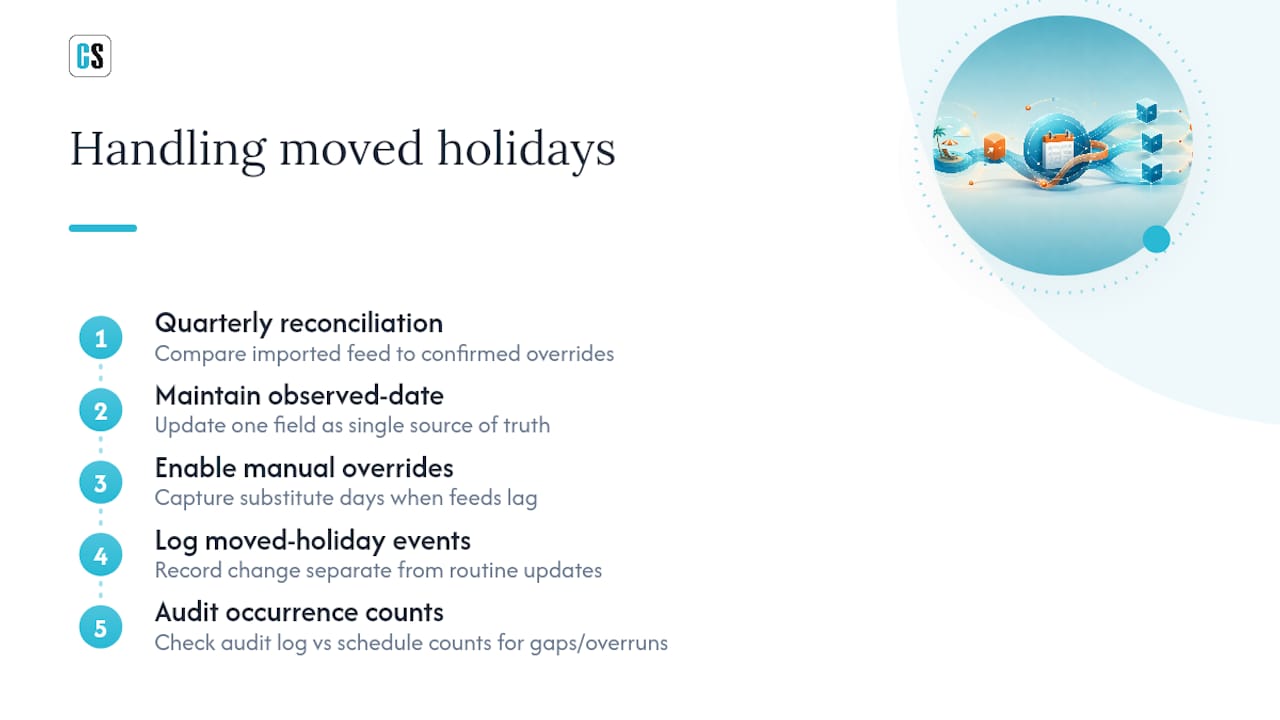
The core problem is that a static holiday list captures the legal date but not necessarily the observed date your organization actually follows. That's why the observed_date field matters more than the raw calendar date field. When a holiday shifts, you want to update one field in one place, not hunt through a dozen job templates for hardcoded dates.
Build a quarterly reconciliation step where your imported feed gets checked against any manually confirmed observed-date overrides. Government feeds sometimes lag on announcing substitute days, especially for holidays with less than a year of advance notice, so a manual override capability isn't optional. It's the safety net for the feed's blind spot.
For jobs already scheduled around a holiday that later gets moved, don't just edit the date and move on. Log the change as a distinct event, separate from a routine calendar update, because a moved holiday can retroactively affect occurrence counts on schedules using skip-and-extend mode. If three of your twelve planned occurrences already accounted for the old date, a late change can leave you one run short or one run over, and the only way to catch that is checking the audit log against the current occurrence count.
How Does Skipping Holidays Affect Downstream Workflows?
A skipped run rarely stays contained to the job that skipped it. Most enterprise reporting pipelines are chains: a data extraction job feeds a transformation job, which feeds a report generation job, which feeds a delivery job. Skip one link, and every job downstream either runs against stale data or has nothing to run against at all.

This is where the handoff risk problem that distributed teams face inside their own regional calendars applies just as directly to job dependencies. If your data warehouse refresh skips on a regional holiday but the report generation job downstream doesn't know that, it either fails outright or, worse, silently runs against yesterday's numbers and delivers them as if they were current.
The fix is to make the skip event itself a signal that downstream jobs can consume, not just a log entry nobody reads until something breaks. A skipped upstream job should either trigger a corresponding skip in dependent jobs, or trigger a backfill request that runs the chain end to end once the holiday has passed. Building this dependency awareness in from the start costs a few hours of configuration. Retrofitting it after a quarter of silently stale reports costs a lot more, usually in the form of a business stakeholder asking why last month's numbers looked wrong.
Test this specifically during your simulation phase: don't just check that job A skips correctly, check what job B does when job A skips.
How Do You Keep Your Holiday Calendar Synced Automatically?
Manually maintained holiday lists degrade the moment nobody remembers to update them, which is why syncing against a reliable external source on a schedule of its own, not just once a year, matters.
Government iCal and ICS feeds are the most dependable starting point because they're published by the entities that actually set the holidays, and many are updated the moment a substitute day gets announced. Public APIs that expose holiday data for multiple countries and states let you pull structured data programmatically rather than parsing a calendar file by hand, which matters once you're managing more than two or three regions.
Set up a recurring sync job, ideally weekly, that pulls from your chosen feed and reconciles it against your internal calendar table. Flag any discrepancy for manual review rather than auto-applying every change silently. A sync job that runs without oversight is how a bad or delayed feed entry turns into a production incident.
Keep manual override capability even after automating the sync. Company-specific closures, like a regional office shutdown that isn't a public holiday, will never show up in a government feed, and your automated sync shouldn't be able to delete a manual entry it doesn't recognize. The combination of automated sync plus a protected manual layer is what keeps the calendar both current and accurate.
What the Data Actually Tells You to Prioritize
The conventional advice on this topic treats holiday scheduling as an HR calendar problem: block off dates, notify staff, move on. That framing misses what actually breaks enterprise reporting pipelines. It's not the missing holiday flag. It's the missing audit trail and the missing downstream dependency check.
Does the skipped run generate a logged event? Does a downstream job know its upstream dependency didn't run? Does a fallback recipient exist when the primary owner is out?
If you take one thing from this article, prioritize the audit and alerting layer before you refine your holiday calendar's precision. The gap between those two isn't data quality. It's operational discipline, and that's the part most guides skip entirely.
Automate Holiday-Aware Report Delivery With ChristianSteven Software
Building holiday lookups, preview simulations, and audit logging from scratch across every job template is exactly the kind of infrastructure work that eats a quarter of an IT team's roadmap. ChristianSteven Software's automation tools already handle it, so your team configures the rule once instead of maintaining custom skip logic across a dozen scattered scripts.

PBRS for Power BI and ATRS for Tableau both support per-region holiday exclusions, pre-publish previews of upcoming skipped runs, and full audit logging on every schedule change. Fallback recipients are built in, so a report doesn't stall out just because the primary recipient is on holiday, and every skipped run leaves a record your team can review instead of a silent gap someone discovers a month later. Start a trial of PBRS or ATRS and configure your first holiday-aware schedule against your own report library before you commit to anything.
Sources
- Create and manage recurring schedules — Skedulo docs
- Holiday scheduling: tips and examples — Homebase blog
- Automatic Public Holiday Management — Waybill
- Holiday scheduling: remote-team pitfalls — Lathire
FAQ
Is It Okay to Skip Holidays in a Production Schedule?
Yes, as long as the skip generates a logged event and, for critical jobs, an alert. The risk isn't skipping the holiday, it's skipping it silently with no record of what happened.
How Do I Take Holidays off My Calendar in a Scheduler?
Most enterprise schedulers let you attach a holiday calendar to a job template and choose one of three modes: ignore, skip-and-extend, or skip-and-match-end-date, applied per region.
What Holidays Are No Longer Recognized in Some Regions?
Holiday recognition varies by jurisdiction and changes over time as governments add or remove observed days, which is exactly why a static, manually typed holiday list drifts out of date. Sync against an authoritative government feed or public API rather than relying on a list built once and left alone.
How Do I Skip Holidays in Microsoft Project or Similar Scheduling Tools?
Project-style schedulers typically let you assign a holiday calendar to a task or project base calendar, and the tool automatically shifts task dates around those non-working days. For BI reporting workflows specifically, a purpose-built delivery scheduler like PBRS handles this with per-region calendars and preview simulations rather than a single project-wide calendar.
What's the Safest Default Mode for Enterprise Reporting Jobs?
Skip-and-extend, paired with a pre-run holiday lookup, is the safest default for most BI and reporting workloads because it preserves the total number of scheduled runs rather than silently dropping one.