
The fastest reliable pattern for SQL query recipients: build a semicolon-delimited recipient string with STUFF and FOR XML PATH, then hand that string to msdb.dbo.sp_send_dbmail, or route the whole job through an automation tool that handles formatting and retries for you. That single move (query, concatenate, send) covers most notification and reporting needs without extra middleware.
Three things you need no matter which path you pick:
- Recipients: a valid, deduplicated list pulled straight from your query results.
- Subject: static or dynamically built from row data.
- Query and body: the SQL that generates the content, plus how you want it formatted.
A single broadcast email is cheap and fast. Personalizing per recipient costs more compute and more code. Automation platforms trade a bit of setup time for consistent formatting, retry logic, and audit trails you won't get from a raw script.
Key Takeaways
The most reliable way to email SQL query results is to build a recipient list with STUFF/FOR XML PATH, call sp_send_dbmail through a monitored SQL Agent job, and move to dedicated automation once formatting or scale outgrows a script.
| Point | Details |
|---|---|
| Build recipient strings correctly | Use STUFF with FOR XML PATH for a clean, semicolon-delimited list; fall back to COALESCE only on legacy SQL Server versions. |
| Match method to the job | Concatenate for broadcast sends, loop or use a cursor only when true personalization is required. |
| Guard against empty sends | Add a "send only if query has results" flag to stored procedures to stop blank notification emails. |
| Preview before automating recipients | Test query-based distribution groups and database-driven recipient queries with a preview and a small sandbox run first. |
| Move to automation at scale | ChristianSteven Software's PBRS, ATRS, CRD, and IntelliFront BI handle formatting, dynamic recipients, and retries that hand-built scripts struggle to maintain. |
Table of Contents
- When to Concatenate, Loop, or Automate Recipient Queries
- T-SQL Patterns for Building Recipient Lists and Sending Query Results
- How to Configure Database Mail and Schedule the Send
- Dynamic Recipient Lists: Query-Based Groups vs. Database-Driven Queries
- Why HTML Built in SQL Breaks and What to Do Instead
- Testing and Monitoring Automated SQL Email Jobs
- When Custom Scripts Stop Being Enough
- Editorial Take: Code Skill Isn't the Bottleneck Here
- Get Reliable Report Delivery Without Maintaining SQL Scripts
- Sources
- FAQ
When to Concatenate, Loop, or Automate Recipient Queries
Picking the wrong pattern here is how a five-minute task turns into a two-day debugging session. Match the method to the job, not the other way around.
- Concatenate for broadcast sends. If everyone on the list gets the identical subject and body, build one semicolon-delimited string and fire a single
sp_send_dbmailcall. This is the cheapest option on server resources and the easiest to troubleshoot. - Loop or use a cursor for personalization. When each recipient needs a filtered version of the data (their own sales numbers, their own open tickets), you need a row-by-row send. Expect higher CPU and I/O load, and test with realistic volumes before trusting it in production.
- Hand it to a scheduler or automation tool when reliability matters more than simplicity. Once you need retries on failure, multiple output formats, delivery logging, or recipients that change based on live data, a script becomes a liability rather than a shortcut.
Pro Tip: Don't loop by default just because it feels more "correct." A cursor sending 4,000 individual emails from inside a T-SQL job step will hammer your mail queue and your SQL Server's tempdb. Reach for row-by-row sends only when personalization is genuinely required.
T-SQL Patterns for Building Recipient Lists and Sending Query Results
Here's the code you'll actually copy and adjust. Swap table and column names for your own schema; the structure holds regardless of the domain.
STUFF + FOR XML PATH is the standard way to flatten a result set into one string suited for sp_send_dbmail:
DECLARE @Recipients VARCHAR(MAX);

SELECT @Recipients = STUFF((
    SELECT '; ' + Email
    FROM dbo.Users
    WHERE IsActive = 1
    FOR XML PATH('')
), 1, 2, '');
This is the pattern developers reach for on Stack Overflow when they need to notify only the users who appear in a specific result set, rather than a static distribution list.
COALESCE concatenation is an older fallback that still works on legacy SQL Server versions, though it's less efficient on large row counts:
DECLARE @Recipients VARCHAR(MAX) = '';

SELECT @Recipients = COALESCE(@Recipients + '; ', '') + Email
FROM dbo.Users
WHERE IsActive = 1;
Cursor loop for personalized sends, where each row triggers its own sp_send_dbmail call:
DECLARE @Email VARCHAR(255), @Body NVARCHAR(MAX);
DECLARE cur CURSOR FOR SELECT Email, ReportBody FROM dbo.PendingNotifications;
OPEN cur;
FETCH NEXT FROM cur INTO @Email, @Body;
WHILE @@FETCH_STATUS = 0
BEGIN
    EXEC msdb.dbo.sp_send_dbmail
        @profile_name = 'MainProfile',
        @recipients = @Email,
        @subject = 'Your Update',
        @body = @Body;
    FETCH NEXT FROM cur INTO @Email, @Body;
END
CLOSE cur; DEALLOCATE cur;
For anything you'll reuse, wrap the logic in a stored procedure. A well-documented example, proc_Query_To_Email, takes parameters like @Subject, @Recipients, @Query1, @OrderBy1, @BodyIntro, and @SendOnlyIfQuery1HasResults. That last flag matters more than it looks: it stops the procedure from firing an empty, useless email when the underlying query returns zero rows.
How to Configure Database Mail and Schedule the Send
Getting mail flowing out of SQL Server itself is mostly a one-time setup, but it's easy to get sloppy on permissions.
- Set up Database Mail first. Create a mail account, wrap it in a profile, and grant
DatabaseMailUserRoleonly to the accounts and jobs that actually need to send. Microsoft's Database Mail documentation walks through account and profile setup in detail. Don't grant broad send rights to every service account "just in case." - Call
sp_send_dbmailfrom a SQL Agent job step, not from an ad hoc script running on someone's desktop. Always specify@profile_nameexplicitly. Set@body_format = 'HTML'if you're sending formatted tables, or leave it as plain text for simple alerts. - Decide between attachments and inline content early.
@query_attachment_filenamelets you attach query output as a CSV or text file instead of cramming it into the email body, which sidesteps a lot of rendering headaches (more on that below). - Monitor job history, not just the mail queue. SQL Agent's job history tab tells you if the step even ran;
msdb.dbo.sysmail_event_logtells you if the send itself failed. Check both when something goes missing.
Schedule the job on whatever cadence the business need actually calls for. Daily digest emails don't need hourly polling, and hourly alerts shouldn't be crammed into a nightly batch window.
Dynamic Recipient Lists: Query-Based Groups vs. Database-Driven Queries
There are two distinct flavors of "dynamic recipients," and conflating them causes real damage.
Directory-driven query-based groups (Exchange or Active Directory) rebuild their membership from an LDAP filter every time the group is used. Get the filter or the container scope wrong, and you can silently include or exclude entire departments. One Identity's documentation is blunt about this: always use the preview function to check actual returned members before you enable the group in production.
Database-driven recipient queries are the ones you write yourself against application tables. The scoping problem is the same, just in your own SQL. A common example: notifying followers of a comment without accidentally emailing the person who wrote the comment. The fix is a simple join filter, excluding rows where the follower's user ID matches the comment author's ID.
- Always preview the exact recipient set a query will produce before wiring it into a live send.
- Run limited test batches (5 to 10 addresses) before opening the job to the full list.
- Build a "send only if results exist" guard into every recurring job.
Pro Tip: Keep a throwaway test mailbox subscribed to every automated job during development. It's the cheapest early-warning system for a scoping mistake that would otherwise land in 3,000 inboxes.
Why HTML Built in SQL Breaks and What to Do Instead
String-concatenated HTML looks fine in your test client and then falls apart in Outlook, Gmail, or a mobile mail app that strips inline styles differently. This isn't a rare edge case. It's the default outcome of hand-building markup inside T-SQL string variables, where a single missing closing tag or unescaped ampersand can silently mangle the whole message.
Practitioner experience is consistent on this point: custom HTML generation inside SQL is tedious to write, harder to maintain, and frequently produces output that renders inconsistently across mail clients. Teams that automate report delivery generally push formatting and rendering to a dedicated tool rather than fighting client quirks in T-SQL strings.
If you do need inline HTML tables, keep the markup minimal, apply your ORDER BY clause before you build the string (not after), and test the rendered output in at least two major email clients.
- Attach a CSV, PDF, or Excel file instead of building an HTML table when the data is more than a handful of rows.
- Separate sorting logic from formatting logic; sort the result set first, then format.
- Reserve inline HTML for short, simple summaries, not full report tables.
Testing and Monitoring Automated SQL Email Jobs
Skipping validation is the single most common reason automated sends go wrong in production.
- Preview before you schedule. Run the recipient query alone and eyeball the row count and email formatting before attaching it to
sp_send_dbmail. - Send to a sandbox list first. Point the job at two or three internal test addresses for at least one full run cycle.
- Check both logs after go-live. Review
msdb.dbo.sysmail_event_logfor SMTP-level failures and SQL Agent job history for step-level errors, and set up an alert on job failure. - Build in throttling and fallbacks. For very large recipient sets, split the batch, use BCC where appropriate, and validate email format before sending to avoid bounces clogging your mail queue.
If a job that used to run cleanly suddenly stops delivering, the troubleshooting steps for automated report emails apply just as well to custom SQL jobs as they do to packaged reporting tools.
When Custom Scripts Stop Being Enough
Every pattern above works, and plenty of teams run production notification systems on nothing but sp_send_dbmail and a SQL Agent job. The limits show up as scale and stakes increase: more recipients, more formats, more people asking "why didn't I get this report."
ChristianSteven Software builds automation for exactly that gap, with PBRS for Power BI, ATRS for Tableau, CRD for Crystal Reports, and IntelliFront BI for live dashboards, backed by SOC 2 Type II certification. These tools solve the operational problems that hand-rolled scripts tend to struggle with:
- Consistent formatting across HTML, PDF, and Excel without maintaining string-built markup.
- Dynamic, data-driven recipient lists that update automatically as your source data changes.
- Built-in retry logic, delivery logging, and error alerts instead of a bare job-history tab.
- Secure delivery to email, cloud storage, or collaboration tools from one central schedule.
If your recipient list logic has outgrown a stored procedure, that's usually the signal to look at a purpose-built platform instead of adding another layer of T-SQL.
Editorial Take: Code Skill Isn't the Bottleneck Here
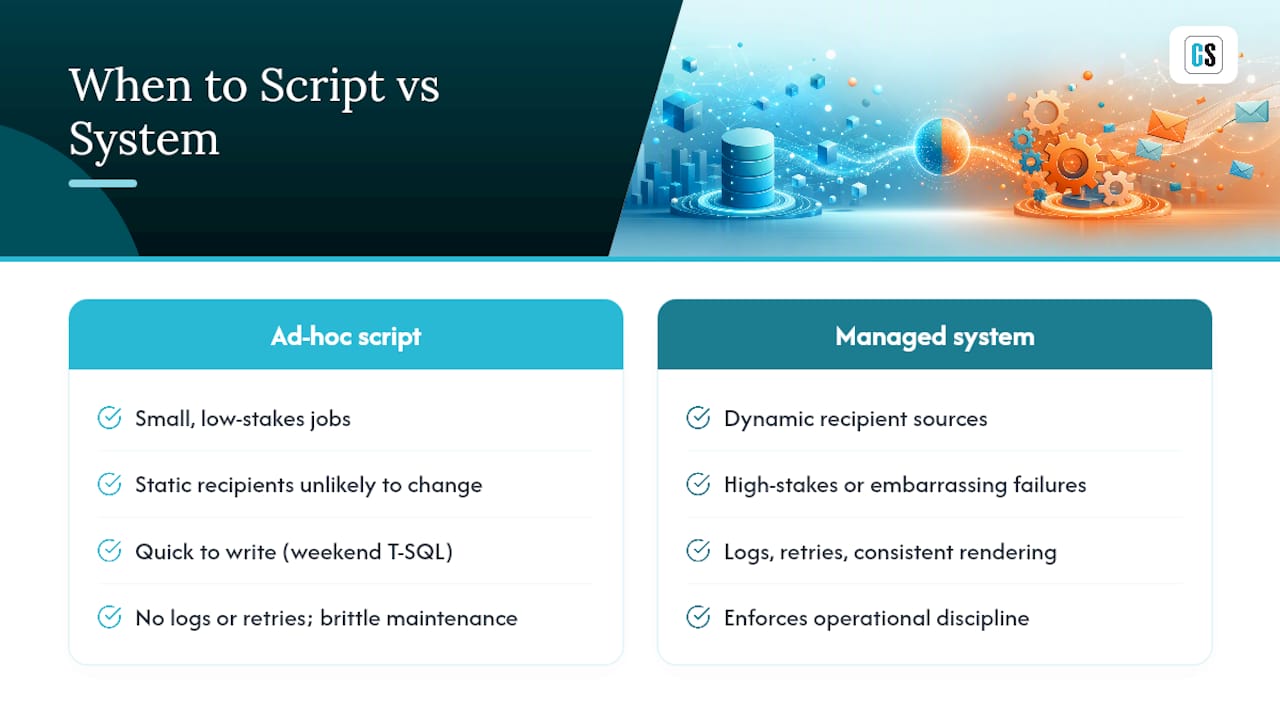
The technical part of this problem is genuinely easy. Any developer with a weekend of T-SQL experience can write a STUFF/FOR XML PATH concatenation and wire it to sp_send_dbmail. Where teams actually get burned is scoping and maintenance, not syntax.
Conventional advice on this topic obsesses over the string-building trick and treats the send as an afterthought. That's backwards. The real risk lives in the recipient query itself: a join that's one filter short of correct, a "send only if results" flag nobody bothered to add, HTML that renders fine in your test client and breaks everywhere else. None of that is a coding problem. It's an operational discipline problem, and scripts don't enforce discipline. People do, until they get busy and stop checking.
My honest read: write the script when the job is small, low-stakes, and unlikely to change. The moment recipients update dynamically from live data, or a formatting failure would actually embarrass someone, you're better off with a system that logs, retries, and renders consistently by default.
Get Reliable Report Delivery Without Maintaining SQL Scripts
Custom sp_send_dbmail jobs work until the recipient list gets complicated, the formatting needs multiply, or the one person who understands the stored procedure changes teams. ChristianSteven Software exists for exactly that inflection point: instead of maintaining T-SQL string-building code every time a report changes shape, you get dynamic, data-driven scheduling with formatting handled for you.

If your team runs Power BI, automated email delivery for Power BI reports through PBRS replaces custom scripts with scheduled, formatted exports and dynamic recipient rules that update as your data does. Tableau shops get the same coverage through ATRS, including scheduled report distribution and automated Tableau email sharing without hand-built HTML. SSRS users can pair their existing reports with SQL-RD scheduling for the same reliability.
Start with a trial of PBRS for Power BI automated exports and see how much of your custom email script you can retire in a single afternoon.
Sources
- How to send an email only to users who appear in query results? — Stack Overflow
- Query to Email….Well Formatted Email — Simple SQL Server
- Administer query-based distribution group — One Identity documentation
FAQ
What Are the 5 Basic SQL Queries?
The core operations are SELECT, INSERT, UPDATE, DELETE, and JOIN. For emailing recipients, SELECT combined with JOIN is what typically builds your recipient list.
How Do You Automate a SQL Query and Email the Results?
Build the recipient list and result set with T-SQL, then call msdb.dbo.sp_send_dbmail from a SQL Agent job on a schedule. For dynamic recipients, multiple formats, or delivery logging, a tool like ChristianSteven Software's PBRS or ATRS handles the scheduling and formatting automatically.
How Do You Find the Top 5 Customers in SQL?
Use SELECT TOP 5 with an ORDER BY clause on the metric you're ranking by, such as total order value: SELECT TOP 5 CustomerID, SUM(OrderTotal) FROM Orders GROUP BY CustomerID ORDER BY SUM(OrderTotal) DESC.
How Do You List All Table Names in a SQL Query?
Query INFORMATION_SCHEMA.TABLES with SELECT TABLE_NAME FROM INFORMATION_SCHEMA.TABLES WHERE TABLE_TYPE = 'BASE TABLE' to get every user table in the current database.
Why Does My Automated Email Job Send to the Wrong Recipients?
This almost always traces back to an unscoped join or an untested filter in the recipient query. Preview the exact result set and run a small test batch before enabling any scheduled job in production.