
Power BI is defined as a business intelligence platform that transforms fragmented operational data into automated, real-time dashboards for faster decision-making. The role of Power BI in operational reporting goes far beyond chart creation. It replaces manual, static processes with live data pipelines that give business analysts and operational managers a single, trusted view of performance. 59% of finance leaders are already integrating AI into operational and financial reporting. That shift signals a broader move toward automated, insight-driven workflows where platforms like Power BI sit at the center.
The core value Power BI delivers is consolidation. It pulls data from ERP systems, CRM platforms, spreadsheets, and cloud databases into one governed model. Analysts stop spending hours assembling reports and start spending that time interpreting results. That shift, from data preparer to strategic advisor, is the real impact of Power BI on operational teams.
What is the role of Power BI in operational reporting?
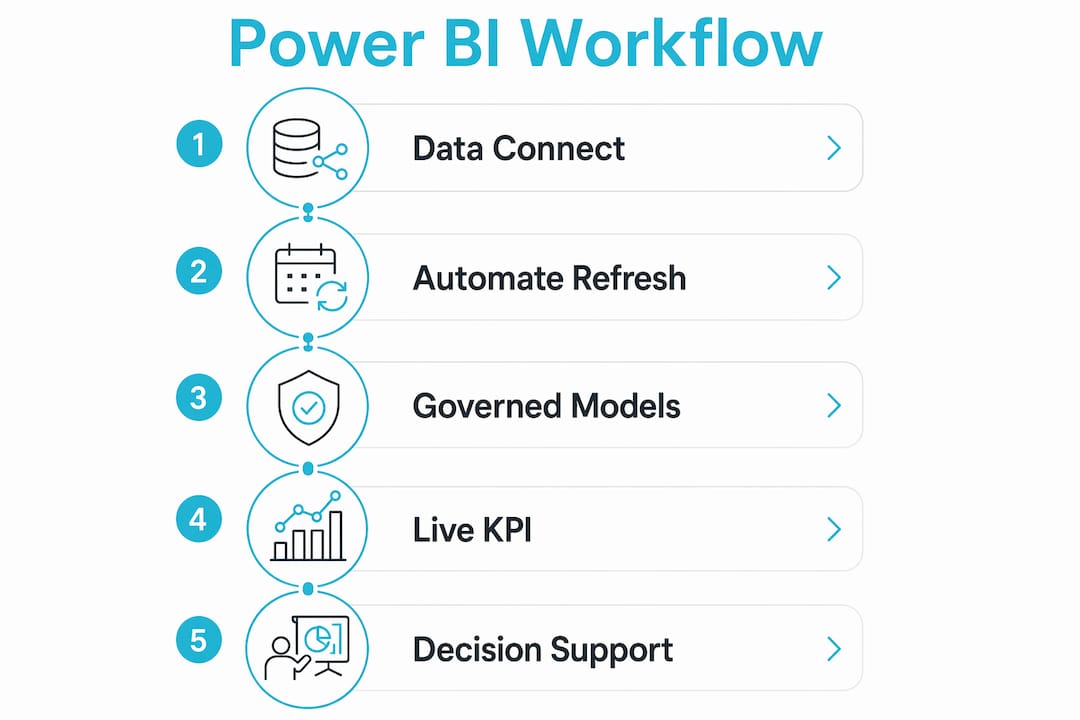
Power BI's role in operational reporting is to automate data consolidation, enforce governance, and deliver live KPI tracking across every layer of an organization. The platform connects directly to operational data sources, refreshes on a defined schedule or in near real time, and surfaces metrics that managers need without manual intervention.

Visuals and chart design account for just 20% of operational reporting utility. The remaining 80% comes from a governed, live, and reconciled data foundation. That ratio matters because many teams invest heavily in visual polish while neglecting the data architecture underneath. A beautiful dashboard built on stale or unreconciled data produces confident but wrong decisions.
Power BI's role in business intelligence extends to enforcing that foundation through features like row-level security, certified datasets, and data lineage tracking. Row-level security restricts what each user sees based on their role. A warehouse supervisor sees their facility's throughput; a regional director sees all facilities. One report serves both without exposing data that falls outside each person's scope.
The platform also supports multi-entity scenarios common in enterprise reporting. A holding company with five operating divisions can build one shared data model and publish role-filtered views to each division's management team. That architecture eliminates the version-control chaos that comes with distributing separate Excel files.
Pro Tip: Build your Power BI data model around operational workflows first, not around the reports you currently produce. Existing reports often reflect the limits of old tools, not the actual questions your business needs answered.
How does Power BI handle data modeling and automation?
Effective operational reporting in Power BI starts with a well-structured data model, not with visuals. The model defines relationships between tables, sets calculation logic using DAX (Data Analysis Expressions), and determines how data refreshes. Getting this right upfront prevents months of rework later.
Automation in Power BI operates at several levels:
- Scheduled refresh: Power BI Service refreshes datasets on a defined schedule, from every 30 minutes to once daily, pulling updated data from connected sources without manual exports.
- Incremental refresh: Large operational tables, such as transaction logs with millions of rows, refresh only the new or changed records. These cut refresh time from hours to minutes.
- DirectQuery and Direct Lake: These modes query the source system live rather than importing a snapshot. Microsoft Fabric with Direct Lake delivers live data rendering in Power BI, which is critical for mission-critical operations like logistics.
- Dataflow pipelines: Power BI Dataflows handle ETL (extract, transform, load) logic in the cloud, so multiple reports share one cleaned data source rather than each analyst maintaining their own transformation scripts.
Embedding time intelligence and scenario management within Power BI reduces reporting cycles and increases decision support for finance and operations teams. Time intelligence functions in DAX let analysts compare this week's throughput to the same week last year with a single measure, rather than building that logic manually in a spreadsheet.
Governance is the final layer. Certified datasets in Power BI Service signal to the organization that a dataset has been reviewed and approved. Analysts build reports on certified sources rather than creating their own versions of the truth. That single practice eliminates the most common source of conflicting numbers in operational reviews.
What visualization and data storytelling features power effective operational dashboards?
Data storytelling in Power BI is the practice of structuring visuals so that the right person sees the right level of detail without needing technical help. Layered dashboard architecture improves communication by giving executives a summary view while letting operational users drill into the detail behind any number.
A well-designed operational dashboard uses three layers:
- Executive overview: High-level KPIs, trend lines, and traffic-light indicators showing overall health at a glance.
- Operational detail: Drill-through pages that break KPIs down by region, product line, shift, or team.
- Transaction-level data: Filtered tables or exports for analysts who need to investigate individual records.
Traffic-light indicators signal performance health in Red, Yellow, and Green, directing user focus to areas needing immediate action. This design choice reduces the cognitive load on busy managers. They scan the dashboard, spot the red indicators, and act. They do not need to read every number to know where the problem is.
Power BI's Smart Narratives feature generates plain-language summaries of chart data automatically. A manager who does not read charts fluently can still understand what the data says. Anomaly detection alerts notify users when a metric moves outside its expected range, so exceptions surface without anyone having to monitor the dashboard continuously.
| Feature | Operational benefit |
|---|---|
| Traffic-light KPI cards | Immediate status signal without reading raw numbers |
| Drill-through pages | Root-cause analysis without building a new report |
| Smart Narratives | Plain-language summaries for non-technical managers |
| Anomaly detection alerts | Proactive exception flagging without manual monitoring |
| Interactive slicers | On-the-fly filtering by date, region, or product |
Pro Tip: Design your executive overview so that every critical KPI fits on one screen without scrolling. If a manager has to scroll to find a problem, the dashboard has already failed its primary job.
What are common challenges and best practices when deploying Power BI for operational reporting?
The most common failure in Power BI deployments is treating the platform as a basic reporting layer without redesigning the underlying data models and refresh pipelines. A common deployment failure occurs when teams simply recreate their existing Excel reports in Power BI without rethinking the workflow. The result is a more expensive version of the same problem.
Successful deployments follow a structured transition process:
- Audit existing reports. Catalog every report currently in use, who uses it, how often, and what decisions it drives. Many organizations discover they maintain dozens of reports that nobody reads.
- Redesign the data model. Map operational workflows and build the data model around the questions the business actually asks, not the columns that exist in the source system.
- Run parallel reporting. Running new Power BI dashboards alongside legacy Excel reports for about two weeks helps build trust and resolve data discrepancies before full adoption. This step is non-negotiable for organizations where operational decisions carry financial or safety consequences.
- Reconcile data sources. Every number in the Power BI dashboard must trace back to a single, authoritative source. Discrepancies between the dashboard and the source system destroy user confidence faster than any technical failure.
- Train by role, not by feature. Teach warehouse managers how to use the logistics dashboard. Teach finance analysts how to use the forecasting model. Generic Power BI training produces generic adoption.
Transitioning from static Excel reports to Power BI dashboards revealed hidden operational trends within three weeks in documented deployments, enabling quick corrective action. That speed of insight is only possible when the data foundation is clean and the model is built correctly from the start.
Pro Tip: Assign a data steward for each major operational domain during the transition. That person owns the reconciliation between Power BI numbers and source system numbers. Without clear ownership, discrepancies linger and trust erodes.
How does Power BI support operational reporting across industries?
Power BI's practical applications span every sector where operational data drives daily decisions. The platform's ability to connect to diverse data sources makes it adaptable without requiring custom development for each use case.
Logistics and supply chain: Live dashboards track shipment status, warehouse utilization, and carrier performance in real time. Managers see delivery exceptions the moment they occur rather than discovering them in a morning report. Direct Lake connectivity means the dashboard reflects the current state of the warehouse management system, not a snapshot from the previous night.
Finance and operations: Embedding scenario management within Power BI lets finance teams model the impact of operational changes, such as a supplier price increase or a production slowdown, without leaving the reporting environment. Combined financial and operational dashboards give CFOs and COOs a shared view of performance, reducing the time spent reconciling numbers before executive meetings.
Quality management: Manufacturers use Power BI to monitor defect rates, first-pass yield, and scrap volumes by production line and shift. Anomaly detection alerts trigger when defect rates cross a threshold, giving quality engineers time to intervene before a batch ships. The role of Power BI in data storytelling is especially clear here: a single drill-through from a red KPI card to the underlying production records replaces hours of manual investigation.
Human resources and workforce operations: HR teams track headcount, overtime, and absenteeism against operational targets. Managers see staffing gaps before they affect output rather than after. Scheduling Power BI reports to deliver automatically ensures every stakeholder receives the right report at the right time without manual distribution.
The consistent pattern across all these use cases is the same: Power BI replaces a reactive, manual reporting cycle with a proactive, automated one. Operational managers stop chasing data and start acting on it.
Key Takeaways
Power BI's role in operational reporting is to replace manual, fragmented data processes with automated, governed, and real-time dashboards that give analysts and managers the information they need to act decisively.
| Point | Details |
|---|---|
| Data foundation is primary | 80% of operational reporting value comes from governed, live, reconciled data, not visual design. |
| Automation reduces cycle time | Scheduled refresh, incremental refresh, and DirectQuery eliminate manual data assembly for operational teams. |
| Layered dashboards serve all users | Executive overviews and drill-through detail pages serve different audiences within one report. |
| Parallel transition builds trust | Running Power BI alongside legacy reports for two weeks resolves discrepancies before full adoption. |
| Workflow redesign is required | Recreating existing reports in Power BI without redesigning the data model produces the same problems at higher cost. |
What I've learned from watching Power BI deployments succeed and fail
The teams that get the most from Power BI are not the ones with the best visualizations. They are the ones that treated the deployment as an organizational change project, not a software installation.
I have seen analysts spend three months building a beautiful operational dashboard only to have managers ignore it because the numbers did not match what the ERP showed. The dashboard was technically correct. The ERP had a different cut-off logic. Nobody reconciled the two before launch. That single oversight cost months of credibility.
The shift that matters most is when analysts stop being asked "can you pull that report for me?" and start being asked "what does this mean for next quarter?" Power BI creates the conditions for that shift by automating the mechanical work. But the shift only happens if the organization commits to the data governance work underneath. Live data without governance is just faster noise.
The role of Power BI in business intelligence is ultimately about giving people the confidence to act on what they see. That confidence comes from trust. Trust comes from reconciled, governed, and consistently delivered data. Build that first, and the visualizations will do their job.
— Christian
How Christiansteven extends Power BI's operational reporting capabilities
Christiansteven has spent over 20 years building reporting automation tools for organizations that need more than what native scheduling provides. Its PBRS product automates the generation and delivery of Power BI reports on precise schedules, to specific recipients, in the formats each stakeholder needs.

For business analysts and operational managers who need reports delivered automatically across the enterprise, PBRS handles burst reporting, data-driven distribution, and multi-format export without manual intervention. The platform is SOC 2 Type II certified, which matters when operational reports contain sensitive financial or personnel data. Christiansteven's latest CRD release adds new automation features that reduce the gap between data availability and report delivery. You can also create data-driven Power BI packages directly through the PBRS web application to automate personalized report distribution at scale.
FAQ
What is Power BI used for in operational reporting?
Power BI connects to operational data sources, automates data refresh, and delivers real-time KPI dashboards that replace manual Excel-based reporting. It gives business analysts and operational managers a single, governed view of performance metrics.
How does Power BI improve decision-making for operational managers?
Power BI surfaces exceptions through traffic-light indicators and anomaly detection alerts, so managers act on problems immediately rather than discovering them in next-day reports. Drill-through pages let them trace any KPI to its root cause without requesting a new report.
What is the biggest mistake teams make when deploying Power BI for operations?
The most common failure is recreating existing reports in Power BI without redesigning the data model or refresh pipeline. This produces a more expensive version of the same static reporting problem.
How long does it take to transition from Excel to Power BI for operational reporting?
A structured transition typically runs parallel reporting for about two weeks to reconcile data discrepancies and build user confidence before decommissioning legacy Excel reports.
Can Power BI handle real-time operational data?
Yes. Using DirectQuery or Microsoft Fabric with Direct Lake, Power BI queries source systems live, making it suitable for mission-critical operations like logistics and supply chain management where data latency affects decisions.