
The best email report delivery for medium-to-large organizations runs on a centralized scheduler with governance built in, not native BI subscriptions stretched past their limits. That means one platform handling dynamic bursting, multi-format exports (PDF, Excel), routing to email plus SFTP or SharePoint, and full audit logging across Power BI, SSRS, Tableau, and Crystal Reports. This is about BI report automation, not marketing-email deliverability. ChristianSteven Software builds schedulers like PBRS and ATRS around exactly this model.
TL;DR:
- Native BI subscription tools often fail at scale due to license restrictions, single output formats, and lack of audit logs, limiting their enterprise use.
- A centralized scheduler enables dynamic report bursting, multi-format exports, delivery to multiple destinations, and comprehensive audit trails necessary for compliance.
- Proof of mature enterprise reporting includes the ability to handle large recipient volumes, complete delivery logs, and support for encryption and role-based access controls.
- Effective rollout requires a deliberate, phased approach with documented scope, pilot testing, validation, and a four-week human review to prevent formatting and permission errors.
- Metrics such as manual intervention rate and delivery success are key indicators of a healthy automated reporting pipeline, with manual touches ideally trending toward zero within three months.
Table of Contents
- Why a Centralized Scheduler Beats Native Subscriptions at Scale
- What to Look for in an Email Reporting Solution
- How Do You Roll Out Automated Report Delivery Safely?
- What KPIs Actually Matter for Automated Report Delivery?
- How ChristianSteven's Products Put This Approach Into Practice
- Best Practices for Email Report Formatting and Template Design
- Strategies for Optimizing Email Deliverability and Avoiding Spam Filters
- Automation Tools and Scheduling Options for Report Delivery Timing
- Handling Different Email Client Compatibility Issues
- User Permissions and Access Control for Emailed Reports
- Ready to Move Past Native Subscriptions? Start With PBRS or ATRS
- Sources
- FAQ
Why a Centralized Scheduler Beats Native Subscriptions at Scale
Native subscription tools built into Power BI or Tableau work fine for a five-person team sharing one dashboard. They break down once an organization needs to send 400 personalized variants of a regional sales report to external distributors who have no platform license. Power BI's own subscription model caps out on exactly this kind of scale problem, and the same limits show up in Tableau and SSRS environments.
The practical failure points repeat across every platform:
- License requirements that block sending to external recipients without paid seats
- A single output format per run, with no way to combine PDF for executives and Excel for analysts in one schedule
- Minimal or no delivery logs, so a failed send at 6:00 AM goes unnoticed until someone complains
- No dependency logic, meaning a report can publish successfully even when the upstream data refresh failed
A dedicated scheduler solves this by consolidating scheduling, formatting, and delivery into one governed layer that sits above the BI platform. Every run gets logged, every recipient list gets personalized, and IT retains a single point of control instead of dozens of ungoverned subscriptions scattered across departments. For organizations pursuing SOC 2 compliance, that consolidated audit trail is often the difference between a clean review and a scramble.
What to Look for in an Email Reporting Solution
Evaluating vendors gets easier with a short list of non-negotiables rather than a feature-by-feature bake-off. Here's what actually separates enterprise-ready tools from glorified email plug-ins:
- Dynamic bursting and personalization. The scheduler should split one report into hundreds of filtered, recipient-specific versions automatically, not require a separate manual export per region or manager.
- Multi-format exports. PDF, Excel, and sometimes CSV or Word, generated from the same run without duplicate scheduling jobs.
- Destination flexibility. Email is the default, but SFTP, SharePoint, Teams, and portal delivery should be options in the same platform.
- Audit logs and retention. Every send, retry, and failure needs a timestamped record that survives a compliance audit.
- Authentication and encryption. Look for SOC 2 Type II certification or equivalent evidence, plus encrypted credential storage for mailbox and database connections.
- Orchestration and dependency controls. The tool should hold a report until its upstream data source finishes refreshing, which reduces false or incomplete publications.
- API access and parameterization. REST API hooks let other systems trigger reports on events, not just clock time.
Pro Tip: Ask any vendor to show you a failed delivery log from a real customer environment during the demo. If they can't produce one instantly, their logging isn't mature enough for enterprise audit requirements.
How Do You Roll Out Automated Report Delivery Safely?
A phased rollout beats a big-bang launch every time, mostly because it catches formatting and permission mistakes before they reach 500 inboxes instead of five.
- Draft the operating contract first. Before anyone touches configuration, document purpose, scope, owners, delivery rules, and a release calendar. This single document prevents most of the scope creep that kills automation projects in month two.
- Pilot with one report. Pick a high-value, recurring report with a stable recipient group. Fix the grain (daily, weekly, by region) and assign a clear owner before scaling further.
- Design recipient lists deliberately. Build them around permissions and dynamic filtering, not static email chains someone will forget to update when a manager changes territories.
- Run validation tests. Check formatting across email clients, confirm bursting logic pulls the right filters, and verify attachments open cleanly on mobile.
- Hold a four-week human review window. Have a real person check every automated send against the source report during this period before trusting the pipeline unsupervised.
- Configure alerts and retries. Set exception routing so a failed job notifies IT immediately, with a documented correction process for reissuing a corrected report.
- Scale only after the pilot proves stable. Add report volume once you have four straight weeks of clean runs and a documented process other team members can follow.
The insight worth stealing here: start with the smallest reliable record set and prove the exception handling before you add complexity. Teams that skip this step usually end up rebuilding their recipient logic twice.
What KPIs Actually Matter for Automated Report Delivery?
Five metrics tell you almost everything about whether an automated delivery pipeline is healthy: on-time delivery rate, run success rate, manual touch rate, recipient access failures, and reconciliation variance between the report and its source data. These are the core operational metrics that separate a trustworthy pipeline from one that just looks automated on paper.
KPI to watch: Manual touch rate, the percentage of scheduled sends that required someone to intervene, fix, or manually resend, is the single clearest sign a pipeline isn't actually hands-free yet. A healthy enterprise deployment should trend that number toward zero within the first quarter.
Every report a recipient opens should show a few surface-level signals without requiring a click: last successful update timestamp, a freshness indicator, and a visible flag for any exceptions in that run. Automated checks (did the file generate, did the send succeed, did the row count match expectations) should catch the obvious failures. Human review stays reserved for the ambiguous cases: a report that ran successfully but shows data that looks wrong. Clear escalation rules, who gets paged, how fast, and through what channel, keep that second category from turning into a support ticket avalanche.
How ChristianSteven's Products Put This Approach Into Practice
ChristianSteven Software builds four schedulers around this exact architecture, each mapped to a specific BI platform:
- PBRS extends Power BI with bursting, multi-format export, and delivery scheduling that goes well beyond native subscriptions.
- ATRS applies the same model to Tableau, automating report distribution to email and other destinations on a governed schedule.
- CRD handles Crystal Reports delivery for organizations still running that platform alongside newer BI tools.
- IntelliFront BI covers real-time dashboards and KPIs where the delivery need is a live view rather than a static export.
All four share the trust signals enterprise buyers actually check during procurement: SOC 2 Type II certification, delivery logs with a full auditable run history, and role-based access controls that keep report configuration in IT's hands rather than scattered across department spreadsheets.
| What to validate in a PoC | Why it matters |
|---|---|
| Bursting a report to 50+ personalized recipients | Confirms the platform handles real enterprise volume, not just a demo case |
| Delivery log for a deliberately failed run | Shows whether audit history is genuinely complete |
| Multi-destination routing in one schedule | Tests email plus SFTP or SharePoint in the same job |
| SOC 2 Type II report request | Confirms compliance evidence is current and accessible |
| Authentication options for mailbox and data source | Verifies encryption and credential handling meet IT policy |
Request each of these specifically. A vendor that hesitates on the failed-run log or the SOC 2 documentation is telling you something about how mature their operation actually is. PBRS's Power BI scheduling capabilities are worth reviewing directly if Power BI is your primary platform.
Best Practices for Email Report Formatting and Template Design
A report that looks perfect in Power Query and arrives as a broken table in Outlook has failed, regardless of how clean the underlying data is. Template design for automated delivery needs to account for the recipient's inbox, not just the report designer's screen.
Keep tables narrow enough to render on a phone screen without horizontal scrolling, since a growing share of executives open reports on mobile first. Embed charts as images rather than live objects. Interactive visuals rarely survive translation into an email body, and most clients strip them or show a broken placeholder instead. PDF attachments solve this reliably for anything with complex formatting, while inline HTML tables work better for short, glanceable summaries like daily KPI snapshots.
Standardize a header block across every automated report: report name, data as-of date, and the owner's contact information. This single habit eliminates a huge share of "is this the latest version?" emails that otherwise land in IT's inbox. Keep subject lines consistent and parseable (something like "Weekly Sales Summary, Region 3, Week of March 9") so recipients can filter and search their own archives without opening every message.
Test every template against Outlook, Gmail, and Apple Mail before it goes live, since rendering differences between clients are the most common source of "broken report" complaints in the first month of any automation rollout.
Strategies for Optimizing Email Deliverability and Avoiding Spam Filters
An automated report that lands in spam is functionally the same as a report that never sent. Deliverability for internal BI reports depends less on content tricks and more on server reputation and authentication.
Set up SPF, DKIM, and DMARC records for the sending domain before launching any automated report program. Corporate mail servers and gateways increasingly reject or quarantine unauthenticated senders, and an automation platform sending thousands of reports a week needs clean authentication to stay trusted. If reports send from a dedicated address (something like reports@yourcompany.com), keep its sending volume and pattern consistent. Spiky, irregular volume from a new address is exactly the pattern spam filters flag.
Avoid embedding excessive images or oversized attachments; a 15MB PDF triggers size-based filtering on many corporate gateways well before it triggers any content-based spam score. Keep attachment sizes reasonable and offer a portal or SharePoint link as an alternative for large report packages. Watch for bounce and rejection logs in your scheduler. A reporting platform with consolidated delivery logs will surface a pattern of soft bounces before it becomes a full domain reputation problem, giving IT time to fix the issue before recipients notice missed reports.
Automation Tools and Scheduling Options for Report Delivery Timing
Timing options matter more than most teams realize during initial setup. A scheduler limited to fixed daily or weekly triggers will eventually miss the reports that actually need event-driven delivery.
Time-based scheduling covers the majority of use cases: daily sales summaries at 7:00 AM, weekly executive dashboards every Monday, month-end close reports on the first business day. Data-driven scheduling adds a layer most native tools lack entirely: a report fires only when a data condition is met, say, when a batch job finishes loading the previous day's transactions, rather than at a fixed clock time regardless of whether the data is ready.
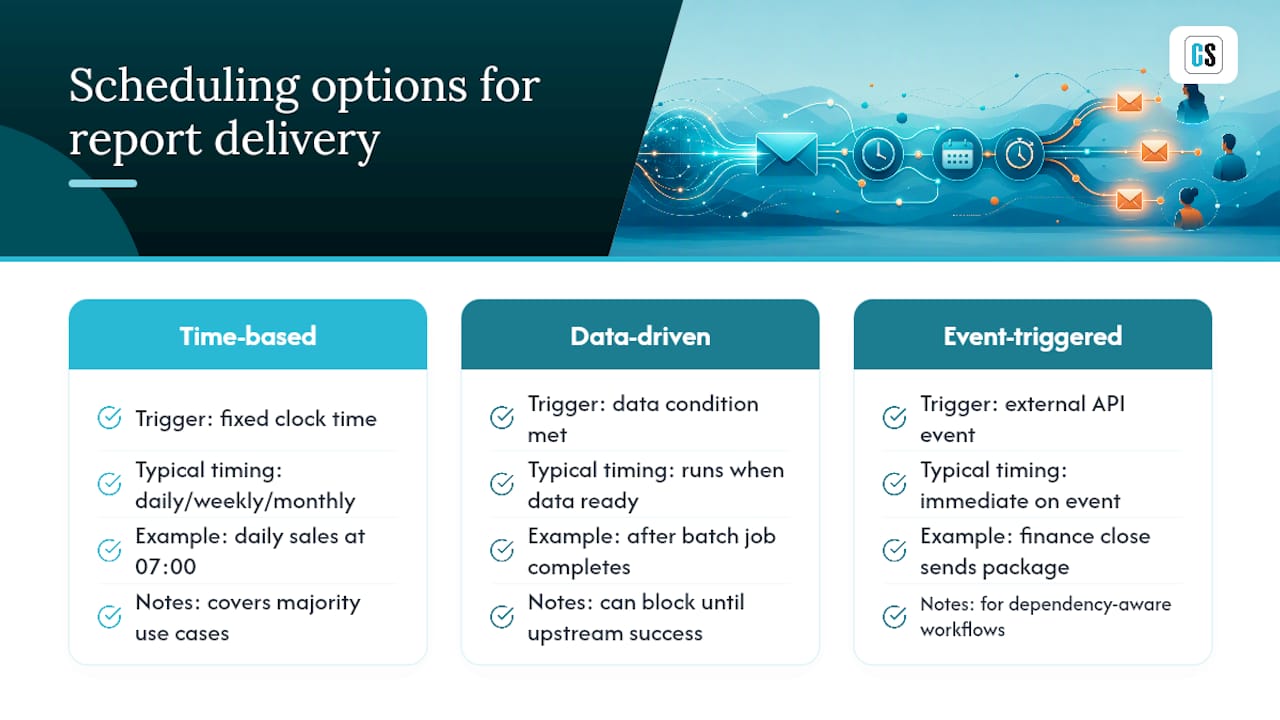
Event-triggered workflows go further still, launching a report send off an external system event through an API call. A finance team closing the books might trigger a full package of reconciliation reports automatically the moment the closing process marks itself complete, instead of waiting for a scheduled 9:00 AM run that might fire before the data is actually final. Dependency-aware scheduling that blocks a downstream report until its upstream job succeeds prevents exactly the kind of premature, incomplete send that erodes recipient trust in automated reporting.
Handling Different Email Client Compatibility Issues
Outlook, Gmail, and Apple Mail render HTML email differently enough that a report perfectly formatted in one client can look genuinely broken in another. This is one of the most underestimated sources of support tickets in any new automation rollout.
Outlook uses Microsoft Word's rendering engine for HTML email, which handles CSS inconsistently and often collapses complex table layouts. Gmail strips certain style tags and caps message size more aggressively than Outlook. Apple Mail on iOS renders closest to a standard browser but shrinks tables aggressively on smaller screens. The practical fix is simple: default to PDF attachments for anything with dense tables, multiple charts, or precise formatting requirements, and reserve inline HTML for short, simple summaries.
Test every new report template in all three major clients before it goes into production rotation, not just the client the IT team happens to use internally. A report that looks fine in the sender's own Outlook inbox can still break for half the recipient list using Gmail on a phone.
User Permissions and Access Control for Emailed Reports
Once a report leaves the BI platform and lands as an email attachment, the platform's own row-level security no longer applies. This is the single biggest compliance blind spot in report automation, and it catches organizations that assume their Power BI or Tableau permissions automatically carry over.

Recipient lists need to mirror actual data access rights, not just organizational convenience. A regional manager's report should filter to their region at generation time, not rely on the recipient to "only look at their section" of a report that technically contains company-wide data. Role-based access control at the scheduler level, tying recipient groups to defined data filters, closes this gap before a report ever gets sent.
External recipients (distributors, auditors, board members without platform licenses) need special attention. Confirm the scheduler can authenticate and deliver to non-licensed external addresses without exposing the underlying BI platform or requiring a guest account. Document who approved each recipient list and when, since that approval trail is often the first thing an auditor asks for when reviewing how sensitive financial or HR data reached external inboxes.
Author perspective: frequent pitfalls and practical fixes from deployments
The rollouts that stall almost always skip the operating contract and try to launch a dozen reports at once instead of one. Inconsistent grain, one report defined by region, another by department, breaks recipient logic fast. And teams that rush past the four-week human review window end up finding formatting bugs from customer complaints instead of from their own testing.
— Christian Ofori-Boateng
Ready to Move Past Native Subscriptions? Start With PBRS or ATRS
If native Power BI or Tableau subscriptions have already hit their ceiling on bursting, formats, or external recipients, the fix isn't a workaround. It's a scheduler built for exactly that gap. ChristianSteven Software gives IT and BI teams a governed layer that sits above the BI platform: full delivery logs, multi-format bursting to hundreds of personalized recipients, and destinations beyond email including SFTP and SharePoint, all without renegotiating platform licenses for every external recipient.

When you request a demo, ask specifically for three things: a live bursting run to a personalized recipient list, a delivery log from a deliberately failed send, and documentation of SOC 2 Type II compliance. A 30-day proof of concept should cover one high-value report, a defined recipient group, and a documented release calendar, enough to prove the model before scaling further. Start with PBRS for Power BI automated exports if Power BI is your primary platform, or explore ATRS for automating Tableau report delivery if Tableau is where your bottleneck lives.
Sources
- Report Automation Planning: Build a Dependable Delivery Service | Edilec
- Reporting Automation Playbook: Build & Scale for 2026 | Cyndra Blog
FAQ
What Is the Best Way to Deliver BI Reports by Email at Scale?
A centralized scheduler with dynamic bursting, multi-format export, and audit logging outperforms native BI subscriptions for organizations sending reports to more than a handful of recipients or destinations.
How Is This Different From Email Marketing Deliverability?
This covers automated delivery of BI reports and dashboards to internal and external recipients on a schedule, not inbox placement or bounce-rate optimization for marketing campaigns.
How Long Should the Initial Human Review Period Last?
Most successful rollouts run a four-week human review window, checking every automated send against the source report before trusting the pipeline unsupervised.
Can Automated Reports Reach External Recipients Without a BI Platform License?
Yes. Enterprise schedulers like PBRS and ATRS deliver to non-licensed external addresses by generating and sending the report outside the BI platform's own access layer, provided recipient permissions are configured correctly.
What Certification Should I Look for in a Reporting Vendor?
SOC 2 Type II certification is the strongest available signal that a vendor's delivery logs, access controls, and data handling meet enterprise audit standards.