
Automated business reporting is defined as the technology-driven process of collecting, transforming, generating, and distributing reports without manual intervention. The case for automating business reports is built on hard numbers: up to 40% of staff time is recoverable from manual reporting tasks, errors drop by as much as 90%, and report delivery accelerates by 70%. The industry term for this discipline is reporting automation, though managers often search for it simply as business report automation. ChristianSteven Software has spent more than two decades turning complex reporting workflows into hands-free processes across Power BI, Tableau, SSRS, and Crystal Reports environments. The gap between what automation can deliver and what most finance teams actually use is striking: nearly half of finance departments operate with no automation at all, even as 98% of CFOs report investing in digitization.
Why automate business reports? The core case
Reporting automation replaces the manual cycle of pulling data, formatting spreadsheets, and emailing files with a scheduled, rules-based system that runs without human prompting. The business case is not theoretical. 75% of finance specialists spend 5 to 6 hours every week recreating the same reports. That adds up to 300 hours per year, per person, spent on assembly rather than analysis.

The real cost is not just time. Manual reporting creates decision latency, a term for the gap between when data is available and when decision-makers actually see it. Decision latency from manual delays leads to stale information and poor timing on critical business decisions. Automation solves this by delivering near-real-time data on a consistent schedule, so managers act on current facts rather than last week's numbers.
The advantages of automating reports extend beyond speed. Automation removes the mechanical work between raw data and finished reports, freeing analysts to interpret results rather than assemble them. That shift from assembly to analysis is where real business value is created.
How does automating business reports improve accuracy and reduce errors?
Manual reporting processes are structurally prone to error. Copy-paste mistakes, formula overwrites, and inconsistent number formatting are not signs of careless staff. They are predictable outcomes of asking humans to repeat the same mechanical steps hundreds of times. Automation reduces manual errors by up to 90% by enforcing consistent data rules and formatting standards on every run.
The mechanism is straightforward. Automated pipelines apply the same extraction logic, the same transformation rules, and the same output format every single time. There is no variation based on who ran the report or how tired they were on a Friday afternoon. This consistency is especially critical for regulated outputs like accounts receivable aging reports or monthly financial close reports, where a single misplaced decimal can trigger compliance issues.
Exception handling adds another layer of protection. Well-built automation alerts the right people when a metric deviates beyond a set threshold or when data fails to refresh on schedule. This is different from sending every anomaly as a notification. Exception handling logic must be programmed to flag only meaningful deviations, preventing the notification fatigue that causes teams to ignore alerts entirely.
AI tools take accuracy further by identifying anomalies in data that rule-based systems might miss. They also generate plain-language narrative summaries that explain what the numbers mean, reducing the risk of misinterpretation at the executive level. For managers who want to reduce reporting errors without adding headcount, this combination of rules-based automation and AI-assisted narrative is the most direct path.
Pro Tip: Audit your data pipeline before automating. Clean, well-structured source data is the single biggest factor in whether automated reports are trustworthy or just faster versions of the same errors.
What are the efficiency gains of automating recurring business reports?
The efficiency gains from automating recurring business reports are measurable and immediate. The 40% staff time recovery figure is not a ceiling. It represents the average across organizations that automate high-frequency reports like weekly sales summaries, daily operational snapshots, and monthly financial reviews.
The most impactful reports to automate first share three characteristics:
- High frequency. Reports that run daily, weekly, or monthly consume the most cumulative staff time. Weekly sales reports and monthly financial close reports are the clearest targets.
- Consistent structure. Reports with a fixed format and defined data sources are the easiest to automate without extensive rework.
- Wide distribution. Reports sent to multiple stakeholders benefit most from automated delivery, since manual distribution multiplies the time cost at every step.
Automating high-frequency reports like weekly sales and monthly reviews first secures early wins and builds organizational buy-in for broader automation programs. That sequencing matters. A single successful automation builds the internal credibility needed to expand the program.
Scheduling and delivery mechanisms are the operational backbone of recurring report automation. A properly configured system generates the report, formats it for the correct audience, and delivers it to the right inbox or dashboard at the right time, without anyone pressing a button. For managers overseeing real-time reporting across multiple departments, this consistency removes a significant coordination burden.
Pro Tip: Start with one report that your team runs every week without fail. Automate that single report completely before expanding. The quick win creates momentum and reveals any data quality issues before they scale.
What are the key prerequisites for successful report automation?
Automation does not fix broken processes. It accelerates them. The most common failure in business report automation is skipping the preparation phase and automating a flawed manual workflow, which produces wrong answers faster and at greater scale.
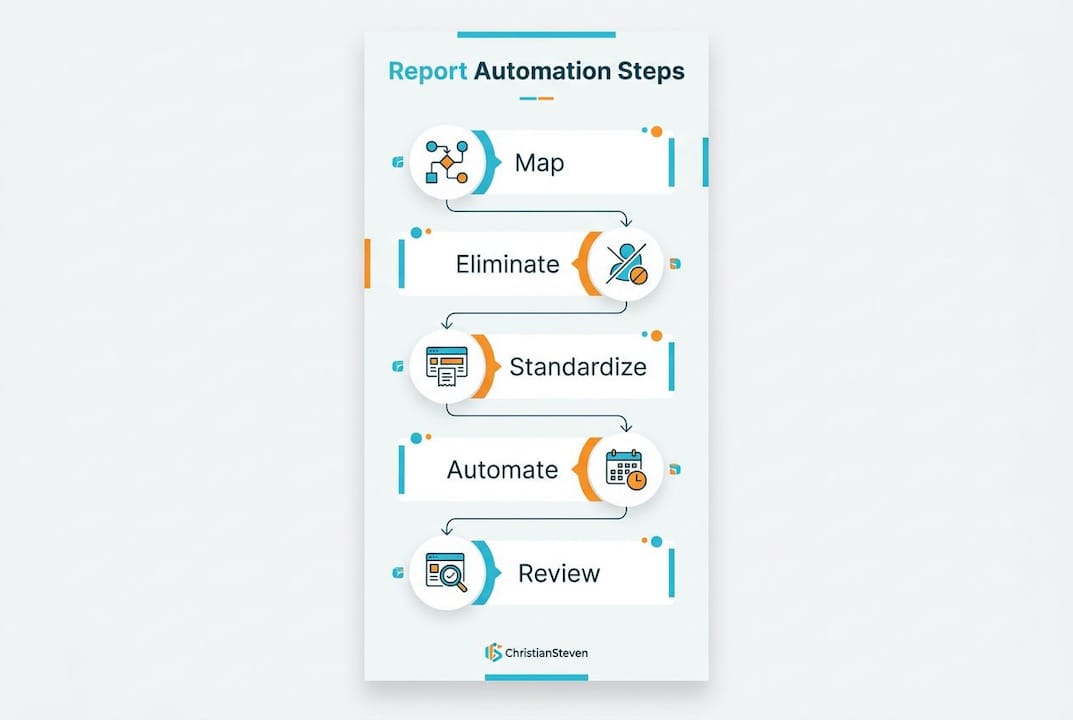
The correct sequence is: map, eliminate, standardize, then automate. Auditing and cleaning data sources, standardizing metrics, and removing redundant reports before automation are the steps that determine whether the output is trustworthy. Each step has a specific purpose.
Mapping means documenting every existing report, who uses it, how often it runs, and where the data comes from. This step typically reveals that a significant portion of reports are duplicates or are no longer used by anyone.
Eliminating means removing redundant reports and resolving conflicting metric definitions. If two departments define "revenue" differently, automation will encode that conflict permanently.
Standardizing means establishing unified naming conventions, data extraction logic, and transformation rules across all reports that will be automated.
| Practice | Good automation | Poor automation |
|---|---|---|
| Data preparation | Clean, audited pipelines before automation | Automate raw, unvalidated data sources |
| Metric definitions | Unified definitions across all reports | Conflicting definitions encoded into scripts |
| Exception handling | Alerts on meaningful anomalies only | No alerts, or alerts on every minor change |
| Human review | Review gates for executive-level reports | Fully hands-off with no oversight |
| Scope | Start with one high-frequency report | Automate everything simultaneously |
Human review gates remain necessary even in mature automation programs. Executive-level reports carry enough organizational weight that a single error can damage credibility. Automated generation with a final human check before distribution is the right balance for high-stakes outputs.
Pro Tip: Build a short checklist that runs before each automated report distributes. Even a two-item check, confirming data refreshed and totals are within expected range, catches the errors that exception handling misses.
How can AI enhance automated reports, and what challenges should you expect?
AI adds a capability that rules-based automation cannot provide: plain-language narrative. A traditional automated report delivers numbers on schedule. An AI-enhanced report delivers numbers plus a written explanation of what changed, why it likely changed, and what it means for the business. AI tools can cut report generation time by up to 80%, with the largest gains coming from eliminating manual narrative writing.
The implementation challenges are real and worth understanding before committing to an AI-enhanced approach:
- Data quality. AI models amplify data problems. A clean pipeline produces accurate narratives. A dirty pipeline produces confident-sounding wrong answers.
- Integration complexity. Connecting AI tools to existing BI environments like Power BI or Tableau requires structured data outputs and API access that not every organization has ready.
- Prompt engineering. The quality of AI-generated narrative depends heavily on how instructions are structured. Vague prompts produce vague summaries.
- Human oversight. AI outputs require human review, particularly for reports that inform financial decisions or go to external stakeholders.
- Governance. Organizations need clear policies on which reports can use AI-generated narrative and which require human-authored commentary.
AI reporting automation requires clean data pipelines, structured prompts, and scheduled delivery mechanisms to function reliably. Organizations that treat AI as a plug-and-play solution without addressing these prerequisites consistently underperform those that prepare their data environment first. For managers tracking fleet or operational data, the same principle applies: automated data export systems, like those used in fleet tracking workflows, depend on clean, structured data before any reporting layer can function correctly.
Key Takeaways
Automating business reports delivers measurable gains in speed, accuracy, and staff capacity only when organizations prepare their data environment and processes before automation begins.
| Point | Details |
|---|---|
| Time recovery is significant | Automation recovers up to 40% of staff time lost to manual reporting tasks. |
| Errors drop sharply | Consistent data rules reduce manual errors by up to 90% across automated reports. |
| Sequence before automating | Map, eliminate, and standardize existing workflows before any automation is applied. |
| Start with high-frequency reports | Weekly sales and monthly financial close reports deliver the fastest, most visible wins. |
| AI requires clean data | AI-generated narrative adds value only when the underlying data pipeline is accurate and well-structured. |
What I've learned from watching automation programs succeed and fail
I've reviewed enough reporting automation programs to identify the single most reliable predictor of failure: teams that skip standardization. They map their reports, get excited about the technology, and jump straight to automation. Six months later, they have fast reports that nobody trusts because the underlying metric definitions were never reconciled.
The Map, Eliminate, Standardize, Automate sequence is not a suggestion. It is the difference between a program that scales and one that gets quietly abandoned after the first executive questions a number. The organizations that follow this sequence consistently report that the standardization phase alone, before any automation tool is deployed, produces measurable improvements in reporting quality.
The other pattern I see repeatedly is underestimating the value of starting small. Automating one weekly sales report completely, with proper exception handling and a human review gate, teaches a team more about their data environment than any planning document. It surfaces the data quality issues, the metric conflicts, and the distribution edge cases that would otherwise derail a larger rollout.
Automation does not replace judgment. It removes the mechanical work so that judgment can be applied where it actually matters. The report automation benefits that organizations consistently underestimate are not the time savings. They are the quality improvements that come from analysts spending their time on interpretation instead of spreadsheet assembly.
— Bobbieann Gordon
ChristianSteven Software for automated report delivery
ChristianSteven Software builds the scheduling and delivery layer that turns a one-time automated report into a reliable, recurring process. ATRS, the Tableau report scheduler, connects directly to Tableau environments and handles the full distribution cycle: generate, format, and deliver to the right recipient on the right schedule, without manual steps.

For teams running Tableau, automating Tableau report delivery through ATRS removes the manual export and email steps that consume analyst time every week. The Tableau scheduler supports conditional delivery, burst reporting, and exception-based alerts, giving managers consistent, governed report distribution across their entire Tableau environment. ChristianSteven Software holds SOC 2 Type II certification, which means the delivery infrastructure meets the security standards that enterprise teams require.
FAQ
Why automate business reports instead of using spreadsheets?
Spreadsheets require manual data entry and formatting on every run, which introduces errors and consumes hours of staff time. Automation enforces consistent rules and delivers reports on schedule without human intervention.
How much time can report automation actually save?
Finance specialists spend up to 300 hours per year recreating the same reports manually. Automation recovers up to 40% of that time for higher-value analytical work.
What reports should be automated first?
Start with high-frequency reports like weekly sales summaries and monthly financial close reports. These deliver the fastest time savings and build organizational confidence in the automation program.
Does automating reports eliminate the need for human review?
No. Human review gates remain necessary for executive-level and externally distributed reports. Automation handles generation and delivery; human judgment validates the output before it influences major decisions.
What is the biggest risk in business report automation?
Automating a flawed manual process encodes its errors into every future report. Auditing and standardizing data sources and metric definitions before automation is the step that prevents this outcome.