
For most enterprise BI teams running Power BI, Tableau, SSRS, or Crystal Reports, ChristianSteven Software (PBRS, ATRS, CRD, and IntelliFront BI) is the strongest dedicated scheduling choice in 2026. It covers on-premises deployment, data-driven bursting, event-triggered workflows, and multi-format delivery in a single product family — the combination that matters most when you're managing hundreds of reports across a regulated environment.
Here's the short version of who should pick what:
- Best overall for enterprise BI scheduling: ChristianSteven Software (PBRS for Power BI/SSRS, ATRS for Tableau, CRD for Crystal Reports) — purpose-built for on-prem, data-driven, and event-triggered scheduling across the major BI platforms, with SOC 2 Type II certification.
- Best built-in option for Microsoft shops: Microsoft Power BI (Power BI Service or Report Server) — adequate for teams already standardized on Microsoft and running moderate report volumes without complex bursting needs.
- Best built-in option for Tableau teams: Tableau Server/Online — covers extract refresh and basic distribution, but hits limits fast when you need conditional delivery or multi-destination routing.
- Best for finance and management reporting (SMB): Fathom or Zoho Analytics — lighter tools suited to smaller teams that don't need enterprise-grade scheduling infrastructure.
- Best for cloud-native, all-in-one BI: Domo — strong for cloud-first organizations that want scheduling baked into a unified data-to-dashboard platform.
IT managers and BI architects responsible for multi-platform environments, compliance requirements, or high report volumes will find the most leverage in a dedicated scheduler. Finance teams at smaller organizations can often get by with a built-in tool or a lightweight SaaS option.
Key Takeaways
Dedicated report schedulers with data-driven bursting, event triggers, and on-premises deployment outperform native BI scheduling for any enterprise running high report volumes, multiple BI platforms, or strict compliance requirements.
| Point | Details |
|---|---|
| Dedicated vs. native scheduling | Native BI schedulers hit limits at scale; dedicated tools handle bursting, event triggers, and multi-destination delivery. |
| Data-driven bursting is the key differentiator | Only dedicated schedulers can pull recipient and filter parameters from a live database query for individualized report delivery. |
| On-prem deployment matters for regulated industries | Cloud-only tools are disqualified for many healthcare, finance, and government environments; verify deployment model first. |
| SOC 2 Type II is the security baseline | Require documented SOC 2 Type II certification covering the scheduling infrastructure, not just the company. |
| ChristianSteven Software covers the enterprise stack | PBRS, ATRS, CRD, and IntelliFront BI together cover Power BI, Tableau, SSRS, and Crystal Reports with on-premises deployment and SOC 2 Type II certification. |
Table of Contents
- Best report scheduling software at a glance
- How we picked and tested these tools
- Short reviews of the top report-scheduling and reporting platforms
- Key features and checklist for choosing report-scheduling software
- Deployment, security, and typical pricing and implementation timeline
- When to pick a dedicated scheduling product versus a BI tool's native scheduler
- How ChristianSteven Software addresses enterprise report scheduling needs
- Final recommendation and next step checklist
- ChristianSteven Software: evaluate PBRS and ATRS for your environment
- Sources
- FAQ
Best report scheduling software at a glance
The table below covers the tools that appear most frequently in enterprise shortlists, mapped to the dimensions that actually drive procurement decisions. Tools with thin public profiles on a given dimension are marked "—" instead of guessed.
A few quick notes on the table:
- Tools like Salesforce, HubSpot, Google Analytics, and QuickBooks Online include scheduling as a secondary feature inside a broader platform. They work well within their own data silos but don't support cross-platform bursting or advanced delivery routing.
- Finance-focused tools (Fathom, Spotlight Reporting, Syft Analytics, Reach Reporting, Joiin) are purpose-built for management reporting from accounting platforms. They're excellent in their lane and poor outside it.
- ChristianSteven Software is the only entry in this table that covers Power BI, Tableau, SSRS, and Crystal Reports under one licensing umbrella with on-premises deployment and SOC 2 Type II certification.
How we picked and tested these tools
The goal here was to identify tools that enterprise IT and BI teams can actually rely on, not just tools that look good in a demo. Hands-on tests and roundups consistently show that buyers in 2026 prioritize connector breadth, automation depth, and deployment model over UI aesthetics — so that's where the evaluation weight went.
Rating criteria used in this review:
- Automation features: Does the tool support data-driven scheduling (where schedule parameters come from a database query), event triggers (file change, database record update), and conditional delivery? These separate enterprise-grade schedulers from basic cron wrappers.
- Connector coverage: Which BI platforms, data sources, and delivery destinations does the tool natively support? A scheduler that only works with one platform is a point solution, not infrastructure.
- Output formats and delivery destinations: PDF, Excel, CSV, email, SFTP, SharePoint, REST API, cloud storage — the more destinations covered natively, the less custom glue code your team writes.
- Deployment model: On-premises, cloud, or hybrid. Regulated industries often can't use cloud-only tools; this criterion eliminates a large portion of the market for those buyers.
- Security and compliance: SOC 2 Type II certification, encryption at rest and in transit, role-based access controls, and audit logging are table-stakes for enterprise procurement.
- Scalability: How does the tool behave under concurrent report generation? Does it queue, prioritize, or fail?
- Support and SLAs: Dedicated enterprise support, documented response times, and a track record of regular product updates.
Sources used include vendor documentation, platform scheduling references for Salesforce, Splunk, and ServiceNow, product demos, G2 and Capterra review data as corroborating signals, and industry roundups that tested tools against real-world scheduling scenarios. G2 and Capterra ratings are treated as one signal among several — not the primary ranking driver.
Short reviews of the top report-scheduling and reporting platforms
ChristianSteven Software (PBRS, ATRS, CRD, IntelliFront BI)
ChristianSteven Software is the only vendor in this list that ships a dedicated scheduling product for each of the four major enterprise BI platforms: Power BI (PBRS), Tableau (ATRS), Crystal Reports (CRD), and real-time dashboards (IntelliFront BI). That breadth matters in mixed-platform environments where a single IT team manages reports across all four.
PBRS automates Power BI and SSRS exports with data-driven schedules, event triggers, and delivery to email, SFTP, SharePoint, cloud storage, and REST API endpoints. ATRS does the same for Tableau, adding file-change and database-record event triggers that let reports fire the moment source data update rather than on a fixed clock.
Strengths:
- Data-driven bursting: report parameters (recipient, filter, format) pulled directly from a database query
- Event-triggered scheduling: file changes, database record creation/updates
- On-premises deployment with SOC 2 Type II certification
- Covers Power BI Service, Power BI Report Server, Power BI Premium, all SSRS editions, Tableau Server, Tableau Cloud, and Crystal Reports
- Multiple delivery destinations in a single workflow: email, SFTP, SharePoint, REST API, cloud storage
- Documented monthly product updates and enterprise support SLAs
Limitations:
- On-premises focus means cloud-only buyers need to evaluate fit carefully
- Requires initial setup investment; not a five-minute SaaS signup
Pricing: Perpetual or subscription licensing; contact ChristianSteven for a quote based on server and report volume.
Microsoft Power BI
Power BI's built-in scheduling covers the most common enterprise use case: scheduled refresh of datasets and subscription-based email delivery of reports and dashboards. For organizations already running Microsoft 365, the integration with Teams, SharePoint, and Azure Active Directory is genuinely seamless.
The ceiling appears quickly, though. Paginated report subscriptions support PDF and Excel delivery, but data-driven subscriptions (where recipient and filter parameters come from a database) require Power BI Premium or Premium Per User licensing. Cross-platform delivery (sending a Power BI report to an SFTP server or triggering a report from a database event) isn't native — you'd need Power Automate or a third-party scheduler.
Strengths:
- Native Microsoft ecosystem integration
- Broad analyst adoption; low training overhead for M365 shops
- Paginated reports support PDF/Excel delivery with Premium licensing
Limitations:
- Data-driven subscriptions require Premium licensing
- No native event-triggered scheduling
- Cross-platform delivery requires additional tooling
Pricing: Per-user (Pro) or capacity-based (Premium) licensing; included in some Microsoft 365 bundles.
Tableau
Tableau Server and Tableau Cloud support scheduled extract refreshes and subscription-based email delivery of views and workbooks. For visualization-heavy teams, this covers the basics well. The scheduling UI is straightforward, and Tableau's REST API lets developers build more complex delivery workflows.
Where Tableau's native scheduling falls short: conditional delivery, data-driven bursting (sending different filtered views to different recipients based on a database query), and multi-destination routing all require external tooling. ATRS was built specifically to fill that gap.
Strengths:
- Strong visualization and embedded analytics
- REST API for custom scheduling workflows
- Tableau Cloud handles infrastructure for cloud-first teams
Limitations:
- No native data-driven bursting
- Conditional delivery requires external tools
- On-premises (Tableau Server) carries significant infrastructure overhead
Pricing: Per-user or site-based subscription.
Domo
Domo's cloud-native architecture means scheduling is baked into the same platform as data ingestion, transformation, and visualization. Dataflow scheduling, alert triggers, and Beast Mode calculated fields give data teams a unified environment without separate scheduling infrastructure.
The trade-off is vendor lock-in and pricing opacity. Domo's connector library exceeds 1,000 sources, which is genuinely impressive, but custom pricing and enterprise contracts make it hard to benchmark cost without a sales conversation.
Strengths:
- Cloud-native, end-to-end platform
- 1,000+ connectors
- Alert-based triggers and automated dataflow scheduling
Limitations:
- Cloud-only; not suitable for on-premises requirements
- Pricing is opaque; enterprise contracts required for full feature access
Zoho Analytics
Zoho Analytics offers scheduled reports, automated data sync, and email delivery at price points that SMB and mid-market teams can actually afford. The Zoho ecosystem integration (CRM, Books, Projects) is a genuine advantage for organizations already running Zoho.
Outside the Zoho ecosystem, connector depth drops. For teams running Power BI or Tableau alongside Zoho, the scheduling features don't extend to those platforms.
Strengths:
- Affordable tiered pricing
- Strong Zoho ecosystem integration
- Self-service setup with minimal IT overhead
Limitations:
- Limited value outside the Zoho ecosystem
- Not designed for enterprise-scale bursting or on-premises deployment
Fathom
Fathom targets finance and management reporting for small-to-medium businesses, pulling data from Xero, QuickBooks, and MYOB to generate scheduled management reports and KPI snapshots. The output quality for board-level financial reporting is high, and setup is fast.
The scope is narrow by design. Fathom doesn't do operational BI, doesn't connect to SQL databases or data warehouses, and isn't built for IT-managed scheduling infrastructure. For a CFO at a 50-person company, it's excellent. For an IT manager running enterprise BI, it's the wrong tool.
InetSoft
InetSoft covers embedded reporting and scheduled exports with flexibility that suits organizations building reporting into their own applications. Its burst reporting capability and JDBC/REST connector support give development teams more control than most SaaS-only options.
Strengths:
- Flexible embedding and export options
- Burst reporting support
- On-prem, cloud, and hybrid deployment
Limitations:
- Less polished UI than modern SaaS tools
- Requires more technical setup than plug-and-play options
Telerik Reporting
Telerik Reporting is a developer toolkit, not an out-of-the-box scheduler. Development teams building custom .NET applications get rich report design controls and export options (PDF, Excel, Word, HTML). Scheduling requires integration with an external engine — Telerik doesn't ship a native scheduler.
Best for: teams that need pixel-perfect report design embedded in a custom application and are comfortable wiring up their own scheduling layer.
Salesforce
Salesforce's built-in report scheduling runs on daily, weekly, or monthly cadences and emails HTML report versions to users with folder access. It's adequate for CRM-centric reporting where the audience is Salesforce users and the data lives in Salesforce.
The constraint is hard: scheduling behavior depends on folder sharing and user permissions, output is HTML email (not PDF or Excel), and the data scope is Salesforce-only. Cross-platform scheduling or multi-format delivery requires external tooling.
Whatagraph
Whatagraph is purpose-built for marketing agencies that need to send white-labeled client reports on a schedule. Automated PDF and email delivery, 40+ marketing connectors (Google Analytics, Meta, LinkedIn, and others), and a drag-and-drop report builder make it fast to set up for agency use cases.
Outside marketing reporting, it has little to offer. No SQL connectors, no on-premises deployment, no enterprise security certifications.
Coupler.io
Coupler.io automates data imports from 60+ sources into Google Sheets, Excel, and BI tools on a scheduled basis. For spreadsheet-first teams that need fresh data without manual exports, it solves a real problem efficiently.
It's not a report scheduler in the enterprise sense. There's no bursting, no event triggering, no multi-destination delivery. Think of it as a scheduled ETL layer for spreadsheet users.
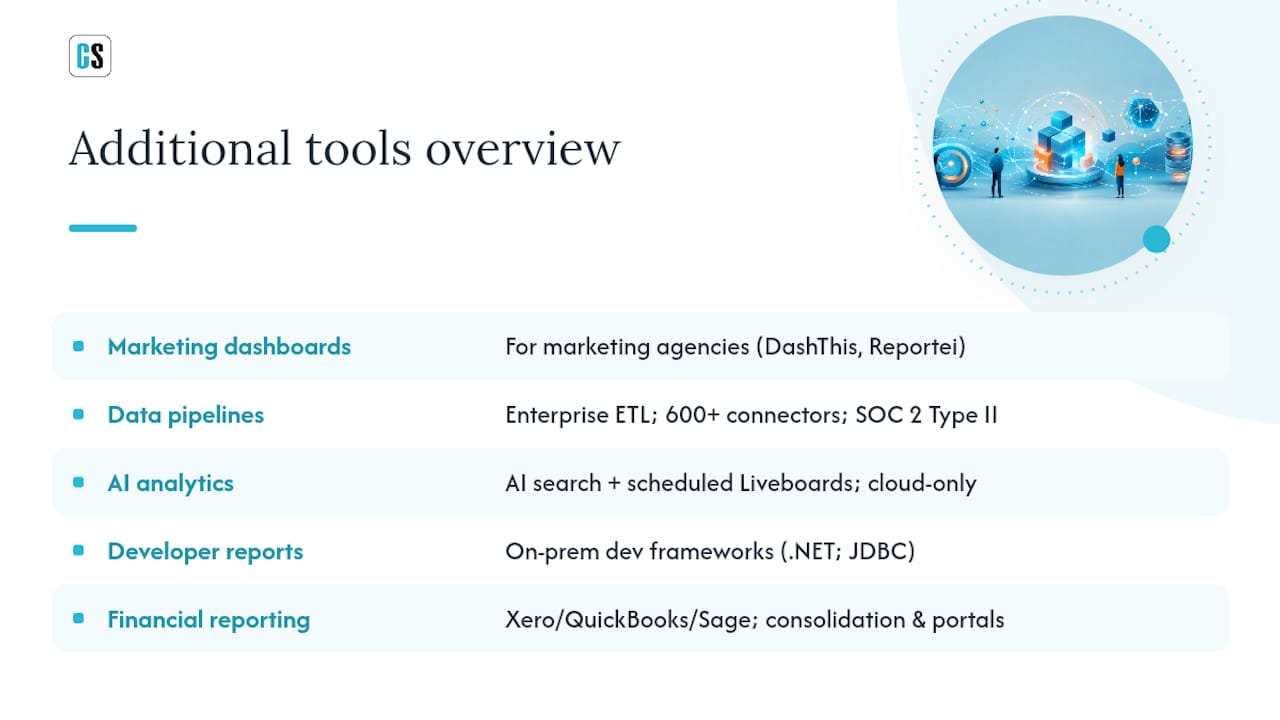
Additional tools: quick takes
DashThis serves marketing agencies with scheduled PDF and email delivery of marketing dashboards. Similar positioning to Whatagraph; the choice between them often comes down to connector preference and UI feel.
Adverity targets enterprise marketing data operations with 600+ connectors and SOC 2 Type II certification. It's a data pipeline tool first; reporting is downstream of its core ETL function.
ThoughtSpot brings AI-driven search analytics and scheduled Liveboards to cloud data warehouse environments. Strong for self-service analytics teams; not a fit for on-premises BI scheduling.
Datapine covers mid-market BI with scheduled report delivery and SQL connectivity. Solid for teams that need dashboard reporting without enterprise complexity.
Integrate.io is an ETL/ELT platform with 200+ connectors and scheduled pipeline runs. Like Coupler.io, it's a data movement tool rather than a report scheduler.
FastReport Mono and FineReport are developer-oriented reporting frameworks with on-premises deployment. FastReport Mono targets cross-platform .NET environments; FineReport is widely used in enterprise reporting in Asia-Pacific markets, with strong parameterized delivery and JDBC connectivity.
QueryTree is an open-source SQL reporting tool with basic scheduling. It suits small development teams that want lightweight ad hoc reporting without licensing costs.
Spotlight Reporting, Syft Analytics, Reach Reporting, and Joiin all occupy the same niche: scheduled financial and management reporting for accounting firms and multi-entity SMBs, connecting to Xero, QuickBooks, and Sage. They differ mainly in UI, consolidation features, and pricing. Joiin specializes in multi-entity consolidation; Reach Reporting emphasizes client portal delivery; Syft and Spotlight compete on report design quality.
Reportei and Cometly serve digital marketing agencies with scheduled marketing and attribution reports. Reportei connects to Google Analytics, Meta, and LinkedIn; Cometly focuses on ad attribution across Meta, Google Ads, and TikTok.
Adobe Customer Journey Analytics is an enterprise customer journey platform with scheduled workspace exports. It's a significant investment suited to organizations already in the Adobe Experience Platform ecosystem.
HubSpot and Google Analytics include scheduling as a secondary feature within their respective CRM and web analytics platforms. Both work well within their own data boundaries and poorly outside them.
Celoxis, MeisterTask, ProWorkflow, and Teamwork.com are project management platforms with reporting features. Teamwork.com has the most developed reporting capabilities among project tools, including scheduled project metric reports. None of them are BI schedulers in the enterprise sense.
QuickBooks Online schedules financial reports within the QuickBooks data environment. Useful for small business finance; not relevant for IT-managed BI infrastructure.
Signara has limited publicly available information on scheduling capabilities and deployment model at the time of writing.
Pro Tip: When evaluating any tool in a proof of concept, test data-driven scheduling specifically: create a small database table with recipient email addresses and report filter parameters, then verify the tool can read that table and generate individualized report bursts. Most tools that claim "data-driven scheduling" support only basic parameterization — not true database-driven bursting.
Key features and checklist for choosing report-scheduling software
The difference between a tool that works in a demo and one that holds up in production usually comes down to a handful of specific capabilities. Here's how to evaluate them systematically.
Automation and scheduling capabilities
- Data-driven scheduling: Can the tool read schedule parameters (recipient, filter, format, frequency) from a database query? This is the defining feature for enterprise bursting — sending individualized reports to hundreds of recipients without manual configuration.
- Event-triggered scheduling: Can a report fire when a file changes, a database record is created or updated, or an API event fires? Fixed-clock scheduling misses the window when data lands at unpredictable times.
- Conditional delivery: Can the tool suppress a report if it contains no data, or route it to a different destination based on a threshold? Splunk's scheduled reports demonstrate this well: actions (email, CSV output, webhooks) can be conditioned on search results, and cron expressions give precise control over timing.
- Concurrency and queue management: What happens when 50 reports are scheduled to run at the same time? Does the tool queue them, prioritize by SLA, or fail silently?
- Error handling and retries: Does the tool log failures, retry on transient errors, and alert administrators when a scheduled report doesn't complete?
Connector and platform coverage
- BI platform connectors: Which platforms does the tool natively support? Power BI Service, Power BI Report Server, Tableau Server, Tableau Cloud, SSRS, Crystal Reports — each requires a different integration approach.
- Delivery destinations: Email (SMTP), SFTP, SharePoint, cloud storage (S3, Azure Blob, Google Cloud Storage), REST API, database write-back, collaboration tools (Teams, Slack). The broader the native destination list, the less custom code your team writes.
- Output formats: PDF, Excel (XLSX), CSV, PNG, HTML, Word. Regulated industries often require PDF with digital signatures; finance teams want Excel; web dashboards want HTML or PNG.
Operational and security criteria
- Deployment model: On-premises, cloud, or hybrid. Regulated industries (healthcare, finance, government) often require on-premises or private cloud deployment. Verify this before shortlisting.
- SOC 2 Type II certification: The baseline for enterprise security procurement. Verify the certification scope (which systems are covered) and the audit period.
- Encryption: At rest and in transit. Ask for specifics: AES-256 at rest, TLS 1.2+ in transit.
- Access controls and audit logs: Role-based access, report-level permissions, and a tamper-evident audit log of who scheduled what and when.
- Scalability: Ask the vendor for documented performance benchmarks: concurrent report generation, maximum report volume per hour, and behavior under load.
Pro Tip: In your proof of concept, run a concurrency test: schedule 20–30 reports to fire simultaneously and monitor queue behavior, completion time, and error logs. This single test reveals more about production readiness than any feature checklist.
Deployment, security, and typical pricing and implementation timeline
Deployment models
- On-premises: The tool runs on your servers, inside your network perimeter. Data never leaves your environment. Required for many regulated industries. Typical setup time: 1–5 days for a basic pilot; 2–6 weeks for a full enterprise rollout with Active Directory integration and multi-server configuration.
- Cloud (SaaS): The vendor hosts everything. Fastest to start; least control over data residency and security configuration. Pilot possible in hours; full rollout in days to weeks depending on connector setup.
- Hybrid: On-premises scheduling engine with cloud-based management or delivery. Balances control and convenience. Setup complexity varies by vendor.
Security checklist
- SOC 2 Type II certification (verify scope and audit period)
- Encryption at rest (AES-256 or equivalent) and in transit (TLS 1.2+)
- Role-based access controls at the report, schedule, and destination level
- Audit logs: immutable records of schedule creation, modification, execution, and delivery
- Network isolation options (on-prem deployment, private cloud, VPN-only access)
- Credential management: how are SMTP passwords, SFTP keys, and API tokens stored? (Encrypted secrets store, not plaintext config files)
For HR reporting workflows and other sensitive data domains, the audit log and access control requirements are especially critical — you need to demonstrate who received which report and when.
Pricing shapes
- Perpetual license: One-time purchase plus annual maintenance. Common for on-premises tools. Higher upfront cost; lower long-term cost for stable deployments.
- Subscription: Annual or monthly recurring fee. Common for SaaS tools. Easier to budget; costs scale with usage.
- Per-server licensing: Common for on-premises schedulers. Cost scales with the number of servers running the scheduling engine.
- Per-user or per-report licensing: Common for SaaS tools. Cost scales with user count or report volume.
- Capacity-based licensing: Common for BI platforms (Power BI Premium, Tableau). Cost scales with compute capacity rather than user count.
Typical implementation timeline:
- Quick pilot (single report family, one BI platform): 1–2 weeks
- Departmental rollout (one team, multiple report types): 4–8 weeks
- Enterprise rollout (multi-platform, multi-team, Active Directory integration): 3–6 months
When to pick a dedicated scheduling product versus a BI tool's native scheduler
The direct answer: if any of the following apply to your environment, a dedicated scheduler will pay for itself quickly.
- Report volume exceeds what native scheduling handles gracefully. Most BI platforms throttle concurrent scheduled jobs. When you're running hundreds of reports per day, native schedulers queue unpredictably or fail silently.
- You need data-driven bursting. Sending individualized filtered reports to 500 recipients based on a database query is not a native feature in Power BI, Tableau, or Salesforce. It requires a dedicated scheduler.
- Your environment spans multiple BI platforms. A team running Power BI for finance, Tableau for operations, and Crystal Reports for legacy compliance reports needs a single scheduling layer — not three separate native schedulers with three separate audit trails.
- Event-triggered delivery is required. If reports need to fire when a database record changes or a file lands on an SFTP server, native BI schedulers (which run on fixed clocks) won't meet the requirement.
- Compliance and audit requirements are strict. Native schedulers rarely provide the tamper-evident audit logs, role-based access controls, and documented SLAs that regulated industries require.
- SLA commitments exist for report delivery. If a business unit is contractually committed to delivering reports by a specific time, you need a scheduler with retry logic, failure alerting, and priority queuing — not a best-effort cron job.
Decision checklist:
- Do you generate more than 50 scheduled reports per day? → Dedicated scheduler.
- Do you need to send different filtered views to different recipients automatically? → Dedicated scheduler.
- Do you run more than one BI platform? → Dedicated scheduler.
- Do you need reports to trigger on data events, not just time? → Dedicated scheduler.
- Does your industry require SOC 2 or equivalent compliance for report delivery? → Dedicated scheduler with documented certification.
- Are your report volumes stable, low, and confined to one platform? → Native scheduling may be sufficient.
Industry-specific examples where dedicated schedulers are the practical choice:
- Financial services: Daily risk reports bursted to individual portfolio managers with their specific holdings — data-driven scheduling from a positions database.
- Healthcare: Patient census reports delivered to department heads at shift change, triggered by an ADT (Admission, Discharge, Transfer) database event.
- Manufacturing: Production quality reports sent to plant managers when a batch record closes in the MES system — event-triggered, not clock-triggered.
- Retail: Weekly sales performance reports bursted to 200 store managers, each filtered to their store, generated from a single report template.
Understanding how BI tools integrate with scheduling infrastructure is the first step toward making this decision with confidence.
How ChristianSteven Software addresses enterprise report scheduling needs
ChristianSteven Software's product family covers the four BI platforms that dominate enterprise environments — Power BI, Tableau, SSRS, and Crystal Reports — with dedicated on-premises schedulers for each. That's not a marketing claim; it's the practical reality of what the products do.
PBRS handles Power BI Service, Power BI Report Server, Power BI Premium, and all SSRS editions. It supports data-driven schedules (parameters from a database), event triggers (file change, database record events), and delivery to email, SFTP, SharePoint, cloud storage, and REST API. ATRS does the same for Tableau Server and Tableau Cloud, adding workflow hooks for post-delivery actions. CRD automates Crystal Reports scheduling and distribution for organizations still running Crystal Reports in production. IntelliFront BI provides real-time dashboards and KPI monitoring for teams that need live visibility alongside scheduled delivery.
The SOC 2 Type II certification covers the scheduling infrastructure — not just the company — which matters when procurement teams ask for evidence of security controls rather than just a checkbox.
Key capabilities across the product family:
- Data-driven bursting: schedule parameters (recipient, filter, format) pulled from a live database query
- Event-triggered workflows: reports fire on file changes, database record creation, or database record updates
- Multi-destination delivery in a single workflow: email, SFTP, SharePoint, cloud storage, REST API, database write-back
- Output formats: PDF, Excel, CSV, PNG, HTML, and more
- On-premises deployment: data stays inside your network perimeter
- Documented monthly product updates and enterprise support SLAs
- Automated Power BI report distribution without requiring Power Automate or Premium licensing for data-driven subscriptions
For IT managers evaluating SSRS automation, CRD and PBRS together cover the full SSRS scheduling lifecycle — from parameterized report generation to multi-destination delivery with audit logging.
Final recommendation and next step checklist
By buyer profile:
- IT-managed enterprise, multi-platform BI environment: ChristianSteven Software (PBRS + ATRS + CRD as needed). The only option that covers Power BI, Tableau, SSRS, and Crystal Reports under one scheduling umbrella with on-premises deployment and SOC 2 Type II.
- Microsoft-only shop, moderate report volumes: Power BI native scheduling (with Premium for data-driven subscriptions). Add PBRS when volume or complexity grows.
- Tableau-only team, basic distribution needs: Tableau native subscriptions. Add ATRS when you need data-driven bursting or event-triggered delivery.
- Finance team at an SMB: Fathom, Spotlight Reporting, or Syft Analytics depending on your accounting platform (Xero, QuickBooks, Sage).
- Marketing agency: Whatagraph or DashThis for client reporting; Adverity for enterprise marketing data operations.
- Cloud-first, all-in-one BI: Domo.
Demo and POC checklist — what to test before you buy:
- Schedule a report using a database table as the source of recipient addresses and filter parameters (true data-driven bursting test)
- Trigger a report from a file drop or database record update (event trigger test)
- Deliver the same report simultaneously to email, SFTP, and SharePoint (multi-destination test)
- Run 20–30 reports concurrently and observe queue behavior and completion time (concurrency test)
- Verify audit log entries for each scheduled execution: timestamp, recipient, format, delivery status
- Test failure handling: disconnect the SMTP server mid-run and verify the tool logs the failure and retries
- Request the vendor's SOC 2 Type II report and verify the audit period covers the scheduling infrastructure
Suggested buying approach: Start with a pilot covering one report family on your primary BI platform. Validate scheduling cadence, event triggers, and delivery destinations against your SLA requirements. Then expand to additional platforms and report types once the core workflow is proven.
The real cost of "good enough" scheduling
Most IT teams I've spoken with didn't set out to buy a dedicated report scheduler. They started with native scheduling in Power BI or Tableau, hit a wall at some point — usually when a business unit asked for individualized reports for 200 people, or when a compliance audit demanded delivery logs that didn't exist — and then went looking for a real solution.

The pattern is consistent: native scheduling works until it doesn't, and the moment it stops working is usually the moment a business-critical process depends on it. The teams that avoid that crisis are the ones that choose BI reporting software with scheduling infrastructure in mind from the start, not as an afterthought.
The other thing worth saying plainly: the difference between a scheduler that has SOC 2 Type II certification and one that doesn't isn't just a procurement checkbox. It's the difference between a vendor that has had its security controls independently audited and one that hasn't. In regulated industries, that distinction shows up in your own audit findings, not just the vendor's marketing.
Organizational governance matters here too. The best scheduling tool in the world fails if the organization hasn't defined who owns the schedule catalog, who approves new scheduled reports, and who gets alerted when a delivery fails. The technology is the easier part.
ChristianSteven Software: evaluate PBRS and ATRS for your environment
Two decades of focus on BI report automation means ChristianSteven Software has solved the problems that generic schedulers haven't: data-driven bursting at scale, event-triggered delivery across mixed BI platforms, and on-premises deployment with documented security controls.

If your team runs Power BI, PBRS automates exports without requiring Power Automate or Premium licensing for data-driven subscriptions — a concrete cost and complexity reduction for most enterprise environments. For Tableau teams, ATRS handles automated Tableau report exports to PDF and other formats, with event-triggered workflows that fire on database changes rather than fixed clocks.
When you request a demo, ask specifically to see: event-triggered workflow configuration, a data-driven bursting run with a live database table, and the audit log output for a completed schedule. Those three tests will tell you more than any slide deck. Start your evaluation at Go.
Sources
- Schedule a Report for Refresh | Salesforce Help
- Schedule reports | Splunk Cloud Platform
- Generate and distribute a report
FAQ
What is the best software for scheduling and automating reports?
For enterprise environments running Power BI, Tableau, SSRS, or Crystal Reports, ChristianSteven Software (PBRS, ATRS, CRD) is the strongest dedicated option in 2026, covering data-driven bursting, event triggers, and on-premises deployment with SOC 2 Type II certification. For lighter needs within a single platform, native scheduling in Power BI or Tableau may be sufficient.
What are the top reporting tools for business intelligence teams?
The most capable tools for BI scheduling and automation include ChristianSteven Software, Microsoft Power BI, Tableau, Domo, and InetSoft for enterprise use; Zoho Analytics and Fathom for mid-market and finance teams; and Whatagraph or DashThis for marketing agency reporting.
When should I use a dedicated report scheduler instead of built-in scheduling?
Use a dedicated scheduler when you need data-driven bursting (individualized reports from a database query), event-triggered delivery, cross-platform scheduling across more than one BI tool, or documented audit logs for compliance — capabilities that native BI schedulers don't support at enterprise scale.
What platforms do good report-scheduling tools support?
The strongest enterprise schedulers support Power BI Service, Power BI Report Server, Tableau Server, Tableau Cloud, SSRS, and Crystal Reports, with delivery to email, SFTP, SharePoint, cloud storage, and REST API endpoints. Connector breadth across both BI platforms and delivery destinations is the primary differentiator at the enterprise level.
What security certifications should I require from a report-scheduling vendor?
SOC 2 Type II is the baseline for enterprise procurement. Verify that the certification covers the scheduling infrastructure specifically, confirm the audit period is current, and ask for evidence of encryption at rest and in transit, role-based access controls, and tamper-evident audit logging.