
TL;DR:
- Automating Tableau reports requires choosing a solution that matches your reporting complexity and scale.
- Native tools suit simple, recurring distributions but lack support for bursting, multi-format exports, or dynamic routing.
- Enterprise schedulers like ATRS deliver scalable, governed automation with bursting, multi-format exports, and audit trails.
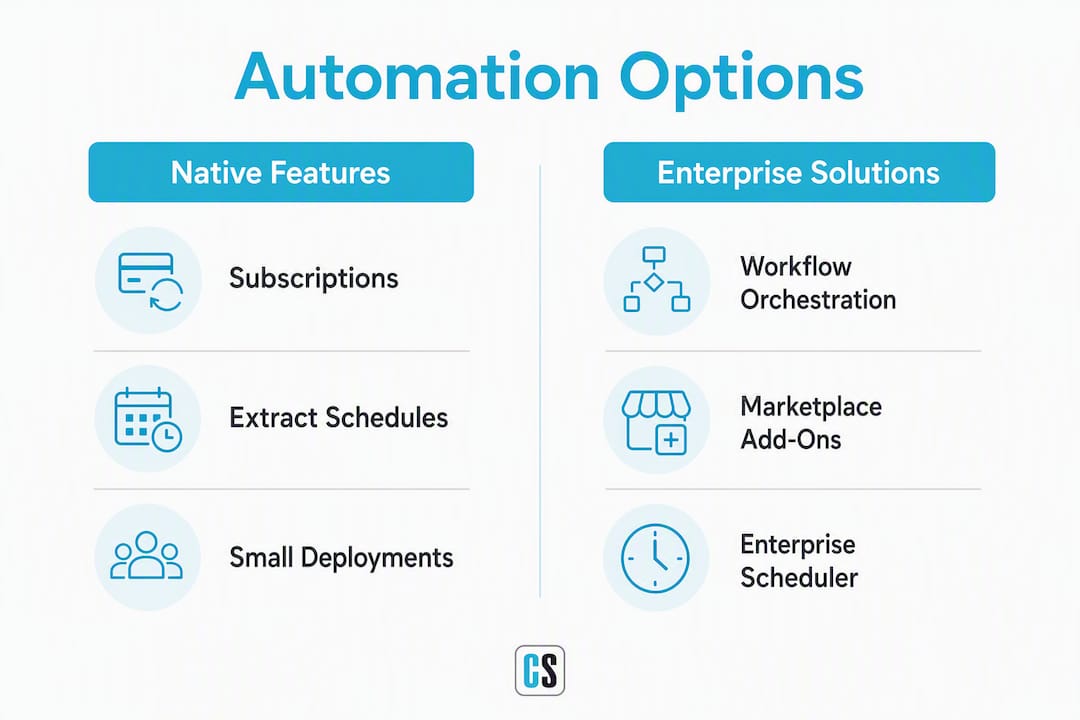
Yes, you can fully automate Tableau reports in production. The right route depends on your scale: native Tableau subscriptions and extract schedules work for small teams with simple, recurring outputs; orchestration via Apache Airflow, Prefect, or the Tableau REST API fits pipeline-integrated deployments where Tableau jobs need to slot into a broader DAG; and an enterprise scheduler like ATRS (Automated Tableau Reporting Scheduler) by ChristianSteven Software is the practical choice when you need data-driven bursting, multi-format exports, dynamic recipient lists, and a centralized audit trail. ChristianSteven Software holds SOC 2 Type II certification, which matters the moment regulated data enters the picture.
Before you go further, do two things:
- Audit your current report inventory: list every report distributed manually, its frequency, recipient count, and format.
- Pick one high-frequency, low-complexity report as your automation pilot. Prove the workflow before scaling.
Table of Contents
- Why automate Tableau reports in the first place?
- What are your options for automating Tableau reports?
- How do you put automated Tableau reporting into production?
- Which export formats and delivery destinations should you use?
- Where does Tableau's native automation fall short?
- What capabilities should an enterprise scheduler provide?
- How do you keep automated report distribution secure and auditable?
- What does Tableau report automation actually cost?
- How do you choose the right automation approach?
- Key Takeaways
- The part most automation projects get wrong
- ATRS handles the enterprise gaps that native Tableau cannot
- Authoritative sources and further reading
- FAQ
Why automate Tableau reports in the first place?
Manual report distribution is one of the most persistent drains on analyst time in BI teams. Every hour spent exporting dashboards, renaming files, and emailing attachments is an hour not spent on analysis. Automation converts that cost into governed, auditable throughput.

The operational case is straightforward. Automated scheduling eliminates human error in export timing, format selection, and recipient routing. Consistency improves: stakeholders receive the same report at the same time, in the same format, every cycle. When a data refresh fails, a properly configured scheduler catches it and holds delivery rather than sending a stale file.
Governance is where automation earns its keep in regulated environments. A centralized scheduler maintains delivery logs, timestamps, and chain-of-custody records that manual email threads cannot replicate. For finance, healthcare, and compliance-heavy operations, that audit trail is not optional.
Key benefits by stakeholder:
- Executives: Consistent, on-time delivery of KPI snapshots without chasing analysts.
- Finance teams: Month-end packages distributed simultaneously to all regions, in the right format, without manual intervention.
- Operations: Real-time or near-real-time dashboards refreshed and pushed automatically after ETL completes.
- Analysts: Time reclaimed from repetitive export tasks and redirected to actual analysis.
SOC 2 Type II certification from ChristianSteven Software signals that the automation infrastructure handling your report delivery meets independently audited security and availability standards — a meaningful trust signal when sensitive data is in transit.
What are your options for automating Tableau reports?
Four distinct categories exist, and they are not interchangeable. Picking the wrong one creates either under-capability or unnecessary complexity.
Native subscriptions and extract schedules
Tableau Server and Tableau Cloud both support built-in subscriptions (email snapshots of views or workbooks) and scheduled extract refreshes. Setup is fast, no additional software required, and the feature set covers straightforward use cases: a weekly PDF emailed to a fixed list, or a daily extract refresh keeping a dashboard current.
The ceiling is low. Native features work for small deployments but struggle with bursting, multi-format runs, and advanced routing. If your recipient list changes based on data, or you need the same workbook exported as both PDF and Excel in a single run, native subscriptions will not get you there.
Lightweight extensions and marketplace add-ons
The Tableau Exchange and third-party marketplaces offer extensions that add scheduling or export capabilities on top of native Tableau. These are useful for teams that want more than subscriptions but are not ready to invest in a full enterprise platform. Tradeoffs include vendor dependency, limited support for complex delivery scenarios, and variable security posture.
Orchestration via workflow tools and APIs
For teams already running data pipelines, integrating Tableau into an existing orchestration layer is a natural fit. Apache Airflow supports custom TableauOperators that call the REST API to publish workbooks, trigger extract refreshes, and control task sequencing. Prefect Cloud can programmatically create and manage Tableau Server schedules, coordinating downstream distribution only after upstream data steps succeed.
Tabcmd and the Tableau Server Client (TSC) library are practical for scripted automation: publishing workbooks, exporting views, and updating permissions. The tradeoff is maintenance overhead. Scripts break when API versions change, credentials rotate, or rate limits shift. Every custom script is a future support ticket.
Enterprise scheduling platforms
Purpose-built schedulers handle what the other three categories cannot: data-driven bursting to hundreds or thousands of personalized outputs, multi-format exports in a single run, event-driven triggers, dynamic recipient mappings, and centralized auditing. ATRS from ChristianSteven Software is the on-premises enterprise option in this category, built specifically for Tableau environments.
How do you put automated Tableau reporting into production?
Follow this sequence. Skipping steps, especially testing and monitoring, is where most automation projects create problems they later have to undo.
- Audit and inventory candidate reports. List every manually distributed report: owner, frequency, recipient count, format, and data source. Prioritize by frequency and recipient volume.
- Stabilize and publish shared data sources. Automation built on unstable or locally cached data sources will produce inconsistent outputs. Publish certified data sources to Tableau Server or Cloud before scheduling anything against them.
- Design your parameter, filter, and row-level security (RLS) strategy. For bursted reports, determine how recipient-specific filtering works: via RLS in the data source, via parameters passed at runtime, or via a recipient mapping table.
- Choose output formats and delivery destinations. Match format to recipient need (PDF for presentation, Excel for downstream processing, CSV for data pipelines). Confirm delivery endpoints: email server, SFTP credentials, SharePoint/Drive permissions.
- Select your scheduling approach. Native subscriptions for simple cases; orchestration if Tableau jobs belong in an existing pipeline DAG; enterprise scheduler if bursting, multi-format, or audit requirements apply.
- Build and test the automation. Run end-to-end tests with real data. Verify file integrity, format fidelity, and that recipient routing logic produces the correct output per recipient.
- Implement monitoring, logging, and alerting. Every scheduled job needs a failure notification path. Silent failures — jobs that complete without error but deliver stale or empty files — are harder to catch than outright errors.
- Run a pilot and iterate. Start with one report, one delivery channel, and a small recipient group. Measure delivery success rate, data freshness, and recipient feedback before expanding.
Pro Tip: Always chain distribution jobs to extract refresh completion. A scheduler that fires distribution before the extract finishes will send yesterday's data in today's report. Chaining jobs so delivery triggers only after a successful refresh is one of the most important safeguards in any mature automation pipeline.
Which export formats and delivery destinations should you use?
Format choice is not a preference question. It is a downstream-use question.
| Format | Fidelity | Editable | Typical File Size | Best Use Case |
|---|---|---|---|---|
| High | No | Medium | Executive snapshots, compliance records, print-ready reports | |
| Excel | Medium | Yes | Medium–Large | Finance teams, downstream calculations, pivot analysis |
| CSV | Low | Yes | Small | Data pipelines, database ingestion, bulk processing |
| PPTX | High | Partial | Large | Board presentations, stakeholder briefings |
For delivery, the channel should match the recipient's workflow and the data's sensitivity. Email works for internal snapshots. SFTP is the standard for external partners and regulated file transfers. SharePoint and Google Drive suit teams already working in those environments. Collaboration tools like Microsoft Teams can receive automated report notifications, though attaching full exports there raises governance questions for sensitive data.
External recipients require additional controls: encrypted delivery, access expiration, and a clear record of what was sent and when.
Pro Tip: Establish a naming convention before your first automated delivery: include report name, date, and recipient segment in the filename (e.g., SalesRegion_West_2026-06-01.pdf). Add a folder retention policy so archives do not grow unbounded. Fixing naming conventions after hundreds of files exist is painful.
Where does Tableau's native automation fall short?
Native tools are a reasonable starting point, not a destination for complex reporting environments. The limitations surface quickly once volume or complexity grows.
Native subscriptions lack the capability to support data-driven bursting, multi-format runs, dynamic recipient lists, and complex routing. That is not a criticism; it reflects the feature's intended scope.
Common pain points in practice:
- No data-driven bursting. Sending 500 personalized regional reports from one workbook requires a purpose-built bursting engine, not native subscriptions.
- Extract refresh coordination. Native subscriptions do not wait for extract refreshes to complete. Distribution and refresh run on independent schedules, creating a race condition.
- Limited format options. Subscriptions deliver PNG or PDF. If downstream teams need Excel or CSV, native tools require a separate manual step.
- No centralized audit trail. Who received what, when, and whether the file was delivered successfully is not tracked in a queryable log.
- External recipient management. Routing reports to external partners or customers with different data scopes is not a native capability.
These limitations surface most visibly in month-end close cycles, multi-region reporting, and any workflow where a regulator might ask for delivery confirmation.
What capabilities should an enterprise scheduler provide?
If you are evaluating a purpose-built scheduler, use this as your baseline checklist. Any platform that cannot check most of these boxes is not enterprise-grade.
Feature checklist:
- Data-driven bursting: one workbook, parameterized filters, recipient mapping from a database query
- Multi-format exports in a single scheduled run (PDF, Excel, CSV, PPTX)
- Event-driven triggers: fire on extract refresh completion, file arrival, or API call
- Job chaining: distribution waits for successful extract refresh before executing
- Dynamic recipient lists: recipients and their data scope pulled from a live data source
- Robust error handling: retry policies, failure notifications, and dead-letter logging
- Centralized audit log: timestamped record of every delivery attempt and outcome
- Secure delivery: SFTP, encrypted email, cloud storage (SharePoint, Google Drive, S3)
- RBAC and SSO integration: role-based access to the scheduler itself, integrated with your identity provider
- On-premises or hybrid deployment: data never leaves your environment if compliance requires it
Procurement evaluation questions (numbered for your RFP):
- Does the platform support data-driven bursting with recipient mappings from a database?
- Can a single scheduled job export to multiple formats simultaneously?
- Does job chaining tie distribution to extract refresh success?
- What retry and error-handling policies are configurable?
- Is there a queryable audit log with delivery confirmation?
- What delivery destinations are supported natively (SFTP, SharePoint, S3, email)?
- Does the platform support on-premises deployment?
- What compliance certifications does the vendor hold?
ATRS (Automated Tableau Reporting Scheduler) from ChristianSteven Software addresses each of these. It runs on-premises, supports multi-format exports, data-driven bursting, and event triggers, and carries SOC 2 Type II certification. For teams in regulated industries or with strict data residency requirements, the on-prem deployment model is often the deciding factor.
Pro Tip: Ask every vendor for a reference customer in your industry who runs bursting at your target volume. A vendor comfortable with 50 scheduled jobs may not have the architecture to handle 5,000 personalized outputs per night.
How do you keep automated report distribution secure and auditable?
Security is not a post-implementation concern. It belongs in the design phase, before the first scheduled job runs.
The foundation is identity: every automated delivery should be traceable to a service account with documented permissions, integrated with your SSO provider. Row-level security in Tableau controls what data each recipient sees; the scheduler controls where that data goes. Both layers must be configured and tested independently.
Practical controls to implement:
- Integrate the scheduler with your SSO/identity provider (Okta, Azure AD, or equivalent) for RBAC on the scheduler itself.
- Enforce RLS in Tableau data sources so bursted outputs contain only the data each recipient is authorized to see.
- Encrypt files in transit (TLS for email and SFTP) and at rest for archived outputs containing sensitive data.
- Maintain a delivery audit log with timestamps, recipient identifiers, file hashes, and delivery status.
- Implement retention and purge policies: automated reports accumulate fast, and indefinite retention creates both storage and compliance risk.
- Mask or redact sensitive fields (PII, financial identifiers) in outputs destined for external recipients.
ChristianSteven Software's SOC 2 Type II certification means the platform's security controls, availability commitments, and operational processes have been independently audited. For procurement teams that need to demonstrate due diligence on their automation infrastructure, that certification is a concrete starting point.
What does Tableau report automation actually cost?

Licensing and infrastructure costs vary enough that a single figure would be misleading. What you can do is identify the cost drivers and size your requirements before you talk to vendors.
Primary cost drivers:
- Number of scheduled jobs (daily, weekly, monthly run frequency)
- Bursting volume: how many personalized outputs per run, per day
- Output formats and storage requirements for archives
- Delivery destination integrations (SFTP credentials, cloud storage APIs, email server configuration)
- Deployment model: on-premises infrastructure costs versus cloud-hosted licensing
- Support tier and SLA requirements
Budgeting approach: Start with a pilot covering your highest-frequency, highest-recipient-count report. Measure actual run time, burst count, and storage consumption over one full cycle (including month-end peak). Use those numbers to project annual volume, then add a 30% capacity buffer for growth and peak load.
Custom scripting has a hidden cost that rarely appears in initial estimates: ongoing maintenance. Every API version change, credential rotation, or Tableau Server upgrade is a potential script failure. Purpose-built schedulers absorb that maintenance internally; custom scripts push it back to your team.
How do you choose the right automation approach?
Work through this decision sequence before committing to any tool or architecture.
- Count your scheduled outputs. Fewer than 50 simple subscriptions per week? Native Tableau features are probably sufficient.
- Check for bursting requirements. If any report needs personalized filtering per recipient at scale, you need a bursting engine. Native subscriptions cannot do this.
- Assess pipeline integration needs. If Tableau jobs must slot into an existing Airflow or Prefect DAG, orchestration is the right layer.
- Evaluate compliance requirements. Regulated data, external recipients, or audit trail requirements point toward an enterprise scheduler with documented security certifications.
- Estimate in-house engineering capacity. Custom scripting is viable if you have engineers who can maintain it. If the BI team owns the automation without dedicated engineering support, a purpose-built scheduler reduces long-term risk.
Red flags when evaluating vendors:
- Routine tasks require custom scripting to configure.
- No centralized audit log or delivery confirmation.
- Error handling is limited to email alerts with no retry logic.
- Delivery security relies on unencrypted email attachments.
- Pricing is opaque or tied to per-output counts without a cap.
Decision shortcut: match scale, compliance need, and engineering capacity to the category. Small and simple: native. Pipeline-integrated: orchestration. Large, regulated, or bursting-heavy: enterprise scheduler.
Key Takeaways
Enterprise Tableau report automation requires matching your scale and compliance needs to the right approach: native scheduling, orchestration, or a purpose-built enterprise scheduler.
| Point | Details |
|---|---|
| Native tools have a low ceiling | Tableau subscriptions work for simple, fixed-recipient reports but cannot handle bursting, multi-format runs, or dynamic recipient lists. |
| Job chaining prevents stale outputs | Always trigger distribution after a confirmed extract refresh, not on an independent schedule. |
| Bursting requires a dedicated engine | Personalized outputs at scale need a scheduler that reads recipient mappings from a database and applies parameterized filters per recipient. |
| Security belongs in the design phase | Implement SSO, RLS, encrypted delivery, and audit logging before the first automated job runs in production. |
| ChristianSteven Software's ATRS | ATRS is the on-premises enterprise scheduler for Tableau, covering bursting, multi-format exports, job chaining, and SOC 2 Type II-certified delivery. |
The part most automation projects get wrong
Most Tableau automation projects fail not because the technology is hard, but because teams underestimate the coordination problem. The scheduler is the easy part. The hard part is the contract between your ETL pipeline, your Tableau extract refresh schedule, and your distribution jobs. When those three things are not explicitly sequenced, you get a system that looks automated but regularly delivers yesterday's numbers in today's report.
The second failure mode is brittle scripting. Teams build a working Python script against the Tableau REST API, it runs cleanly for three months, then a credential rotation or a minor API version change breaks it at 2 AM on the last business day of the quarter. Nobody finds out until a VP emails asking where the report is. Purpose-built schedulers handle auth rotation, retry logic, and API compatibility internally. That is not a feature; it is the reason they exist.
Governance is the third gap. Automation without an audit trail is just faster manual work. If you cannot answer "who received the Q3 revenue report, in what format, at what time, and did the delivery succeed?" you do not have governed automation. You have a scheduled guess.
The teams that get this right treat automation as a pipeline discipline, not a reporting feature. They design for failure, monitor every job, and build the audit trail from day one.
ATRS handles the enterprise gaps that native Tableau cannot
When your reporting operation outgrows native subscriptions, ATRS from ChristianSteven Software is built for exactly what comes next. It runs on-premises, so your data never leaves your environment. A single scheduled job can burst hundreds of personalized PDF or Excel outputs, each filtered to the right recipient, delivered to email, SFTP, SharePoint, or cloud storage simultaneously.

ChristianSteven Software has spent more than two decades building BI automation infrastructure for organizations that cannot afford silent failures or ungoverned delivery. ATRS chains distribution to extract refresh completion, logs every delivery attempt with timestamps and status, and integrates with your SSO provider for role-based access control. SOC 2 Type II certification backs the security posture.
If your team is hitting the limits of native Tableau scheduling, start an ATRS trial or request a demo and see how the enterprise feature set maps to your specific reporting workflows.
Authoritative sources and further reading
Before building production automation jobs, consult the API documentation and orchestration guides below. They cover the technical specifics that general guides cannot.
- Tableau Report Scheduler: A Practical Guide To Automating Enterprise Reporting — Product-agnostic overview of what a scheduler does, enterprise features to evaluate, and procurement criteria.
- How To Automate Reports In Tableau: A Practical Guide For Enterprise Teams — Covers native capabilities, scripting options with tabcmd and TSC, and when each approach applies.
- Automating Tableau Reports with ATRS — Product-aligned guide showing how ATRS extends Tableau automation with bursting, multi-format exports, and event triggers.
- Advanced Tableau Report Scheduler: Architecting Enterprise-Grade Automation — Deep dive into large-scale scheduling architecture and governance patterns for IT architects.
- Tableau Scheduled Reporting Best Practices in 2026 — Current operational patterns for governance, monitoring, and capacity planning.
FAQ
Can Tableau send automated reports natively?
Yes, through subscriptions and extract refresh schedules on Tableau Server and Tableau Cloud. Native features cover simple, fixed-recipient email delivery but do not support data-driven bursting, multi-format exports, or dynamic recipient lists.
What is data-driven bursting in Tableau report automation?
Bursting runs one master workbook with parameterized filters and maps each output to a specific recipient based on a database query. It produces hundreds of personalized reports in a single scheduled job, a capability that requires an enterprise scheduler like ATRS.
When should a BI team use an enterprise scheduler instead of native Tableau?
When reporting requirements include bursting at scale, multi-format single-run exports, dynamic recipient routing, centralized audit trails, or on-premises deployment for compliance reasons, native Tableau subscriptions are not sufficient. ATRS from ChristianSteven Software is built for these scenarios.
How do you prevent automated reports from delivering stale data?
Chain distribution jobs to extract refresh completion rather than running them on independent schedules. A scheduler that triggers delivery only after a confirmed successful refresh eliminates the race condition that produces stale outputs.
What security certifications should an enterprise Tableau scheduler hold?
SOC 2 Type II is the standard independent audit for security, availability, and confidentiality controls. ChristianSteven Software holds SOC 2 Type II certification, which supports procurement due diligence for regulated industries.