
For enterprise-scale scheduling, bursting, and multi-destination delivery, native Tableau Subscriptions won't get you there alone. Once you need personalized reports going to hundreds of recipients, delivery to SFTP or SharePoint, or audit trails your compliance team can actually use, an on-premises scheduler built for Tableau, such as ATRS from ChristianSteven Software, closes the gap.
That's not a knock on Tableau. Subscriptions do what they're designed to do. They just weren't built for the enterprise-scale distribution problems that show up once your dashboard footprint grows past a single department. The capabilities that push teams toward an external scheduler tend to be the same ones every RFP eventually asks about:
- Event-driven triggers that fire after a data refresh or an external system flag, not just on a clock
- Bursting and personalization that send the right slice of a report to each recipient, at volume
- Multi-destination delivery to email, SFTP, file shares, and SharePoint, with format control across PDF, Excel, and CSV
- Centralized logging and error handling so a failed delivery doesn't disappear silently
Disclosure: ChristianSteven Software publishes this article, and ATRS is presented below as the recommended solution for these scenarios.
Key Takeaways
Enterprise Tableau reporting requires an external scheduler like ATRS when bursting, multi-destination delivery, or audited governance exceed what native Subscriptions provide.
| Point | Details |
|---|---|
| Know the native ceiling | Tableau Subscriptions handle simple scheduled snapshots but lack bursting, SFTP/SharePoint delivery, and centralized audit logs. |
| Match the tool to the risk | Keep native subscriptions for internal snapshots; route mission-critical or regulated distributions through an external scheduler. |
| Lead evaluations with logging and triggers | Centralized audit trails and event-driven triggers catch more real-world failures than raw feature counts. |
| Run a live proof-of-concept | Ask vendors to demo a 100+ recipient burst, error logs, and a chained job tied to a data refresh before signing anything. |
| ATRS covers the enterprise checklist | ChristianSteven Software's ATRS delivers bursting, event triggers, multi-destination exports, and SOC 2 Type II backed governance. |
Table of Contents
- What Native Tableau Subscriptions Do and Where They Fall Short
- What Are the Alternatives to Native Tableau Subscriptions?
- How Do You Evaluate a Tableau Subscriptions Alternative?
- How ATRS Meets Enterprise Tableau Scheduling Requirements
- Vendor Guidance Alone Won't Fix a Bad Rollout
- Try ATRS for Enterprise Tableau Report Automation
- FAQ
What Native Tableau Subscriptions Do and Where They Fall Short
Tableau Subscriptions handle the basics well. A user schedules a snapshot, image or PDF, or a link back to a dashboard, and Tableau sends it out on a recurring schedule or, in newer configurations, triggers when the underlying data refreshes. For a manager who wants their weekly sales dashboard delivered every Monday morning, that's genuinely enough.
The friction starts once an organization scales past that use case. Three patterns show up repeatedly in enterprise environments:
- Limited bursting and personalization. Subscriptions send the same view to everyone on the list. Sending 200 regional managers each their own filtered slice of a dashboard isn't a native capability.
- Restricted destinations and calendar logic. Delivery is largely email-based, and schedule patterns don't handle business calendars, blackout windows, or complex recurrence well.
- Weak governance and format control. There's no centralized log of who got what, when, or whether a delivery failed. Merging multiple views into one PDF, or enforcing password protection, requires workarounds.
The operational consequence is predictable: schedule collisions during peak hours, unnecessary load on the Tableau Server or Cloud site during refresh windows, and BI teams stitching together tabcmd scripts and Task Scheduler jobs to patch the gaps. Those scripts work until someone leaves the team or a server gets patched, and then nobody remembers why the Tuesday export stopped running.
What Are the Alternatives to Native Tableau Subscriptions?
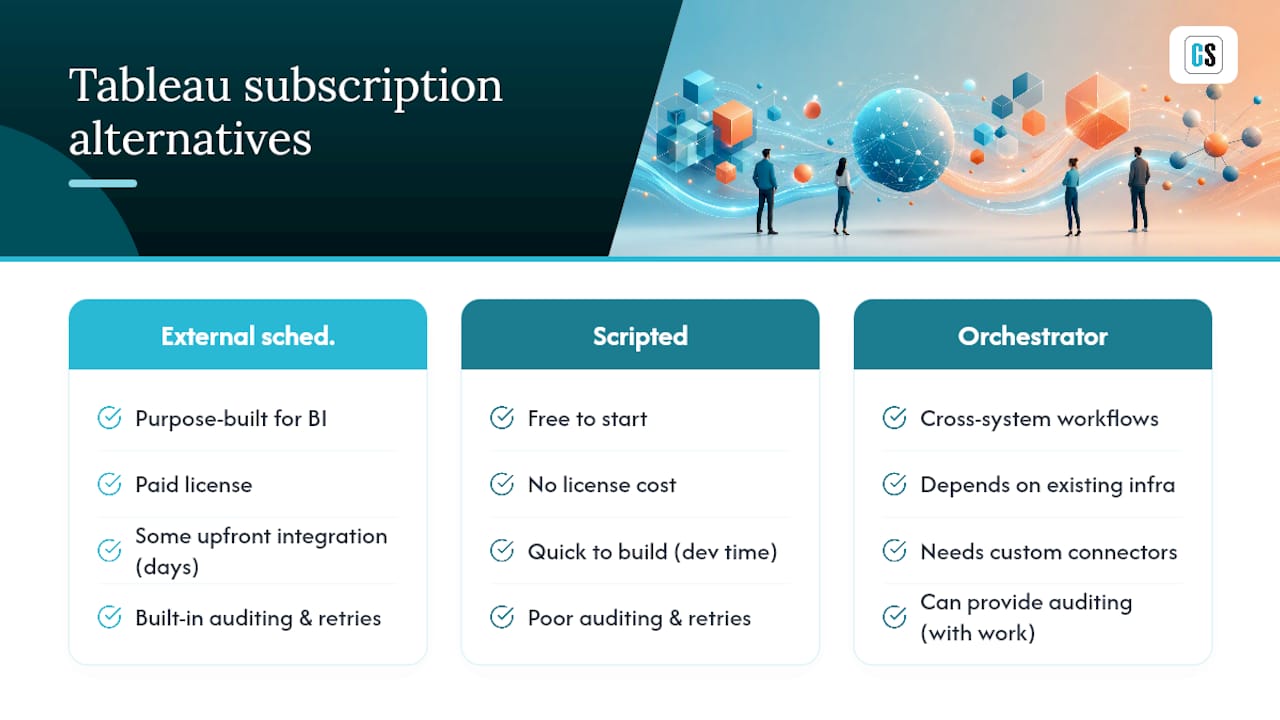
Three broad categories fill the gap, and each fits a different kind of organization.
Purpose-built external schedulers are designed specifically for BI report automation. They handle bursting, event triggers, multi-destination exports, and governance out of the box. The trade-off is a license cost and some integration effort up front, though that effort is usually measured in days, not months, for a defined use case.
Scripted automation, using tabcmd or the REST API paired with cron or Windows Task Scheduler, costs nothing to start. Anyone with development time can build it. The problem shows up later: these scripts have poor auditing, no built-in retry logic, and tend to break at scale or during Tableau Server upgrades. Large-scale distribution needs, hundreds or thousands of personalized PDFs, routinely overwhelm hand-rolled scripts that were fine at a dozen recipients.
Enterprise orchestrators like Apache Airflow or a company's existing job scheduler handle cross-system workflows well, coordinating Tableau alongside ETL jobs, databases, and other applications. They usually require custom connectors or extra development to talk to Tableau specifically, which adds a maintenance burden that BI teams don't always have the bandwidth to own.
Pro Tip: Don't rip out native subscriptions wholesale. Keep them for simple, user-driven internal snapshots, and reserve an external scheduler for anything mission-critical, customer-facing, or subject to regulatory review. That split keeps your Tableau Server load predictable and limits the external tool's footprint to where it earns its cost.
The hybrid approach is what most mature BI teams land on, because it matches the tool to the risk. A weekly internal snapshot doesn't need an audit trail. A regulated financial disclosure sent to external stakeholders does.
How Do You Evaluate a Tableau Subscriptions Alternative?
A proof-of-concept without a checklist tends to turn into a demo of whatever the vendor wants to show you. Structure the evaluation around what actually breaks at enterprise scale.
- Scheduling flexibility — does it support business calendars, blackout windows, and cron-style patterns, not just fixed intervals?
- Bursting and personalization — can it split one dataset into hundreds of individualized deliveries automatically?
- Destination coverage — email, SFTP, file shares, and SharePoint, at minimum.
- Format control — multi-page PDF merging, Excel with formatting intact, and CSV for downstream systems.
- Event-driven triggers — can jobs run only after an external workflow completes, such as an ETL load or a file drop, instead of firing on a fixed clock regardless of data readiness?
- Chaining and dependencies — can one job wait on another before running?
- Retries and error handling — does a failed delivery retry automatically and alert someone?
- Centralized logging — one place to see every delivery, success or failure, across the organization.
- Security controls — encryption in transit, password-protected PDFs, role-based access.
- Compliance evidence — SOC 2 or an equivalent attestation, especially if the tool touches customer data.
When you get vendors on a call, skip the slide deck and ask for a live demo: a bursting run to at least 100 recipients, the audit log for a failed job, and a chained sequence that only fires after a data refresh completes.
A few answers should end the conversation fast. No centralized audit trail, manual per-recipient scripts instead of true bursting, no SFTP or SharePoint support, or no secure PDF option are all signs the tool wasn't built for this job.
| Checklist Item | Why It Matters |
|---|---|
| Bursting at volume | Confirms the tool can personalize deliveries beyond a handful of recipients |
| Event-driven triggers | Prevents sending reports before source data has actually refreshed |
| Centralized logging | Gives IT a single place to diagnose failed or delayed deliveries |
| Compliance attestation | Signals the vendor meets a recognized security standard like SOC 2 |
How ATRS Meets Enterprise Tableau Scheduling Requirements
ATRS was built to answer exactly the checklist above, not retrofit it. It chains Tableau extract-dependent jobs so an export only fires after a successful refresh, and it supports conditional sends based on data content or an external flag, which solves the "premature delivery" problem that plagues fixed-time subscriptions.
On the distribution side, ATRS delivers to email, SFTP, file shares, SharePoint, and cloud storage, with PDF, Excel, and CSV export options and full job chaining. Combined with bursting for personalized, high-volume distributions, that covers the core gaps native subscriptions leave open.
- Event triggers tied to data refreshes, not just the clock
- Bursting for hundreds of personalized recipient-specific reports
- Multi-destination delivery: email, SFTP, SharePoint, file shares
- Centralized logging and error handling across every scheduled job
- Password-protected PDF generation for sensitive distributions
A finance team running a month-end close pack no longer waits on someone to manually export and email a dozen department-level PDFs after the data refresh finishes. ATRS chains the export to the refresh event and sends each department its own version automatically. A retail chain doing store-level bursting sends every store manager their own performance report from a single scheduled job instead of a script that breaks every time a new store opens.
Pro Tip: If your procurement team asks about security posture before anything else, lead with ChristianSteven Software's SOC 2 Type II certification and more than two decades automating enterprise reporting across Tableau, Power BI, SSRS, and Crystal Reports. That answer usually clears the room faster than a feature list.
Vendor Guidance Alone Won't Fix a Bad Rollout
Most advice on this topic stops at "buy a scheduler." That's incomplete. The checklist matters less than how disciplined a team is about applying it before signing anything, and I'd argue most enterprise BI teams skip the proof-of-concept step because they're in a hurry to stop the manual export pain, then get surprised six months later when the tool they picked can't chain jobs the way their finance close process needs.
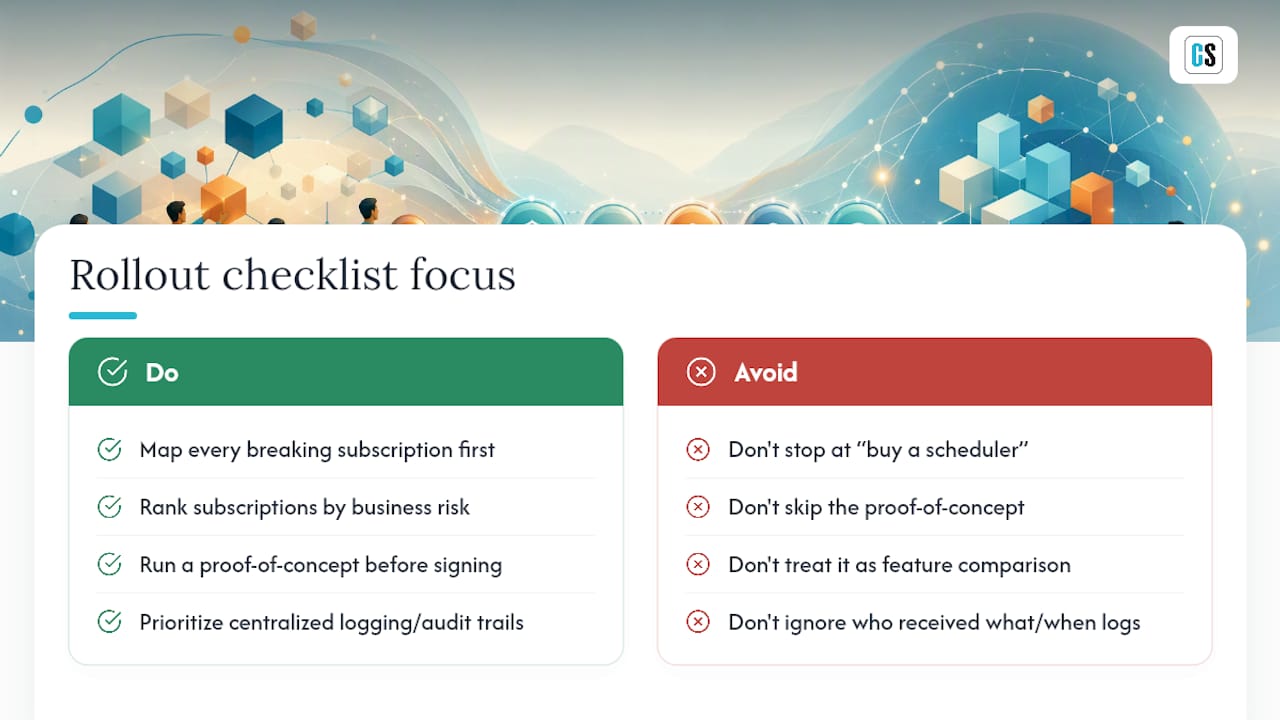
The conventional wisdom treats this as a feature comparison exercise. It's really a workflow-mapping exercise first. Before you evaluate any tool, map every subscription that currently breaks, causes a support ticket, or gets patched with a manual export, and rank them by business risk. A missed internal snapshot is an inconvenience. A missed regulated distribution is a different category of problem entirely.
What gets underestimated most is auditability. Teams obsess over bursting volume and destination lists, then get blindsided in a security review because nobody can produce a log of who received what and when. If you prioritize one thing on the checklist first, make it centralized logging, not the feature that looks best in a demo.
— Christian Ofori-Boateng
Try ATRS for Enterprise Tableau Report Automation
If you've been patching the gaps with tabcmd scripts and manual exports, ATRS gives you a purpose-built path instead. It handles bursting to hundreds of recipients, fires deliveries off actual data-refresh events instead of a fixed clock, and routes output to email, SFTP, SharePoint, or file shares with the audit trail your security team will actually ask for.

ChristianSteven Software backs ATRS with SOC 2 Type II certification and more than two decades automating BI delivery across Tableau, Power BI, and Crystal Reports environments, which matters when procurement wants proof, not promises. If your team also runs Power BI, the same automation philosophy extends through PBRS for Power BI exports. For teams weighing broader automation priorities across the business, this overview of AI-driven efficiency tools for SMEs is a useful read alongside your BI roadmap.
Start with a live ATRS demo and bring your worst recurring export headache. Ask to see it fixed in real time.
FAQ
What Is the Main Limitation of Tableau Subscriptions?
Native Subscriptions can't burst personalized content to large recipient lists, and they offer limited destinations, mostly email, with no centralized audit log of deliveries.
Can Tableau Subscriptions Trigger on Data Refresh?
Yes, Tableau supports a "When Data Refreshes" option for subscriptions, but it doesn't extend to conditional logic or chaining based on external system events the way an external scheduler can.
What Is Bursting in the Context of Tableau Reporting?
Bursting splits one dataset into individualized reports, sending each recipient only their relevant slice, such as one store manager receiving only their store's performance data automatically.
Is ATRS a Replacement for Tableau Subscriptions?
ATRS complements native subscriptions rather than replacing them outright. Most teams keep subscriptions for simple internal use and use ATRS for bursting, multi-destination delivery, and audited enterprise distributions.
Does ChristianSteven Software Meet Enterprise Security Requirements?
ChristianSteven Software holds SOC 2 Type II certification and has automated enterprise BI reporting across Tableau, Power BI, SSRS, and Crystal Reports for over two decades.