
Report monitoring and alerting is a proactive BI system that continuously evaluates data against predefined business thresholds and notifies stakeholders the moment a deviation occurs. Unlike a traditional report, which summarizes what already happened, a monitoring and alerting system catches problems as they develop. The distinction matters: retrospective reports serve strategic audiences reviewing progress; real-time alert notifications serve operational teams who need to act now.
Key outcomes a well-configured system delivers:
- Immediate notification when a KPI crosses a threshold
- Faster incident response without manual data checks
- Reduced time between a data anomaly and a business decision
- Consistent stakeholder awareness across distributed teams
Table of Contents
- What report monitoring and alerting actually consists of
- Why monitoring and alerting strengthens your BI workflow
- Best practices for setting up effective alert thresholds
- How ChristianSteven Software approaches BI monitoring and alerting
- Real-world use cases where monitoring and alerting pays off
- ChristianSteven Software automates the full alerting workflow for you
- Key Takeaways
- FAQ
What report monitoring and alerting actually consists of
Every monitoring and alerting system shares the same core architecture, regardless of the BI platform underneath it.
- Data ingestion and polling: The system queries data sources on a defined schedule, from every minute to every hour, depending on how time-sensitive the metric is.
- Rule and threshold definitions: Each monitored metric gets a condition. Sales below $50,000 by noon on a Tuesday. Inventory under 200 units. Server response time above 2 seconds.
- Alert engine: This component evaluates incoming data against the defined rules continuously and triggers an alert instance when a condition is met.
- Notification routing: Alerts reach stakeholders through multiple channels — email, Slack, Microsoft Teams, SMS, or webhooks — based on severity and recipient role.
- BI source integration: The system connects directly to your existing data sources: Power BI datasets, Tableau extracts, SQL Server Reporting Services feeds, or Crystal Reports data connections.
Pro Tip: Design your polling frequency around the cost of a missed event, not around what feels reasonable. A daily sales report is fine for a weekly review; a fraud detection rule needs a five-minute polling window at most.
Why monitoring and alerting strengthens your BI workflow
Monitoring dashboards provide near real-time data with drill-down capability, while reporting dashboards emphasize summarized KPIs with narrative context. Both serve different audiences, and conflating them creates problems for both groups.

Operational teams get buried in weekly summaries they cannot act on. Strategic stakeholders get flooded with granular alerts that mean nothing to them. A dual-track approach, where monitoring feeds operations and reporting feeds leadership, keeps each audience focused.
The concrete benefits of adding a report alerting system to your BI stack:
- Faster incident response: Teams learn about a data issue in minutes, not at the next scheduled report run.
- Improved data accuracy: Automated checks catch feed failures, null values, and schema changes before they corrupt downstream reports.
- Reduced manual effort: Nobody needs to open a dashboard every morning to check whether a number crossed a line.
- Better stakeholder engagement: Targeted alerts reach the right person, which means fewer "did anyone notice this?" emails.
Integrating monitoring with automated BI report workflows turns a passive reporting environment into one that actively surfaces what needs attention.
Best practices for setting up effective alert thresholds
Google's SRE team built their alerting philosophy around time-series data and programmable alert rules, and the core lesson applies directly to BI: the quality of an alert depends almost entirely on how precisely the rule is written.
- Set thresholds with business context, not gut feel. A 10% revenue drop means something different at 9 AM Monday than at 4 PM Friday. Build time-of-day and day-of-week awareness into your rules.
- Use anomaly detection to cut false positives. Static thresholds generate noise. Anomaly detection flags deviations from a rolling baseline, which is far more signal-rich.
- Apply debouncing to avoid alert flapping. An alert that fires, clears, and fires again within minutes trains teams to ignore it. Debouncing and anomaly detection suppress transient spikes before they generate a notification.
- Include diagnostic context in every alert message. The alert should tell the recipient what metric fired, what the current value is, what the threshold was, and where to look next. An alert that just says "threshold exceeded" is nearly useless.
- Customize severity and quiet hours per team. Alert severity and quiet-hour settings prevent a low-priority inventory flag from waking up a sales director at 2 AM.
- Review and retune rules quarterly. Business conditions change. A threshold that made sense in Q1 may generate constant noise by Q3.
Pairing these practices with a solid automation checklist helps teams roll out monitoring workflows without missing configuration steps.
How ChristianSteven Software approaches BI monitoring and alerting
ChristianSteven Software has spent more than two decades turning complex BI reporting workflows into reliable, automated processes. The product suite covers the platforms where most enterprise BI teams actually live:
- PBRS for Power BI: Schedules and delivers Power BI reports with data-driven alert conditions that trigger distribution only when specific data conditions are met.
- ATRS for Tableau Reports: Automates Tableau report delivery and alerting across teams, with conditional scheduling built in.
- CRD for Crystal Reports: Brings the same scheduling and threshold-based delivery to Crystal Reports environments.
- IntelliFront BI: Delivers real-time dashboards and KPI monitoring for teams that need live operational visibility.
The company holds SOC 2 Type II certification and consistently earns high customer satisfaction ratings, which matters when you are handing an automated system the keys to your report distribution pipeline. Expertise spans Power BI, SSRS, Tableau, and Crystal Reports, so the platform fits wherever your data already lives.
Pro Tip: When evaluating any monitoring reports software, ask whether conditional delivery is native or bolted on. ChristianSteven Software builds threshold-based alerting into the scheduling engine itself, so alerts and reports share the same workflow rather than running as separate systems.
Real-world use cases where monitoring and alerting pays off
Retail inventory management: A distribution company sets a Crystal Reports alert to fire when any SKU drops below a two-week supply threshold. The purchasing team gets an email before the stockout, not after the complaint.
Financial close monitoring: A finance team running Power BI uses PBRS to watch for reconciliation variances above a set dollar amount. The alert routes to the controller within minutes of the data refresh, cutting close cycle time.
IT infrastructure reporting: An IT department uses BI reporting improvements paired with SSRS alerts to flag server response degradation before it affects end users. The on-call engineer gets a Teams notification with the affected server name and current response time already in the message.
Sales pipeline tracking: A sales operations team configures IntelliFront BI to alert regional managers when pipeline coverage drops below a target ratio, giving them time to act before the quarter closes.
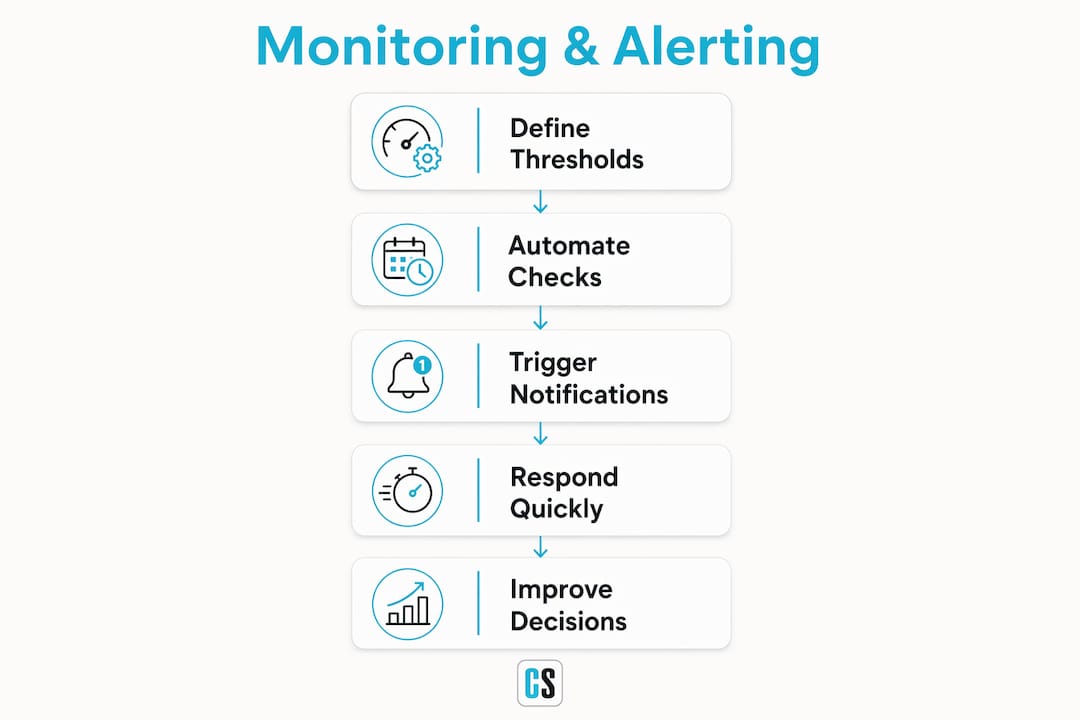
Each of these scenarios shares the same pattern: a defined threshold, an automated check, and a notification that reaches the right person with enough context to act immediately.
ChristianSteven Software automates the full alerting workflow for you
Knowing how monitoring and alerting works is one thing. Having a system that runs it without manual intervention is another.

ChristianSteven Software gives BI teams the ability to move from scheduled reporting to conditional, threshold-driven delivery across Power BI, Tableau, Crystal Reports, and SSRS, all within a single platform that has been production-tested for over 20 years. SOC 2 Type II certification means your data pipeline meets enterprise security standards. High customer satisfaction ratings mean the system works the way it is supposed to, consistently.
If your team runs Tableau, automating your Tableau report delivery with ATRS is a practical starting point. For Crystal Reports environments, the Crystal Reports Scheduler handles conditional scheduling out of the box. Start a free trial or contact the team at christiansteven.com to see which product fits your current stack.
Key Takeaways
Report monitoring and alerting is a proactive BI process that evaluates data against defined thresholds and delivers real-time notifications to the right stakeholders before problems escalate.
| Point | Details |
|---|---|
| Monitoring vs. reporting | Monitoring serves operational teams with real-time alerts; reporting serves strategic stakeholders with summarized KPIs. |
| Core system components | Every alert system requires data polling, rule definitions, an alert engine, and multi-channel notification routing. |
| Threshold quality matters | Anomaly detection and debouncing reduce false positives and alert fatigue more effectively than static thresholds alone. |
| Context in alert messages | Alerts should include the metric name, current value, threshold, and a diagnostic pointer to speed up triage. |
| ChristianSteven Software | PBRS, ATRS, CRD, and IntelliFront BI deliver threshold-based alerting natively across Power BI, Tableau, Crystal Reports, and SSRS. |
FAQ
What is report monitoring and alerting in BI?
Report monitoring and alerting is a system that automatically evaluates data against predefined business rules and sends notifications to stakeholders when conditions are met, enabling faster decisions than traditional scheduled reports allow.
How does a report alerting system differ from a standard report?
A standard report summarizes historical data on a fixed schedule; a report alerting system fires a notification the moment a live data condition crosses a defined threshold, without waiting for the next report run.
What channels can alert notifications use?
Alert notifications can route through email, SMS, Slack, Microsoft Teams, Telegram, and webhooks, with severity and quiet-hour settings customizable per recipient and team.
How do you reduce alert fatigue in a monitoring system?
Use anomaly detection instead of static thresholds, apply debouncing to suppress transient spikes, and customize alert severity per team member so only critical notifications reach people outside business hours.
Which ChristianSteven Software products support report monitoring and alerting?
PBRS handles Power BI, ATRS covers Tableau, CRD manages Crystal Reports, and IntelliFront BI provides real-time dashboard and KPI monitoring, all with conditional, threshold-based delivery built into the scheduling engine.