
For reliable, scalable paginated report delivery at enterprise scale, use a dedicated report scheduler rather than relying solely on native subscriptions. PBRS from ChristianSteven Software is the recommended option in this guide because it centralizes bursting, multi-channel delivery, and auditing under one system. That combination handles the three things native tools struggle with: sending personalized reports to a large number of recipients, delivering to email, SFTP, and Teams simultaneously, and logging every run for compliance.
TL;DR:
- Native Power BI subscriptions are suitable only for small, internal, and simple report distributions with a fixed format and no personalization.
- A dedicated report scheduler like PBRS is necessary when distributing to external recipients, handling multiple formats, or managing complex calendars and exceptions.
- Effective schedulers must support data-driven delivery, event triggers, multi-channel routing, and comprehensive logging to ensure reliable, compliant report distribution.
- Proper operational controls such as audit trails, approval workflows, and capacity planning are essential to prevent failures at scale.
- Prioritizing infrastructure setup, dependency management, and failure handling is key to avoiding common scheduling pitfalls and ensuring data accuracy.
Table of Contents
- When Native Subscriptions Are Enough (And When You Need a Scheduler)
- What a Best-in-Class Paginated Report Scheduler Must Do
- How to Implement Automated Report Scheduling Step by Step
- Governance, Monitoring, and Auditing at Production Scale
- Why This Guidance Comes From Direct Operational Experience
- The Real Gap in Most Scheduling Advice
- Evaluate PBRS for Your Environment
- Sources
- FAQ
When Native Subscriptions Are Enough (And When You Need a Scheduler)
Power BI's built-in subscription feature works fine for a small team checking a sales dashboard every Monday morning. It falls apart the moment your distribution list grows past a few dozen people or you need anything beyond a basic PDF snapshot sent to authenticated internal users.
Most organizations end up running a hybrid model: native subscriptions for casual internal use, and a dedicated scheduler for anything touching external recipients, regulatory deadlines, or complex formatting. That split isn't a compromise. It reflects how enterprises actually distribute Power BI reports once volume and complexity increase.
Stick with native subscriptions if:
- Your audience is small, internal, and already authenticated in Power BI
- You're sending one format (usually PDF or a live link) on a simple daily or weekly cadence
- Nobody needs a personalized version of the report based on their region, department, or client account
Move to an external scheduler like PBRS when:
- You're bursting the same report to dozens or hundreds of recipients with different data slices
- Recipients are external, unauthenticated, or sit outside your Power BI tenant
- You need multiple output formats (PDF for executives, Excel for analysts, CSV for a partner's ingestion pipeline) from a single report
- Your calendar has real-world exceptions (fiscal quarters, holidays, month-end close) that a simple daily/weekly rule can't express
- Auditors or compliance officers need proof of who received what, and when
If you check two or more boxes in the second list, you've outgrown native scheduling.
What a Best-in-Class Paginated Report Scheduler Must Do
A scheduler earns its place in production by preventing the failure modes that make BI teams look bad: the report that went to the wrong region, the delivery that silently failed at 2 a.m., the audit request nobody can answer. Here's the feature list worth insisting on before you commit to a tool.
- Data-driven subscriptions and dynamic parameterization. The system should pull recipient lists and parameters from a database table, view, or query, so one schedule can burst a personalized report to every sales manager without you building 50 separate jobs.
- Event triggers and custom calendars. Look for schedules that respect business days, fiscal calendars, and exception dates (holidays, blackout periods) rather than a rigid "every Tuesday" rule. PBRS supports a wide range of schedule types, including working-day rules and custom exception calendars.
- Multi-channel delivery and format mapping. PDF, Excel, and CSV output routed to email, SFTP, SharePoint, Teams, or a network folder, all from the same underlying report.
- Pre- and post-actions with dependency orchestration. The scheduler should be able to trigger a dataset refresh first, then queue and throttle the actual report run so it doesn't fire on stale data.
- Centralized logging, SLA monitoring, and alerts. Every run needs a timestamp, a status, and a retention policy behind it.
- Security and governance controls. Role-based access, approval workflows for schedule changes, and audit trails that hold up under a compliance review.
- Blank-report and error handling policies. The system needs a rule for what happens when a query returns zero rows, so recipients don't get an empty PDF that looks like a mistake.
Pro Tip: Ask any vendor how their tool handles a report that exceeds normal page or row limits. A dedicated scheduler handles oversized paginated exports and can merge multiple exports into one bookmarked package, which native tools typically can't do at all.
How to Implement Automated Report Scheduling Step by Step
Rolling out paginated report scheduling isn't a weekend project, but it's not months of work either if you sequence it correctly. Here's the order that avoids the most common rollout mistakes.
- Audit and classify every report by audience, required format, parameters, and business owner. You can't automate what you haven't inventoried.
- Design the calendar and cadence, mapping exceptions (month-end, fiscal year boundaries) and defining an SLA for each report: when it must arrive and what happens if it's late.
- Build data-driven subscriptions with parameter sources pulled from a database table or query, following the pattern in ChristianSteven's data-driven schedule tutorial.
- Configure destinations and format rules. A common setup: PDF for executives, Excel for analysts who need to pivot the numbers, CSV for a partner's automated ingestion system.
- Integrate with your refresh and ETL events so reports only run after the underlying dataset finishes updating, not on a fixed clock that might beat the data.
- Set up monitoring and retry policies, including a runbook that tells the on-call analyst exactly what to check when a delivery fails.
- Test with a dry run against a small sample list before flipping on full-scale bursting to your entire distribution.
A few things to check before you go live:
- Does the mail server or storage destination have a size limit that a full recipient burst might hit?
- Are parameter sources refreshed on the same schedule as the report itself, or could they go stale?
- Who gets notified first if a run fails at 3 a.m., and how fast do they need to respond?
Practitioner communities regularly raise the same concern: ensuring data accuracy and reliability when a paginated report runs on a schedule instead of on demand. The fix is almost always in step 5. If the report fires before the refresh finishes, no amount of clever scheduling saves you.
Governance, Monitoring, and Auditing at Production Scale
Once dozens of schedules are running unattended, governance stops being optional. You need a system of record, not a folder of one-off jobs nobody remembers building.

Start with a central schedule catalog using consistent naming conventions, so anyone on the team can find and understand a job without asking its original creator. Every log entry should capture the schedule ID, run timestamp, parameters used, payload size, delivery status, and recipient list. That level of detail is what turns a support ticket into a five-minute fix instead of a half-day investigation.
Governance essentials to put in place:
- Approval workflows before anyone edits a production schedule
- Role-based access separating who can view, edit, and approve schedules
- A retention and archive policy for delivered files and logs, tied to your compliance requirements
- Capacity planning for concurrent jobs, since bursting to a large list without throttling can overwhelm a mail server or file share
When distribution lists grow large, queue-based batching keeps delivery within operational limits instead of flooding your infrastructure in one burst. Run periodic reconciliation checks, comparing what was scheduled against what actually delivered, to catch silent failures before an auditor does.
Why This Guidance Comes From Direct Operational Experience
ChristianSteven Software has spent more than two decades automating BI report workflows across Power BI, SSRS, Tableau, and Crystal Reports environments, holding SOC 2 Type II certification for the security and process controls enterprises expect from a long-term automation partner.
Christian Ofori-Boateng has documented much of that operational knowledge in hands-on tutorials covering data-driven schedules, custom calendars, and exception handling, the kind of detail that only surfaces after watching thousands of scheduled runs succeed and occasionally fail. If you want implementation-level detail beyond what fits here, the step-by-step guide to setting up a single report schedule walks through the wizard screen by screen, including how to configure exception calendars and retry behavior.
The Real Gap in Most Scheduling Advice
Most articles on this topic list features. They rarely explain why those features exist, which means teams buy a tool, flip on a dozen schedules, and get blindsided six months later when a recipient list changes or a dataset refresh runs late.
The uncomfortable truth is that scheduling failures are rarely about the scheduling engine itself. They're about what happens around it: a query that returns zero rows and nobody defined a blank-report policy for, a mail server that chokes at recipient two hundred because nobody planned for batching, a schedule someone edited without approval and broke for a whole department.
If you take one thing from this guide, prioritize the operational plumbing before the feature checklist: audit trails, dependency triggers tied to actual data refreshes, and a runbook for failures. A scheduler with fifty features and no logging discipline behind it will fail you in exactly the same ways native subscriptions do, just at a larger scale and with more people copied on the angry email thread.
— Christian Ofori-Boateng
Evaluate PBRS for Your Environment
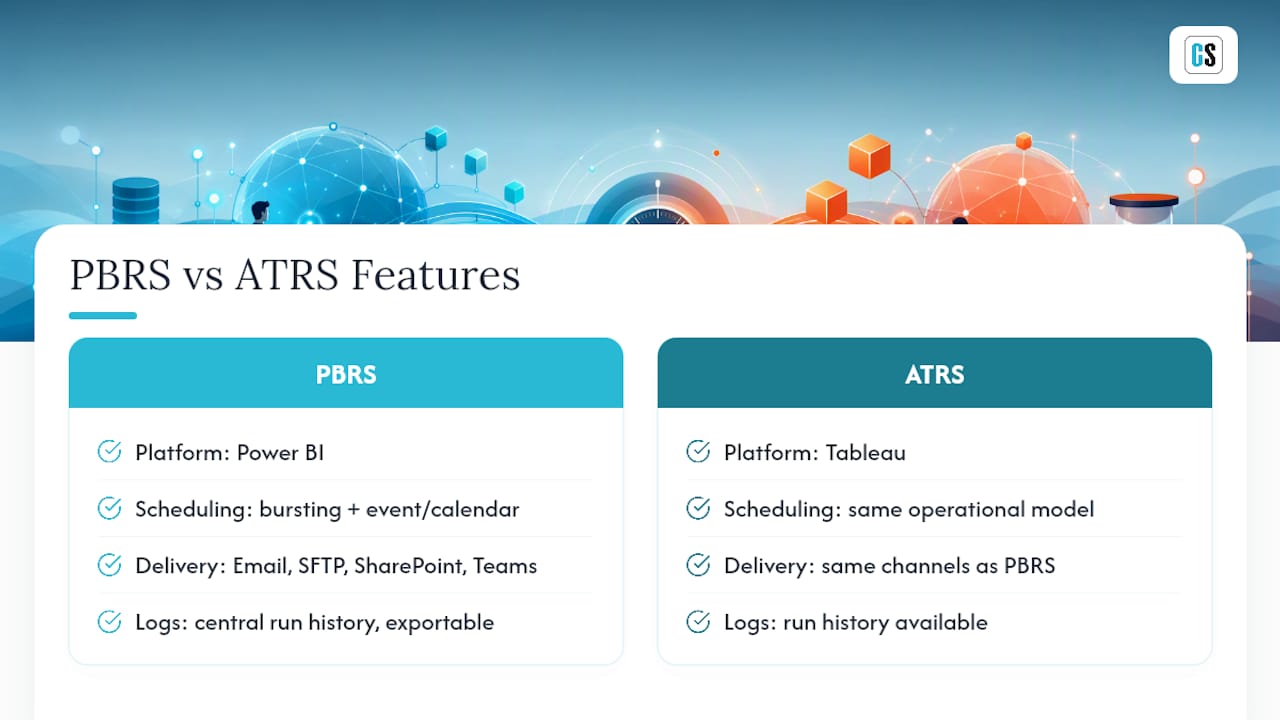
PBRS maps directly to the checklist above: data-driven bursting for personalized reports, event and calendar triggers for real-world scheduling needs, multi-channel delivery across email, SFTP, SharePoint, and Teams, and centralized logs that give you an answer the moment someone asks "did that report go out?"

That last part matters more than most teams realize until they're sitting in an audit with no record of past deliveries. PBRS keeps a run history for every schedule, which turns a compliance request from a scramble into a five-minute export. For teams running Power BI, the PBRS automated export features cover the format handling and destination routing this guide walks through, without requiring a separate automation platform bolted on top.
If Tableau is part of your reporting mix alongside Power BI, ChristianSteven Software also builds ATRS for scheduling and exporting Tableau reports on the same operational model. Start with a trial, run it against two or three of your highest-volume reports, and check the delivery logs after the first week. That's the fastest way to see whether it solves the specific failure points your current process has.
Sources
For hands-on configuration, see the PBRS feature walkthrough, the data-driven schedule tutorial, and the practical scheduling guide for analysts. Each covers a specific piece of the setup described in this guide, from parameter sources to destination configuration.
- What s the best way to schedule Power BI paginated reports and ensure data accuracy
FAQ
What Is a Paginated Report Scheduler?
It's software that automates the generation, formatting, and delivery of paginated (print-ready) reports on a defined schedule or trigger, handling recipient lists, output formats, and delivery destinations without manual intervention.
Do I Need PBRS if I Already Use Power BI's Native Subscriptions?
Only if your needs go beyond native subscriptions' limits: large or external recipient lists, multiple output formats, complex calendars, or audit requirements. Many teams run native subscriptions for small internal audiences and a dedicated scheduler for enterprise distribution.
Can a Report Scheduler Handle Different Data for Different Recipients?
Yes, this is called bursting or data-driven subscriptions, where a single report template runs once per recipient with parameters pulled from a database table so each person gets their own filtered version.
What Happens if a Scheduled Report Query Returns No Data?
A well-configured scheduler applies a blank-report policy that either skips delivery or flags the run as an exception, rather than sending recipients an empty file that looks like a system error.
How Do I Prevent Scheduled Reports From Overwhelming a Mail Server?
Use queue-based batching and throttling when bursting to large recipient lists, since combining parameter-driven filtering with batching keeps delivery volume within your mail server's operational limits.