
ChristianSoftware offers report bursting solutions that support enterprise needs with automation-first delivery across multiple BI platforms. If your shop is fully committed to Power BI Service and wants a native option instead, Microsoft Power BI Paginated Reports is an alternate. Judge every option on platform support, personalization depth, delivery channels, and audit security.
TL;DR:
- ChristianSteven Software supports four major BI platforms with a unified automation layer and comprehensive multi-channel delivery, making it ideal for enterprise-scale bursting.
- Effective tools must separate report design from delivery logic, support real-time scheduling and event triggers, and provide detailed audit logs to ensure compliance.
- Run pilots with real data, test retry mechanisms, and verify archived output retrieval to confirm the tool's reliability before full deployment.
- Match the tool to your BI environment: Power BI users favor Power BI Paginated Reports; teams with multiple platforms should consider ChristianSteven's integrated approach.
- Verify the tool's operational trustworthiness through proven controls like SOC 2 Type II certification, separate report templates, and thorough audit trails.
Table of Contents
- What Are the Best Report Bursting Tools Right Now?
- Which Tool Fits Your BI Environment?
- How Do You Evaluate a Report Bursting Tool Before You Buy?
- What Makes a Report Bursting Vendor Trustworthy?
- What I've Learned Watching Bursting Rollouts Succeed and Fail
- How to Test ChristianSteven Software in a Live Demo
- Sources
- FAQ
What Are the Best Report Bursting Tools Right Now?
Report bursting takes one master report and splits it into personalized copies for dozens or thousands of recipients, each filtered to show only their data. The tools that do this well share three traits: they separate the report template from the delivery logic, they support real scheduling and event triggers, and they log every delivery for audit purposes. That separation is what ISG One calls an "automate-first" approach, and it's the dividing line between a tool built for enterprise bursting and one that just exports files on a timer.
Five names come up consistently when BI teams shop this category:
- ChristianSteven Software (PBRS / ATRS / CRD) — enterprise automation across Power BI, Tableau, SSRS, and Crystal Reports
- Helical Insight — open-source, pixel-perfect paginated reporting
- Microsoft Power BI Paginated Reports — native paginated reporting inside Power BI Service
- Jaspersoft — developer-friendly embedded reporting with strong pagination
- Bold Reports — embeddable paginated reports with a developer API focus
Here's how they stack up on the dimensions that actually matter to a buyer running an evaluation, not just a features checklist.
| Tool | Best For | Platforms Supported | Delivery Channels | Personalization / Dynamic Filtering | Scheduling & Triggers | Output Formats | Deployment | Pricing Model |
|---|---|---|---|---|---|---|---|---|
| ChristianSteven Software (PBRS/ATRS/CRD) | Enterprise automation-first bursting across multiple BI platforms | Power BI, Tableau, SSRS, Crystal Reports | Email, SharePoint, Teams, cloud storage, database, webhooks | Data-driven, parameter-based recipient filtering | Cron-style schedules, data-change and event triggers | PDF, Excel, and platform-native exports | On-premises | Subscription or perpetual license |
| Helical Insight | Teams that want open-source control and pixel-perfect paginated reports | Custom/open-source BI stack | Configurable via open-source integration | Filter logic set at the code/config level | Scheduling via integration work | Paginated, pixel-perfect layouts | Self-hosted, open-source | Free/open-source with implementation cost |
| Microsoft Power BI Paginated Reports | Organizations standardized on Power BI Service | Power BI Service only | Power BI Service, exports for email distribution | Parameter-driven filtering within Power BI | Power BI Service scheduling | Pixel-perfect print-ready PDF, Excel | Cloud (Power BI Service) | Included in Power BI Premium/Pro licensing tiers |
| Jaspersoft | Developer-led teams embedding pixel-perfect reports into applications | Custom applications via API | Application-embedded, exportable outputs | Developer-defined parameters | API and application-triggered | Pixel-perfect PDF and export formats | On-prem or cloud | Subscription/enterprise licensing |
| Bold Reports | Teams needing embeddable paginated reports with developer APIs | Custom applications via SDK/API | Embedded delivery, exportable outputs | API-driven parameter filtering | Developer-configured scheduling | Paginated PDF, Excel, Word | On-prem or cloud | Subscription licensing |
ChristianSteven Software leads this list because it's the only entrant covering four major BI platforms with the same automation layer, and it pairs that reach with the multi-destination delivery and audit logging that enterprise buyers weigh most heavily when a tool has to survive a security review, not just a demo.
Which Tool Fits Your BI Environment?
The right pick depends less on brand reputation and more on which platforms you already run and how much delivery infrastructure you're willing to build yourself.
-
ChristianSteven Software (PBRS/ATRS/CRD) is built for teams running Power BI, Tableau, SSRS, or Crystal Reports (or several at once) who need one automation layer instead of four separate scripts. It handles master-template bursting with parameter-driven filters, pushes output to email, SharePoint, Teams, or cloud storage, and keeps a SOC 2 Type II audit trail behind every send. A regional bank running weekly branch-level P&L reports through PBRS can burst one Power BI dataset into 150 filtered PDFs and route each to the right branch manager's inbox, with a log showing exactly when each one landed.
-
Helical Insight suits a team with in-house developers who want pixel-perfect paginated output without paying license fees, and who don't mind building the scheduling and delivery layer themselves. It's a strong fit for a data engineering group that already maintains its own BI stack and treats reporting as another code repository.
-
Microsoft Power BI Paginated Reports works well when your organization has already standardized on Power BI Service and wants paginated, print-ready reports without introducing another vendor. The tradeoff: distribution stays largely inside the Power BI ecosystem, so bursting to channels like Teams or S3 usually means layering on extra tooling.
-
Jaspersoft targets developer-centric environments that embed reports directly into a customer-facing or internal application. Its pixel-perfect rendering and API depth make it a natural fit for a software company that ships reporting as a feature of its own product, not as a back-office function.
-
Bold Reports covers similar ground to Jaspersoft. Its embeddable, API-first paginated reports appeal to teams building reporting into a SaaS product where a developer, not a business analyst, owns the reporting pipeline.
Some newer entrants layer AI-generated narrative summaries on top of scheduled delivery, an approach worth watching even though it's not yet standard in enterprise bursting evaluations. For most BI teams, the deciding factor is still whether the tool separates report design from delivery logic cleanly enough to scale past a handful of recipients.
How Do You Evaluate a Report Bursting Tool Before You Buy?
Run any candidate through the same checklist you'd use for a data pipeline vendor, not a reporting nicety. Buyer roundups consistently score tools on distribution capability, governance, and setup effort, and those three categories map to a short list of concrete questions.
- Does it connect natively to your BI platform (Power BI, Tableau, SSRS, Crystal Reports), or does it require exports and manual re-import?
- Can recipients get truly personalized data through parameter-driven filters, not just the same file mailed to everyone?
- Does scheduling support event and data-change triggers, not just fixed cron-style timing?
- Can it deliver to every destination your organization actually uses (email, SharePoint, Teams, S3, webhooks)?
- Does it log every delivery, retry, and failure with a timestamped audit trail?
- Will it hold up at volume: hundreds of recipients, dozens of reports, daily runs?
- What happens when a delivery fails? Is there automatic retry with a visible retry log?
Ask a vendor to run this eight-step script live, not on slides:
- Upload a single master report template.
- Set a parameter-driven burst targeting 20 to 30 test recipients.
- Deliver simultaneously to email, Teams, and cloud storage.
- Pull up the audit log for that run.
- Force a delivery failure and show the retry behavior.
- Export the same report in both PDF and Excel.
- Change one recipient's filter and rerun without touching the base template.
- Show where completed outputs archive and for how long.
Walk away if a vendor can't produce an audit trail, can't do dynamic per-recipient filtering, delivers a garbled export, or has no answer for encryption at rest in its archive. Those aren't rough edges. They're the difference between a tool that survives a compliance audit and one that doesn't.
Pro Tip: Before you sign anything, run the pilot against a "shadow" recipient list, a small subset of real IDs, and manually verify three or four output files line by line. That's the fastest way to catch a filter logic error before it bursts incorrect data to hundreds of real recipients.
Matching delivery mode to how people actually consume reports matters as much as the technical checklist. Some stakeholders want an emailed PDF; others just want a link to a live dashboard, and forcing one delivery method on both groups is a common reason bursting rollouts stall.
What Makes a Report Bursting Vendor Trustworthy?
Two decades in this category taught ChristianSteven Software one lesson: enterprises don't buy bursting tools on feature lists. They buy them on operational trust, and that trust rests on a short list of verifiable proof points.
- SOC 2 Type II certified operations, covering the controls auditors actually check
- Native support across Power BI, Tableau, SSRS, and Crystal Reports under one automation layer
- Master-template automation that separates report design from delivery, so one template can serve hundreds of personalized recipients
- Full audit logging and archived output history for compliance review
A pilot run against these proof points should show three things in the first two weeks: deliveries land on schedule without manual intervention, every send has a matching log entry, and archived outputs stay retrievable months later. If a pilot can't demonstrate all three, the tool isn't ready for production bursting, no matter how clean its demo looked.
What I've Learned Watching Bursting Rollouts Succeed and Fail
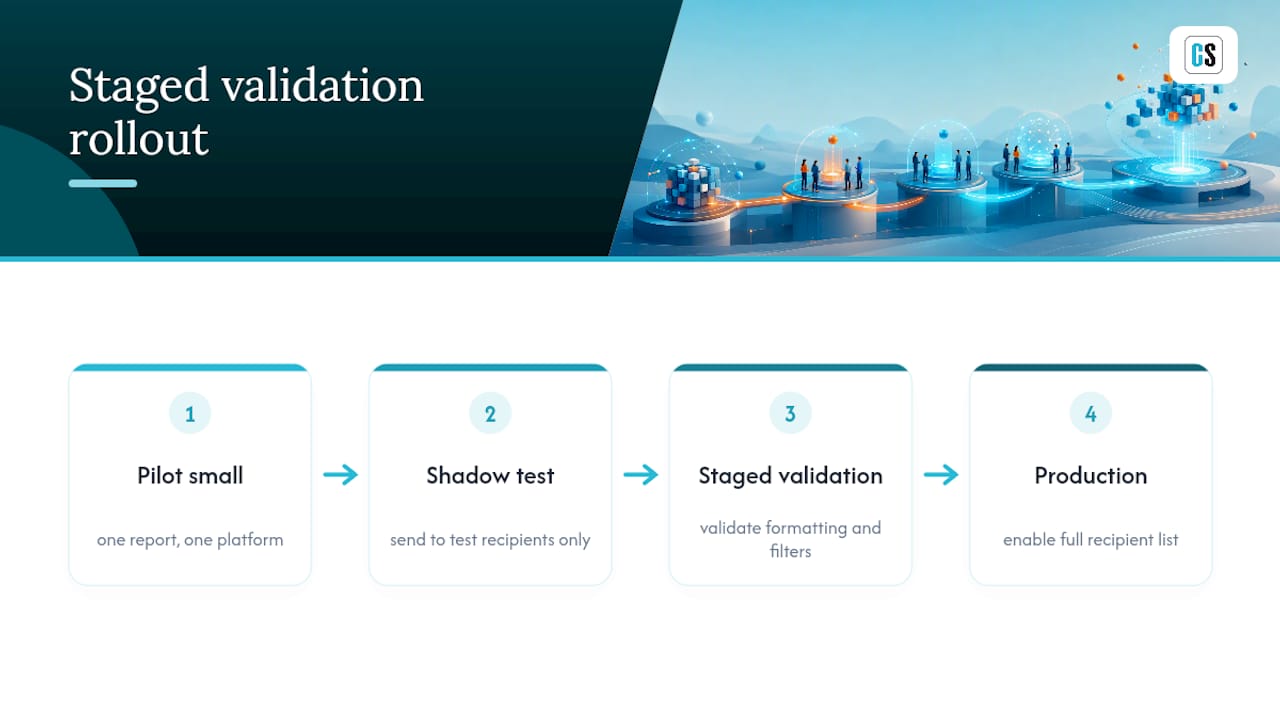
The rollouts that work start small, on purpose. Teams that try to burst every report to every recipient in week one almost always hit a filter logic error they don't catch until a wrong report lands in the wrong inbox. The fix isn't more testing. It's a smaller blast radius: pilot with one report, one platform, and a shadow list of test recipients before touching production data, mirroring the staged validation approach that catches formatting regressions before they reach real people.
The second lesson is less obvious: retry behavior matters more than initial delivery speed. Every enterprise network has a Tuesday morning where the mail server hiccups or a Teams webhook times out. What separates a tool worth keeping from one worth replacing is whether it retries automatically, logs the retry, and alerts someone if it fails twice, not whether the first attempt was fast.
Track three numbers during any pilot: delivery success rate, average time from schedule trigger to recipient inbox, and the percentage of runs that required manual intervention. If that last number isn't trending toward zero by week three, the tool or the implementation has a problem worth solving before scaling up.
— Christian Ofori-Boateng
How to Test ChristianSteven Software in a Live Demo
ChristianSteven Software gives you one automation layer instead of four, if your reporting spans Power BI, Tableau, SSRS, and Crystal Reports, you're not stitching together separate tools for each platform, you're running one. PBRS supports Power BI report bursting, ATRS manages Tableau reports, and CRD handles Crystal Reports, sharing a common delivery infrastructure with multiple channels and security controls.

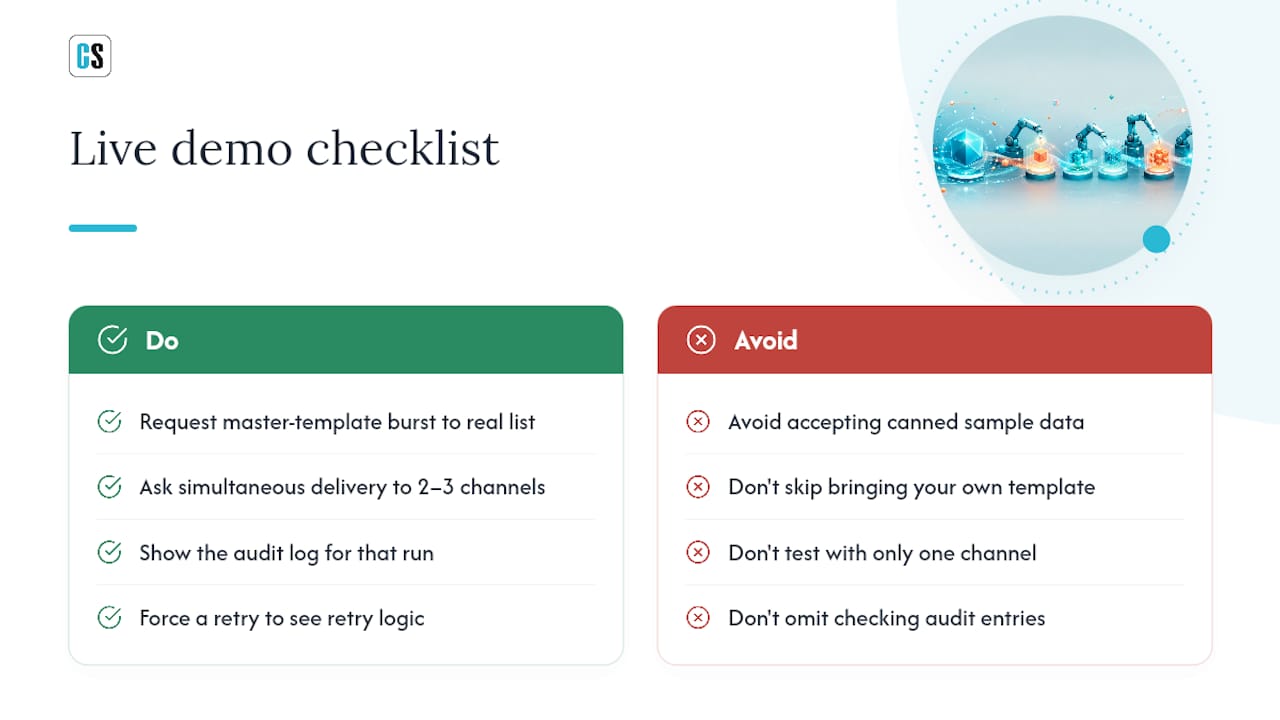
When you run the demo, ask for exactly what's in the buying checklist above: a master-template burst to a real recipient list, simultaneous delivery to two or three channels at once, the audit log for that run, and a forced retry so you can see the retry logic in action. If your environment is Power BI heavy, PBRS's report bursting feature is the fastest path to seeing parameter-driven filtering work against your own dataset. If Tableau is the priority instead, the ATRS automation page walks through the same delivery model for Tableau workbooks.
Start a trial or request a live demo through the PBRS product page and bring your own report template. Seeing your actual data burst and delivered, not a canned sample, is the only test that tells you whether this fits your environment.
Sources
See the ISG One automation guide, Helical Insight on GitHub, and PBRS scheduling documentation.
- How to implement an 'automate-first' approach · ISG One
- Automate Report Generation | Caddi
- Top 10 Best Report Distribution Software | Top Picks 2026 · WorldMetrics
FAQ
What Are the Top Report Bursting Tools for Enterprise BI?
ChristianSteven Software (PBRS/ATRS/CRD), Helical Insight, Microsoft Power BI Paginated Reports, Jaspersoft, and Bold Reports are the five tools BI teams evaluate most often, each suited to a different platform mix and delivery need.
What's the Difference Between Report Bursting and Report Scheduling?
Report scheduling just runs a report on a timer. Report bursting takes one master report, applies parameter-driven filters, and splits it into personalized copies for each recipient before delivering them.
Are There Good Free or Open-Source Report Bursting Options?
Helical Insight offers an open-source path to pixel-perfect paginated reports, though it typically requires in-house development work to build scheduling and multi-channel delivery around it.
What Should I Look for in a Report Bursting Demo?
Ask the vendor to burst a master template to real recipients with dynamic filters, deliver to at least two channels simultaneously, show the audit log, and demonstrate retry behavior after a forced failure.
Do Report Bursting Tools Support AI-Generated Summaries?
A newer category of tools pairs scheduled reports with AI-generated narrative briefings, but this remains an emerging feature rather than a standard enterprise bursting requirement.