
The best report monitoring tools are enterprise BI automation platforms that schedule, render, deliver, and monitor reports across Power BI, Tableau, SSRS, and Crystal Reports, replacing manual exports with tracked, alert-driven workflows. For IT and BI teams, that means picking a platform with real bursting, multi-channel delivery, and full run-history visibility. ChristianSteven Software's PBRS, ATRS, CRD, and IntelliFront BI cover that ground for organizations standardizing report delivery across mixed BI environments.
TL;DR:
- Report monitoring tools must support bursting into personalized report versions for multiple recipients across various delivery channels, including email and cloud storage.
- Vendors should provide real-time run-history, automatic retries, and escalation rules during demonstrations to verify their monitoring capabilities.
- A comprehensive enterprise tool requires SOC 2 Type II certification, encryption at rest and transit, and recipient-specific access controls to ensure security and compliance.
- Power BI and Tableau native scheduling are limited at scale, making dedicated automation layers essential for large, mixed, and compliant report distributions.
- Implementing automated reporting should prioritize syncing with dataset refreshes, testing with real recipients, and establishing a run-history dashboard to prevent silent failures.
Table of Contents
- What Do Enterprise Report Monitoring Tools Actually Do?
- What Features Should You Require From a Report Monitoring Tool?
- How Do Power BI, Tableau, SSRS, and Crystal Reports Differ?
- How Should You Roll Out Automated Report Scheduling?
- What Security and Compliance Signals Matter Most?
- How Do You Run a Vendor Evaluation and Pilot?
- What Two Decades of Automating Reports Has Taught Me
- Putting PBRS, ATRS, CRD, and IntelliFront BI to Work
- Sources
- FAQ
What Do Enterprise Report Monitoring Tools Actually Do?
An enterprise report monitoring tool takes over the full lifecycle of a report: it schedules the run, renders the output, formats it correctly, sends it to the right person, and then watches to confirm it actually arrived. When something fails, it alerts someone instead of letting a stale report sit unnoticed in an inbox that nobody checks until Monday.
The business case is straightforward. When reporting runs on autopilot, finance and BI staff stop assembling spreadsheets and start interpreting the numbers, which is the higher-value work leadership actually wants from them. That shift in where time goes is usually the biggest win teams report after automating.
In practice, enterprise delivery covers:
- Scheduled distribution to executives, regional managers, and external partners
- Bursting a single report into dozens or hundreds of personalized versions
- Delivery to email inboxes, Slack and Teams channels, SFTP servers, and cloud storage
- Automatic retries and escalation when a data source or delivery target fails
Get this right and reporting becomes invisible infrastructure. Get it wrong and someone is manually re-running a Crystal Reports export at 11 p.m. because a scheduled job silently failed three days ago.
What Features Should You Require From a Report Monitoring Tool?
Not every scheduling tool built into a BI platform can handle enterprise volume or complexity. Before signing anything, screen vendors against this list, in roughly this order of importance:
- Scheduling flexibility. Look for CRON-style scheduling, calendar-based exceptions (holidays, month-end), and data-driven schedules that trigger off a database value rather than a fixed clock time.
- Bursting and personalization. The platform should support cycle-through-values bursting, generating one report per region, cost center, or client from a single template and recipient list.
- Format and channel coverage. Confirm native support for PDF, Excel, PowerPoint, and CSV output, delivered to email, Teams, Slack, SFTP, or cloud storage destinations.
- Monitoring depth. You want visible run history, last-run and next-run timestamps, current status, automatic retries, and escalation rules when a job fails repeatedly.
- APIs and scale. REST API hooks, multi-tenant support, and the ability to trigger runs from external events matter once you move past a handful of reports.
- Security posture. Encrypted attachments, verified sending domains, and audit logs should be standard, not an add-on.
Pro Tip: Ask any vendor to show you a live run-history screen during the demo, not a slide about it. If they can't pull up real timestamps and statuses on the spot, assume the monitoring is thinner than the sales deck suggests.
How Do Power BI, Tableau, SSRS, and Crystal Reports Differ?
Each BI platform handles scheduling and delivery differently, and those differences drive real architecture decisions.
- Power BI caps native subscriptions at a small number of recipients with no real personalization. Enterprises typically layer in the Export API alongside Power Automate to scale delivery and personalize content, and paginated (RDL) reports add their own rendering quirks worth testing early.
- Tableau separates subscriptions from data-driven alerts, and neither one bursts a report into per-recipient variants on its own. Most teams building true bursting on Tableau lean on a dedicated automation layer instead of native scheduling.
- SSRS and paginated report servers run well on-premises but need deliberate version control and deployment discipline, especially when scheduling engines and finance workflows depend on consistent report versions across environments.
- Crystal Reports remains common in legacy finance and operations stacks. It exports cleanly to PDF and Excel but has no native scheduling engine of its own, so automation has to come from outside the tool.
Mixed environments, where Power BI dashboards sit next to legacy Crystal Reports, are the norm in most enterprises, not the exception. That reality is exactly why a platform-agnostic automation layer tends to outperform relying on each tool's built-in scheduler.
How Should You Roll Out Automated Report Scheduling?
Implementation problems rarely come from bad software. They come from skipping steps that seem optional until a report goes out with yesterday's numbers.
- Schedule around refresh windows. Confirm the underlying dataset finished refreshing successfully before triggering an export, not just at a fixed clock time.
- Test with real recipients. Validate row-level security and recipient scoping using actual accounts, not an admin login that bypasses every restriction.
- Build a run-history dashboard. Give your team one place to see every scheduled job's status, timestamps, and delivery outcome, so stale subscriptions surface before someone complains.
- Define retry and escalation rules. Decide in advance how many retries happen automatically and who gets paged when a job fails a third time.
- Version-control report artifacts. Especially on-premises servers, deploy changes through a controlled process rather than editing production files directly.
Pro Tip: Run your first two weeks of automated schedules in parallel with the old manual process. It's the cheapest insurance you'll ever buy against a silent failure nobody notices until quarter close.
Teams that treat monitoring and alerting as a discipline in its own right, not an afterthought bolted onto scheduling, catch failures in hours instead of days. A dedicated guide on report monitoring and alerting covers the escalation logic in more depth if you're building this from scratch.
What Security and Compliance Signals Matter Most?
Report automation touches sensitive financial and operational data, so security can't be an afterthought bolted on after selection. Require vendors to demonstrate:
- Encryption at rest and in transit for stored reports and email attachments
- Verified sending domains and encrypted attachments, with a full delivery audit trail for every send
- Recipient-level access controls that prevent one person from accidentally receiving another department's data
- Independent third-party attestation, such as SOC 2 Type II, covering the vendor's security controls over time rather than a single point-in-time snapshot
SOC 2 Type II specifically matters because it evaluates controls over a monitoring period, typically several months, not just a one-day audit. For a system that touches payroll, revenue, or customer data on a recurring schedule, that distinction is worth asking about directly during procurement.
How Do You Run a Vendor Evaluation and Pilot?
A short, structured pilot beats a long feature-comparison spreadsheet almost every time, because it forces the vendor to prove claims instead of just listing them.
- Burst a real report to your actual required recipient count, not a demo list of five names, and confirm parameterization works per recipient.
- Request the vendor's security documentation, a sample run-history screen, and at least one customer reference in your industry.
- Get a written deployment timeline for both on-premises and cloud scenarios. On-prem paginated report setups often take longer due to versioning and deployment steps.
- Compare licensing structure (subscription versus perpetual), total cost of ownership over three years, and the support SLA you'd actually get if a delivery job fails at 2 a.m.
A burst test at realistic scale tends to expose the gap between marketing claims and actual performance faster than any other single check. If a vendor hesitates to run one, that hesitation is itself useful information.
What Two Decades of Automating Reports Has Taught Me
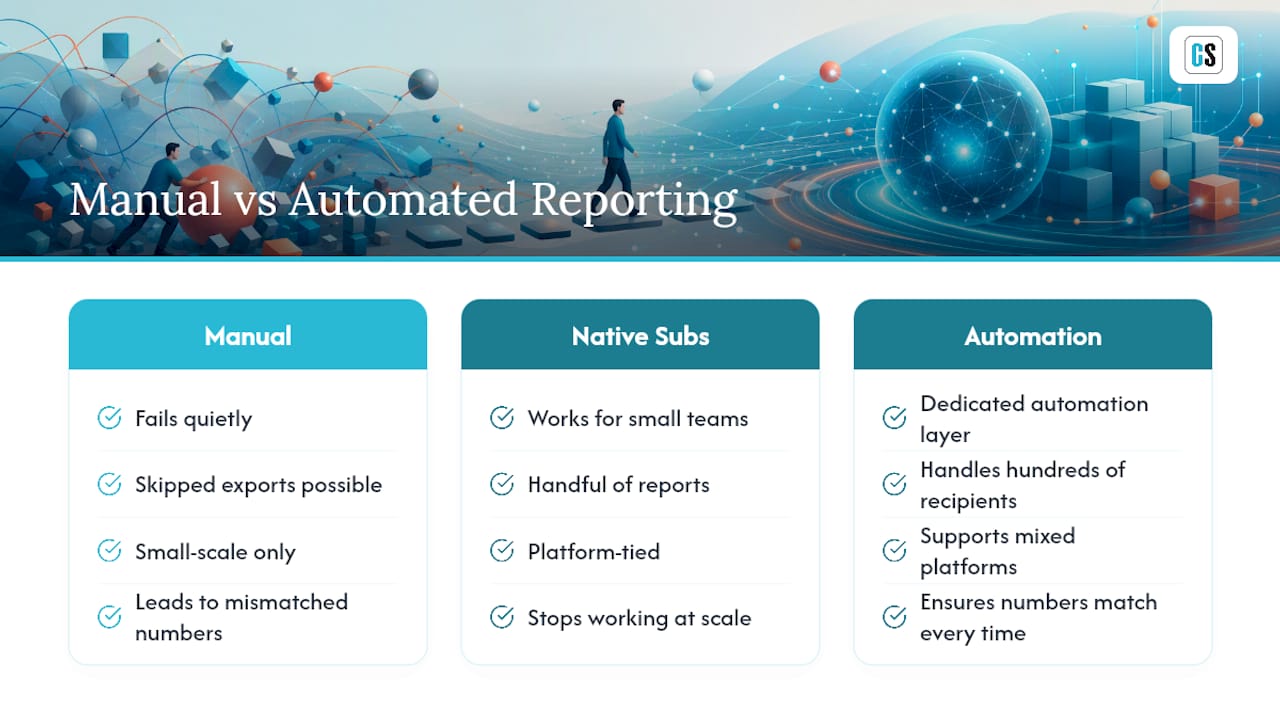
Manual reporting doesn't fail loudly. It fails quietly, one skipped Friday export at a time, until someone in a leadership meeting asks why two departments have different revenue numbers. The consistent pattern across every enterprise deployment I've watched succeed: automation earns trust by making numbers match, every time, without a person in the loop who might forget or run the wrong version.
Native subscriptions in Power BI or Tableau work fine for a small team with a handful of reports. Once you're bursting to hundreds of recipients across mixed platforms with compliance requirements attached, that's when a dedicated automation layer stops being optional.
— Christian Ofori-Boateng
Putting PBRS, ATRS, CRD, and IntelliFront BI to Work
ChristianSteven Software is the automation layer built for exactly the checklist above, without forcing you to rebuild your BI stack around one vendor's native scheduler. PBRS handles Power BI scheduling and bursting beyond what native subscriptions allow. ATRS covers Tableau delivery and alerting. CRD automates legacy Crystal Reports exports that have no built-in scheduler at all. IntelliFront BI adds real-time dashboards and KPI monitoring on top.

Every product runs on the same operational backbone: run history, last-run and next-run status, retry logic, and audit logs, backed by SOC 2 Type II certification. If you're running Power BI, start by scoping a pilot around automated exports without Power Automate. If Tableau is your primary platform, the Tableau automation and email delivery setup is the faster starting point. Either way, scope your pilot around the recipient count, format mix, and delivery channels you actually use in production, not a simplified demo scenario.
Sources
Technical claims on Power BI subscription limits and Export API patterns come from Wicked Smart Data's enterprise delivery guide. For warehouse-native reporting patterns and observability practices, see Astrato's automated reporting playbook and the Basedash comparison of scheduled reporting tools.
FAQ
What Makes a Report Monitoring Tool "Enterprise-Grade"?
It needs bursting to hundreds of personalized recipients, multi-channel delivery, full run-history visibility, and third-party security attestation like SOC 2 Type II, not just basic scheduling.
Can Native BI Subscriptions Replace a Dedicated Automation Tool?
Native subscriptions in Power BI and Tableau work for small teams and low recipient counts, but they lack the bursting, personalization, and monitoring depth enterprises typically need at scale.
How Long Does Enterprise Report Automation Take to Deploy?
Cloud deployments often go live in days to a few weeks, while on-premises setups with paginated reports or legacy Crystal Reports usually take longer due to versioning and deployment steps.
What Should Be Included in a Vendor Pilot?
A real burst test at your actual recipient count, security documentation review, a sample run-history screen, and a written deployment timeline for your specific environment.
Does ChristianSteven Software Support Mixed BI Environments?
Yes. PBRS, ATRS, CRD, and IntelliFront BI cover Power BI, Tableau, Crystal Reports, and real-time dashboards, respectively, which fits organizations running more than one BI platform at once.