
The best enterprise reporting software isn't a dashboard tool. It's an on-premises report automation layer that sits on top of Power BI, Tableau, SSRS, and Crystal Reports, handling scheduling, formatting, and delivery without a human touching a single export button. That's the category ChristianSteven Software builds for, with products like PBRS and ATRS designed to move reports from those engines into inboxes, cloud folders, and databases automatically, on a schedule your team never has to babysit.
TL;DR:
- Effective enterprise report automation requires support for burst scheduling that can generate hundreds of personalized outputs without overloading servers.
- Native support for Power BI, Tableau, SSRS, and Crystal Reports with data-driven, event-triggered schedules ensures reliable and format-preserving delivery.
- Deployment should include failover options, detailed run-history logs, and dynamic recipient lists tested with real data before broad rollout.
- Vendors must hold SOC 2 Type II certification, enforce role-based access, encrypt report data, and maintain audit trails to meet security standards.
- A thorough stress test during proof-of-concept, including simulated burst runs, is essential to verify the system's scalability and reliability under load.
Table of Contents
- What Should IT Teams Check When Choosing Enterprise Reporting Software?
- Which Features Prove a Reporting Tool Is Enterprise-Grade?
- How Do You Deploy and Scale Enterprise Report Automation?
- What Security and Trust Signals Should You Require?
- What Do BI Teams Get Wrong About Report Automation?
- Get Hands-Free Reporting With PBRS, ATRS, CRD, and IntelliFront BI
- Sources
- FAQ
What Should IT Teams Check When Choosing Enterprise Reporting Software?
Most procurement checklists for reporting software focus on charts and dashboards. That's the wrong lens if your actual problem is getting the right report to the right person on time, every time, without a BI analyst manually exporting PDFs at 6 a.m. Here's what actually separates a report automation tool that survives a real enterprise rollout from one that stalls in the pilot phase.
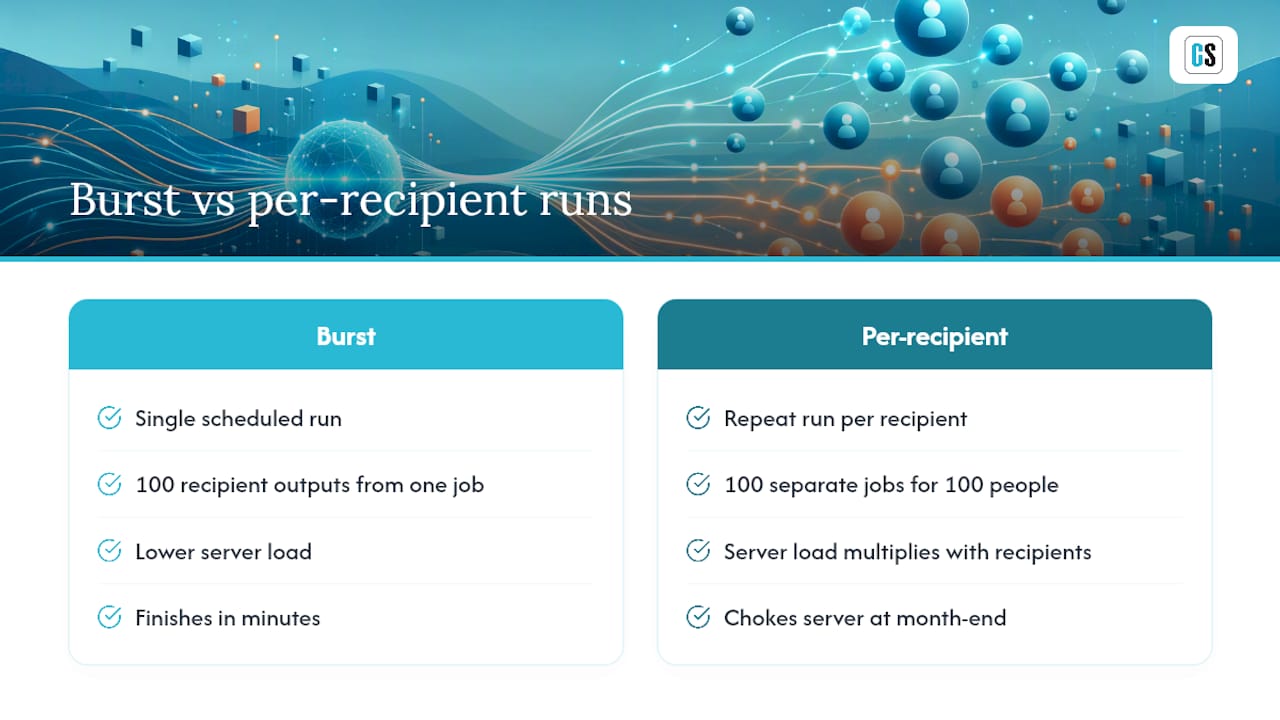
Scalability under load. Ask about burst scheduling: can the tool generate hundreds of recipient-specific outputs from a single scheduled run, or does it multiply server load with every additional recipient? Burst scheduling architecture is the difference between a report job that finishes in minutes and one that chokes your reporting server during month-end close.
Engine coverage. Confirm native support for Power BI paginated reports, Tableau workbooks, SSRS, and Crystal Reports. Buyer guides consistently rank governed scheduling and format fidelity across these engines as the top evaluation axis for enterprise report management tools.
Scheduling intelligence. Look for data-driven schedules and event-triggered runs, not just calendar-based jobs.
Delivery flexibility. Email, SFTP, cloud storage, and database drops, all in PDF, Excel, or CSV.
Operational controls. Retry logic, failure alerts, and run monitoring.
Governance. Role-based access, audit trails, and snapshot history.
Architecture fit. Evaluate the tool against your existing Microsoft or SAP stack and governance model, not as an isolated purchase. A practical BI selection framework treats reporting automation as part of the data architecture, which is exactly how procurement teams should be scoring it.
Which Features Prove a Reporting Tool Is Enterprise-Grade?
Vendor demos look impressive. A proof-of-concept run tells you the truth. Before signing anything, put the software through this checklist and watch what breaks.
- Burst scheduling with recipient-specific outputs. One execution should generate personalized reports for dozens or hundreds of recipients without spinning up dozens of separate jobs.
- Pixel-perfect rendering. Multi-page, print-oriented documents still matter for finance and compliance teams, and Crystal Reports remains a strong fit precisely because it preserves exact layouts at scale.
- Multi-format, multi-output runs. The same schedule should produce a PDF for email and an Excel file for the data warehouse, in one pass.
- Dynamic parameterization. Filters and distribution lists should query live data at run time, not sit hardcoded in a config file.
- High-availability options. Look for clustering or failover configurations that keep schedules running if a server goes down.
- Audit logs and snapshot history. Every rendered output should be stored and retrievable for comparison across runs, a baseline expectation in regulated reporting environments.
- Delivery confirmation. The system should tell you when a report failed to land, not leave a finance director wondering why the 9 a.m. dashboard never showed up.
- Prebuilt connectors. Native integration with Power BI, Tableau, SSRS, and Crystal Reports beats custom scripting every time.
Pro Tip: During a proof-of-concept, force a burst run with at least 100 simulated recipients and check the timestamp gap between the first and last delivery. If it's more than a minute or two, the architecture probably isn't built for burst scheduling and will bottleneck once you're running real payroll or board reports.
How Do You Deploy and Scale Enterprise Report Automation?
On-premises deployment gives IT teams control over data residency and integration with internal SSRS or Crystal Reports servers, which matters for finance teams handling regulated data. Hybrid setups add flexibility for cloud destinations like Power BI Service or SharePoint, but they introduce more moving parts to monitor.
Sizing matters more than most teams expect. A single burst execution producing dozens of personalized outputs doesn't scale linearly with recipient count when the engine handles bursting correctly, but a poorly architected tool will see execution time balloon as the recipient list grows. Test this before go-live, not after.
Before rolling out broadly, confirm these operational basics:
- Failover settings that prevent duplicate deliveries if a job restarts mid-run
- Run-history logs detailed enough to troubleshoot a missed delivery without opening a support ticket
- A named owner for every critical schedule, with change control on edits
- Dynamic distribution lists tested against live source queries, since static recipient lists create maintenance overhead as org charts change
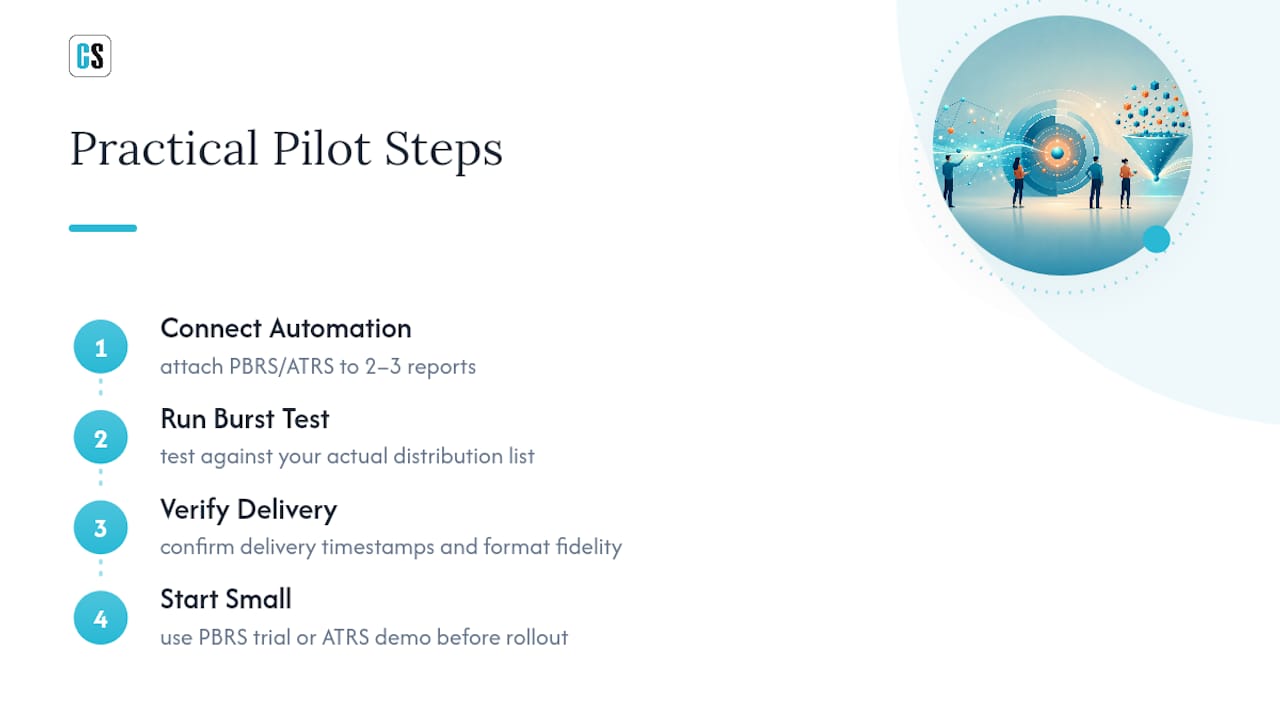
A simple pilot test plan: pick three reports with different urgency levels, run each through a burst scenario, and confirm delivery timestamps and formatting hold up under load.
What Security and Trust Signals Should You Require?
Security questions separate vendors who can handle regulated finance and healthcare reporting from those who can't. Don't take a sales deck's word for it. Ask for documentation.
- SOC 2 Type II certification or an equivalent independent attestation, confirming controls were tested over time, not just designed on paper
- Role-based access control that limits who can view, edit, or trigger specific report schedules
- Encrypted transport and storage for reports in transit and at rest
- Immutable audit trails and snapshot history for every rendered report
- Documented data handling practices for reports containing personally identifiable information
- Published SLA commitments and a track record of customer satisfaction, not just uptime marketing claims
Vendors serious about enterprise deployments carry SOC 2 Type II certification and publish it, not bury it in a footnote. That single credential tells procurement teams more about operational discipline than almost any feature list, because it means an outside auditor has verified controls around access, change management, and data handling held up under real scrutiny.
What Do BI Teams Get Wrong About Report Automation?
The biggest mistake I see in enterprise rollouts isn't picking the wrong software. It's treating automation as a scheduling convenience instead of an operations discipline. Teams set up a nightly export, call it done, and never test what happens when 300 regional managers all need a personalized version of the same report by 8 a.m. sharp.
Automation-first thinking changes that. Instead of a BI analyst manually running exports every Monday, the system handles delivery, and that analyst's time goes toward actual analysis instead of file management. I'd recommend a 30 to 60 day pilot: pick two or three of your most critical, highest-visibility reports, run burst tests under realistic recipient loads, and validate that formatting and delivery hold up before expanding further.
Christian Ofori-Boateng, whose work at ChristianSteven Software focuses on turning manual reporting workflows into hands-free processes, has seen the same pattern repeat across industries: the tools that fail in production are the ones never stress-tested during evaluation.
— Christian Ofori-Boateng
Get Hands-Free Reporting With PBRS, ATRS, CRD, and IntelliFront BI
If your team is still exporting reports by hand every morning, that manual step is the bottleneck, not your reporting engine. ChristianSteven Software builds products designed to automate scheduling and delivery for Power BI reports, Tableau workbooks, Crystal Reports, and to deliver real-time dashboards and KPIs to stakeholders without a manual refresh.

Each product supports the checklist above out of the box: burst scheduling for recipient-specific outputs, dynamic data-driven schedules, delivery to email, cloud, SFTP, or database destinations, and format fidelity across PDF, Excel, and CSV. Backed by SOC 2 Type II certification and more than two decades running BI automation for finance and IT teams, the platform is built for environments where a missed report delivery isn't an inconvenience, it's a compliance problem.
A practical pilot: connect PBRS or ATRS to two or three of your highest-visibility reports, run a burst test against your actual distribution list, and confirm delivery timestamps hold up. Start with the PBRS trial for Power BI automation or the ATRS demo for Tableau report delivery to see how it fits your current stack before committing to a wider rollout.
Sources
For deeper context on evaluation criteria and architecture fit, review the enterprise report management buyer guide and the BI tool selection framework. On the dashboard side, IntelliFront BI's KPI delivery capabilities and this piece on why analytics drives measurable ROI round out the business case for automated, reliable delivery.
- Best Enterprise Report Management Software (2026)
- WebFOCUS ReportCaster: Enterprise Scheduling and Distribution Architecture in 2026
- How to Evaluate Enterprise BI Tools: A Practical Selection Framework
FAQ
What Is Enterprise Report Automation Software?
It's software that schedules, formats, and delivers reports and dashboards from engines like Power BI, Tableau, SSRS, and Crystal Reports without manual intervention, handling everything from burst distribution to error alerts.
Is On-Premises or Cloud Better for Enterprise Reporting?
On-premises deployment gives IT teams direct control over data residency and integration with internal SSRS or Crystal Reports servers, which matters most for regulated finance and healthcare reporting; hybrid setups add cloud delivery flexibility on top of that.
What Is Burst Scheduling and Why Does It Matter?
Burst scheduling generates many personalized report outputs from a single execution instead of running separate jobs per recipient, which keeps server load manageable during high-volume distribution.
Does ChristianSteven Software Support Power BI and Tableau?
Yes. PBRS automates scheduling and delivery for Power BI reports, and ATRS handles the same function for Tableau workbooks, both with support for dynamic distribution and multiple export formats.
What Certifications Should Enterprise Reporting Vendors Have?
SOC 2 Type II certification is the baseline trust signal procurement teams should require, since it confirms an independent auditor verified security and operational controls over time, not just at a single point.