Event-driven reporting captures and processes business events the moment they happen, feeding near real-time reports and alerts instead of waiting for a nightly batch job to catch up. If a customer abandons a cart, a loan payment posts, or a sensor crosses a threshold, the report reflects it in seconds or minutes, not the next morning.
That speed isn't free. Event-driven pipelines trade the simplicity of batch jobs for harder problems: ordering guarantees, deduplication, and partial or "in-flight" data that hasn't settled yet.
Here's a quick gut check on whether it fits your situation:
- Choose event-driven when decisions depend on freshness measured in seconds or minutes: fraud alerts, SLA breaches, operational dashboards, or anything tied to a regulatory clock.
- Stick with batch when nightly or hourly aggregation already meets the business need and the added operational complexity of streaming infrastructure isn't worth it.
- Consider a hybrid when only part of your reporting (say, exception alerts) needs to be instant while the rest can stay on a scheduled cadence.
Pro Tip: Before building anything, write down the exact decision each report or alert drives, and how many minutes of delay that decision can tolerate. That number, not enthusiasm for streaming tech, should decide your architecture.
One caution worth flagging up front: event-driven systems often surface data before it's fully reconciled. Google's own documentation on event reporting notes that event data can take up to 24 hours to settle into standard reports, even though Realtime views show activity within 30 minutes. Design your reports to flag "provisional" versus "final" values from day one.
Key Takeaways
Event-driven reporting works because it processes business events as they occur, trading batch simplicity for freshness, smaller failure domains, and the ability to meet same-day regulatory deadlines.
| Point | Details |
|---|---|
| Core definition | Events trigger capture and processing in near real time, replacing scheduled batch scans of the full dataset. |
| Biggest technical risk | Ordering and deduplication issues cause most production incidents; design idempotent event schemas from the start. |
| Regulatory driver | Fannie Mae's LL-2026-05 requires same-day or next-morning event reporting, a deadline batch cycles can't meet. |
| Core tool stack | Kafka for streaming, Debezium for CDC, and Flink or ksqlDB for stream processing cover most implementations. |
| Rollout strategy | Pilot on a non-critical, moderate-volume dataset before scaling to mission-critical reporting. |
| BI integration | ChristianSteven Software's PBRS, ATRS, and CRD platforms connect stream outputs to Power BI, Tableau, and Crystal Reports delivery. |
Table of Contents
- What Is Event-Driven Reporting, and How Does It Differ From Batch?
- How Does an Event-Driven Reporting Architecture Actually Flow?
- Which Patterns and Tools Actually Build This?
- Where Does Event-Driven Reporting Pay Off Fastest?
- What Do You Gain, and What Will Slow You Down?
- How Do You Actually Roll This Out in Production?
- What Does a Real Event-Driven Reporting Pipeline Look Like End to End?
- How Do You Monitor and Govern This at Scale?
- Should You Pilot Event-Driven Reporting, and How Do You Start?
- An Editorial Take on Adopting Event-Driven Reporting
- Bringing Event-Driven Data Into Your Existing BI Reports
- Sources
- FAQ
What Is Event-Driven Reporting, and How Does It Differ From Batch?
Event-driven reporting is a data delivery pattern where a discrete business occurrence, an event, triggers capture, processing, and often a report or alert, rather than a scheduled job scanning the whole database on a timer. Martin Fowler's widely cited breakdown of the concept splits it into three related but distinct patterns: event notification (a lightweight "something happened" signal), event streaming (a continuous, ordered log of state changes consumers can replay), and event sourcing (using the event log itself as the system of record, with current state derived by replaying events). Fowler's taxonomy of event-driven systems is worth reading in full if you're deciding which pattern fits your reporting layer, because conflating the three is the most common early design mistake.
Batch reporting, by contrast, pulls a full or incremental snapshot on a schedule, hourly, nightly, weekly, and recalculates from scratch. It's simple to reason about and easy to reconcile, but it always reports the past.
| Dimension | Event-driven reporting | Batch reporting |
|---|---|---|
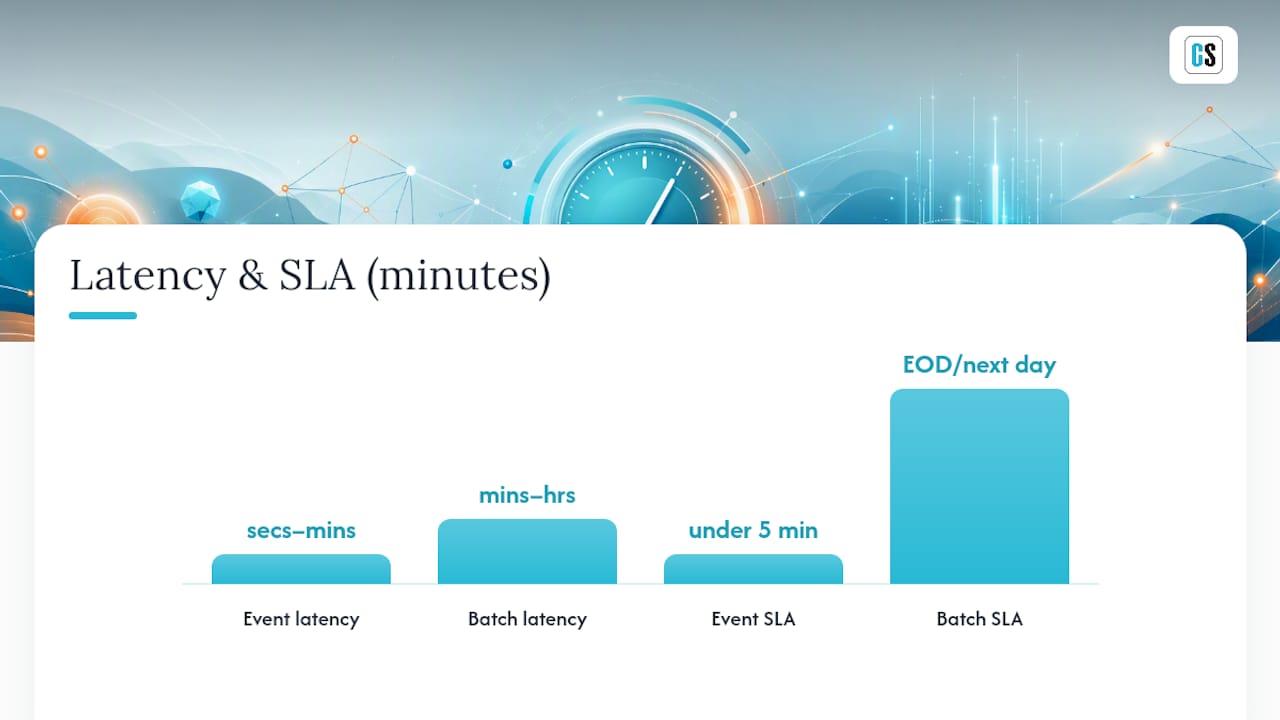
| Latency | Seconds to minutes | Minutes to hours (often overnight) |
| Failure domain | Isolated to the event or partition affected | A failed batch job can block the entire report |
| Reconciliation | Continuous, with provisional and final states | Point-in-time, generally cleaner to audit |
| Typical SLA | Near real-time (under 5 minutes common) | End-of-day or next-business-day |
A minimal event worth reporting on typically needs four fields, and skipping any of them causes headaches later:
{
  "timestamp": "2026-03-12T14:32:07Z",
  "entity_id": "loan_00219431",
  "event_type": "payment_posted",
  "payload": { "amount": 1450.00, "currency": "USD" },
  "metadata": { "source_system": "core_banking", "schema_version": "1.2" }
}
The metadata.schema_version field is the one teams forget, and it's the one that saves you six months later when the payload shape changes and old events are still sitting in a topic.
How Does an Event-Driven Reporting Architecture Actually Flow?
Every event-driven reporting stack, regardless of vendor, breaks down into the same six functional layers. IBM's primer on event-driven architecture frames this as systems that detect, process, communicate, and respond to events in real time, and that four-verb framing maps cleanly onto the components below.
- Event sources — the operational systems generating change: a core banking platform, an e-commerce checkout, an IoT sensor network, a CRM.
- Event capture layer — either Change Data Capture (CDC) reading database transaction logs, or application code explicitly publishing events.
- Messaging or streaming broker — the durable, ordered pipe (Apache Kafka is the dominant choice) that decouples producers from consumers.
- Stream processors — services that filter, join, aggregate, or enrich events as they flow through.
- Materialized stores or datamarts — the queryable landing zone, often a relational warehouse table or an OLAP store, that reporting tools actually read.
- BI/reporting layer and alerting sinks — dashboards, scheduled report deliveries, and threshold-based notifications.
Durability and ordering responsibilities belong squarely in the broker layer. Deduplication logic, however, usually belongs downstream, in the stream processor or the consumer writing to the datamart, because that's where you have enough context (a business key, a version number) to decide whether two records represent the same event or two.
A short callout on a decision teams get wrong constantly: CDC versus application-published events. CDC reads the database's transaction log directly, so it captures every change without asking application developers to add publishing code. That makes it ideal for legacy systems and third-party databases you can't modify. Application-published events, by contrast, let developers emit business-meaningful events (order_shipped rather than row_updated_in_orders_table), which produces cleaner semantics but requires code changes and discipline across every service that touches the data. Most mature architectures end up using both.
Which Patterns and Tools Actually Build This?
Four patterns cover almost every event-driven reporting design, and each has a clear technology home.
Publish–subscribe is the foundational pattern: producers publish to a topic, and any number of consumers subscribe independently. Apache Kafka is the de facto standard broker for this, and Confluent's documentation on Kafka and stream processing is a solid reference for topic design, partitioning strategy, and connector patterns.
Change Data Capture turns database row changes into a stream without touching application code. Debezium is the open-source standard here, tailing MySQL, PostgreSQL, SQL Server, and Oracle transaction logs and publishing changes as Kafka messages.
Event sourcing stores every state change as an immutable event and derives current state by replaying the log. It's powerful for audit-heavy domains (financial ledgers, insurance claims) but adds real complexity in snapshotting and replay performance, so reach for it deliberately, not by default.
Stream processing for transformations is where raw events become reportable metrics. Apache Flink handles complex, stateful transformations (windowed aggregations, joins across streams) at scale. Kafka Streams and ksqlDB are lighter-weight options that live closer to the Kafka ecosystem and suit simpler filtering, aggregation, and enrichment jobs without standing up a separate cluster. For lightweight, bursty enrichment tasks, serverless compute functions are often the more cost-efficient choice, since you pay per invocation rather than running a stream processor around the clock.
A few tooling decisions determine whether this scales cleanly:
- Use a schema registry (Confluent Schema Registry or an equivalent) so producers and consumers agree on message shape before deployment, not after a production incident.
- Pick a serialization format early. Avro and Protobuf are compact and support schema evolution; raw JSON is easier to debug but heavier on the wire and looser on contracts.
- Set explicit retention and compaction policies per topic. High-volume raw events might retain for 3 to 7 days; compacted topics holding "latest state per key" can retain indefinitely.
Security deserves its own line item: broker authentication (SASL/SCRAM or mTLS), encryption in transit and at rest, and access controls scoped at the schema registry level, not just the broker, since a compromised registry can poison every consumer downstream.
Pro Tip: Version every schema change as backward-compatible by default, additive fields only, never removing or renaming an existing field. Breaking changes should get a new event type, not a mutated old one, or you'll spend a weekend debugging why half your consumers are silently dropping records.
Where Does Event-Driven Reporting Pay Off Fastest?
Some reporting workloads barely benefit from going event-driven. Others transform completely. The clearest wins show up in a handful of recurring scenarios:
- Operational dashboards that ops or support teams watch live, order volume, queue depth, system health, where a 15-minute delay defeats the purpose.
- SLA monitoring and alerts, where the value is entirely in catching a breach before it compounds, not in reporting it after the fact.
- Fraud detection, which depends on flagging an anomalous transaction pattern within seconds of it occurring, not in tomorrow's batch review.
- Real-time financial reconciliation, matching payments against expected schedules as they post rather than at end of day.
- Anomaly detection for infrastructure and ops teams, catching a spike in error rates or latency while it's still a minor incident.
Financial services also gives a concrete, deadline-driven example of why event timing can be a compliance requirement rather than a convenience. Fannie Mae's Lender Letter LL-2026-05 reorganizes servicer reporting around event timing: loan servicers must report loan-level servicing events to the Fannie Mae Servicing Platform the same day they're processed, but no later than 3:00 a.m. Eastern time the next business day, with escrow-related reporting revisions carrying staged effective dates later in 2026. This is a summary for context, not legal guidance, but it illustrates something important: when a regulator sets a same-day-or-next-morning deadline, batch reporting on a 24 hour cycle simply cannot comply, and an event-driven pipeline becomes a compliance necessity, not an optimization.
Pro Tip: Match your aggregation window to the decision it supports. A fraud alert might need per-transaction granularity with no aggregation at all, while an SLA dashboard is often better served by a rolling 5-minute window, raw per-event views just add noise for the person watching it.
What Do You Gain, and What Will Slow You Down?
The honest framing here is a trade, not a free upgrade.
Benefits:
- Fresher data, often reducing reporting latency from hours to seconds or minutes.
- Smaller failure domains: a single bad event or a stalled consumer doesn't necessarily block the entire report, the way one failed nightly job can.
- Better auditability, since an event log naturally preserves the sequence of what happened and when, rather than overwriting state on each batch run.
Challenges:
- Ordering guarantees are hard to preserve across partitions or multiple topics, and out-of-order events can quietly corrupt aggregates.
- Replay and backfill logic gets complicated fast: reprocessing six months of history through a stream processor built for incremental updates is a different engineering problem than a batch rerun.
- Operational overhead is real. You're now running and monitoring a broker cluster, stream processing jobs, and schema governance on top of whatever reporting layer you already had.
The design fix for most of this is idempotency. Every event should carry a unique identifier so that processing it twice, which will happen eventually, produces the same result as processing it once. Combine that with a deduplication window in your stream processor keyed on that identifier, and most of the "duplicate row" incidents that plague early event-driven rollouts disappear.
Where full end-to-end streaming isn't justified, a hybrid micro-batch fallback (processing accumulated events every 60 to 300 seconds instead of continuously) often delivers 90% of the freshness benefit with a fraction of the operational complexity. Real-time reporting isn't always about zero latency so much as matching latency to the decision it feeds.
Pro Tip: Design your event schema with a reconciliation field, a running total or checksum the receiving system can compare against the source periodically. It turns "did we lose events?" from a mystery into a five-minute query.
How Do You Actually Roll This Out in Production?
A working rollout follows a fairly consistent sequence, whether you're modernizing a finance datamart or building a new operational dashboard.
- Scope the use case and define the events that actually matter. Resist the urge to stream everything; define 5 to 10 high-value event types first.
- Design the event schema, including the metadata fields covered earlier, timestamp, entity ID, event type, payload, schema version.
- Decide CDC versus application-published events for each source system, based on whether you can modify the producing application.
- Choose your broker and processing model. Kafka plus ksqlDB or Kafka Streams covers most mid-complexity needs; reach for Flink when you need complex windowed joins across multiple streams.
- Build the materialized view or datamart that your BI layer will actually query, and confirm it stays correct under replay.
- Wire in the BI and reporting layer, including alert thresholds and delivery schedules.
A few configuration details separate a stable pipeline from a fragile one:
- Retention and compaction: raw event topics might retain 7 days; compacted "current state" topics retain indefinitely.
- Consumer group settings: tune
max.poll.recordsand session timeouts to match processing speed, or you'll see unnecessary rebalances under load. - Checkpoint intervals: for stateful stream processors like Flink, checkpoint every 30 to 60 seconds to bound reprocessing time after a failure.
- Dead-letter queue strategy: route malformed or unprocessable events to a separate topic instead of blocking the main stream, and alert on that queue's depth.
For the operational runbook, three items matter more than the rest: define exactly how backfills run (typically replaying from a specific offset or timestamp rather than reprocessing everything), document a safe reprocessing procedure that won't double-count already-delivered reports, and build automated reconciliation checks comparing event counts and totals between source and datamart on a regular cadence.
Pro Tip: For most BI reporting workloads, pairing CDC with serverless compute for the enrichment step is the most cost-efficient combination, CDC keeps load off the source database, and serverless functions let you pay per event processed instead of running a stream processor around the clock for intermittent volume.
What Does a Real Event-Driven Reporting Pipeline Look Like End to End?
A concrete example makes the abstractions above easier to hold onto. The CDC Data Reporting project from the CDC's public health informatics team publishes a working reference architecture that maps almost exactly onto BI automation needs: a transactional source database feeds Debezium, which captures change events and publishes them to Kafka topics, and a downstream reporting pipeline service consumes those topics and runs post-processing logic (including stored procedures) to hydrate reporting datamarts in near real time.
Translate that sequence into a BI automation context and it looks like this:
- Source database (loan servicing system, CRM, ERP) commits a transaction.
- Debezium tails the transaction log and emits a change event.
- The event lands on a Kafka topic, partitioned by entity ID for ordering.
- A stream processor or serverless function enriches the event (joining reference data, applying business rules).
- The enriched result writes to a warehouse table or materialized datamart.
- A BI automation layer detects the new or changed data and triggers report generation and delivery.
That last step is where on-prem BI automation tools earn their place; integrating with specialized HR reporting software can further enhance real-time data insights. A stream processor doesn't natively know how to format a Power BI export, push a Tableau workbook refresh, or email a formatted PDF to a distribution list, it just produces clean, current data. The handoff typically happens one of four ways: a file drop the automation layer polls, a REST API call that triggers report generation on demand, a direct database write the automation tool watches for changes, or a push notification that triggers delivery immediately. For teams running Power BI in a report automation pipeline, the REST API trigger is usually the cleanest integration point, since it lets the stream processing layer call report generation directly instead of waiting on a polling interval.
Compliance matters here too. If your source data touches financial servicing, healthcare, or other regulated domains, every hop in this pipeline needs an audit trail: who or what triggered the report, what data version it reflects, and when it was delivered. That's a meaningful reason to run this on infrastructure with independent security certification rather than a patchwork of scripts.
Pro Tip: Put a circuit breaker between your stream processor and the report delivery component. If the BI automation layer is down or slow, the circuit breaker should queue or retry with backoff rather than letting failed delivery attempts pile up and overwhelm the endpoint the moment it recovers.
How Do You Monitor and Govern This at Scale?
Operating an event-driven reporting pipeline is a different discipline than watching a nightly batch job succeed or fail. You need continuous signals, not a single pass/fail check.
The signals worth alerting on:
- Consumer lag, the gap between the latest event on a topic and the last one your consumer has processed. Rising lag is usually the earliest sign of trouble.
- Processing latency percentiles (p50, p95, p99), not just averages, since a slow tail often hides the incidents that matter most.
- Error rates per stream processing job, broken out by error type where possible.
- Reconciliation deltas, the gap between source system totals and what landed in your datamart.
A testing checklist that catches problems before production does:
- Contract testing between producers and consumers, verifying schema compatibility on every deploy.
- Replay tests, confirming that reprocessing a known event window produces identical results.
- Chaos injection, deliberately killing a broker node or stream processor instance to verify recovery behavior.
- Automated end-to-end validation of materialized views against source of truth on a scheduled cadence.
Governance ties it together: enforce schema changes through the registry rather than ad hoc topic creation, scope access controls so only authorized services can produce to sensitive topics, and set explicit retention and cost controls before volume grows past what anyone budgeted for.
Pro Tip: Use tiered retention, keep raw, high-volume events for a shorter window (3 to 7 days) in standard storage, then compact or archive to cheaper cold storage for anything you need for audit purposes beyond that. It's a straightforward way to control the storage cost of streaming infrastructure without losing compliance history.
Should You Pilot Event-Driven Reporting, and How Do You Start?
The decision usually comes down to two variables: how fast the business needs the data, and how volatile that data actually is.
- If your SLA requires sub-hour freshness and the underlying data changes frequently throughout the day, event-driven is the right default.
- If reporting only needs to reflect end-of-day state and volume is modest, batch remains simpler to build and cheaper to run.
- If only a subset of reports needs speed, alerts, exception handling, a hybrid approach lets you stream the narrow slice that matters and batch the rest.
| Business need | Data volatility | Recommended approach |
|---|---|---|
| Sub-minute alerts (fraud, SLA breach) | High | Event-driven, full streaming |
| Intraday dashboards | Moderate to high | Event-driven or micro-batch hybrid |
| End-of-day financial close | Low to moderate | Batch, with event-driven exception alerts layered on |
| Static reference reporting | Low | Batch remains the right choice |
A pilot checklist that keeps the first attempt low-risk:
- Pick a non-critical dataset where a mistake won't disrupt operations.
- Define 3 to 5 event types with clear business meaning, not a raw schema dump.
- Implement CDC or an application publisher for that single source.
- Stream events into a sandbox Kafka topic, isolated from production traffic.
- Build one small materialized view and connect it to a BI automation layer for delivery, testing self-service reporting automation setup patterns as you go.
- Run reconciliation tests comparing the pilot output against the existing batch report for at least two weeks.
Pro Tip: Choose a pilot dataset with moderate, steady volume, high enough to prove the pattern works under real load, low enough that a mistake costs you an afternoon instead of a postmortem. Success looks like matching or beating your batch report's accuracy while cutting latency by an order of magnitude.
An Editorial Take on Adopting Event-Driven Reporting
Most enterprise rollouts I've seen fail for a boring reason: teams treat event-driven reporting as a technology swap, Kafka instead of a cron job, rather than a change in how the organization thinks about data state. The Freddie Mac team's own notes on streamlined event-based reporting make a point that deserves more attention than it gets: moving to event-driven reporting requires explicit lineage, status flags for in-flight data, and versioned business rules so auditors can trace exactly why a number changed. Skip that groundwork and you'll ship a technically impressive pipeline that nobody trusts, because finance and compliance teams can't tell provisional numbers from final ones.
The conventional wisdom says event-driven reporting is primarily an engineering upgrade. It's really a governance upgrade wearing engineering clothes. The hard part was never getting Kafka to run; it's deciding who owns reconciliation tolerances and how you label a number that might still change in the next five minutes.
Pro Tip: Treat your first successful pilot as the seed of an internal playbook, document the event definitions, the reconciliation approach, and the failure modes you hit, and hand that playbook to the next team before they start from zero.
Bringing Event-Driven Data Into Your Existing BI Reports
Everything in this guide assumes you can get fresh, reconciled data into a datamart. The harder question for most teams is what happens next: how that data actually reaches the people who need it, in the format they already use. That's the gap ChristianSteven Software closes. Instead of building custom delivery code on top of your Kafka or CDC pipeline, you connect the stream's output, a file drop, a REST call, a database write, directly to report automation that already knows how to format, schedule, and deliver Power BI, Tableau, SSRS, or Crystal Reports outputs.

That matters most for teams running on-premises BI environments where cloud-native streaming tools don't natively talk to legacy reporting formats. PBRS handles the Power BI side of that handoff with REST API triggers built for exactly this kind of event-driven delivery, while ATRS covers Tableau and CRD covers Crystal Reports, all backed by SOC 2 Type II certified infrastructure. If you're evaluating how to wire event-driven data into reports people already trust, start a PBRS trial and see how the trigger and delivery configuration maps onto your own pipeline.
Sources
- Fannie Mae updates event-based reporting and escrow reporting requirements - TENA
- What do you mean by “Event-Driven”? — Martin Fowler
- Events report — Google Analytics Help
- Confluent — Kafka and stream processing platform
FAQ
What does event-driven mean?
Event-driven means a system reacts to discrete occurrences, called events, as they happen, rather than checking state on a fixed schedule. In reporting, that means a report or alert fires when a relevant business event occurs instead of waiting for the next batch run.
Can you give an example of event-driven programming?
A common example is a web page that runs a function only when a user clicks a button, the code sits idle until that click event fires. In backend systems, a similar pattern triggers a fraud check the moment a transaction event is published, rather than scanning all transactions hourly.
Is Kafka an event-driven system?
Kafka is the messaging backbone most event-driven systems are built on, not the whole system itself. It durably stores and distributes event streams between producers and consumers, but the "event-driven" behavior comes from how the producers and consumers around Kafka are designed.
Can you provide an example of an event-driven system?
A CDC pipeline using Debezium to capture database changes, publishing them to Kafka, and triggering downstream report delivery is a complete event-driven system, as shown in the CDC's own public reporting pipeline architecture. ChristianSteven Software's PBRS and ATRS platforms plug into that kind of pipeline as the final delivery step, turning fresh event data into a formatted report automatically.
How is event-driven reporting different from real-time reporting?
Real-time reporting is the outcome, minimal delay between an occurrence and its appearance in a report, while event-driven reporting is the architecture that typically produces that outcome by processing events as they arrive rather than on a batch schedule.