
TL;DR:
- Self-service reporting automation speeds up report creation from days to minutes by automating governed data pipelines. Using event-based triggers and phased rollouts ensures data accuracy, trust, and reliable delivery. ChristianSteven Software offers four products that facilitate secure, scalable, and hands-free enterprise reporting across multiple BI platforms.
Self-service reporting automation setup is the process of configuring governed, automated data pipelines that generate and deliver BI reports without manual effort each time. Done right, it can cut report generation time from days to minutes, significantly reducing the workload. The key distinction from uncontrolled spreadsheet chaos is governance: users get autonomy within defined boundaries, not a free-for-all. A governed semantic layer ensures every department sees the same metric definitions, so "revenue" means the same thing in finance as it does in sales.
Event-based triggers are what separate modern automation from old-school scheduled reports. Instead of running at a fixed time against potentially stale data, event-based triggers fire when the data pipeline actually completes a refresh. ChristianSteven Software builds exactly this kind of architecture across its four core products: PBRS for Power BI, ATRS for Tableau, CRD for Crystal Reports, and IntelliFront BI for real-time dashboards and KPIs.
Pro Tip: Start your self-service reporting automation setup with a small pilot group on your highest-frequency, most structured recurring report. Validate data clarity and tool functionality before any broader rollout.
Table of Contents
- Best practices for a successful self-service reporting automation setup
- Common pitfalls that derail self-service reporting automation
- How ChristianSteven Software handles self-service reporting automation
- Key Takeaways
- ChristianSteven Software makes hands-free BI reporting practical
- FAQ
Best practices for a successful self-service reporting automation setup
Getting the foundation right before you automate anything is the single most important decision you will make. Automating on a broken data model just produces wrong answers faster.
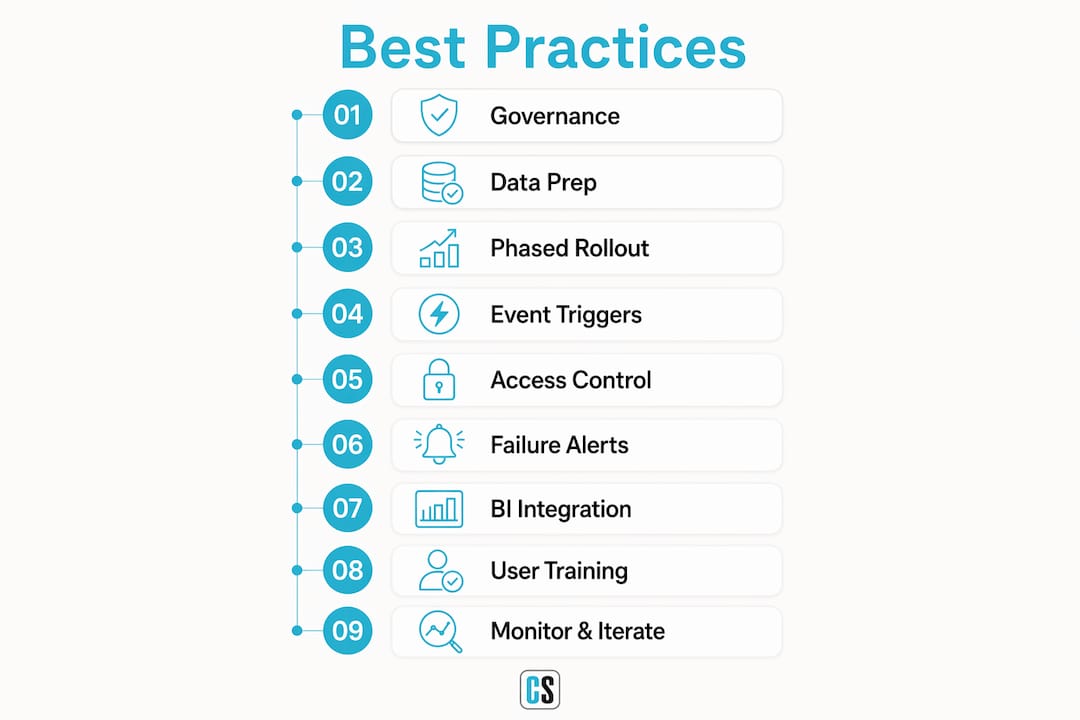
1. Establish a governed semantic layer first. Every metric needs one agreed-upon definition before a single pipeline runs. If revenue from the CRM differs from revenue in the ERP, automated reports will surface both without flagging the conflict. Define KPIs once, in one place, and enforce them across all reports.

2. Reconcile and prepare your source data. Data preparation and reconciliation are foundational. Automating on messy data amplifies errors rather than eliminating them. Run automated quality checks before connecting any source to your reporting layer.
3. Use a phased rollout, not a big-bang launch. Pilot programs with small, controlled user groups validate tool functionality and data clarity before broader rollout. Start with the report that costs your team the most time each period, automate it end-to-end, and run it in parallel with the manual version until the numbers reconcile.
4. Configure event-based triggers over time-based schedules. Tie report generation to pipeline completion events, not arbitrary cron jobs. This prevents reports from running against incomplete data, which is one of the most common trust-killers in early automation programs.
5. Implement tiered access controls. Match user capability to data autonomy. A board member needs read-only dashboard access; a finance analyst building new cost models needs access to the governed semantic layer with approved metrics. Role-based permissions should mirror your organizational hierarchy, not be configured as an afterthought.
6. Build failure alerting from day one. If a report fails to generate because of an API timeout or a schema change in the source system, the report owner must know immediately, not when a stakeholder asks why Monday's report never arrived. Failure alerting is non-negotiable for production pipelines.
7. Integrate with your existing BI ecosystem. No single automated reporting tool fits all use cases. BI-native tools work well for dashboard-style KPI updates; LLM-based tools handle written executive narratives. Most mature implementations combine both. ChristianSteven Software integrates across Power BI, SSRS, Tableau, and Crystal Reports environments without requiring you to rebuild your existing stack.
8. Train users on both the tool and the data. Tool skills get users into the interface. Data literacy keeps them from drawing wrong conclusions. Both dimensions matter. Role-based onboarding, office hours, and short "how-to" playbooks reduce support requests and build confidence faster than a single all-hands training session.
9. Monitor adoption and iterate. Track how many users access the environment regularly, whether the ad hoc reporting queue has shrunk, and whether users cite self-service numbers in meetings or still bring their own spreadsheets. If the spreadsheets persist, something in the environment is not meeting user needs.
Pro Tip: For any report going to senior stakeholders, maintain a human review gate for at least the first four weeks. Route the output to a reviewer before it ships. Once error rates stabilize below your acceptable threshold, you can reduce the review frequency, but never fully remove it for high-stakes outputs.
Common pitfalls that derail self-service reporting automation
Most automation projects that fail do so in the sequencing, not the concept. The organization buys a BI license, configures dashboards, invites users, and then discovers that nobody defined what "margin" means. Users encounter conflicting numbers, lose trust, and never return.
Without governance, self-service reporting creates multiple conflicting versions of the same number. That is the opposite of its intended purpose. Governance is not a bureaucratic layer on top of automation. It is the technical foundation that makes automation trustworthy.
The most common pitfalls, and how to avoid them:
- Skipping data preparation. Connecting raw, unreconciled sources to an automated pipeline means errors get generated and distributed at scale. Fix data quality upstream, before it reaches the reporting layer.
- Launching without a pilot. A broad rollout before validating data clarity and tool behavior almost always produces low adoption. A phased approach starting with high-impact recurring reports builds user trust and reduces project failures.
- Using time-based schedules instead of event triggers. A report that runs at 6:00 AM against a pipeline that closes at 6:15 AM will always contain yesterday's data. Event-based triggers solve this by design.
- Ignoring access controls. Governance risk concentrates at the levels where users can create and share new content. Without guardrails restricting access to governed datasets, users bypass the semantic layer, extract raw data, apply their own logic, and produce their own version of reality.
- No monitoring or alerting. Silent failures are the worst kind. A report that simply does not arrive is invisible until a stakeholder notices. Build alerting so failures route to a named owner, not a shared inbox.
- Neglecting security. Automated pipelines that carry sensitive financial or HR data need role-based access controls, row-level security, and immutable audit logs configured before the first report runs. Retrofitting compliance architecture after automation is producing reports is far harder than building it in from the start. For teams managing payroll and financial data, automated reconciliation workflows that integrate governance controls from the outset reduce both risk and manual cleanup.
How ChristianSteven Software handles self-service reporting automation
ChristianSteven Software has spent more than two decades turning complex reporting workflows into reliable, hands-free processes. The product portfolio covers the four BI environments where most enterprise reporting actually lives.
PBRS automates Power BI report scheduling, delivery, and distribution with event-based triggers, burst reporting, and role-based access controls. It connects directly to Power BI datasets and delivers formatted reports to the right recipients on the right schedule, without anyone manually exporting a file.
ATRS does the same for Tableau. It handles automated Tableau report delivery with configurable schedules, event triggers, and governed distribution lists. Teams that previously spent hours exporting and emailing Tableau views can configure ATRS once and let it run.
CRD brings the same automation to Crystal Reports environments, scheduling and delivering reports with secure, governed workflows. Organizations that have not migrated away from Crystal Reports get the same hands-free delivery capability as modern BI platforms.
IntelliFront BI provides real-time dashboards and KPI monitoring, giving business users a governed self-service analytics interface without requiring IT to build every view from scratch.
Across all four products, ChristianSteven Software builds in the features that matter most for production automation:
- Built-in audit trails and immutable logs for compliance
- Role-based access controls tied to organizational hierarchies
- Failure alerting that routes to named owners, not shared inboxes
- Event-based triggers linked to data pipeline completion
- Human review workflow support for high-stakes report distribution
- SOC 2 Type II certification, covering the security and availability standards enterprises require from a long-term automation partner
The scalable deployment approach ChristianSteven Software supports means you can start with one automated report and expand the program without rebuilding your architecture. That matters when you are running a pilot and need to prove ROI before committing to a full rollout.
Pro Tip: Use ChristianSteven Software's event-based trigger configuration to tie PBRS or ATRS report generation directly to your data warehouse refresh completion. This single change eliminates the most common source of stale-data complaints in automated reporting programs.
Key Takeaways
Effective self-service reporting automation requires governed data, event-based triggers, phased rollout, and continuous monitoring before any user-facing deployment goes live.
| Point | Details |
|---|---|
| Time savings potential | Automated reporting can reduce report generation time by up to 80%, cutting work from days to minutes. |
| Governance comes first | A governed semantic layer with agreed metric definitions prevents conflicting numbers and maintains user trust across departments. |
| Event triggers over schedules | Tying report generation to pipeline completion events, not fixed times, prevents reports from running against stale or incomplete data. |
| Phased rollout reduces risk | Starting with a small pilot group on high-frequency reports validates data clarity before broader deployment. |
| ChristianSteven Software | PBRS, ATRS, CRD, and IntelliFront BI deliver SOC 2 Type II certified, event-driven automation across Power BI, Tableau, Crystal Reports, and real-time dashboards. |
ChristianSteven Software makes hands-free BI reporting practical
For IT and BI teams that have read this far and are ready to move from theory to a working pipeline, ChristianSteven Software is built for exactly this transition. The gap between knowing best practices and having a production-ready automated reporting system is usually a tooling problem, not a knowledge problem.

PBRS, ATRS, CRD, and IntelliFront BI give you event-based triggers, built-in governance, failure alerting, and SOC 2 Type II security out of the box, across the BI platforms your team already uses. You do not need to rebuild your stack or hire additional engineers. ChristianSteven Software connects to your existing Power BI, Tableau, SSRS, or Crystal Reports environment and starts delivering governed, automated report generation from day one. With more than two decades of automation experience and consistently high customer satisfaction ratings, the company has handled the edge cases, the failure modes, and the compliance requirements that catch first-time implementations off guard. Start with one report, prove the ROI, and expand the program from there.
FAQ
What is self-service reporting automation setup?
Self-service reporting automation setup is the process of configuring governed data pipelines, access controls, and delivery schedules so that BI reports generate and distribute automatically, without manual intervention. Users access reports within defined boundaries rather than building them from scratch each time.
How much time can automated reporting actually save?
Automated reporting can reduce report generation time by up to 80%, cutting work that previously took days down to minutes. The largest gains come from eliminating manual data collection, formatting, and distribution steps.
Why do self-service reporting automation projects fail?
The most common failure is poor sequencing: organizations deploy BI tools before establishing governed metric definitions and data quality controls. Users encounter conflicting or inaccurate data, lose trust, and stop using the system. Governance and data preparation must come before any user-facing rollout.
What are event-based triggers and why do they matter?
Event-based triggers fire report generation when a data pipeline completes a refresh, rather than at a fixed scheduled time. This prevents reports from running against incomplete or stale data, which is one of the most frequent causes of inaccurate automated outputs.
Which ChristianSteven Software products support self-service reporting automation?
ChristianSteven Software offers PBRS for Power BI, ATRS for Tableau, CRD for Crystal Reports, and IntelliFront BI for real-time dashboards and KPIs. All four products include event-based triggers, role-based access controls, failure alerting, and SOC 2 Type II certified security.