
For recurring, template-locked BI reports pulled from Power BI, Tableau, SSRS, or Crystal Reports, a governance-first automation tool beats a narrative-first one, and some software solutions are built specifically for that job. If your bottleneck is still shaping the story inside a deck rather than refreshing the same report on schedule, a narrative-first tool fits better.
TL;DR:
- Governance-first tools excel at reliably automating scheduled report delivery, especially when templates are fixed and sources are stable.
- Integration stability is critical; native connections to Power BI, Tableau, and SSRS reduce failure risks in automated workflows.
- Pilot success depends on testing real templates and data sources, with small scope allowing validation before scaling operations.
- Support responsiveness and security certifications like SOC 2 Type II are essential for maintaining trust and compliance in automated distribution.
- Enterprise BI suites handle large-scale analytics but come with higher costs and longer implementation times compared to purpose-built automation platforms.
Table of Contents
- What Are the Real Rollstack Alternatives for BI Teams?
- How Do These Categories Compare on the Dimensions That Matter?
- What Should You Check Before Choosing a Tool?
- Why ChristianSteven Software Fits the Governance-First Category
- What Does It Actually Cost to Pilot One of These Tools?
- How Do the Feature Sets Actually Compare?
- How Good Is the User Experience, Really?
- Where Does Each Type of Tool Actually Win?
- Can These Tools Scale as Reporting Volume Grows?
- How Strong Is Support Once You're Actually Using the Tool?
- What Security and Compliance Features Actually Matter?
- Practitioner Perspective: Running a Realistic Pilot
- How to Get Started With ChristianSteven Software
- Sources
- FAQ
What Are the Real Rollstack Alternatives for BI Teams?
Buyers researching rollstack alternatives usually land in one of three camps, not one giant list of competing apps. G2's own alternatives breakdown groups the market into visualization tools, enterprise BI suites, and specialized report automation platforms, which maps closely to how BI teams actually think about the decision.
Narrative-first tools exist to help someone draft a deck, shape an argument, and turn raw numbers into a story a board wants to read. They shine for one-off presentations, quarterly business reviews built from scratch, or pitch decks where the content changes every cycle.
Governance-first tools exist to take a report that already works and get it out the door, on time, in the right format, to the right list of people, every single week or month without a human touching it. Template stays locked. Data source stays connected. The job is distribution and reliability, not composition.
Enterprise BI suites handle both reporting and the underlying analytics platform itself: data modeling, security layers, self-service dashboards, and slide or export delivery as one feature among many. PeerSpot's comparison of Rollstack against larger platforms shows this category gets pulled in mainly when scale or existing platform investment (think SAP BusinessObjects or Sisense) makes a standalone tool redundant.
A quick way to self-classify:
- If you're still writing the narrative each cycle, you need narrative-first.
- If the report is finished and just needs to go out on schedule, you need governance-first.
- If you're managing security, modeling, and delivery across dozens of data sources, you're probably shopping for enterprise BI, not a slide tool at all.
How Do These Categories Compare on the Dimensions That Matter?
Best-for use case is the first fork in the road. Narrative-first tools fit teams building a new story every cycle. Governance-first tools fit teams running the same report structure against a live BI source on a fixed calendar. Enterprise BI suites fit organizations that need reporting as one module inside a bigger analytics platform.
Integration stability is where a lot of narrative-first tools quietly fall short. G2's research notes that enterprises weighing governance and compliance needs tend to prioritize stable, native connections to Power BI, Tableau, and SSRS over flashier design features. A tool that pulls data through a fragile API bridge or requires re-authentication every few weeks will fail exactly the workflows it was bought to fix.
Implementation complexity and total cost split along similar lines. PeerSpot reviews of enterprise BI platforms like Sisense point out that these suites deliver strong scalability but carry a steeper learning curve and higher upfront investment than purpose-built automation tools, which are usually faster to pilot.
Distribution and error handling separate the toy from the tool:
- Can it send to email, cloud folders, and collaboration platforms, not just export a file?
- Does it support data-driven or event-triggered schedules, or only fixed timers?
- Does it log failures and retry automatically, or does someone find out a report never went out only when a client asks where it is?
One practical signal worth remembering: XLSlides' comparison against Rollstack frames the entire category split around one question, drafting a first version versus automating a recurring refresh. That question alone eliminates most of the wrong-fit purchases teams make.
What Should You Check Before Choosing a Tool?
Run through this list before you sit through a single demo:
- Source compatibility. Confirm native, not bridged, connections to your actual BI stack (Power BI, Tableau, SSRS, Crystal Reports) rather than a generic API that someone configured to sort of work.
- Template locking. Verify the tool preserves your branded layout and formatting run after run instead of regenerating a design each time.
- Many-to-one generation. Check whether it can take one template and personalize output for dozens or hundreds of recipients without manual duplication.
- Distribution targets. Map your required destinations, email, SharePoint, Teams, FTP, database, and confirm each is natively supported.
- Security and compliance signals. Ask for certifications (SOC 2 Type II is the common benchmark), audit logs, and role-based access controls.
During the demo itself, ask pointed questions rather than watching a canned walkthrough:
- How exactly does data mapping work when a source schema changes?
- What happens on failure? Is there automatic retry, alerting, or rollback?
- What's the realistic ceiling on report volume and recipient count before performance degrades?
- What SLA and support tier comes with the license, and what does escalation look like?
- Is pricing per user, per report, or per server, and does that model scale the way your team will?
Watch for red flags that surface almost every time in failed rollouts. If a vendor says data mapping is "just a quick manual step" for each new report, that's manual labor wearing an automation costume. If scheduling or version history isn't native, budget for a second tool later. If pricing tiers are vague or quoted only after a sales call, expect surprises at renewal.
Pro Tip: Ask the vendor to run your actual template, connected to your actual data source, during the demo instead of a prebuilt sample. How that goes tells you more than any feature sheet.
Practitioner notes on report automation consistently point to the same failure mode: skipping a disciplined template and business logic mapping phase up front, which later forces the manual interventions the tool was bought to eliminate.
Why ChristianSteven Software Fits the Governance-First Category
Some software companies build tools that fit this description: governance-first, BI-source-native, and built around scheduled, hands-free distribution rather than deck drafting.
Several tools exist that automate Power BI report exports and scheduling, including data-driven and event-triggered runs, handle scheduled Tableau report delivery to email, cloud storage, and collaboration tools on fixed or dynamic calendars, cover similar automation jobs for Crystal Reports environments, and offer real-time dashboards and KPI monitoring for teams needing live visibility. Some companies in this space may have industry-recognized certifications relevant for security or compliance reviews.
A realistic deliverable looks like this: a finance team locks one Power BI template, connects it to a governed dataset, and has PBRS export and deliver it to multiple regional managers every Monday morning with zero manual touches. If your team is still deciding what story that report should tell, pilot a narrative-first tool first. Once the format is locked, that's when a governance-first platform earns its place.
What Does It Actually Cost to Pilot One of These Tools?
Total cost breaks down differently depending on category, and the sticker price rarely tells the full story. Narrative-first tools often price per seat per month, which stays cheap for a small team but climbs fast once dozens of people need drafting access. Governance-first platforms typically price by server, report volume, or connected data source, which suits teams with a fixed, known reporting footprint rather than a growing headcount of casual users.
Enterprise BI suites carry the highest upfront cost by a wide margin. PeerSpot's reviews of platforms like Sisense describe real tradeoffs between scalability and the investment required to get there, both in licensing and in the specialized staff needed to run the platform.
Pilotability matters as much as the quoted price. A governance-first tool should let you validate value with one template, one data source, and one delivery channel before you commit to a wider rollout. If a vendor insists on a full enterprise deployment before you can see results, that's a cost-control problem disguised as a sales process. Ask specifically whether trial or demo access lets you test against your own live BI source, not a sanitized sample dataset, since that's the only way to know whether the connector actually holds up under your real schema and data volume.
How Do the Feature Sets Actually Compare?
| Dimension | Narrative-first tools | Governance-first tools | Enterprise BI suites |
|---|---|---|---|
| Best for | Drafting new decks, one-off narratives | Recurring, template-locked report delivery | Large-scale analytics plus reporting |
| Data integration | Often manual import or limited API pull | Native Power BI, Tableau, SSRS, Crystal Reports connectors | Deep, but tied to the platform's own ecosystem |
| Template control | Flexible design, rebuilt each cycle | Locked branded templates, consistent every run | Configurable but heavier to maintain |
| Implementation time | Fast, low setup | Moderate, requires mapping phase | Slow, often months |
| Distribution | Export or share manually | Automated email, cloud, database, scheduled | Built-in but bundled with broader platform tools |
The pattern holds across nearly every comparison: narrative-first tools win on speed to first output, governance-first tools win on reliability at scale, and enterprise suites win on breadth at the cost of implementation time.
How Good Is the User Experience, Really?
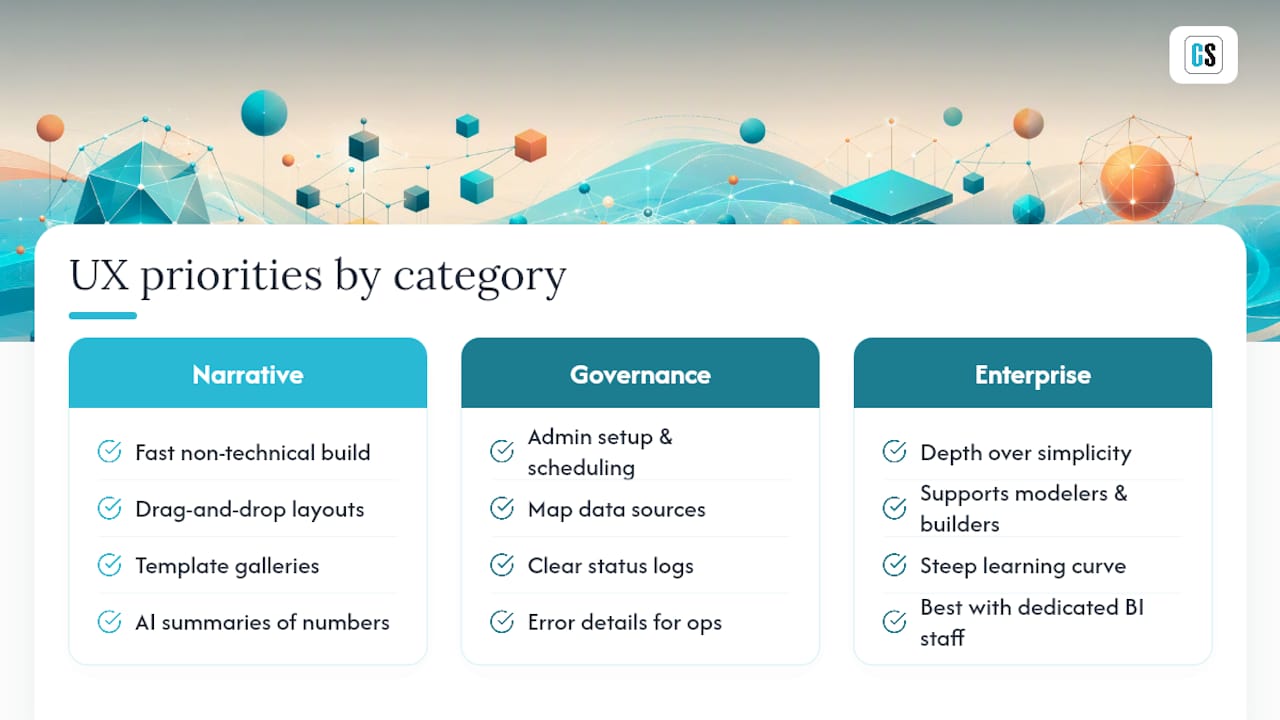
Interface quality means something different in each category, and comparing them on the same yardstick misses the point. Narrative-first tools are judged on how quickly a non-technical user can build something presentable, drag-and-drop layout, template galleries, AI-assisted summarization of raw numbers into talking points.
Governance-first tools get judged on a completely different axis: how fast can an admin configure a schedule, map a data source, and confirm delivery without touching the report's design at all. A clean scheduling interface with clear status logs, showing which reports ran, which failed, and why, matters more here than visual polish. Analysts running these tools day to day care less about aesthetics and more about whether the error console tells them something useful at 7 a.m. when a report didn't land in someone's inbox.
Enterprise BI suites tend to trade simplicity for depth. The interface has to serve data modelers, dashboard builders, and report schedulers all at once, which usually means a steeper learning curve before anyone feels fluent in the tool. That tradeoff is fine for organizations with dedicated BI staff and painful for smaller teams expecting a lighter touch.
The practical test: ask to run your own scheduling workflow during a trial, not the vendor's demo script, and time how long setup actually takes.
Where Does Each Type of Tool Actually Win?
A marketing team preparing a new investor deck every quarter, with numbers pulled from three different sources and a story that changes each time, is the textbook narrative-first case. Speed of drafting and design flexibility matter more than connector depth.
A finance department sending the same weekly variance report to 60 regional managers, built on one Power BI dataset with a locked template, is the textbook governance-first case. Nothing about the story changes week to week. What matters is that it goes out reliably, formatted correctly, without an analyst manually exporting and emailing a PDF every Monday.
A retail chain running dashboards across hundreds of stores, blending sales, inventory, and staffing data into one governed analytics environment with reporting as a downstream feature, is the enterprise BI case. The reporting layer is secondary to the modeling and security work happening underneath it.
Teams that misjudge which case they're in tend to overspend. Buying an enterprise suite to solve a governance-first problem means paying for modeling capability nobody uses. Buying a narrative tool to solve a governance-first problem means an analyst manually rebuilding the same report every cycle, defeating the point of automation entirely.
Can These Tools Scale as Reporting Volume Grows?
Scalability shows up differently depending on what's actually growing: report count, recipient count, or data volume. Governance-first platforms are usually built around many-to-one generation, one template rendered and personalized for hundreds of recipients from a single data pull, which is precisely the pattern that breaks narrative-first tools designed for single-document drafting.

Performance under load also depends on how a tool handles scheduling collisions. If ten reports are all scheduled for 6 a.m. Monday, does the platform queue and process them reliably, or does it choke and silently drop a few? That's a question worth asking directly in a trial, because it rarely shows up until real volume hits.
Enterprise BI suites scale well by design but at a cost curve that punishes smaller reporting needs. Paying for platform-wide scalability to support one recurring weekly report is a mismatch. The right scalability question isn't "can this handle enterprise volume" in the abstract. It's "can this handle my specific volume, on my specific schedule, without new infrastructure."
How Strong Is Support Once You're Actually Using the Tool?
Support quality tends to matter more with governance-first tools than with narrative-first ones, simply because governance-first tools run unattended. When a scheduled report silently fails at 2 a.m., the difference between a responsive support tier and a ticket queue that takes three days is the difference between catching the problem before a board meeting and after it.
Community strength varies widely by category too. Narrative-first and design tools often benefit from large user communities, template marketplaces, and third-party tutorials, since so many users are non-technical and self-serve through forums. Governance-first and enterprise BI tools tend to lean more heavily on vendor-provided documentation and direct support, since the user base is smaller and more technical, and the failure modes are more specific to each organization's data environment.
Ask directly during evaluation what support tiers exist, what response times look like for a production-down issue, and whether a dedicated contact is available past the free trial period. A vendor that can't answer those questions clearly during a sales conversation usually can't answer them clearly during an incident either.
What Security and Compliance Features Actually Matter?
Security requirements scale with how sensitive the underlying data is, and BI reports frequently carry financial, operational, or customer data that compliance teams care about deeply. The baseline checklist includes role-based access control, encrypted delivery channels, and audit logging that shows exactly which report went to whom and when.
Third-party certification is the fastest way to verify a vendor's claims without auditing their infrastructure yourself. SOC 2 Type II certification, which independently verifies security controls over an extended period rather than a single point-in-time snapshot, is the standard most enterprise buyers ask for by name. If a vendor can't produce that certification or an equivalent, treat every other security claim on their site as unverified marketing copy.
On-premises deployment options matter for organizations with strict data residency requirements, since keeping report data and delivery infrastructure inside a controlled network environment removes an entire category of third-party risk that cloud-only tools can't avoid. That's a meaningfully different risk posture than a cloud SaaS tool that routes your BI data through external servers as part of its normal operation.
Practitioner Perspective: Running a Realistic Pilot
Scope the pilot small: one locked template, one governed data source, one delivery channel. Measure time saved per reporting cycle, the drop in manual errors, and how many recipients get covered without a single manual export. A focused pilot like this usually runs two to four weeks before results are clear, versus months for a full enterprise rollout. Expand cadence and templates only after that first cycle proves clean.
— Christian Ofori-Boateng
How to Get Started With ChristianSteven Software
If the governance-first case fits your team, start where your reporting pain actually lives. Teams running Power BI can pilot automated Power BI exports with PBRS, which handles scheduling and delivery without building a separate Power Automate workflow around it.

Teams on Tableau can start with automated Tableau report delivery through ATRS, which covers scheduled exports to email, cloud storage, and collaboration platforms. A typical demo or trial walks through connecting your actual data source, locking a real template, and running one full generation and delivery cycle, exactly the low-risk pilot scope worth insisting on with any vendor. For teams that want to see scheduled KPI dashboards in action first, the free 30-day trial setup is a reasonable starting point before committing to a specific product.
One honest caveat: if your team's real bottleneck is still writing the narrative, deciding what the numbers mean before anyone schedules a refresh, a narrative-first drafting tool or AI-assisted summarization approach solves a different problem than automation software does. Get the story locked first, then automate the delivery.
Sources
For deeper comparison work, G2's Rollstack alternatives page breaks down category-level competitors. PeerSpot's practitioner reviews offer real-world tradeoffs between agile tools and enterprise suites. The TechCrunch coverage of Rollstack explains the broader BI-to-slide automation trend driving this whole category.
FAQ
How Much Does Rollstack Cost Per Month?
Rollstack does not publish flat public pricing, and quotes vary by seat count and usage tier, so getting an exact figure requires contacting sales directly rather than relying on a published rate card.
What Are the Top Reporting Tools for BI Teams?
The strongest options split into narrative-first drafting tools, governance-first automation platforms like ChristianSteven Software's PBRS and ATRS, and enterprise BI suites, with the right pick depending on whether your bottleneck is story creation or recurring distribution.
What Will Replace Tableau for Reporting Automation?
Nothing fully replaces Tableau's visualization layer, but governance-first automation tools commonly sit alongside it, scheduling and distributing the reports Tableau already builds rather than competing with Tableau itself.
What Is Google's Equivalent to Tableau?
Looker Studio (formerly Google Data Studio) is generally considered Google's closest equivalent to Tableau for self-service data visualization, though it differs meaningfully in enterprise scheduling and governance capability.
Is a Narrative-First Tool Better Than a Governance-First Tool?
Neither is universally better. Narrative-first tools win when you're still shaping a deck's story, while governance-first tools like ChristianSteven Software win once the template is locked and the job is reliable, recurring delivery.