
For most enterprise analytics teams, the right move isn't finding a "better" Power BI Helper. It's replacing a development-time utility with an automation server built for scheduling, multi-destination delivery, and error recovery. That distinction drives every recommendation below, and it's where the how-to-choose and promo sections point next.
TL;DR:
- Automated report delivery requires a dedicated automation server capable of scheduling, multi-destination exports, and retry logic, unlike development tools focused on metadata analysis.
- Evaluation criteria for these tools include support for data-driven triggers, secure delivery options, format fidelity, and scalability, with real failure simulations essential during testing.
- Self-hosted open-source platforms like Apache Superset involve higher operational costs and maintenance, making them suitable for teams with strong DevOps capability, whereas commercial products offer quicker deployment with less in-house effort.
- Vendors' support quality varies, so assessing response times and support tiers before purchase is critical to ensure operational reliability during outages or critical failures.
- Tools like ChristianSteven's PBRS and ATRS integrate seamlessly with Power BI and Tableau, respectively, offering tested, certified, and reliable automation with a 30-day pilot proving delivery success and error recovery.
Table of Contents
- What Counts as a BIHelper Alternative? A Category Breakdown
- Why Automation Servers Aren't the Same as Dev Tools
- How Do You Evaluate BI Automation Alternatives?
- Self-Hosted vs. Cloud vs. Enterprise: What's the Real Trade-Off?
- Where ChristianSteven Software Fits the Automation Checklist
- A 30-Day Pilot That Actually Proves Fit
- Getting Support When You Switch Tools
- What Do Real Deployments Show About These Alternatives?
- The Automation-First Case for BI Delivery
- PBRS and ATRS: Where to Start Your Automation Pilot
- Where to Verify These Claims Yourself
- Sources
- FAQ
What Counts as a BIHelper Alternative? A Category Breakdown
Searching for "bihelper alternatives" usually means one of two very different things, and mixing them up wastes procurement cycles. You're either looking for another metadata or documentation tool for Power BI development, or you're looking for something to actually run your reporting operation. The BIHelper ecosystem itself leans toward the first camp. Power BI Helper exports metadata, maps lineage, and generates documentation, with pro tiers adding scheduled scans and notifications. That's development-time analysis, not enterprise delivery.
Here's how the realistic option set breaks down:
- Automation servers and scheduling platforms. These sit on top of your existing BI tool (Power BI, Tableau, SSRS, Crystal Reports) and handle scheduled exports, dynamic distribution lists, and delivery to email, cloud storage, or business systems. This is the category to shop in if your pain point is "reports don't get to the right people reliably."
- Developer utilities and metadata tools. Think documentation generators, lineage mappers, and DAX debuggers. They make your models better; they don't send anything anywhere on a schedule.
- Open-source BI platforms and self-hosted stacks. Tools like Apache Superset give you visualization and dashboarding without licensing fees, but you own the infrastructure, patching, and scaling. It's a legitimate path for teams with strong DevOps capacity and a tolerance for maintenance work.
- Cloud SaaS visualization platforms. Fast to deploy, easy to demo, and often light on the governance and export-fidelity controls that regulated industries need. Great for quick wins, less great once you need audited, paginated PDF delivery to 200 branch offices every Monday at 6 a.m.
The mistake most teams make is comparing tools within one category as if they were interchangeable with tools from another. A metadata analyzer and an automation server solve different problems, and no amount of feature-list scanning changes that. Once you know which category actually matches your pain point, the evaluation gets a lot shorter.
Why Automation Servers Aren't the Same as Dev Tools
The word "helper" does a lot of misleading work in this space. Tools like powerbihelper on PyPI exist as developer-focused CLI utilities for generating projects, testing visuals, and analyzing PBIX metadata. They're genuinely useful for people building and debugging models. They were never built to run production report delivery, and treating them as if they could is where reliability problems start.
An automation server earns that name by handling a specific set of jobs a dev tool doesn't touch:
- Event-driven and data-driven triggers that launch a report run when a database value changes, not just on a fixed clock.
- Multi-destination exports to email, SFTP, cloud storage, and collaboration tools, often within the same job.
- Retry logic that automatically attempts a failed delivery again instead of silently dropping it.
- Audit logs that record who received what, when, and in what format, for compliance review.
- Monitoring and alerting that flags a stalled job before a business user notices a missing report.
Dev tools like Tabular Editor and DAX Studio play a different, complementary role. They're built for model development, debugging, and DAX optimization, and they're excellent at it. Neither one is designed to send a paginated PDF to 40 regional managers every Friday morning and confirm delivery. That's not a knock on the tools. It's just outside their job description.
The operational cost of blurring this line shows up fast. A finance team using a metadata utility to "automate" month-end reporting discovers there's no retry mechanism when the mail server hiccups. A missed delivery to auditors becomes a compliance gap instead of a minor annoyance. This isn't a hypothetical: development-time tools and production automation servers are complementary pieces, and treating one as a substitute for the other is a common and costly misstep.
Pro Tip: Before you shop for a replacement, ask whether your current pain is a delivery problem or a model problem. If reports run slow or DAX measures choke, that's usually fixable with model optimization, not a new platform.
How Do You Evaluate BI Automation Alternatives?
Once you've confirmed you need an automation server rather than another dev utility, the evaluation gets concrete fast. Six criteria separate the products that survive a real production load from the ones that look good in a fifteen-minute demo:
- Scheduling granularity. Can it handle data-driven schedules (triggered by a database value or file arrival), not just fixed daily or weekly runs?
- Destination coverage. Does it deliver natively to email, SFTP, cloud storage (S3, Azure Blob, SharePoint), and REST APIs, or does everything route through a single connector?
- Export fidelity. Does a paginated PDF actually look like the report, with page breaks and headers intact? Does the Excel export preserve formatting instead of dumping raw data?
- Event-driven triggers. Can a workflow launch off an external event, like a new row in a staging table, instead of waiting for the next scheduled slot?
- Security and compliance. Does it support SAML or Active Directory authentication and encrypt data in transit and at rest?
- Scalability and observability. Can you see job status, failure history, and delivery confirmation in one place, and does performance hold up as report volume grows?
During a demo or proof of concept, don't just watch the vendor click through a happy path. Run these tests yourself: schedule a real export against a large report, deliberately break the destination (revoke SFTP credentials, for instance) and watch what the retry logic does, and open the resulting PDF or Excel file to confirm formatting survived the trip. If a vendor can't simulate a failure in front of you, that's worth noting.
A useful reference point here: performance complaints that look like a "need a new platform" problem are frequently solvable at the model level first. SQLBI's guidance on Power BI tooling points teams toward VertiPaq metadata analysis and DAX optimization before assuming the reporting layer itself is broken. Skipping that step means some teams replace a perfectly good BI tool because of a model design issue that a few hours of optimization would have fixed.
Red flags during a PoC: no visible audit trail, delivery confirmation that's just "job completed" with no per-recipient detail, or a sales team that can't answer what happens when a destination is unreachable for six hours.
Self-Hosted vs. Cloud vs. Enterprise: What's the Real Trade-Off?
Every automation path carries a cost structure, and the sticker price is rarely the full story. Self-hosted open-source platforms trade licensing fees for engineering time. Apache Superset is a genuinely capable open-source BI platform, but running it reliably at enterprise scale means someone on your team owns patching, scaling, and uptime, indefinitely. That's a real headcount cost, not a rounding error.
Commercial automation products flip that equation: you pay a subscription or license fee, and the vendor absorbs the maintenance burden. The trade-off shows up in control and speed:
- Upfront vs. ongoing cost. Self-hosted stacks front-load engineering time; commercial products front-load licensing cost and back-load lower maintenance.
- Data residency and control. On-premises automation keeps data inside your network boundary, which matters for regulated industries with strict residency rules.
- Compliance and auditability. Certifications like SOC 2 Type II and ISO 27001 signal that a vendor has independently verified security controls, something harder to prove internally without a dedicated compliance team.
- Time to production. A self-hosted open-source deployment commonly takes weeks to months to reach production readiness, factoring in infrastructure setup, security review, and testing. A commercial automation product configured against existing reports can often reach a working pilot in days.
Licensing costs, learning curve, and integration effort are consistently cited as the hidden costs teams underestimate when evaluating BI alternatives, and that applies as much to open-source migrations as to commercial swaps. Neither path is universally right. A team with strong DevOps capacity and strict data residency requirements might reasonably choose self-hosted. A team that needs auditable delivery running next month, without adding headcount, usually can't afford that runway.
Where ChristianSteven Software Fits the Automation Checklist
ChristianSteven Software builds four products that map directly onto the automation criteria covered above, each tied to a specific reporting environment: PBRS for Power BI, ATRS for Tableau, CRD for Crystal Reports, and IntelliFront BI for real-time dashboards and KPIs. All four share the same core job: scheduling, formatting, and delivering the right report to the right destination, whether that's email, cloud storage, a database, or a collaboration tool, with event-triggered workflows and automated error handling built in rather than bolted on.
The company has spent more than two decades focused specifically on turning manual reporting workflows into hands-free processes, and it holds SOC 2 Type II certification, the audit standard that verifies security controls over time rather than at a single point in time.
| Proof point | What it verifies |
|---|---|
| SOC 2 Type II certification | Independently audited security and availability controls |
| Two decades of BI automation focus | Depth in Power BI, Tableau, SSRS, and Crystal Reports environments |
| High customer satisfaction ratings | Sustained reliability across enterprise deployments |
If you're running a demo, verify these three things yourself: schedule a data-driven export and confirm it triggers correctly, deliberately fail a destination and watch the retry behavior, and check whether the audit log shows per-recipient delivery confirmation.
A 30-Day Pilot That Actually Proves Fit
Skip the long RFP cycle. A focused pilot surfaces integration gaps faster than months of vendor comparison calls, and it gives you real numbers instead of sales claims.
Track four metrics from day one: delivery success rate, delivery latency, format fidelity (does the PDF or Excel file match the source report), and average error resolution time when something breaks.
- Week 1: Connect one real, moderately complex report and confirm the connection reads live data correctly.
- Week 1–2: Build a schedule, including at least one data-driven trigger, and route output to two different destination types (say, email and cloud storage).
- Week 2: Deliberately simulate a failure, an unreachable SFTP server or an expired credential, and time how long recovery takes.
- Week 3: Expand to five to ten reports representative of your actual reporting mix, including at least one paginated PDF and one Excel export.
- Week 4: Pull the audit logs and compare delivery success rate against your current process's baseline.
Bring in whoever currently owns manual report distribution, plus IT or security if the pilot touches SAML/AD authentication or encrypted destinations.
Pro Tip: Don't pilot with your simplest report. Use one with real formatting complexity, since that's where export fidelity problems actually show up.
Getting Support When You Switch Tools
Vendor support quality varies enormously across this category, and it's worth testing before you sign anything, not after. Open-source platforms like Apache Superset lean on community forums, GitHub issues, and public documentation. That works well for teams with in-house engineering depth willing to debug their own deployment, but there's no service-level agreement guaranteeing a response time when production breaks at 2 a.m.
Commercial automation vendors typically offer tiered support: documentation and self-service knowledge bases for routine questions, plus direct technical support for configuration issues and production incidents. The gap between those two models matters most exactly when you don't want it to: during an outage.
Before committing to any option, ask a direct question during the sales or evaluation process: what's the actual response time for a critical delivery failure, and is that commitment written into a contract or just implied? A vendor that can point to a documented support tier and a track record of certifications like SOC 2 Type II has already been through an external audit of its operational practices. A community forum, however active, hasn't. Neither model is wrong, but they carry very different risk profiles, and that risk should factor into your total cost calculation alongside licensing fees.
What Do Real Deployments Show About These Alternatives?
Case studies across the BI automation space consistently point to the same pattern: teams that swap tools without first isolating whether their problem is model performance or delivery reliability tend to relearn the same lessons on the new platform. Teams that separate the two problems, optimize the model first, then evaluate delivery tooling separately, tend to reach a stable state faster.
Open-source deployments of platforms like Apache Superset show a consistent trade-off in practice: lower licensing spend, higher operational investment. Organizations with dedicated platform engineering teams report success running Superset at scale, while smaller analytics teams without dedicated infrastructure support more often describe it as a heavier lift than expected.
On the commercial automation side, the recurring theme in adoption patterns is narrower in scope than a full BI platform swap: teams keep their existing Power BI, Tableau, or Crystal Reports environment and add a dedicated scheduling and delivery layer on top. That's a smaller, lower-risk change than migrating an entire BI stack, and it's why automation servers get evaluated as a distinct category rather than lumped in with full platform replacements.
The consistent thread across these outcomes: the deployments that go smoothly are the ones where the team ran a real pilot, with real failure simulation, before committing to a contract.
The Automation-First Case for BI Delivery
The industry spends a lot of energy debating dashboards and chart types, and not nearly enough on whether the report actually arrives. That imbalance is backwards. A beautiful dashboard nobody receives on time is worse than a plain PDF that lands in the right inbox every single Monday without fail.
Demand for reliable, auditable delivery is rising for a reason that has nothing to do with aesthetics: regulators, auditors, and boards increasingly want proof that the right report went to the right person, not just a screenshot of a dashboard that looked fine in a demo. That's an operational requirement, and it's why SOC 2 Type II certification and multi-decade track records matter more in this category than they do in visualization tooling. You're not buying a chart library. You're buying a dependency your compliance team will lean on.
If there's one thing worth reconsidering about how most teams approach this decision, it's this: they shop for BI tools the way they shop for a car, based on features they can see. Delivery reliability is invisible until it fails. Ask any vendor to prove it under simulated failure before you sign anything, and request a demo if you want to see that proof firsthand.
— Christian Ofori-Boateng
PBRS and ATRS: Where to Start Your Automation Pilot
One solution to this gap is a purpose-built automation layer that sits on top of the BI tool you already run, instead of asking you to migrate anything.

PBRS handles scheduled and event-triggered exports for Power BI, delivering paginated PDFs, Excel files, and more to email, SFTP, cloud storage, or REST API endpoints, with retry logic and audit logs built in. ATRS does the equivalent job for Tableau, automating delivery so report recipients get their data on schedule without anyone manually exporting and emailing files.
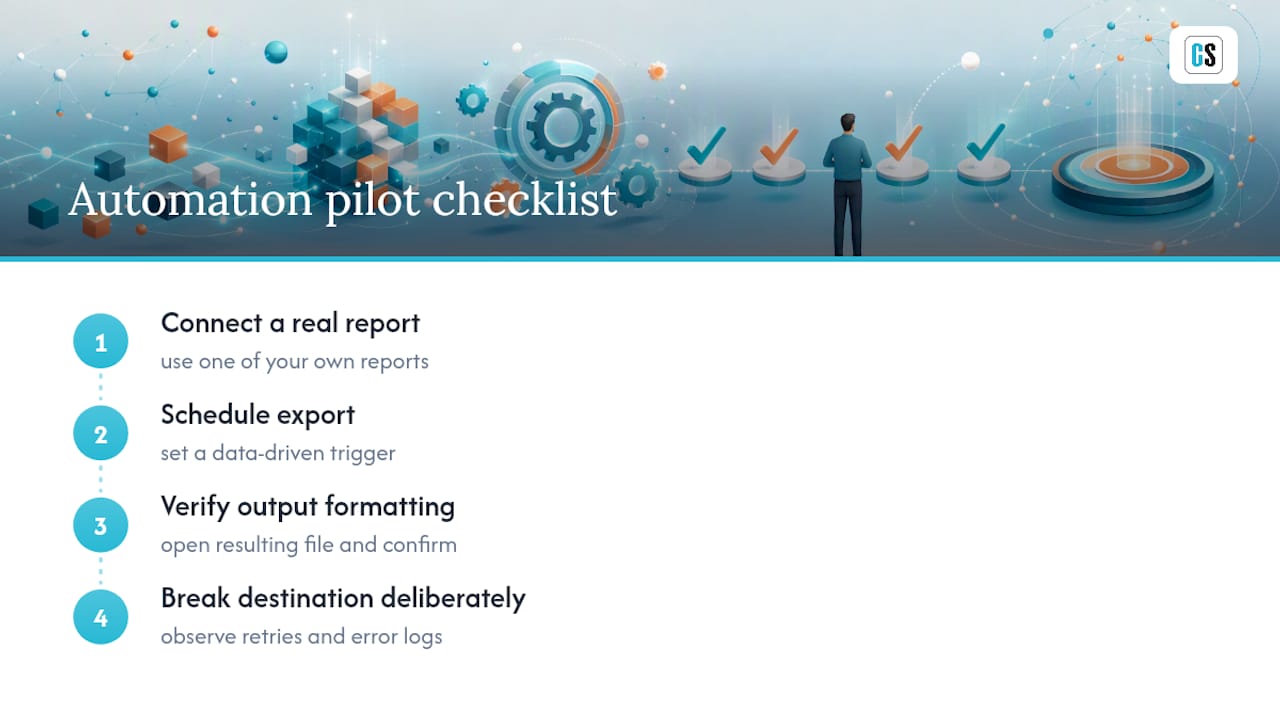
Run the same demo checklist from earlier in this article: connect one of your real reports, schedule an export with a data-driven trigger, open the resulting file to confirm formatting held up, then deliberately break a destination and watch how retries and error logs behave. That's the actual test, not a features slideshow.
If Power BI is your primary environment, start with the PBRS product page and request a demo built around your own reports. If Tableau is the environment in question, the ATRS page walks through the same automated delivery model for Tableau workbooks.
Where to Verify These Claims Yourself
Don't take any vendor's word on automation reliability, including ours, without checking the underlying sources yourself.
- SQLBI's guide to Power BI tooling is the best starting point for model optimization concepts like VertiPaq metadata and DAX tuning, useful before you assume you need a new platform at all.
- Power BI Helper's own site shows exactly what a development-time metadata tool covers, and where its scope ends.
- Apache Superset's documentation is the reference point for evaluating open-source BI at scale, including what self-hosting actually involves.
- powerbihelper on PyPI demonstrates how developer-focused CLI tooling differs from a production scheduling server.
- Tabular Editor is worth reviewing if your evaluation touches model development tooling alongside delivery automation.
- Coursera's rundown on Power BI alternatives is useful for a broader read on licensing and learning-curve trade-offs across the category.
Sources
- Tools in Power BI - SQLBI
- Power BI Helper – A Power BI Tool That Helps!
- Apache Superset
- powerbihelper on PyPI
FAQ
What is the main difference between BIHelper and an automation server?
BIHelper-style tools focus on metadata, documentation, and development-time analysis for Power BI models, while automation servers like PBRS handle scheduled, multi-destination report delivery with retry logic and audit trails.
Do I need a new BI platform or just better automation?
Often just automation. Many performance and reliability complaints trace back to model design issues that DAX and metadata optimization can fix without replacing your reporting tool at all.
Is Apache Superset a good BIHelper alternative?
Apache Superset offers solid open-source visualization and dashboarding, but running it reliably at enterprise scale requires dedicated infrastructure and maintenance effort that commercial automation products absorb for you.
How long does a BI automation pilot typically take?
A focused pilot validating delivery success, format fidelity, and error recovery can reasonably run in about 30 days, well short of a traditional multi-month RFP cycle.
Does ChristianSteven Software replace Power BI or Tableau?
No. PBRS and ATRS sit on top of your existing Power BI or Tableau environment and add scheduled, event-triggered delivery to email, cloud storage, and other destinations, without requiring a platform migration.