
Report bursting automates creating and delivering personalized, parameter-driven reports so each stakeholder receives only the data they need. If you run BI at scale, the fastest way to validate that promise is a controlled 100-recipient burst test using templated outputs, checking render quality, delivery, and monitoring before you commit to production.
TL;DR:
- Native report bursting tools often hit scalability limits beyond a few hundred recipients without external engines or automation layers.
- Data-driven bursting offers full automation and real-time adaptation but requires careful setup of recipient lists, filters, and security measures to prevent leaks.
- Formats like PDFs, PowerPoint, and Excel should match how recipients need to consume reports, with delivery channels supporting email, Slack, Teams, or cloud storage natively.
- Testing and piloting with a 100-recipient burst, including a diversity of data scenarios, ensures rendering success and delivery reliability before a full-scale rollout.
- Supporting infrastructure like data connectivity, identity management, and orchestration tools influences bursting success and should be integrated seamlessly into existing BI workflows.
Table of Contents
- What Are Report Bursting Tools and When Do You Need Them?
- How Do Report Bursting Methods and Architectures Differ?
- Which Delivery Formats and Destinations Should You Support?
- How Do You Plan, Pilot, and Run a Production Report Burst?
- What Causes Report Bursting to Fail at Scale?
- How Does ChristianSteven Software Support Enterprise Report Bursting?
- How Does Report Bursting Fit Your Existing BI Stack?
- Buy vs. Build: A Quick Decision Framework for BI Leaders
- Ready to Pilot Your Own Report Bursting Rollout?
- Sources
- FAQ
What Are Report Bursting Tools and When Do You Need Them?
Report bursting tools take one master report or dashboard and split it into dozens or thousands of personalized versions, each filtered to a specific recipient, region, or account. Instead of a sales manager manually exporting 40 territory PDFs every Monday, a bursting engine runs the report once, applies a filter per recipient, and routes each output automatically.
There are two dominant approaches. Parameter-driven bursting runs the same report template repeatedly with a different input value each time, such as a region code or customer ID pulled from a list. Data-driven bursting pulls the recipient list, filter values, and delivery destinations directly from a database table, so the burst adjusts automatically when the underlying data changes, no manual list maintenance required.
The use cases cluster around a few patterns:
- Customer statements and invoices, where each client sees only their own account data.
- Regional executive summaries, where a VP in EMEA gets different numbers than a VP in APAC from the same base report.
- Board and leadership decks, often reformatted into PowerPoint or PDF for people who never open the underlying BI tool.
- Field and franchise reporting, where hundreds of store managers need the same layout with their own store's figures.
A single sales performance report, for example, can burst into 200 personalized PDFs, one per account manager, each showing only their pipeline, filtered and delivered without anyone touching an export button. The payoff shows up in three places: hours reclaimed from manual exporting, consistent formatting across every recipient, and an audit trail showing who received what and when, something spreadsheet-based distribution never gives you.
How Do Report Bursting Methods and Architectures Differ?
Most BI teams land on one of three architectures, and the right choice depends on scale, not preference.
- Native scheduled subscriptions. Power BI, Tableau, and similar platforms let you schedule a report to email a fixed distribution list. This works fine for a handful of recipients and static filters, but native subscription tools generally lack per-recipient dynamic filtering and hit ceilings fast once you need row-level personalization across hundreds of accounts.
- External schedulers or dedicated bursting engines. These sit outside the BI tool and handle formatting, multi-destination delivery, retries, and logging as first-class features. Vendor-supplied bursting engines typically include dynamic parameter lists, parallel processing queues, and audit trails built specifically for enterprise-scale distribution, which is the gap native subscriptions leave open.
- Event-triggered bursts. Instead of running on a clock, these fire when a condition occurs: a new record lands in a table, a threshold is crossed, a workflow completes. Useful when a report needs to reach someone within minutes of an event rather than at the next scheduled hour.
Qlik's automation tooling illustrates a hybrid worth knowing about: reports can loop over a list of dimension values, producing bursted, multi-page PDF or PowerPoint output on a schedule or a trigger. It's the same underlying idea as data-driven bursting, just built into the automation layer rather than a separate engine.
The trade-offs are predictable. Native tools cost nothing extra but cap out fast. External engines add setup work but buy you control, retries, and logs. Event triggers add near real-time delivery but demand more careful monitoring, since failures can cascade faster when the trigger fires unexpectedly often.
Which Delivery Formats and Destinations Should You Support?
The output format should match how the recipient actually consumes information, not what's easiest to generate. A finance controller wants a formatted PDF or Excel workbook they can file. An executive assistant prepping a board meeting wants PowerPoint. A data engineer feeding a downstream system wants CSV.
Common formats include:
- PDF for anything that needs to look identical everywhere, statements, invoices, compliance reports.
- PowerPoint for executive and board audiences, a trend that's accelerating as platforms increasingly sync live BI data directly into slide decks rather than forcing someone to rebuild a deck by hand every quarter.
- Excel when the recipient needs to pivot, filter, or recalculate on their end.
- CSV for machine-to-machine handoffs.
- HTML for inline email bodies when a full attachment is overkill.
Destinations follow a similar logic: email remains the default, but Slack and Microsoft Teams channels, S3 buckets, Google Drive, SharePoint libraries, and webhook endpoints all show up in modern bursting setups. Some vendor platforms now advertise templated, branded distribution straight to email, Slack, Teams, and cloud storage as a single configured workflow rather than separate integrations.
Packaging matters more than teams expect. One file per recipient is cleanest for personalized statements. Zipped bundles work when an admin needs everyone's file in one place. Dashboard links with permission checks skip file generation entirely, useful when data changes so often that a static PDF goes stale within hours.
How Do You Plan, Pilot, and Run a Production Report Burst?
Treat your first bursting rollout as a five-step sequence, not a single deployment.
- Define recipient lists and a single source of truth for filters. Pull recipient identity, region, and permission data from one governed table, not a spreadsheet someone updates by hand. Every burst inherits the accuracy of this list.
- Build and test templates at scale. A template that renders perfectly for one customer can break for another with unusual characters, missing fields, or an unusually long name. Test rendering across a representative sample, not just your cleanest record.
- Stagger schedules and batch long-running jobs. Google's own documentation on scheduled exports recommends splitting large reports into smaller pieces and spacing schedules roughly 30 minutes apart specifically to avoid timeout and rendering errors, a lesson that applies well beyond one platform.
- Secure outputs and delivery end to end. Encrypt files in transit and at rest, restrict destination folders by role, and keep an audit log of every delivery, not just successes.
- Pilot with a controlled sample before full rollout. Run a real burst, 100 recipients is a workable benchmark size, and measure render success rate, end to end latency, and delivery confirmation before you scale to the full list.
Pro Tip: Run your pilot burst against your messiest real data, not a clean demo dataset. The recipient with the unusual name, the missing region code, or the oversized attachment will surface every template bug your happy-path test missed.
Row-level security deserves its own line item here: filtering data by recipient is not the same as securing the delivery channel. A report can be perfectly filtered and still leak if the email goes to the wrong distribution group or the S3 bucket is misconfigured. Build both checks into your checklist, not just the first one.

For teams distributing from Power BI specifically, the mechanics of scheduling and packaging exports differ enough from generic BI tooling that it's worth reading the platform-specific guidance before you template anything.
What Causes Report Bursting to Fail at Scale?
Bursting setups that work fine at 20 recipients often break at 2,000, and the failure modes are fairly consistent across platforms.
- Rendering timeouts on complex reports with heavy visuals or large datasets. The fix is usually splitting the report into smaller sections or simplifying visuals rather than throwing more compute at the problem.
- Parallelism bottlenecks. Running every job at once floods your rendering engine and database connections simultaneously. Queuing and batching jobs into controlled waves prevents this.
- Mixed-access recipients. Some recipients hold full licenses to your BI platform; others need a lightweight, view-only delivery. Plan permission and licensing strategy before the burst, not after complaints arrive.
- Missing observability. Teams that skip detailed run logs and automatic retries find out about failures from an angry recipient, not from their monitoring.
Services built specifically for automated reporting treat schedule reliability, retries, delivery receipts, and detailed run logs as core, non-negotiable features rather than nice-to-haves, and that's the right instinct. A burst with no retry logic and no log is a burst you'll be debugging blind at 2 a.m.
How Does ChristianSteven Software Support Enterprise Report Bursting?
ChristianSteven Software builds its report automation products around the exact checklist above, rather than treating bursting as an afterthought bolted onto a scheduler.
- PBRS handles data-driven bursting, formatting, and delivery for Power BI reports, including dynamic recipient lists pulled from a database.
- ATRS covers the same workflow for Tableau, with templated exports and multi-destination delivery.
- CRD manages scheduling and bursting for Crystal Reports environments still running in production.
- IntelliFront BI centralizes dashboards and KPIs when teams need a unified delivery layer across sources.
Two trust markers matter here for IT and security teams evaluating any BI automation vendor: SOC 2 Type II certification and more than two decades of operating in Power BI, Tableau, SSRS, and Crystal Reports environments. ChristianSteven Software's own 100 Recipient Burst Test follows the same validation logic recommended earlier: run a controlled batch, measure render success and delivery latency, then scale with confidence rather than hope. For a broader look at how these products compare on bursting specifically, the enterprise bursting tool overview walks through feature mapping in more depth.
How Does Report Bursting Fit Your Existing BI Stack?
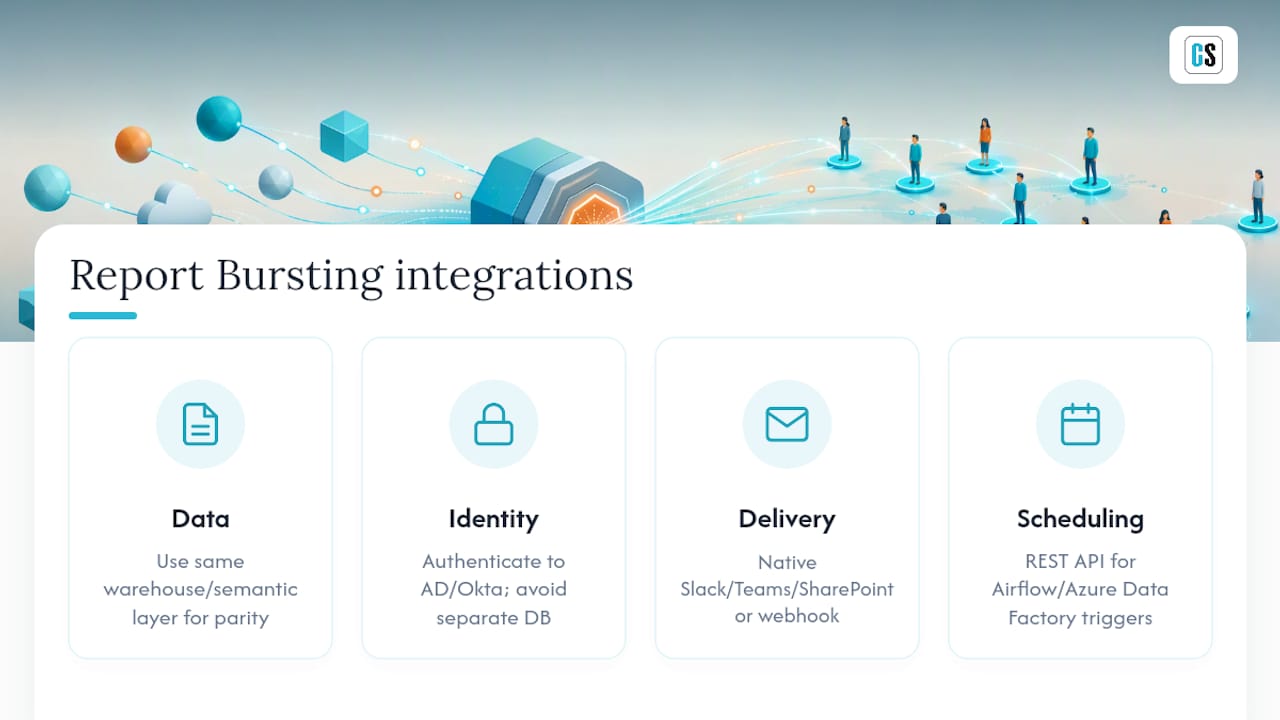
Bursting tools rarely operate in isolation. They sit between your BI platform (Power BI, Tableau, SSRS, Crystal Reports) and whatever your organization already uses for data, identity, and communication, which means integration friction shows up fast if you skip planning.
Start with data connectivity. Your bursting engine needs the same access your analysts have, ideally through the same data warehouse or semantic layer, so filtered outputs match what a recipient would see logging into the dashboard directly. Duplicating data pipelines just to feed a bursting tool creates a second source of truth that drifts out of sync within months.
Identity and access management matters just as much. If your organization runs Active Directory, Okta, or a similar identity provider, your bursting tool should authenticate against it rather than maintaining a separate recipient database. This keeps row-level filtering aligned with actual role changes: when someone leaves a region or changes teams, their report access updates automatically instead of lingering as a stale permission somewhere in a bursting config.
Delivery-channel integration is the third piece. If your teams already live in Slack, Teams, or SharePoint, a bursting tool that only emails PDFs adds friction rather than removing it. Check whether your candidate tool connects to those channels natively or requires a custom webhook build, since that difference affects setup time significantly.
Finally, consider your existing scheduling and orchestration tools. If you already run Airflow, Azure Data Factory, or similar pipelines, a bursting tool that exposes a REST API lets you trigger bursts as one step in a larger workflow instead of managing it as an isolated system.
Buy vs. Build: A Quick Decision Framework for BI Leaders
Buying beats building once you're past a few dozen recipients, need SLA-backed reliability, or require row-level security and audit logging. Building can work for a one-off export or a tiny, static recipient list where the integration is genuinely unique.
Run the math before deciding either way: multiply hours saved per burst by how often you run it, then by your team's cost per hour. A weekly burst that saves six analyst hours at $50 an hour clears $15,000 a year, which covers most licensing costs within months.
Most teams underestimate how quickly a "simple" internal script turns into an unmaintained liability once a template changes or a recipient list grows past what one person can babysit. The build option looks free right up until the person who wrote it leaves, and nobody else can safely touch the code. Buying a purpose-built engine isn't about laziness, it's about not betting your reporting pipeline on one person's tribal knowledge. The organizations that get this right treat the pilot test, not the sales pitch, as the actual proof: if a vendor's tool can't cleanly handle a 100-recipient burst with full logging, it won't handle 2,000 either.
— Christian Ofori-Boateng
Ready to Pilot Your Own Report Bursting Rollout?
ChristianSteven Software is built specifically for teams past the point where native BI subscriptions and manual scripts can keep up. Where a native scheduler tops out at a static distribution list, PBRS, ATRS, and CRD add data-driven bursting, per-recipient filtering, and multi-destination delivery without forcing your team to maintain a fragile custom pipeline.

Backed by SOC 2 Type II certification and more than two decades of production use across Power BI, Tableau, SSRS, and Crystal Reports environments, the platform is built to handle the exact scaling failures covered above: timeouts, mixed-permission recipients, and missing audit trails. If you're running Power BI, start with automated Power BI report exports through PBRS. Tableau teams can look at automated Tableau report delivery with ATRS, and organizations still running Crystal Reports in production can check the Crystal Reports scheduler. Run your own version of the 100 Recipient Burst Test as a demo before committing to a full rollout.
Sources
- Schedule automatic report delivery — Google Docs
- Rollstack automatically syncs data to reports and presentations
- Reporting from Qlik Cloud Analytics with Qlik Automate
- Automated business reporting & scheduled AI briefings — AutoReport
FAQ
What Is Report Bursting?
Report bursting is the process of taking one report and automatically splitting it into multiple personalized versions, each filtered to a specific recipient, then delivering every version to its destination without manual export work. It relies on parameter-driven or data-driven filtering to decide what each recipient sees.
What Are Examples of Report Bursting Tools?
ChristianSteven Software's PBRS, ATRS, and CRD cover Power BI, Tableau, and Crystal Reports respectively, while IntelliFront BI centralizes dashboard and KPI delivery. Vendor-supplied bursting engines and BI-native automation features, like Qlik's looped reporting automations, also fall into this category.
What Are the Top Reporting Tools for Automated Distribution?
The strongest options generally split into BI-native schedulers for simple distribution, dedicated bursting engines like PBRS, ATRS, and CRD for enterprise-scale personalization, and slide-focused automation platforms for executive audiences. The right choice depends on recipient volume, required formats, and how much per-recipient filtering you need.
How Do You Set Up Report Bursting in Oracle Reports?
Oracle Reports supports bursting through its Report Distribution feature, which lets you define distribution lists with parameters that map each recipient to a filtered subset of the report and a delivery destination. Complex or high-volume Oracle bursting setups often benefit from pairing the native distribution engine with an external scheduler for retries, logging, and monitoring, since Oracle's native tooling handles distribution logic but not full operational observability.
How Should You Validate a Report Bursting Tool Before Full Rollout?
Run a controlled pilot burst, a 100-recipient batch is a practical benchmark, and measure render success rate, end-to-end delivery latency, and confirmation receipts. ChristianSteven Software's 100 Recipient Burst Test follows this exact model and is a reasonable template to copy for your own validation before scaling to your full recipient list.